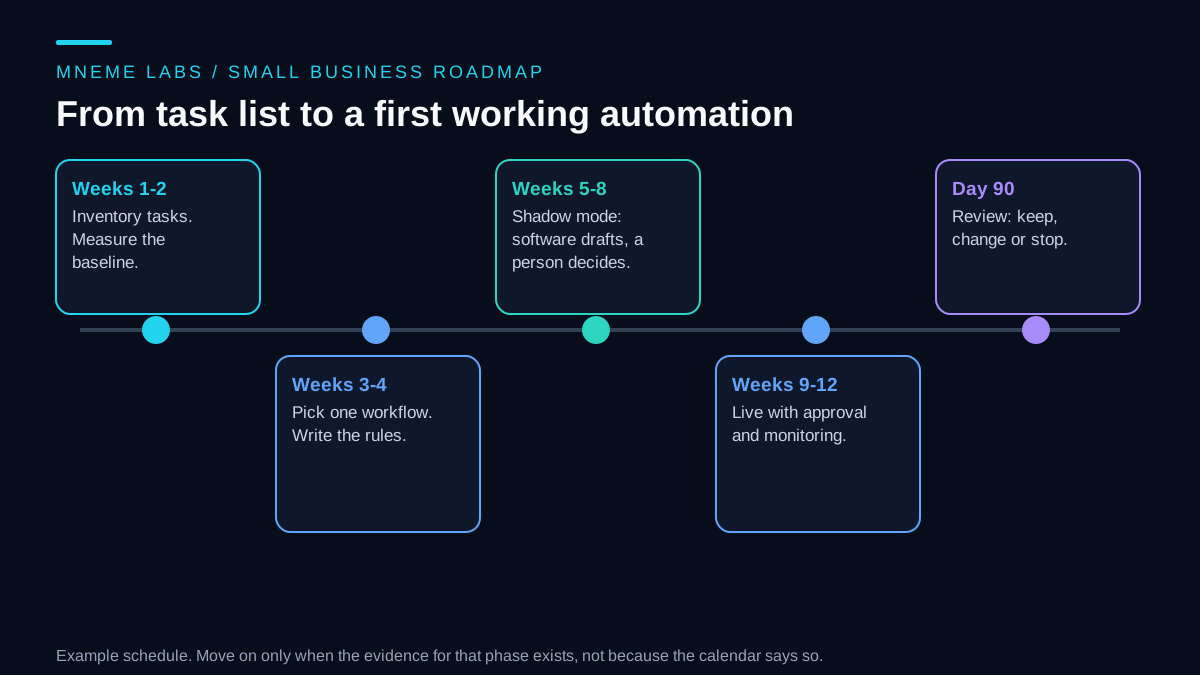
A small business may not need a strategy document about artificial intelligence. It may need just one repetitive job to take less of someone's week, without creating a new problem. The way to get there is a sequence: find the jobs, choose one, test it on synthetic data without permission to take real actions, put it live with a person approving, and decide at a fixed date whether it earned its place.
This guide lays out that sequence as a 90-day roadmap. It is about implementation, which is different from deciding who should do each task, a question the virtual assistant comparison covers. The example business is an invented small online shop. Its numbers are synthetic, and the schedule is an example, so no outcome such as hours saved or revenue gained is promised. The right pace for your business may be slower, and that is fine.
Weeks 1 and 2: take inventory and set a baseline
Before choosing any tool, write down what the business does each week. For each repeating task, record how often it happens, roughly how many minutes it takes, who does it, what data it touches, what happens if it goes wrong, and whether it moves money. A spreadsheet is enough. Ask the people who do the work, since the owner's picture of a task is often tidier than the reality.
Then take a baseline for the tasks most likely to be chosen. The order is: finish a first pass of the inventory, run the ranking sketch from the next section on it with your estimated minutes, and take the top three to five candidates. For each one, record the measure that would show whether an automation helped, such as actual minutes spent per week, or how many customer emails wait more than a day. Record it for the two weeks before changing anything, and keep recording while you pick in weeks 3 and 4. Tasks that rank lower and are not chosen do not need a baseline now. Without one for the task you finally pick, the result at day 90 is an impression.
Weeks 3 and 4: pick one workflow
Rank the inventory, and pick one task. By now you have baseline numbers for the top candidates, so rerun the sketch below with measured minutes in place of your estimates, and let the baseline help you choose. The task you pick carries its baseline forward: the weeks of measurement already recorded stay as the comparison for day 90, and you keep recording the same measure through weeks 3 and 4 and into shadow mode. The sketch scores each task by weekly minutes, how clearly its rules can be written down, and risk, with a penalty for personal data. It holds back any task that moves money or carries the top risk score. The weights are choices to adjust, and the point is to make the ranking explicit so you can argue with it.
def prioritize(tasks):
    """Rank tasks for a first automation. Higher score = better first candidate.

    Each task: name, minutes_per_week, rules_clarity (1-5, 5 = rules fit on a page),
    risk (1-5, 5 = costly or hard to undo), moves_money (bool), touches_personal_data (bool).
    Tasks that move money or score risk 5 are held back from the first wave.
    """
    ranked, held = [], []
    for t in tasks:
        if t["moves_money"] or t["risk"] >= 5:
            held.append(t["name"])
            continue
        penalty = 1 + (0.5 if t["touches_personal_data"] else 0)
        score = t["minutes_per_week"] * t["rules_clarity"] / (t["risk"] * penalty)
        ranked.append((round(score, 1), t["name"]))
    ranked.sort(reverse=True)
    return ranked, held
On the synthetic shop's six tasks, sorting the shared inbox into labels scored 320, the weekly sales summary 225, drafting shipping-status replies 120, and updating product copy 40. Issuing refunds was held back because it moves money, and negotiating supplier terms because it carries the highest risk score. The test file asserts that exact order and the held list, and all checks passed.
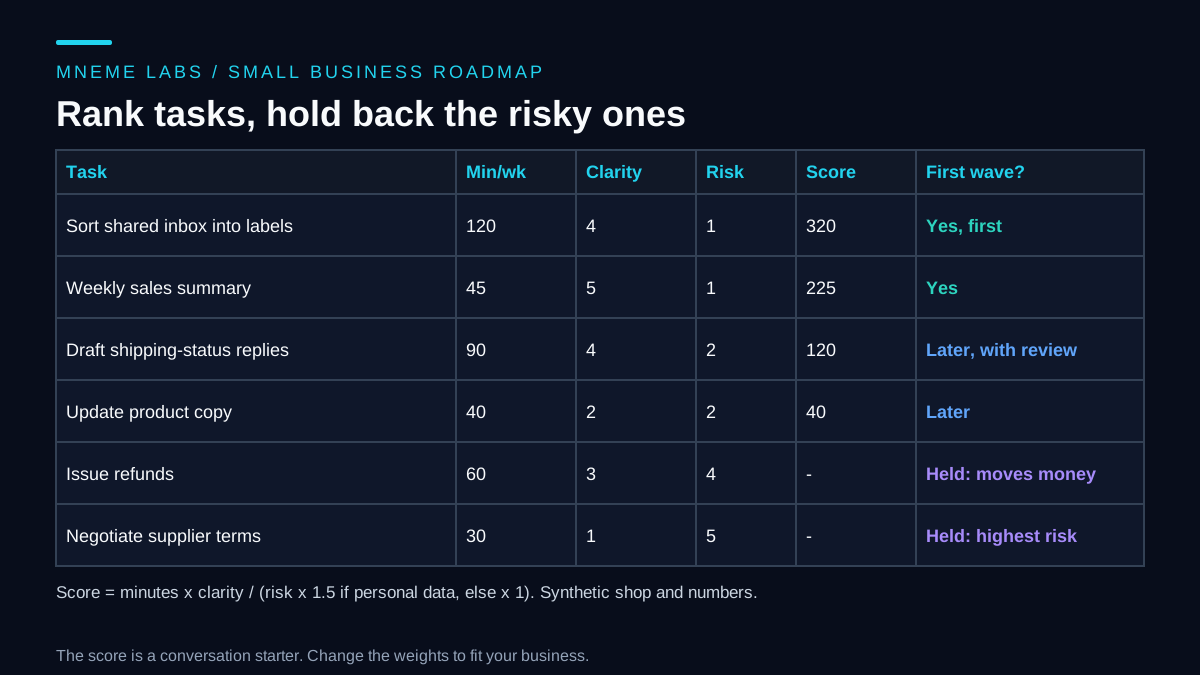
A task that scores well but needs judgment, such as an unhappy customer, still belongs with a person. The scores only help sort tasks that are already suitable. The first pick should be small, low in risk, and visible enough that people will notice if it works. Sorting email into labels is a classic example, since a mistake is easy to spot and undo.
Then write the rules for that one task in plain language. What comes in, what the automation may do, what it must never do, and when it should stop and hand a case to a person. If you cannot write the rules in a page, the task is not ready.
Decide access and data before you build
Each automation needs access to something, and the cheapest time to limit it is before it exists. Google's Gmail API scopes documentation advises choosing the most narrowly focused scope possible. Be precise about what each scope permits: gmail.labels manages label definitions, but does not let an app read messages or apply labels to them. Gmail's message modification endpoint requires a broader scope such as gmail.modify. An inbox classifier therefore needs more access than a label-management utility. If that access is too broad for the pilot, use exported synthetic messages or have a person apply the suggested labels. Whatever tools you use, check the exact endpoint permissions before granting access.
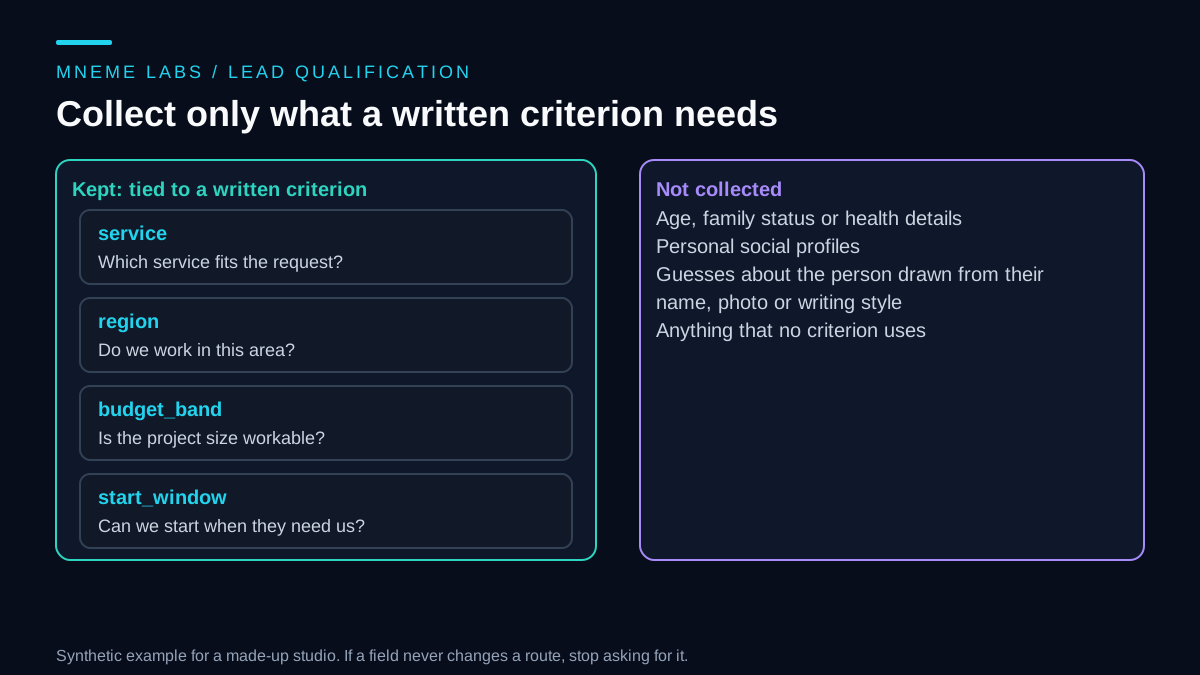
Treat personal data with the same restraint. The UK Information Commissioner's data minimisation guidance says data should be adequate, relevant and limited to what is necessary for the stated purpose, and that you should review what you hold periodically and delete what you no longer need. For an automation, that means passing it only the fields it needs, and keeping its logs free of customer details where you can.
Keep two short lists. An access list shows each automation, the account it uses, the permission it has, and who can remove it. A data list shows what personal data each one touches and where it goes, including any outside AI service. When someone leaves or a tool is replaced, these lists tell you what to switch off.
Weeks 5 to 8: run it in shadow mode
Shadow mode means the software prepares its output and a person does the real work as usual. Nothing reaches a customer. You compare the two. For a reply-drafting task, the software drafts a reply to each incoming email, and the employee writes their own, then someone reads the pairs side by side. In the synthetic log, twelve sample emails produced nine drafts accepted as written, two that were edited, and one that was rejected.
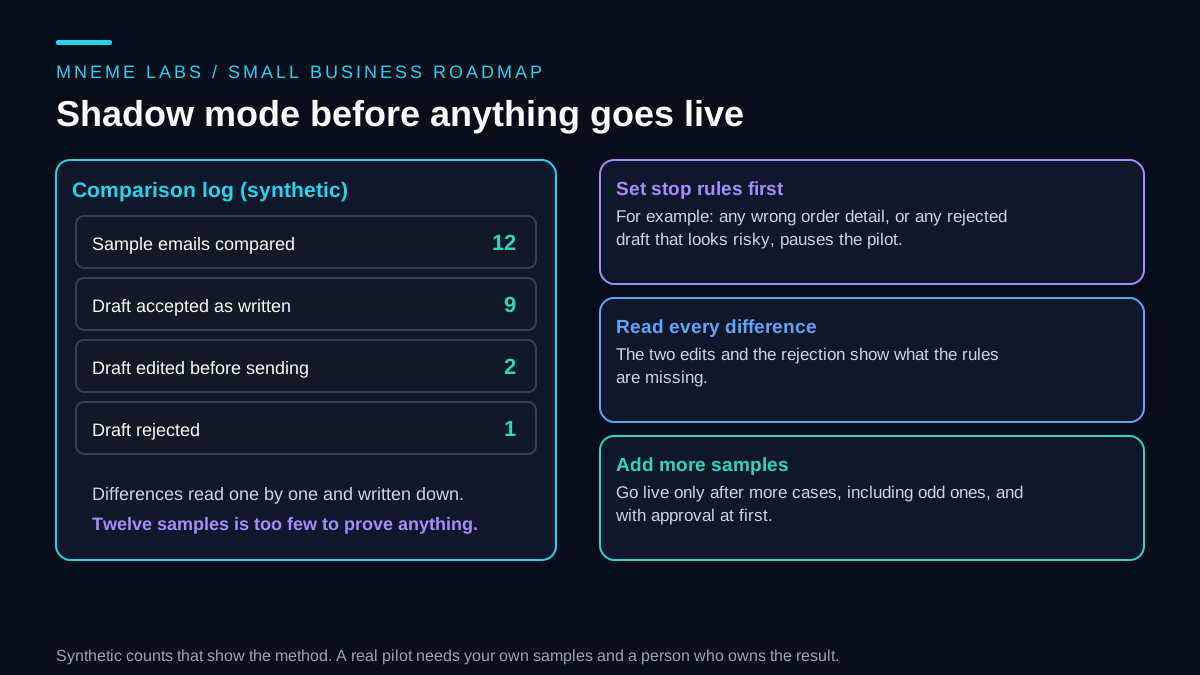
Set stop rules before you start. For example, any wrong order detail pauses the pilot, and so does any rejected draft that looks risky. Read every difference, not only the totals, because the edits and the rejection show what your rules are missing. Twelve samples is far too few to trust, so keep going until you have seen the odd cases too, such as angry messages, refunds, missing information and non-English emails.
Weeks 9 to 12: go live with approval
When shadow mode looks sound, move to supervised use. The software still drafts, and a person approves or sends. Keep this arrangement for longer than feels necessary. The change from "software drafts" to "software acts alone" is the one that creates real risk, and for many tasks you will never need to make it.
Name an owner for each automation. That person checks its output on a schedule, handles its failures and has the authority to switch it off. Add monitoring that tells you when a job did not run, as the monitoring guide explains, and plan for failures and retries using the retries guide. Tell your staff what is changing and why, and ask them to report errors. They see the problems first.
If the automation talks to customers, say so where it makes sense and give people a route to a human. The customer inquiry guide covers that design.
Day 90: keep, change or stop
At day 90, compare with the baseline you recorded for the chosen task, starting in weeks 1 and 2 and continued until shadow mode began. Count the same measures the same way. Include the time spent reviewing, fixing and maintaining the automation, not only the time it saved. Then choose one of three outcomes. Keep it if the measure improved and the errors are manageable. Change it if the idea is right and the rules need work. Stop it if the gain is small or the risk is not worth it. Stopping is a legitimate result, and it costs less than keeping a tool nobody trusts.
Write a one-page runbook for anything you keep: what it does, what it can access, who owns it, how to switch it off and what to check each week. The NIST AI Risk Management Framework is a voluntary framework from the US National Institute of Standards and Technology for incorporating trustworthiness considerations into the design, use and evaluation of AI systems. NIST also published a generative AI profile in July 2024 to help organizations identify risks specific to generative AI. A small business does not need to adopt either formally, but the idea behind them, that you identify risks, measure and manage them, and assign responsibility, is what the lists and runbook above do at a small scale. NIST notes that version 1.0 is being revised, so check the current text if you decide to read it.
Failure cases to plan for
Automating a bad process. If the manual process is confused, software will repeat the confusion faster. Fix the process first.
Skipping the baseline. At day 90, nobody can say whether anything improved. A baseline taken for a different task than the one you chose does not count.
Access that grew. A utility that only managed label definitions is expanded into an inbox classifier with message access. Review the new permission grant explicitly, and review the access list monthly.
Silent failure. A job stops running and nobody notices for weeks. Add a check that alerts you.
A single person who understands it. If they leave, the automation becomes a mystery. Write the runbook and keep it current.
Using a tool because it is new. Choose the task first, and the tool second. A spreadsheet formula or an email rule may solve it.
Customer data in the wrong place. Know where data goes when you use an outside service, and read its retention terms.
Limits
This is a method, not a forecast. It does not tell you which tools to buy, and the synthetic scores do not predict your savings. The schedule is an example, and some businesses need longer. The sources cover access design, data minimisation and risk management in general. They do not certify any particular tool or approach, and the data protection source is UK guidance, so other regions have their own rules.
Next step
Spend this week on the inventory alone. List every repeating task with minutes per week and who does it. Run the ranking sketch on the list, take the top three to five tasks, and start recording the measure you will track for each. Do not choose a tool yet. If you want a hands-on first project once you have a task, the first agent guide walks through a small one.
Sources
- Google, Gmail API scopes: choose the narrowest scope, and the difference between label, read and send scopes.
- ICO, Principle (c): Data minimisation: adequate, relevant and limited data, and periodic review and deletion.
- NIST, AI Risk Management Framework: voluntary framework, the generative AI profile released July 26, 2024, and a note that AI RMF 1.0 is being revised.