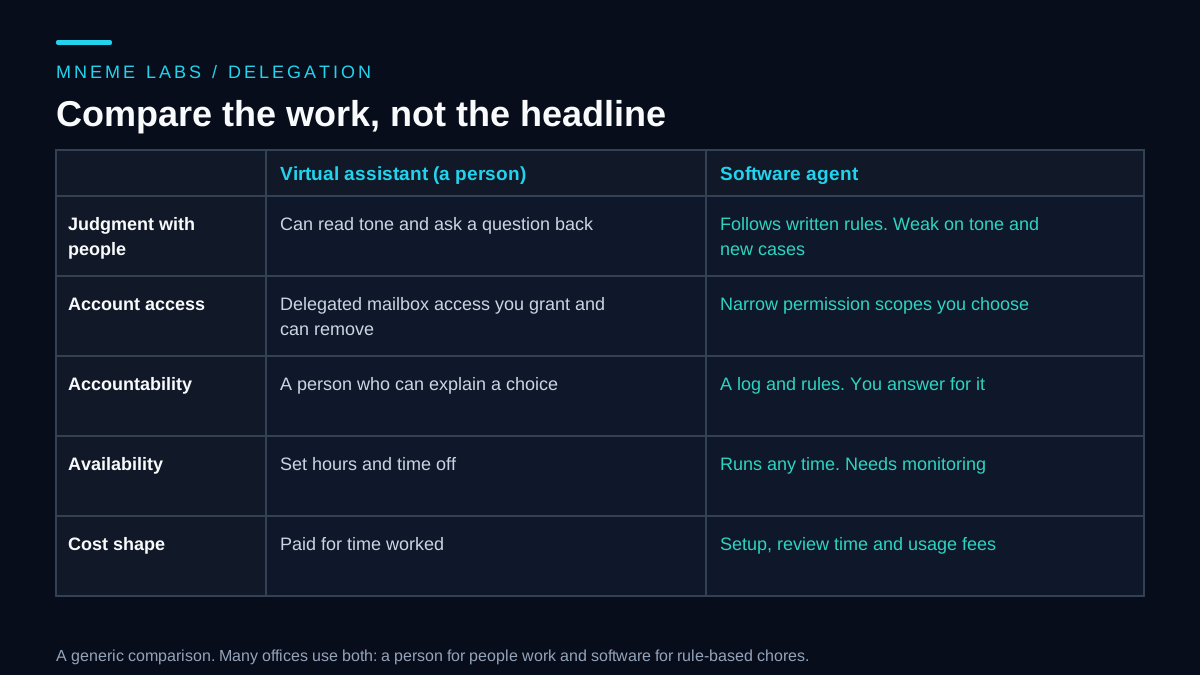
The question "will an AI agent replace my virtual assistant?" hides several smaller questions. Which tasks does the assistant actually do? Which of them depend on judgment, tone or trust? What access does each option need to your accounts? And what does each cost once you count the time spent checking the work? Answering those gives a better result than picking a side.
This guide compares the two options on the work itself. It uses a made-up solo consultant with eight example tasks and invented hourly rates, so the numbers show a method and do not describe any real saving. One plausible outcome is a split, with a person handling work that involves other people and software handling rule-based chores, but your own task list may come out differently. For a wider look at what a calendar and inbox assistant does, see the personal assistant guide.
Start from the task list, not the label
Write down every task the assistant does in a typical month, with a rough number of times per week. Then describe each task with a few yes/no questions:
- Does it involve writing to or speaking with a client or a customer?
- Does it need judgment, such as reading tone or deciding what matters?
- Does it move money?
- Is it hard or impossible to undo?
- Are the rules clear enough to write down in a page?
- How often does it happen?
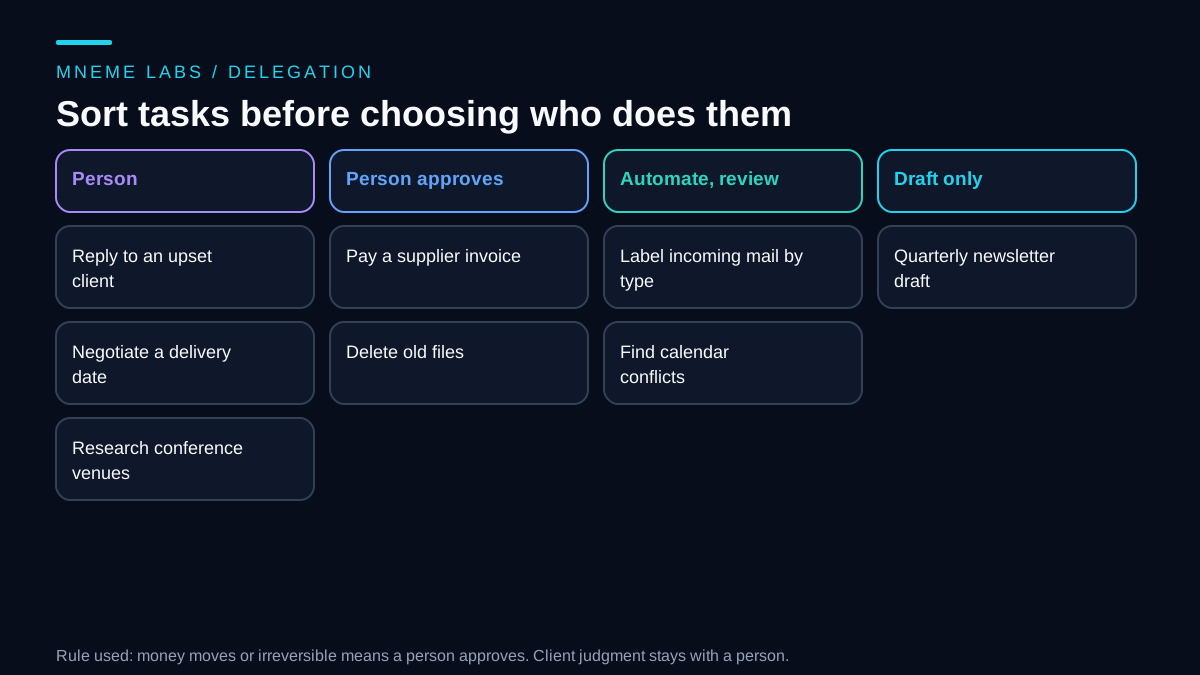
Those six answers sort most tasks. Work that touches clients and needs judgment belongs with a person, because a misread tone or a wrong promise has a cost that a faster draft does not repay. Work that moves money or cannot be undone needs a person's approval, even if software prepares it. Work with clear rules that happens often is a candidate for automation with review. Work with clear rules that happens rarely may be a draft the software prepares and a person finishes. Anything left over, usually vague research or a one-off request, stays with a person.
A sorting sketch you can run
The function below turns those questions into a first-pass lane. It is deliberately small. A person should override it wherever they disagree, and the point of writing it down is to make the rule visible.
def suggest_owner(task: dict) -> str:
    if task["irreversible"] or task["moves_money"]:
        return "person_approves"
    if task["talks_to_clients"] and task["needs_judgment"]:
        return "person"
    if task["rules_are_clear"] and task["per_week"] >= 3 and not task["talks_to_clients"]:
        return "automate_with_review"
    if task["rules_are_clear"]:
        return "automate_draft_only"
    return "person"


def monthly_cost(person_hours, person_rate, setup_hours, setup_months, agent_review_hours,
                 review_rate, usage_and_tool_fees):
    """All numbers are assumptions you supply."""
    person = person_hours * person_rate
    agent = (setup_hours / setup_months) * review_rate + agent_review_hours * review_rate + usage_and_tool_fees
    return {"person": round(person, 2), "agent_plus_review": round(agent, 2),
            "difference": round(person - agent, 2)}
Run against eight synthetic tasks, the sketch puts "reply to an upset client", "negotiate a delivery date" and "research three conference venues" with a person. "Pay a supplier invoice" and "delete old files" land in the approval lane because one moves money and the other cannot be undone. "Label incoming mail by sender type" and "find calendar conflicts" go to automation with review, and a quarterly newsletter draft goes to draft-only. An assertion in the test file confirms all eight, and it passed.
Access works differently for a person and for software
A human assistant usually works inside your accounts through delegation. Gmail's help page on delegating access says a delegate can read, send and delete email in your account on your behalf, and that a message sent by a delegate shows their address. It also says a delegate cannot chat with others or change your password, and it lists several features that are unavailable to delegates. You can remove a delegate when the work ends. For a work or school account, the page notes that an administrator can also delegate access, so check who has it.
Software works through permissions that you approve, called scopes. Google's Gmail API scopes page advises choosing the most narrowly focused scope possible and avoiding scopes the app does not need. It groups scopes into non-sensitive ones such as managing labels, sensitive ones such as sending email, and restricted ones such as reading all mail, with a verification process for public apps that use sensitive data. The broadest scope listed can read, compose, send and permanently delete all email, and the page says to request it only when an app needs permanent deletion, since other actions can be done with less permissive scopes.
Compare those two models in plain terms. A person with delegated access can do almost anything in the mailbox that you can, and what limits them is trust, a written agreement and your ability to remove them. A software agent can be limited by design to reading labels and making drafts, which is a narrower grant than mailbox delegation. That is a real advantage of software, but only if you choose the narrow scope on purpose and test what it can and cannot do.
Count review time in the cost
A person is paid for time worked. A software agent has costs in different places: the hours you or someone else spend setting it up, the hours spent reviewing its work, and any usage or tool fees. The review hours are the ones that surprise people.
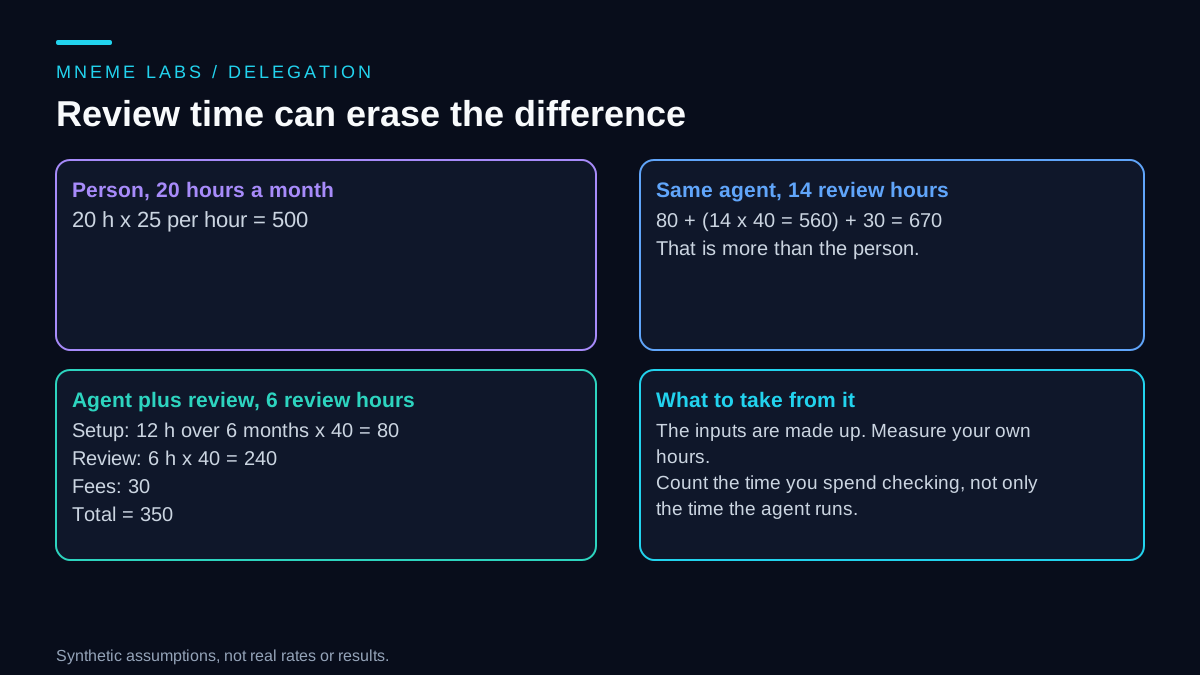
With the invented numbers in the sketch, a person working 20 hours a month at 25 per hour costs 500. An agent with 12 setup hours spread over six months, 6 review hours a month, and 30 in fees, with your own time valued at 40 per hour, costs 350. If review takes 14 hours instead of 6, the same agent costs 670, which is more than the person. The assertion for that scenario also passed. None of the numbers are real. They show that the comparison turns on how much checking the work needs, and you can only learn that by measuring your own review time for a few weeks.
If you hire a person, classification matters
If you work with a human assistant, how you classify them matters for tax and legal reasons. The IRS page on independent contractors versus employees says the answer depends on the degree of control and independence, grouped into behavioral control, financial control and the type of relationship. It says there is no set number of factors that decides it, that businesses must weigh all of them, and that the factors considered should be documented. This applies to the United States, and other countries use different tests. A written agreement does not settle it alone. If your assistant works set hours, uses your tools, and takes direction on how to do the job, the relationship may look more like employment. Ask an accountant or lawyer before you assume.
Failure cases to plan for
Automating a task that needed judgment. An agent replies to a client in a flat tone and the client takes offense. Keep client-facing messages as drafts until a person has read enough of them to trust the pattern, and for upset clients, never automate.
Over-broad access. An agent that can send, delete and read everything can do harm with one bad instruction. Start with read-only or label-only scopes, and add power slowly. The email checking agent guide shows a read-only design.
Loss of context. A human assistant remembers that a client dislikes phone calls. An agent only knows what you give it. Keep a short notes file for each client and include it when drafting.
Silent failure. A person who is stuck tells you. Software may fail without a sound, so set up a check that tells you when a job did not run. The monitoring guide covers this.
A bad handover. When a task moves from a person to software, write down how the person did it, including the exceptions. The exceptions are where an agent fails.
Treating the person as a stopgap. If you plan to automate a role, tell the assistant early. Surprises damage a working relationship you may need again.
Limits
This guide does not predict whether any role will disappear, and it makes no claim about how many assistants software can replace. The sorting rule is crude. Real tasks have more shades, and your own list may need different questions. Cost comparisons depend on your rates and on how much review the work needs. The access notes describe one email provider, and others work differently.
Next step
Make the task list for one month. Answer the six questions for each task, run the sort, and read the result with your assistant if you have one. Pick one task from the automate-with-review lane, set it up with the narrowest access that works, and track the minutes you spend reviewing it for a month. Then decide with data, and leave client conversations with a person unless you have a good reason.
Sources
- Google, Delegate and collaborate on email (Gmail Help): what a delegate can and cannot do, who can delegate in work accounts, and which features are unavailable to delegates.
- Google, Gmail API scopes: choose the narrowest scope, non-sensitive, sensitive and restricted scope groups, and app verification.
- IRS, Independent contractor (self-employed) or employee?: behavioral, financial and relationship factors, no fixed number of factors, and documenting the determination.