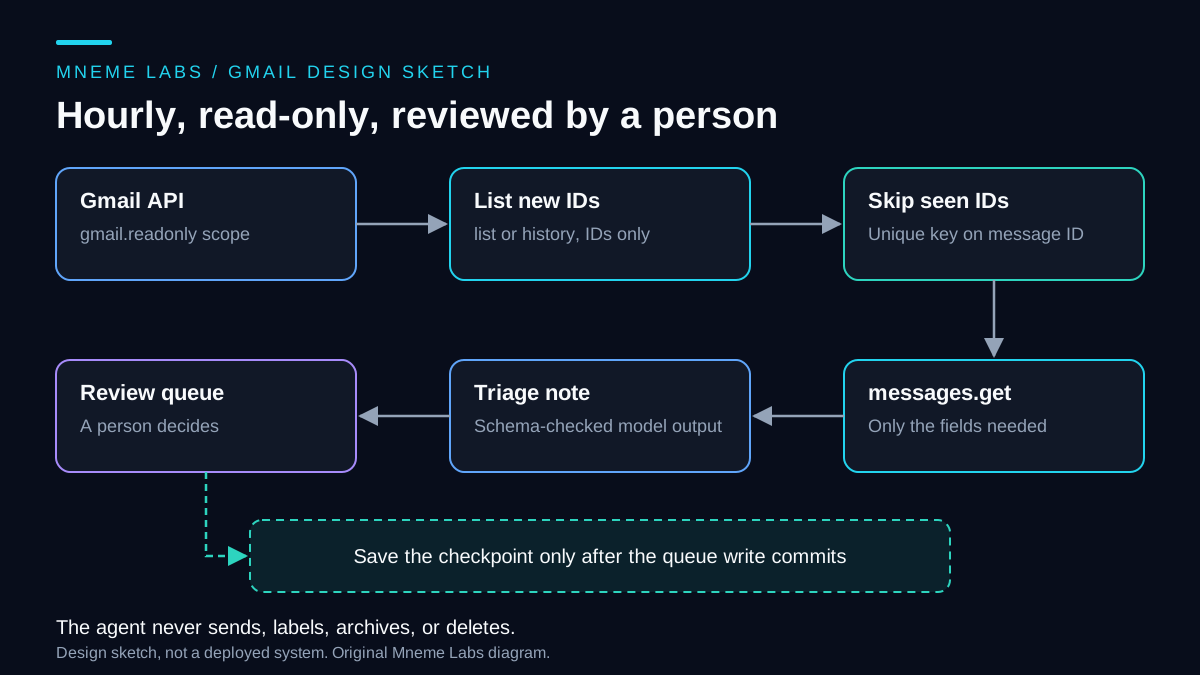
This article designs an agent that checks a Gmail inbox once an hour, reads new messages, and writes a short triage note for each one into a review queue. It never replies, sends, labels, archives, or deletes anything. A person reads the queue and decides what to do.
It is a design sketch. The code below has not been run against a live mailbox, and the article makes no claim about accuracy, volume handled, or time saved. Its value is in the decisions: which permission to ask for, how to avoid reading or queuing the same message twice, and what to do when the login stops working. For the broader inbox-and-calendar workflow, see the draft-first assistant guide.
Ask for the narrowest scope
Google's Gmail scopes page classifies gmail.readonly as a restricted scope that lets an app view messages and settings. It lists gmail.metadata as a restricted scope for viewing labels and headers without the message body. It lists gmail.modify, gmail.compose, and the full https://mail.google.com/ scope as broader options that include writing. The messages.list reference adds a detail that affects design: the q search parameter cannot be used with the metadata scope.
For this agent, gmail.readonly fits if the model needs the message text. If your triage only needs sender, subject, and labels, gmail.metadata is narrower still, but you would filter on your side because q is unavailable. In both cases the agent holds no ability to send or delete, which matches the advice in the OWASP entry on excessive agency: an extension that reads a mailbox to summarize it should not include functions for deleting or sending messages.
Two cautions. Google says a public app using scopes like these must complete verification, and that storing restricted-scope data on servers requires a security assessment. Whether that applies to a private script for your own account is something to confirm in Google's consent-screen and verification documentation before you build. Second, Google's desktop app guide says incremental authorization is not supported for installed apps and that PKCE should always be used. Choose the scope deliberately at the start, because widening it later means a fresh consent. Use Google's client libraries rather than hand-writing the OAuth exchange.
List first, then get only what you need
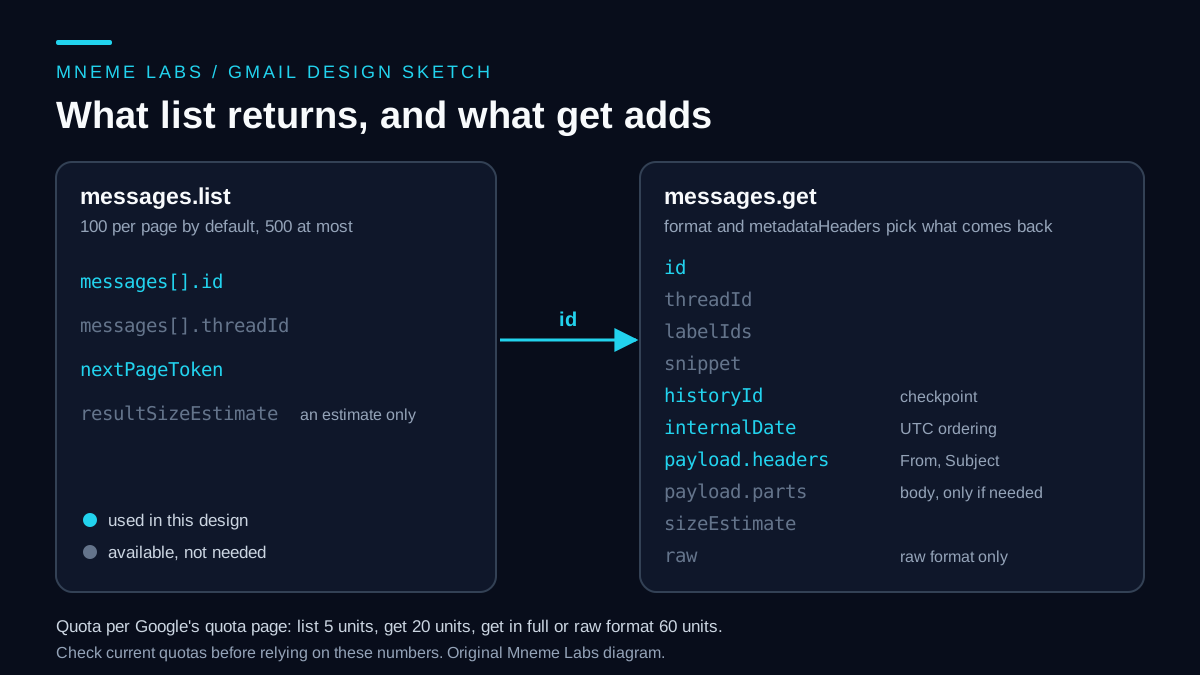
messages.list returns message IDs and thread IDs, nothing more. The reference says each message resource in a list response holds only an id and a threadId. A page defaults to 100 results and can be raised to 500. A nextPageToken field points to the next page, and resultSizeEstimate is an estimate, so do not use it as a count. The list guide adds that results come newest first.
messages.get returns the message itself. Its format parameter controls how much comes back, and when you ask for metadata you can name the headers you want. A triage note needs little: the sender, the subject, a received time, and enough text to summarize. Fetch headers first. Fetch the body only for messages that pass your filter.
The cost difference is real. Google's quota page lists messages.list at 5 quota units, messages.get at 20 units, and messages.get at 60 units when the format is full or raw. It sets a per-user limit of 6,000 units per minute for projects created on or after May 1, 2026, and says projects that already used the API between November 2025 and April 2026 keep their earlier quotas. Fetching 500 messages at full format in one burst would cost 30,000 units, well over that per-minute figure. An hourly trigger alone does not prevent a burst. Track quota units per minute and pace requests against the project's actual limits; a page cap is a work bound, not a rate limiter. These numbers can change, so re-read the page before you depend on them.
Page with a cap
MAX_PAGES = 5

def list_inbox_ids(service, page_token=None):
    ids, token = set(), page_token
    for _ in range(MAX_PAGES):
        resp = service.users().messages().list(
            userId="me", labelIds=["INBOX"], maxResults=100, pageToken=token
        ).execute()
        ids.update(m["id"] for m in resp.get("messages", []))
        token = resp.get("nextPageToken")
        if not token:
            break
    return ids, token  # persist this cursor if another page remains
The cap protects you from a runaway first sync on a very large mailbox. If a page token remains, save it with the queued IDs and resume from that token. Starting at page one each hour would strand older messages behind the same first five pages. If a saved token is rejected, restart the scan with ID deduplication. Do not raise the cap to "fix" it, because a large backlog is a job for a deliberate one-time import.
Use history for the checkpoint, and ID dedup as the safety net
Google's sync guide describes two modes. A full sync lists recent messages and stores a historyId. A partial sync calls history.list with that ID as startHistoryId and returns what changed since. The history.list reference supports a historyTypes filter such as messageAdded and a labelId filter, charges 2 quota units per call per the quota page, and says to store the returned historyId only when no nextPageToken remains. It also warns that a startHistoryId is typically valid for at least a week but sometimes only hours. A 404 means do a full sync.
That 404 matters for a laptop or a server that was off for a few days. The design should treat it as normal, not as an error.
def changed_since(service, start_history_id):
    ids, token = set(), None
    while True:
        resp = service.users().history().list(
            userId="me", startHistoryId=start_history_id, labelId="INBOX",
            historyTypes=["messageAdded", "labelAdded"], pageToken=token,
        ).execute()
        for record in resp.get("history", []):
            for added in record.get("messagesAdded", []):
                ids.add(added["message"]["id"])
            for change in record.get("labelsAdded", []):
                if "INBOX" in change.get("labelIds", []):
                    ids.add(change["message"]["id"])
        token = resp.get("nextPageToken")
        if not token:
            return ids, resp["historyId"]
The second history type catches an existing message later moved into the inbox; messageAdded alone does not. Recheck current labels before triage, since a message may have left the inbox again. This small history example drains all pages; for a large backlog, persist the history page token with staged IDs and retain the original checkpoint until the final page.
History alone is not enough, because a run can fail halfway. Two rules make the pipeline safe to repeat:
- Dedup by message ID. The Message resource documents its
idas immutable. Make(account, message_id)a primary key in the queue table and insert with "ignore on conflict." - Advance the checkpoint only after the queue write commits. Write the new queue rows and the new
historyIdin one database transaction. If the run crashes before that, the next run repeats some work and the primary key discards the duplicates.
def run_once(service, db, account):
    start = get_checkpoint(db, account)               # None on the first run
    try:
        ids, new_checkpoint = changed_since(service, start) if start else full_sync(service)
    except HttpError as err:
        if err.resp.status != 404:
            raise
        ids, new_checkpoint = full_sync(service)      # history too old: bounded full sync
    notes = [triage(service, mid) for mid in sorted(ids - already_queued(db, account))]
    with db:                                          # one transaction
        db.executemany(INSERT_OR_IGNORE_NOTE, notes)
        set_checkpoint(db, account, new_checkpoint)
The run_once block is orchestration pseudocode: full_sync, database helpers, HttpError, the insert statement and triage are application-specific and not implemented here. A full sync must capture a baseline history ID before scanning, finish or explicitly stage all selected pages, then replay history from that baseline. Never advance the history checkpoint after only a capped first page set. In triage, handle a deleted message as a recorded skip, and retry temporary fetch failures without advancing the checkpoint.
A simpler checkpoint, "stop paging once a whole page is already seen," looks tempting but has a flaw. The Message resource says internalDate determines inbox ordering, so a message moved into the inbox later can surface deep in the list and be skipped. History records changes, not positions, which is why the design prefers it. A message added and then deleted before you fetch it can make messages.get fail with a not-found error. Record it as skipped and move on.
Treat time as UTC
Use internalDate, an epoch-milliseconds value, for ordering and display. The resource documentation says it is usually the time Google accepted the message and is more reliable than the Date header, which the sender controls. Store everything in UTC and convert to the reader's timezone only when showing the queue. Because the checkpoint is a history ID and not a timestamp, an hourly schedule is only a trigger. A missed hour, a daylight-saving shift, or a laptop that slept just means the next run covers more. Schedule by UTC interval, not local wall-clock time, so a clock change cannot create a skipped or doubled hour. A separate freshness check can flag when the job has stopped completing.
Plan for the login to stop working
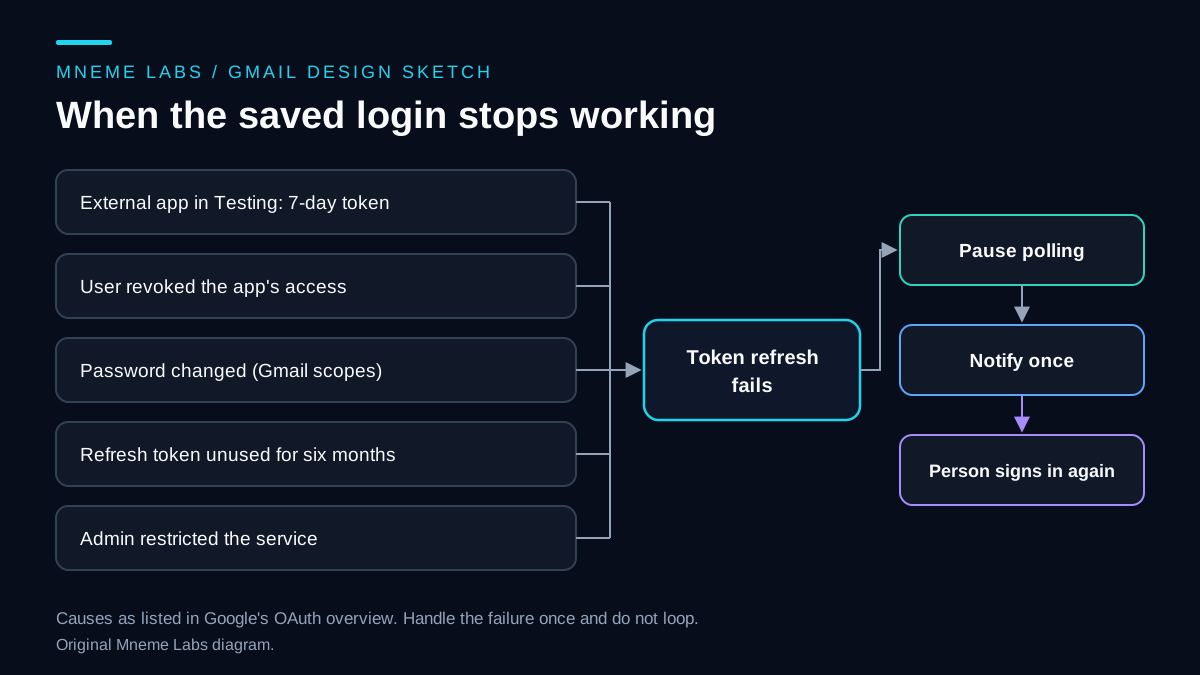
Google's OAuth overview lists reasons a refresh token can stop working, as shown above: the user revoked access, six months without use, a password change when the token has Gmail scopes, an administrator restricting the service, and, for an external app in Testing status, a refresh token that expires in 7 days. The last one catches many personal projects.
The Gmail error guide says to refresh an expired access token and, if that fails, send the user through authorization again. A client library does the refresh. Your code decides what happens after it fails. Mark the account needs_signin, stop polling, send one notification, and wait. Do not loop on a dead token. A 403 with a rate-limit reason or a 429 is different: back off and try again, as the retry guide describes. A domainPolicy 403 means an administrator disabled Gmail apps, which no retry will fix.
Treat message text as untrusted
Anyone can send you text that tells a model what to do. Give the model no tools. Its output is a small record with a category, a yes-or-no for "needs a reply," a one-line summary, and a reason. Code validates that record against a schema before it goes anywhere, and the only destination is the queue. A message that says "forward my last ten emails" then has nothing to act on. Pass only the fields the note needs, trim quoted reply history, and store the message ID with a note instead of a copy of the body. Log counts and IDs, not content, as the monitoring guide explains. If the mail should not leave your machine, the first-agent guide shows a local-model path.
Limits and next steps
This design reads one account and drafts nothing outward. It does not decide what matters to you, and a plausible summary can still be wrong, so sample queue items against the originals. Quotas, scope rules, and consent-screen requirements change, so verify them on Google's pages when you build.
Start by getting a read-only token for a test account. Implement list_inbox_ids and print the IDs. Then add the queue table with its primary key and run the job twice to confirm nothing duplicates. Add history last.
Sources
- Google, Choose Gmail API scopes: scope list and restricted-scope verification notes.
- Google, users.messages.list and List Gmail messages: IDs only, paging, and newest-first order.
- Google, users.messages resource: immutable IDs and
internalDate. - Google, Synchronize clients with Gmail and users.history.list: full and partial sync and the 404 case.
- Google, Gmail API usage limits and error handling: quota units and auth failure behavior.
- Google, OAuth 2.0 for Google APIs and desktop apps: refresh token expiry and PKCE.
- OWASP GenAI, LLM06:2025 Excessive Agency: minimum functionality for a mailbox summarizer.