An assistant that "schedules meetings without you and replies to routine emails" does more than save effort. It changes other people's calendars and lands in their inboxes. Mistakes there are social, and many cannot be undone. A safer design reads your inbox and calendar, then writes proposals that a person approves one at a time.
This guide describes that design. It reports no time savings and no deployment results. The read side, fetching new mail on a schedule, is covered separately in the read-only Gmail polling design. This article is about what to do with what you read, and especially about the calendar details that trip up naive automation.
Make every action a proposal
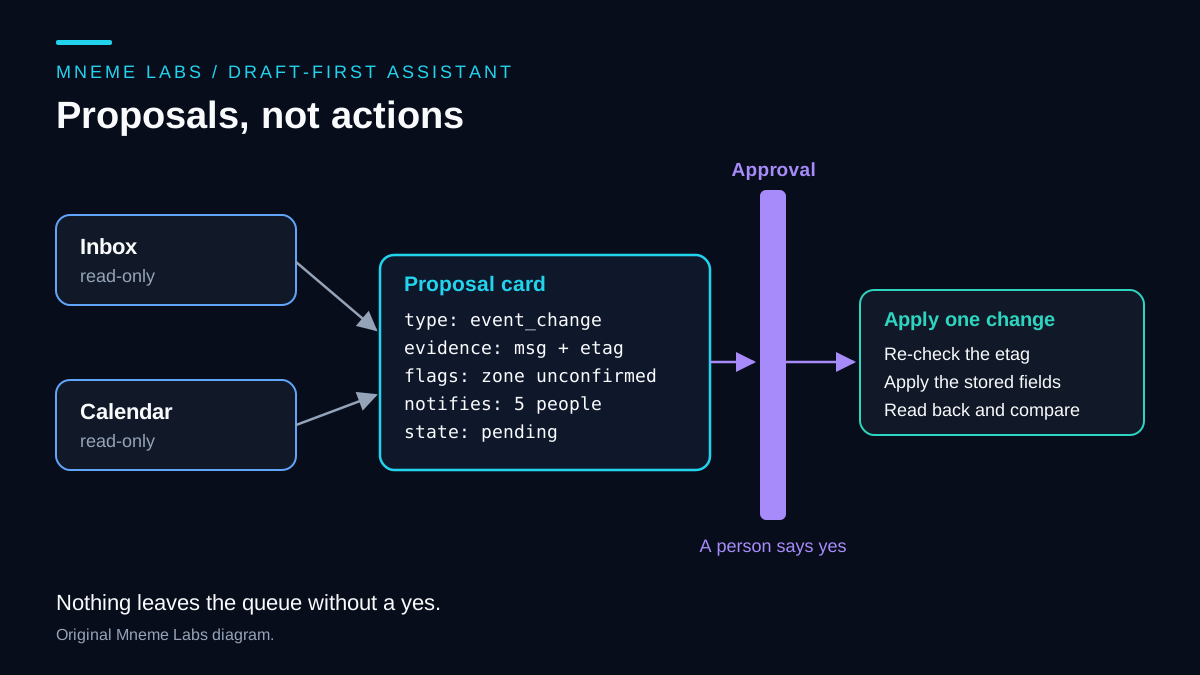
Give the assistant one output type: a proposal record. It holds what the assistant saw, what it suggests, and what will happen if a person says yes.
{
  "proposal_id": "p_0192",
  "type": "event_change",
  "evidence": {"message_id": "msg_01", "event_id": "evt_77", "etag": "etag_from_read"},
  "proposed": {"scope": "this_instance", "new_start_local": "Friday 14:00", "zone": "UNCONFIRMED"},
  "flags": ["time_zone_unconfirmed", "recurring_series", "external_attendee"],
  "notifies": 5,
  "state": "pending"
}
The flags and notifies fields are the point. A reviewer who sees "this may notify five people, one outside your organization, with the time zone still unconfirmed" makes a better decision than one who sees "Move meeting to Friday." This follows the advice in the OWASP entry on excessive agency: require human approval for high-impact actions, and perform authorization in the downstream system instead of trusting the model's judgment.
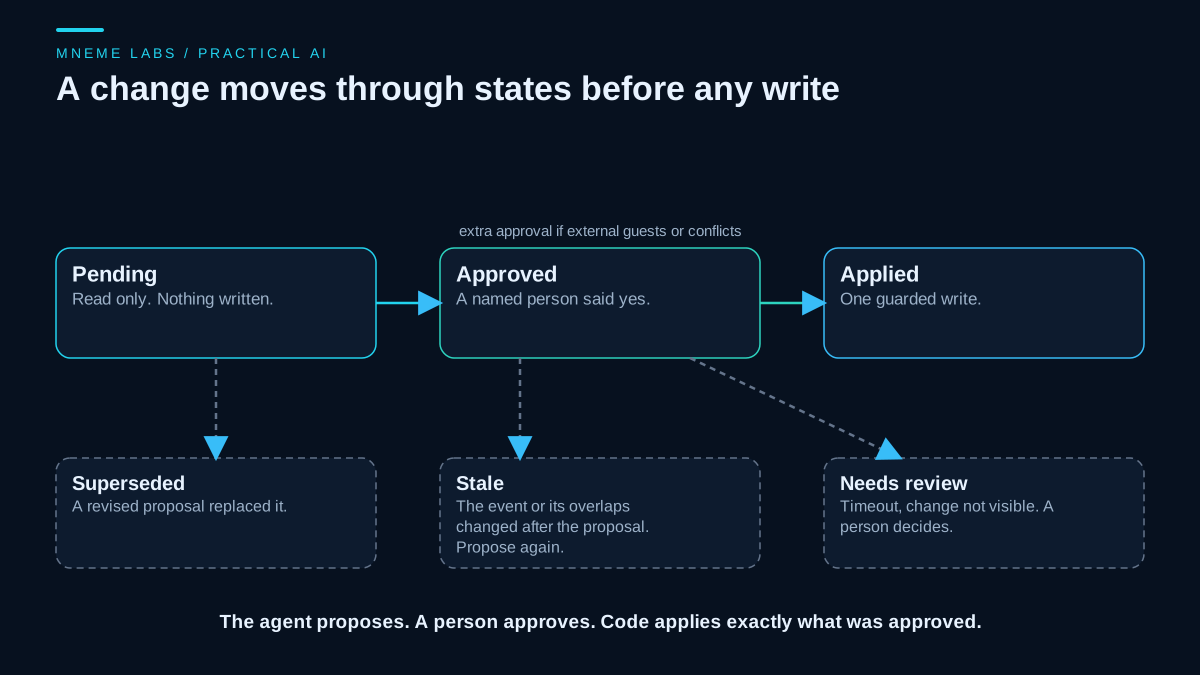
States should include pending, approved, rejected, applied, and stale. The last one matters because time passes between a proposal and an approval.
Triage the inbox by action
Sort messages by what you would do next, not by an importance score the model invents. A working set is: needs a reply, needs a decision, scheduling request, waiting on someone, FYI, and reference. The assistant can propose a category and a one-line reason. It should not archive, delete, or label anything. Deleting messages can discard something the model misclassified. Keep that decision outside this triage workflow.
Where should reply drafts live? Google's Gmail scope list describes gmail.compose as a restricted scope to manage drafts and send email. Putting drafts in Gmail therefore gives the assistant a permission that also includes sending. Keeping drafts in your own review queue lets it work with a read-only scope, at the cost of a copy-and-paste step. Start with the queue. Add compose access only if the friction makes you stop using the tool, and understand what you are granting.
Choose calendar scopes in tiers
Google's Calendar scope table lists scopes that read events (calendar.events.readonly), read availability only (calendar.freebusy), read and edit events (calendar.events), and create or change events on calendars you own (calendar.events.owned). The events.insert reference accepts several of the write scopes, including the narrower owned-calendars one.
Begin with a read-only events scope and no write scope at all. Free/busy is enough for proposing times without exposing event titles to the model. Request write access only after reading proves useful, and then only for the calendars you need. Google's OAuth overview recommends asking for scopes when the feature needs them. Its desktop-app guide also says incremental authorization is not supported for installed apps, so for a local script plan on a fresh consent when you widen access.
Know the calendar facts that break naive assistants
Google's events and calendars guide and the recurring events guide cover the model. These points matter most for an assistant.
Timed and all-day events differ. Timed events use start.dateTime and end.dateTime. All-day events use start.date and end.date, and the guide says the time zone field has no significance for them. Start and end must be the same kind.
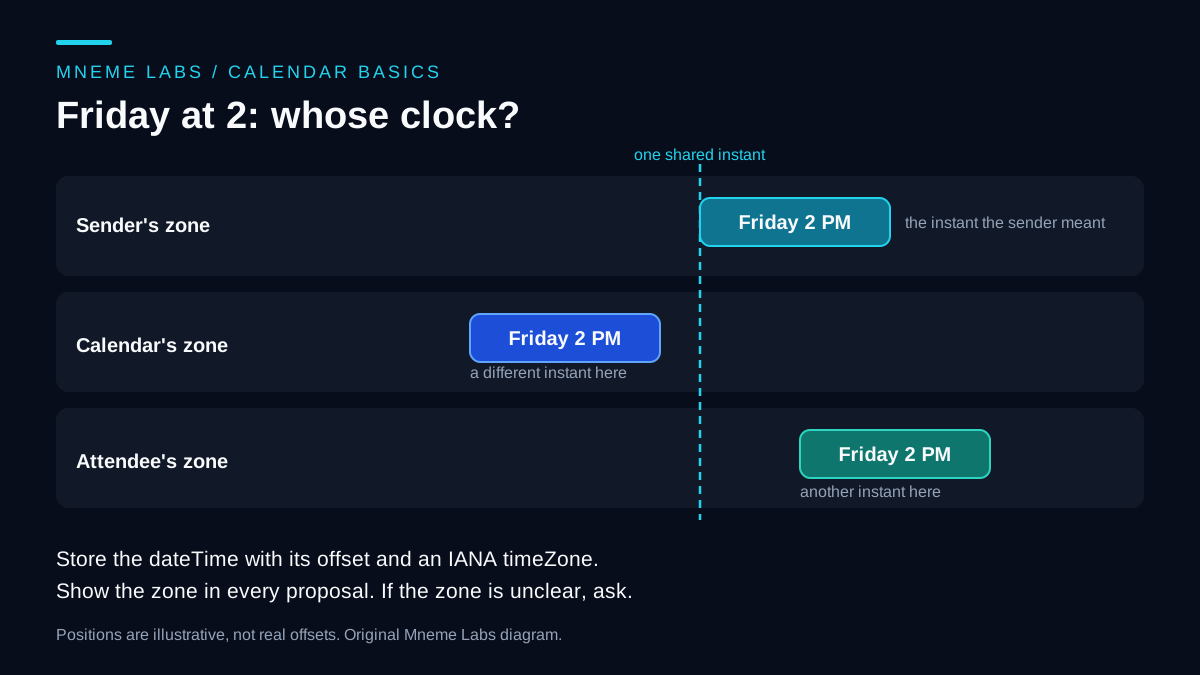
Time zones need care on every call. The events.list reference requires timeMin and timeMax as RFC 3339 timestamps with a mandatory time zone offset. A timeZone parameter controls the zone of the response and defaults to the calendar's own zone. Store an IANA zone name with each proposal, not just an offset, because the offset for a named zone can differ between dates.
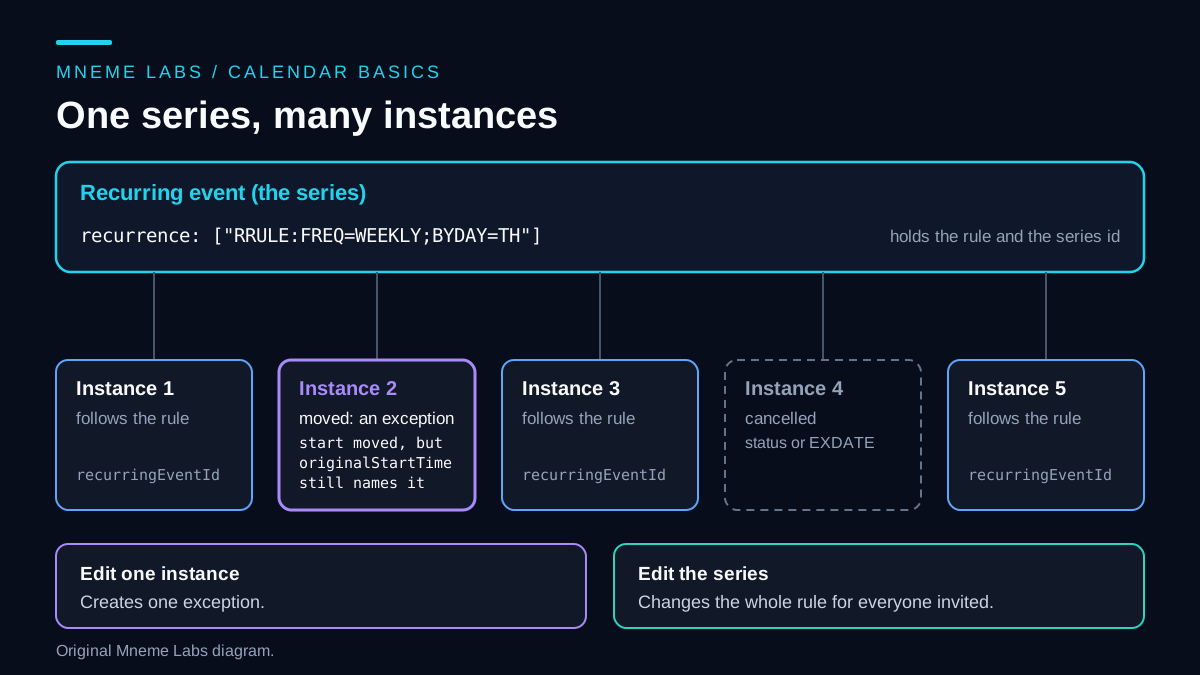
A recurring event is a rule plus instances. The series holds an RRULE from RFC 5545. Each instance carries a recurringEventId pointing to the series and an originalStartTime that identifies its slot even if it was moved. Editing one instance creates an exception. The recurring events guide warns against modifying instances one by one when you mean to change the whole series or "this and following," because that creates many exceptions and sends many change notifications.
Only the organizer's copy holds shared settings. The Calendar error guide documents a 403 when a non-organizer tries to set shared properties, and suggests patch instead of update when your request does not mean to touch those shared properties, because an update without them is treated as setting them to defaults. If you are not the organizer, the right proposal is a message to the organizer, not a change to the event.
Notification behavior is a choice. The insert reference lists sendUpdates values of all, externalOnly, and none, notes that some emails may be sent regardless, and warns that none can cause events not to sync to external calendars or to be lost for some users. Decide explicitly, and show the choice in the proposal.
Proposals go stale. If the event changed after the assistant read it, applying an old change overwrites someone's edit. The error guide describes a 412 when the etag sent in If-Match no longer matches. Store the etag with the evidence, send it when applying, and on a 412 re-read the event and generate a new proposal.
A worked example: "Can we move Thursday's call to Friday at 2?"
Suppose Dana, an external contact, sends that message. You organize a weekly Thursday call with four attendees. Here is how the assistant should handle it.
- Find the event. Query a window around the coming week with
singleEventsset to true, using Dana's address as theqsearch term, which theevents.listreference says matches attendee emails. The result gives instances with theirrecurringEventId. - Decide the scope. "Thursday's call" most likely means one instance, but the message does not say. Propose
this_instanceand flag the ambiguity. - Do not guess the zone. "Friday at 2" could mean Dana's zone, your calendar's zone, or another attendee's. The figure shows how far apart those readings can land. If Dana's zone is unknown, the proposal carries
zone: UNCONFIRMEDand the reply draft asks Dana to confirm the zone, restating the time in your calendar's zone. - Hold the calendar change. The
event_changeproposal stays pending until the time is confirmed. Only the reply draft is ready for review. - Apply carefully. After approval,
patchthe single instance withIf-Matchand the stored etag, withsendUpdatesset to the value the reviewer saw. Then read the event again and compare start and end with the approved values. A mismatch becomes an alert, not a silent success.
Failure modes
- Wrong person. Two contacts share a name. Key on email addresses, not display names.
- Private details in drafts. A reply to one party should not quote another party's event description. Limit fields passed to the model.
- Instructions inside content. An invite description or email body can contain text aimed at the model. The model has no write tools. A plain code path applies only the approved fields of a stored proposal.
- Approval habit. If every proposal looks the same, reviewers click through. Show the diff, the notification count, and the flags at the top.
- Quota changes. Google's tools safety announcement says it adjusted Calendar API quotas for new projects starting May 1, 2026. Read current limits before you design around a number. The retry guide covers 409 duplicates and 412 conflicts in detail.
Measure behavior, not hours saved
Record how often proposals are approved, edited, rejected, or marked stale, and why. Those counts tell you whether to tighten a prompt or drop a proposal type. Do not turn them into a claim about hours saved without timing your own work before and after. The monitoring guide describes a run record that keeps this data without logging message text.
A staged way to start
Week one: a daily brief built from a read-only inbox scope and a read-only calendar scope, with no proposals. Week two: reply drafts in your queue. Later: calendar change proposals, first only for events you organize that have no external attendees. Keep the first-agent guide nearby if you need a local starting point. For the inbox collector, use the Gmail polling design. It covers pagination, history checkpoints and the queue that feeds a daily brief.
Sources
- Google, Calendar events and calendars and Recurring events: timed versus all-day, organizers, series, instances, and exceptions.
- Google, Calendar API scopes, events.insert, and events.list: scope list,
sendUpdates, RFC 3339 offsets,timeZone,singleEvents, andq. - Google, Calendar API errors: non-organizer 403, 409 duplicates, and 412 etag conflicts.
- Google, Gmail API scopes: compose is a restricted scope covering drafts and sending.
- Google, Workspace tools safety and quota changes: quota adjustments effective May 1, 2026.
- OWASP GenAI, LLM06:2025 Excessive Agency: human approval for high-impact actions and downstream authorization.