An HVAC office handles three kinds of work that are easy to confuse: requests that cannot wait, visits that need a time on the calendar, and prices that need to be right. Software can help with the second and third. The first needs a stricter rule, which is that anything that might be a safety problem goes to a person immediately, with a fixed message that a model does not write.
This guide is about office workflow only. It covers intake, scheduling and draft estimates. It does not give repair or diagnostic advice, and it does not claim any time or revenue saving, since those depend on the company. The example business, Northfield Air, is invented, and every record, price and time below is synthetic.
Intake: sort the request before anything else
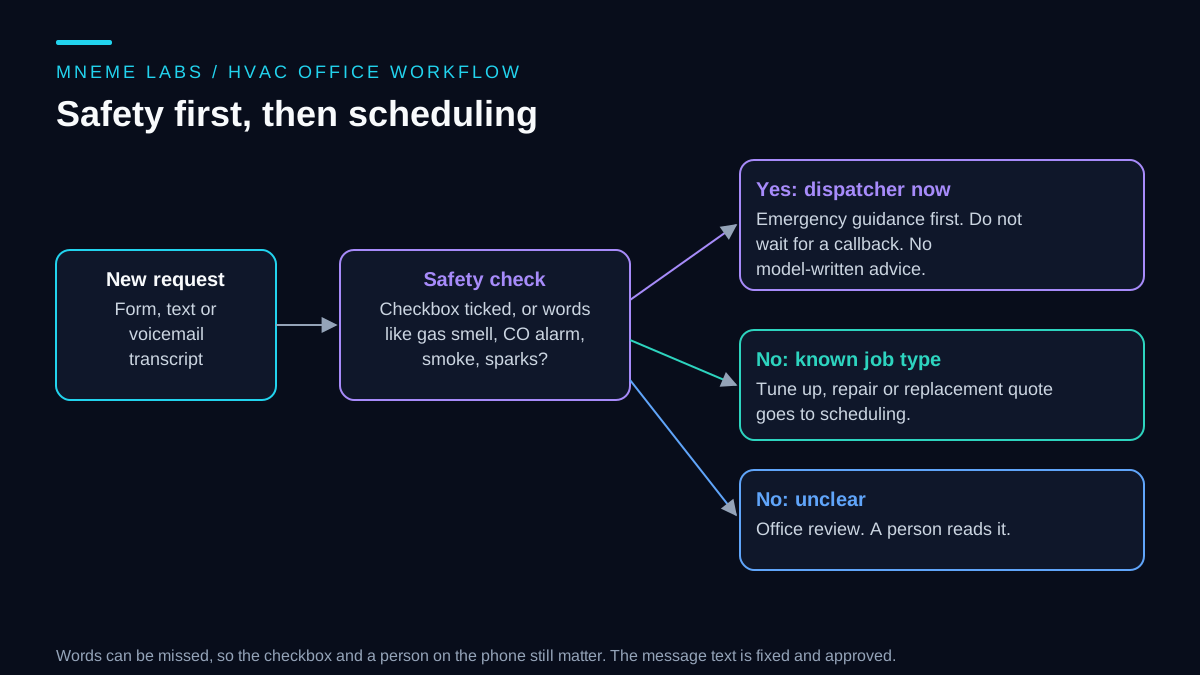
A request arrives as a web form, a text, or a voicemail transcript. The first job is to decide where it goes. A model can help read a messy message and suggest a job type: tune-up, repair, or replacement quote. That suggestion is only a label, and the label drives which queue the request lands in.
The safety check comes first and does not depend on the model. Two layers work together:
- A form question. A checkbox such as "Right now I smell gas, a carbon monoxide alarm is sounding, or I see smoke or sparks" gives the customer an explicit way to report a concern. A missed or misunderstood checkbox cannot establish safety.
- A word list. Broad terms such as "gas", "alarm" and "burning" send a message to a person even if the checkbox is empty. False alarms are acceptable here. The list can still miss an unfamiliar phrase, language or transcription error. Keep emergency instructions visible on the form regardless of what this classifier detects; this is an office routing aid, not an emergency service or a safety assessment.
If either layer fires, the request goes straight to a dispatcher, and the customer sees a fixed message. The wording of that message should come from your local gas utility or fire department guidance and be approved by someone responsible at the company. A model should not write or paraphrase it. The same applies to any instruction about what a customer should do at home. This workflow tells the customer to get to safety and call emergency services, then has a human call back. It never suggests a fix.
Why take this seriously? The US Consumer Product Safety Commission's carbon monoxide questions and answers explains that carbon monoxide is odorless and colorless, can come from malfunctioning fuel-burning appliances such as furnaces and water heaters, and causes early symptoms that resemble the flu without the fever. It also advises against servicing fuel-burning appliances without proper knowledge, skill and tools. People may not recognize the problem, so an office should not expect a customer to describe it correctly. That is the reason for a checkbox and a human callback, not a chatbot that tries to talk the customer through it.
Scheduling: availability goes stale
Once a request is safe to schedule, the next job is offering times. Your calendar tells you when technicians are busy. The Google Calendar API's free/busy query is one example. You send a time range and a list of calendars, and it returns the busy intervals for each. Note that the response time zone defaults to UTC unless you pass one, which is an easy way to offer a slot an hour off. Other scheduling systems have equivalents, and the principle is the same for all of them.
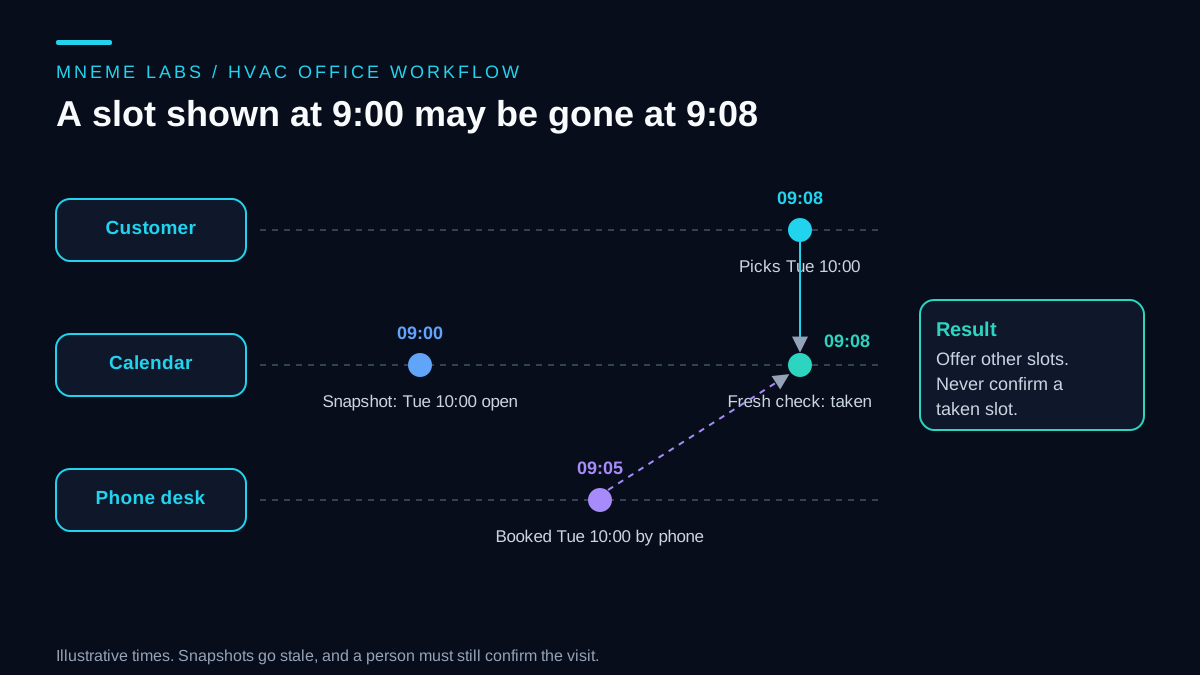
A free/busy answer is a snapshot. Between the moment you read it and the moment a customer picks a time, someone in the office may have booked that slot by phone, which the timeline below shows. So the workflow has two guards.
A freshness limit. Do not offer slots from a snapshot that is more than a few minutes old. Refresh first.
A re-check at confirmation. When the customer picks a slot, read availability again. If the slot is gone, offer others. If it is still open, hold it and let the office confirm. Do not tell the customer the visit is booked until the office has confirmed, since travel time, parts and technician skills are not in a calendar.
Calendar calls can fail, so plan for it. The Calendar API's error guide says a 400 is a permanent error, so do not retry and fix the request instead. For an invalid or expired token it says to get a new access token from the refresh token and, if that fails, send the user through authorization again. For rate limit errors it recommends exponential backoff. If a scheduling call fails and you cannot tell whether a booking was made, send it to the office rather than retrying a write blindly. The failures and retries guide covers that case in detail.
Estimates: draft from a dated price book, then have a person approve
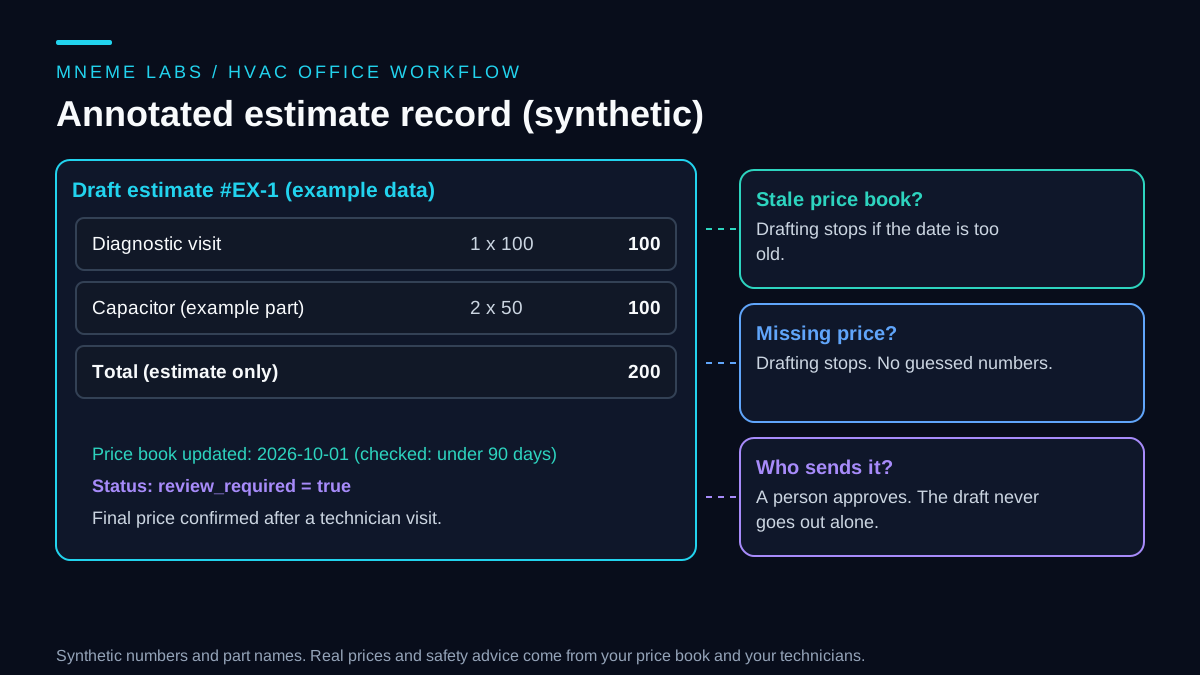
Pricing mistakes are expensive and embarrassing. A safe design keeps the model away from inventing numbers. Prices live in a price book that your company maintains, with an update date. The agent drafts an estimate by looking up items in that book and adding them up. A person approves it before it is sent.
Two checks matter. First, if the price book is older than a limit you choose, drafting stops, because parts and labor costs change. Second, if a requested item has no price, drafting stops instead of guessing. The output always carries a note that it is an estimate and that the final price is confirmed after a technician visit. A model can help with the wording of the cover note or turn a technician's visit notes into a tidy description, as long as it does not change the numbers.
A small sketch you can test
The Python below is standard library only and runs on synthetic data. It shows triage with a fixed safety message, a slot freshness check, a re-check at confirmation, and an estimate draft that refuses stale or missing prices.
from datetime import datetime, timedelta, date

SAFETY_WORDS = ("gas", "carbon monoxide", "alarm", "co detector", "smok", "spark",
                "burn", "fire", "rotten egg")
SAFETY_MESSAGE = "(approved wording from your utility or fire department goes here)"


def triage(text, safety_box_checked, job_kind):
    t = text.lower()
    if safety_box_checked or any(w in t for w in SAFETY_WORDS):
        return "dispatcher_now", SAFETY_MESSAGE
    if job_kind in ("tune_up", "repair", "replacement_quote"):
        return f"scheduling_{job_kind}", None
    return "office_review", None


def offer_slots(snapshot, now, max_age_minutes=10, count=3):
    if now - snapshot["taken_at"] > timedelta(minutes=max_age_minutes):
        return None  # refresh availability first
    return sorted(snapshot["open_slots"])[:count]


def confirm_slot(slot, fresh_open_slots):
    return "needs_office_confirmation" if slot in fresh_open_slots else "slot_taken_offer_again"


def draft_estimate(price_book, items, today, max_age_days=90):
    if (today - price_book["updated"]).days > max_age_days:
        raise ValueError("price book is stale; update it before drafting")
    missing = [i for i, _ in items if i not in price_book["prices"]]
    if missing:
        raise ValueError(f"no price for: {missing}")
    total = sum(price_book["prices"][i] * q for i, q in items)
    return {"total": total, "review_required": True,
            "note": "Estimate only. Final price confirmed after a technician visit."}
The original tests checked a gas-smell message, a ticked checkbox, an unclear request, a 45-minute-old snapshot, an unavailable slot, a two-line estimate totaling 200, and stale or missing prices. A second pass added "gas leak", "smell of gas", "rotten eggs", "furnace is smoking" and "burning odor". All of those synthetic phrases route to the dispatcher. This only verifies those examples, not coverage of real emergencies. The safety message is a placeholder that must be replaced with approved local guidance before use. The slot function checks a supplied list; it does not reserve a real calendar slot or prevent concurrent bookings. The office must use its booking system to hold and confirm the visit. The 10-minute and 90-day limits are example choices.
Failure cases to plan for
A missed safety phrase. The word list will not catch every message. Keep the checkbox, put the emergency wording near the phone number on the site, and make sure someone reviews incoming requests promptly during business hours.
After-hours messages. A request that arrives at night cannot wait for a person in the morning if it might be urgent. Decide who gets alerted after hours and what the fixed message tells customers to do. Do not let a model improvise advice for them.
Double booking. Covered above. Re-check availability and let the office confirm.
Wrong time zone. If the calendar and the website disagree on time zones, the customer arrives an hour early or late. Store times with explicit zones and show the customer the zone.
Stale price book. The draft stops and a person updates the book. Add the date to the estimate so everyone sees which prices were used.
Over-promising in messages. Avoid language such as "we will fix it today" unless a person has confirmed it. A message that sets a false expectation costs more than a slower reply.
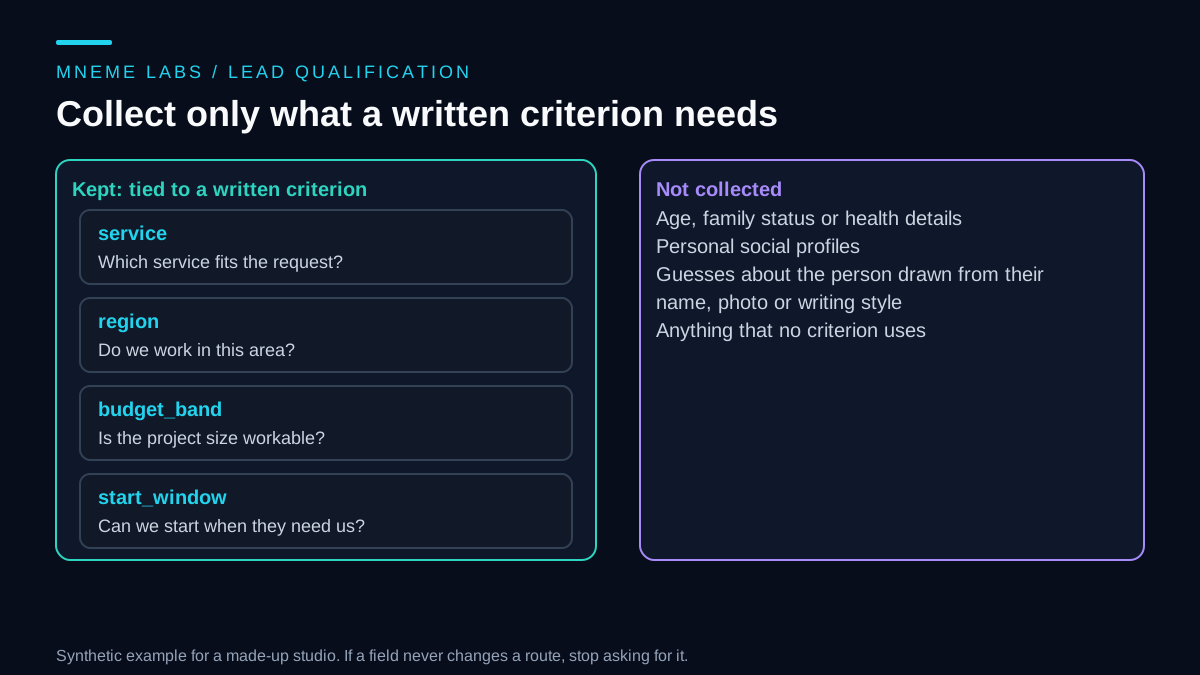
Privacy. Customer names, addresses and phone numbers are personal data. Collect only what scheduling needs, and keep the messages out of any tool that you have not reviewed. The customer inquiries guide discusses handling replies, and the calendar and inbox guide covers general calendar assistants.
Limits
This workflow does not diagnose equipment, advise on repairs, or replace a technician's judgment on site. It does not calculate load sizing, permits or code requirements. Estimates reflect your price book and say nothing about the right system for a home. Local licensing and consumer rules for estimates vary, so check the rules where you work.
Next step
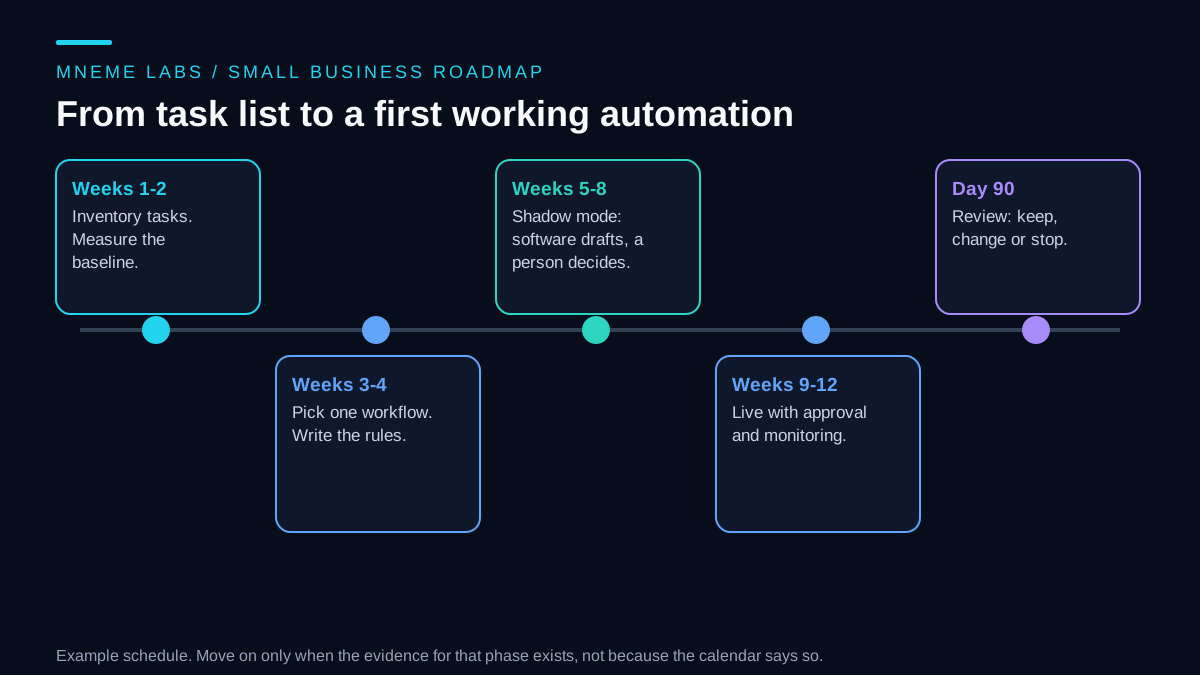
Start with the smallest piece: the intake form. Add the safety checkbox, write the fixed message with your utility or fire department's guidance, and route every request to a person for two weeks. Read what arrives, then add job-type labels, then scheduling holds, then draft estimates. For help with a first small agent, see the first agent guide.
Sources
- CPSC, Carbon Monoxide Questions and Answers: carbon monoxide is odorless, comes from fuel-burning appliances including furnaces, flu-like early symptoms, and the advice not to service fuel-burning appliances without proper skill.
- Google, Calendar API freebusy.query: returns busy intervals for calendars over a time range, with UTC as the default time zone.
- Google, Calendar API errors: 400 is permanent so do not retry, token refresh steps for 401, and exponential backoff for rate limit errors.