A restaurant runs on facts that change by the hour. A table opens up, a dish sells out, a review lands at 11 p.m. The risk with automation in this setting is that a message goes out that was right at 2 p.m. and wrong at 5. A guest is told a table is free when it is not, a post promotes a dish the kitchen has run out of, or a reply says something a manager would never have approved.
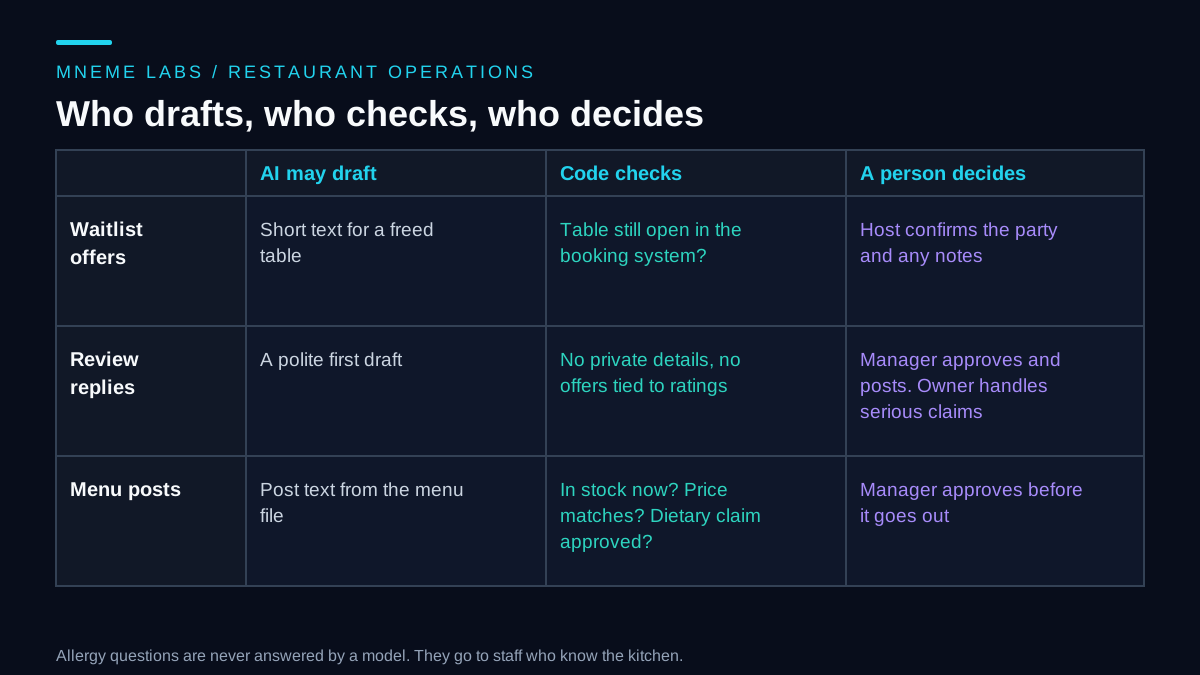
This guide covers three jobs in a restaurant office: offering freed tables to a waitlist, answering reviews, and writing menu posts. For each, it separates what a model can draft, what simple code can check, and what a person decides. The restaurant in the examples is invented, and its dishes, times and prices are synthetic. No result, such as fewer no-shows or more bookings, is claimed, because that depends on the restaurant.
Waitlist offers: the booking system is the source of truth
When a party cancels, a waiting party may want the table. A model can write a short, friendly text. The risky part is not the wording. It is the claim "your table is ready", which is only true if the table is still open when the guest replies.
The safe order of steps is short.
- A cancellation frees a table in your reservation or point-of-sale system.
- Code picks the first waiting party that fits the table size and has agreed to receive messages from you.
- The message offers the table and says it is held for a short, stated time.
- When the guest replies yes, code checks the booking system again. If the table is still open, it is held for the host to confirm. If it is gone, the guest gets an apology and a chance to stay on the list.
Re-checking matters because a walk-in or a phone booking may have taken the table while the text was in transit. Treat the booking system, not the message thread, as the record. Parties with notes such as an allergy or a mobility need should be flagged for the host to read before confirming, and a model should not answer allergy questions. Those go to staff who know the kitchen.
Message consent needs thought too. A text that confirms or changes a booking the guest requested is different from a marketing text. In the United States, the FCC's rule at 47 CFR 64.1200 says that calls which include or introduce an advertisement, or constitute telemarketing, made with an automatic telephone dialing system or an artificial or prerecorded voice to mobile numbers need the called party's prior express written consent, with listed exceptions. The rule text speaks of calls, and the page showed a recent amendment, so whether and how it applies to your texting setup is a question for your messaging provider or a lawyer. The practical step is the same either way. Keep a record of how each guest agreed to be messaged, keep marketing consent separate from booking messages, and honor opt-outs quickly.
Review replies: draft for a manager, escalate the serious ones
Reviews arrive when the team is busy, and a late reply is easy to forget. A model can write a first draft in a polite voice. It should not post anything on its own.
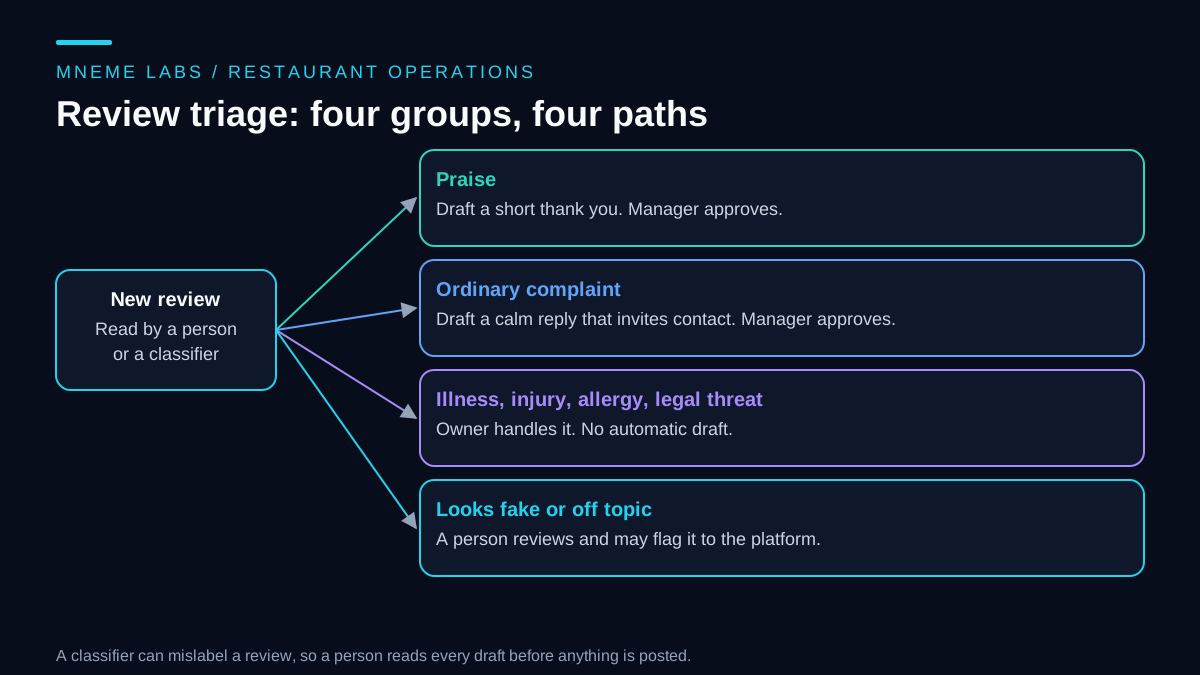
Start by sorting reviews into four groups.
- Praise. Draft a short thank you.
- Ordinary complaints. Draft a calm reply that thanks the guest, names the concern without arguing, and invites them to contact the restaurant directly.
- Serious claims. Anything about illness, injury, an allergic reaction, discrimination, or a legal threat goes to the owner. A draft would risk saying too much or admitting something before the facts are known.
- Suspicious reviews. One that looks fake, off topic or aimed at the wrong business gets a person's attention, who may flag it to the platform.
Some facts about posting are worth knowing. Google's help page on managing customer reviews says you must verify your business before replying, that Google reviews replies against its content policies, that a reply is posted publicly and the reviewer is notified, and that the reviewer can then change their review. Review features also vary by country and business category. So a reply is public and read by the guest and by future customers. Keep guest details out of it. Do not confirm that a named person visited on a given night, and do not discuss orders or health details in public.
Two rules from the US Federal Trade Commission matter for how you treat the review system itself. Its rule on consumer reviews and testimonials says it is an unfair or deceptive practice for a business to write, create or sell fake reviews that misrepresent that the reviewer exists, that they used the business, or what their experience was. The same section has a separate provision about reviews procured from a business's own officers, managers and employees, so read it before asking staff or relatives to post. And section 465.4 makes it unfair or deceptive to give compensation or other incentives in exchange for, or conditioned on, reviews expressing a particular sentiment, positive or negative. In plain terms, a model must never produce a review for you, and a "free dessert if you write five stars" offer is the kind of thing to avoid. Asking every guest for honest feedback is a different matter. Google notes that you can share a review request link or QR code. These rules apply in the US, and other places have their own, so check yours.
Menu posts: facts come from files, not from the model
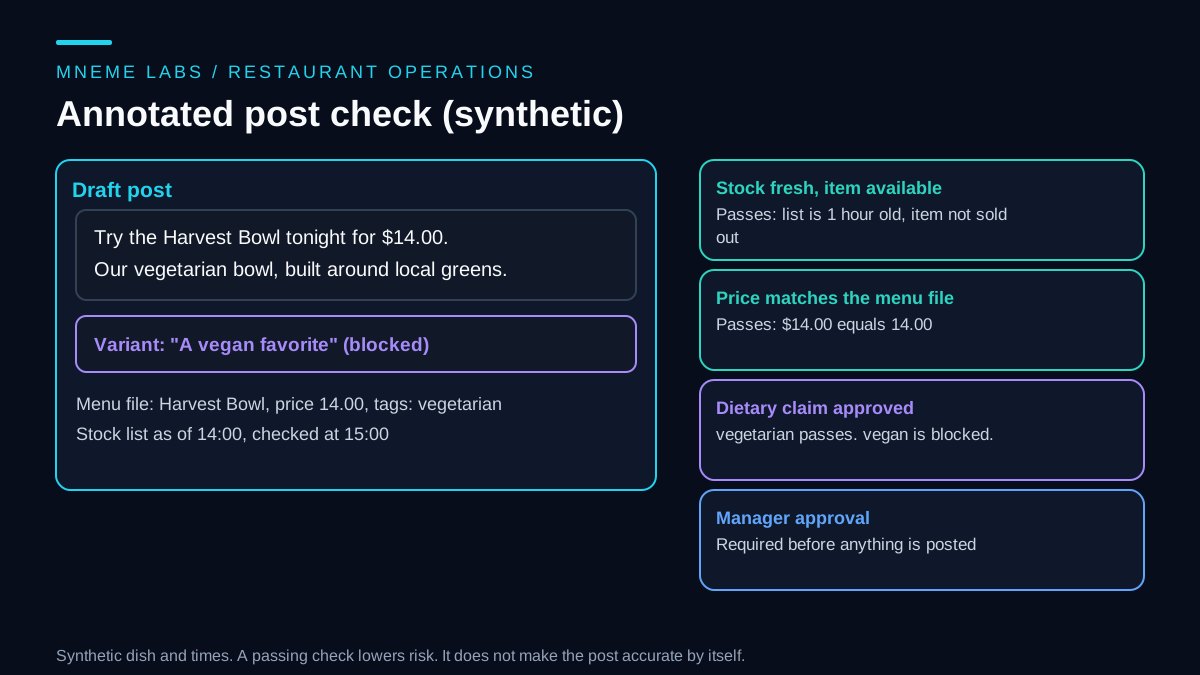
A post that says "try the Harvest Bowl tonight" is fine until the kitchen sells the last one at 5 p.m. Menu marketing goes wrong in three predictable ways: it promotes something unavailable, it states a wrong price, or it makes a dietary claim that nobody approved. Dietary and allergy claims deserve the most care, because a wrong "gluten-free" or "nut-free" can hurt a guest.
The fix is to keep the facts in files that people maintain, and have code compare each draft against them before a manager sees it.
- Menu file. Each item has a name, a price, and a list of approved dietary tags that the kitchen has confirmed.
- Stock list. A list of items that are sold out, with the time it was last updated. If it is older than a limit you choose, drafts for that item are blocked until someone refreshes it.
- Claim check. If the draft uses a dietary word that is not among the item's approved tags, the draft is blocked.
- Price check. Any dollar amount in the draft must equal the menu price.
Here is a compact sketch of the claim, price and stock checks, plus the waitlist re-check. It uses only the Python standard library, and the dish and the guests are synthetic.
import re
from datetime import timedelta

DIET_CLAIMS = ("gluten-free", "vegan", "vegetarian", "dairy-free", "nut-free", "halal", "kosher")


def check_post(draft, item, stock, now, max_stock_age_hours=6):
    """Return a list of problems. An empty list means a manager may review the draft."""
    problems = []
    if now - stock["as_of"] > timedelta(hours=max_stock_age_hours):
        problems.append("stock list is stale")
    elif item["name"] in stock["sold_out"]:
        problems.append("item is sold out")
    text = re.sub(r"\b(gluten|dairy|nut)[\s\u2010-\u2015-]+free\b", r"\1-free", draft.lower())
    for claim in DIET_CLAIMS:
        if claim in text and claim not in item["approved_tags"]:
            problems.append(f"unapproved claim: {claim}")
    for amount in re.findall(r"\$(\d+(?:\.\d{2})?)", draft):
        if abs(float(amount) - item["price"]) > 0.001:
            problems.append(f"price in draft ({amount}) does not match menu ({item['price']})")
    return problems


def offer_freed_table(waitlist, seats, table_still_open):
    """Re-check the booking system first. Flag parties with notes for the host."""
    if not table_still_open:
        return None
    for party in waitlist:
        if party["size"] <= seats and party["text_ok"]:
            return {"party": party["name"], "needs_host_review": bool(party.get("notes"))}
    return None
The test file for the full version runs these cases on synthetic data. A clean draft passes. A stale stock list blocks the post. A sold-out item blocks it. "Vegan" is blocked for an item tagged only vegetarian. "Gluten free" with a space is caught as well. A $12 price on a $14 dish is flagged. A freed table goes to the first party that fits and agreed to texts, with a party that has an allergy note flagged for the host, and nothing is offered when the table is no longer open. All checks passed.
Be clear about what this does not do. A word list catches the claims it knows about. A draft that says "no wheat" or "made without nuts" would slip past a list that only looks for "gluten-free" and "nut-free". For anything about allergens, the safest rule is that only staff-approved wording appears, and the model is not allowed to describe ingredients or allergens at all.
Failure cases to plan for
Stale availability. A table or a dish was available when the draft was written and not when it was sent. Re-check at the moment of sending, not at the moment of drafting.
A public reply that overshares. Keep personal details and order specifics out of replies. A manager should read every draft.
Misclassified reviews. A classifier can read sarcasm as praise or miss a health complaint. That is why a person reads the incoming review too, and why anything near illness or injury is routed to the owner by a simple word list as well as by the classifier.
Voice drift across several locations. A model can slide into generic copy. Keep a short style note per location, with examples of past posts the owner likes, and compare drafts to it.
Booking-system outages. If the system cannot be reached, offer nothing and tell the host. Do not guess.
Duplicate messages. Sending the same offer twice annoys guests. Record each offer with an ID and do not repeat it. The failures and retries guide explains why a timed-out send needs a lookup before a retry.
Limits
This workflow does not run a restaurant. It does not set menus, manage staff, or decide how to respond to a bad night. The checks reduce certain errors. They do not make a post true. Local rules on allergen information, food claims and consumer messages vary, and a food safety or legal adviser can say what applies to you. If your volume is small, a manager with a shared checklist and a notes file may do the same job with less setup.
Next step
Pick one task. Menu posts are a gentle start because nothing reaches a guest without a manager. Write your menu file with prices and the dietary tags your kitchen has confirmed, add a stock list with a time, and run drafts through the check for two weeks. Keep a note of what the checks caught and what slipped through. For general help with replies to customers, see the customer inquiries guide.
Sources
- 16 CFR 465.2, Fake or false consumer reviews: writing, creating, selling or buying reviews that misrepresent the reviewer or their experience, plus a separate provision on reviews procured from insiders.
- 16 CFR 465.4, Buying positive or negative consumer reviews: incentives conditioned on a particular sentiment are unfair or deceptive.
- Google Business Profile Help, Manage customer reviews: verification before replying, content policy review of replies, public replies with reviewer notification, and review request links.
- 47 CFR 64.1200, Delivery restrictions: prior express written consent for advertisement or telemarketing calls using autodialers or prerecorded voice to mobile numbers, with listed exceptions.