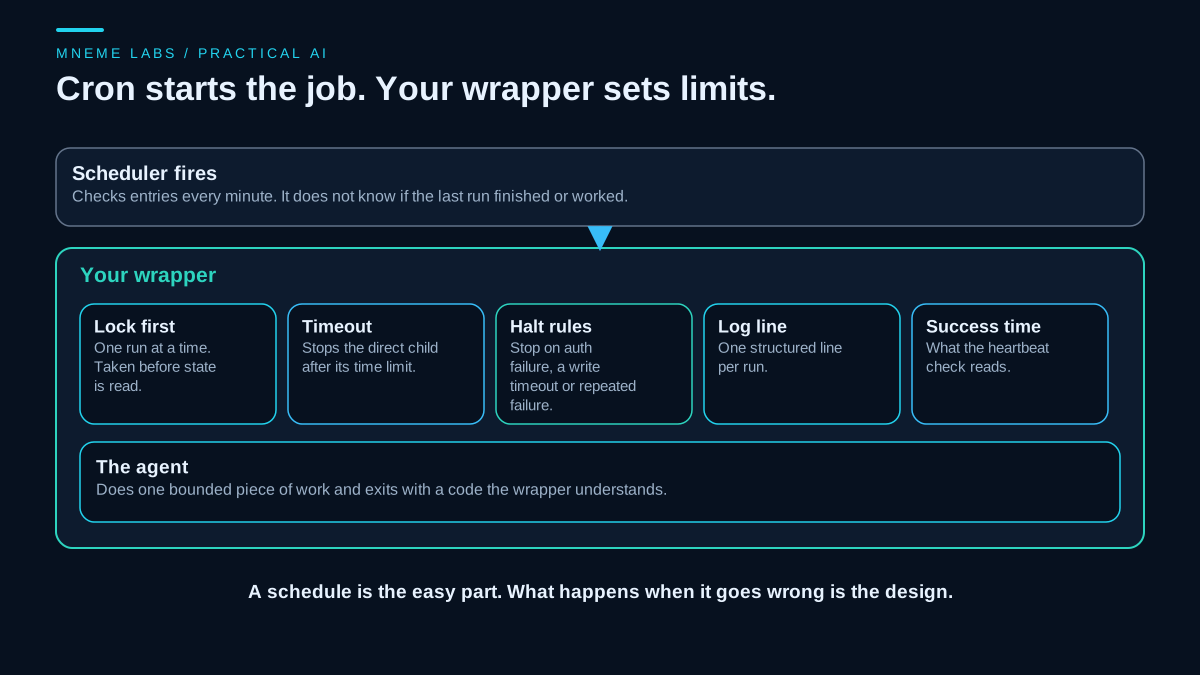
A scheduler solves one problem: starting a command at a given time. An agent that runs on a schedule has several others. A run may still be going when the next one starts. A model call may hang. A write may time out with no way to tell whether it landed. A password may expire, and every later run will fail the same way. A script that runs unattended needs rules for all of these before it needs a clever schedule.
This guide uses cron and a short Python wrapper. The tests ran on synthetic jobs written for this article, on a Windows machine, using the Python standard library. The crontab and flock lines in the guide follow the Linux manual pages and were not run here, so treat them as syntax to check on your own system.
What cron does and does not do
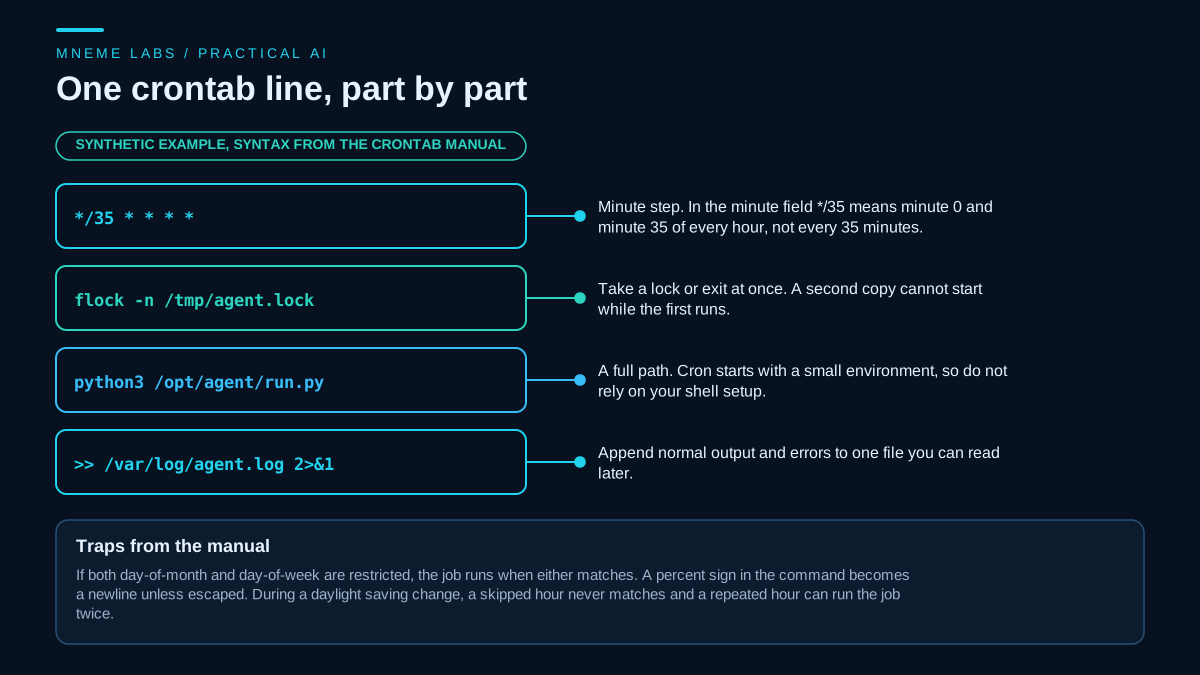
The crontab manual page states the basics. Cron examines its entries every minute. Each entry has five time fields followed by a command, and the command runs under the user who owns the crontab. Cron sets up a small environment: SHELL is /bin/sh, and LOGNAME and HOME come from the password file. Your login shell's setup, such as extra directories on PATH, is not loaded, so use full paths in the command and set what you need at the top of the crontab.
The same page lists behaviors that surprise people.
- Steps restart in each field. In the minute field,
*/35does not mean every 35 minutes. It means minute 0 and minute 35 of every hour. The page gives this as a note and shows a workaround that tests the clock in the command. - Two day fields combine with OR. If both day of month and day of week are restricted, the job runs when either matches. The page's example,
30 4 1,15 * 5, runs on the 1st and 15th and also every Friday. - A percent sign ends the command. In the command part, an unescaped
%becomes a newline, and the text after the first one is sent to the command as input. Escape it with a backslash. - Comments cannot share a line with a command. They are treated as part of the command.
- Daylight saving time bends the schedule. A time that does not exist during the spring change never matches, so the job is skipped. A time that happens twice in the fall matches twice, so the job can run twice.
- Mail. Output is mailed to the crontab's owner unless
MAILTOis set. An emptyMAILTOsends no mail, so decide where output goes on purpose, and capture it in a log file.
Systemd timers are the other common choice on Linux. Their manual describes calendar and monotonic timers, an accuracy setting that defaults to one minute, and a randomized delay setting that spreads similar timers apart. A calendar timer that elapses while the system sleeps catches up when it wakes, though several missed firings collapse into one run. Cron makes no such promise in the page read for this guide, so a laptop that sleeps through a scheduled time may simply miss the run. If your agent must not skip a run, decide which scheduler's behavior you want.
A lock so runs cannot overlap
If a run takes longer than the interval, the next one starts on top of it. For an agent that writes, two copies can send the same message twice. The flock utility wraps a command in a file lock. With -n it fails at once instead of waiting if the lock is held, and -E sets the exit code used for that conflict. Its manual warns that on some network filesystems, such as NFS and CIFS, locks may always fail, so keep the lock file on a local disk.
A crontab line looks like this, with an example script path:
*/30 * * * * flock -n /tmp/agent.lock /usr/bin/python3 /opt/agent/run.py >> /var/log/agent.log 2>&1
A wrapper with a timeout, halt rules and a log
A lock stops overlap. It does not stop a stuck call, a failing job that runs forever, or an expired credential. The wrapper below adds those. It runs a command once, under an exclusive lock, with a hard timeout, halt rules and one structured log line per run. It never retries. A retry is a decision for the next scheduled run or for a person.
Three rules shape the code. The lock is taken first, by an exclusive create that fails if the file exists, and state is touched only while it is held, so a run without the lock changes nothing. The lock is never taken over because of its age, since a slow job and a dead job look the same from outside. And a timeout on a job that may write halts it for review, because the write may or may not have landed.
import contextlib
import json
import os
import subprocess
import time
from datetime import datetime

EXIT_AUTH = 3   # a job exits with this code when its credentials were refused


class LockHeld(Exception):
    pass


@contextlib.contextmanager
def exclusive_lock(path):
    """Create the lock file atomically. Fails at once if it exists. Age alone never frees a lock."""
    try:
        fd = os.open(path, os.O_CREAT | os.O_EXCL | os.O_WRONLY)
    except FileExistsError:
        raise LockHeld(path) from None
    try:
        try:
            os.write(fd, json.dumps({"pid": os.getpid(), "since": time.time()}).encode())
        finally:
            os.close(fd)
        yield
    finally:
        os.remove(path)


def _read_state(path):
    state = {"consecutive_failures": 0, "last_success": None, "halted": None}
    if os.path.exists(path):
        with open(path, encoding="utf-8") as f:
            state.update(json.load(f))
    return state


def _write_state(path, state):
    tmp = path + ".tmp"                                      # write then replace, so a crash leaves no half file
    with open(tmp, "w", encoding="utf-8", newline="\n") as f:
        json.dump(state, f)
    os.replace(tmp, path)


def _log(path, now, name, outcome, code=None, note=""):
    with open(path, "a", encoding="utf-8", newline="\n") as f:       # one structured line per run
        f.write(json.dumps({"at": now.isoformat(), "job": name, "outcome": outcome,
                            "exit": code, "note": note[:200]}) + "\n")


def run_job(name, cmd, state_dir, timeout_s, max_failures=3, read_only=False, now=None):
    """Run cmd (a list) once. Returns an outcome string. Never retries."""
    now = now or datetime.now()
    os.makedirs(state_dir, exist_ok=True)
    state_path = os.path.join(state_dir, name + ".json")
    lock_path = os.path.join(state_dir, name + ".lock")
    log_path = os.path.join(state_dir, name + ".log")
    try:
        with exclusive_lock(lock_path):                      # lock first, then read or write any state
            state = _read_state(state_path)

            def finish(outcome, code=None, note=""):
                _write_state(state_path, state)
                _log(log_path, now, name, outcome, code, note)
                return outcome

            def count_failure():
                state["consecutive_failures"] += 1
                if state["consecutive_failures"] >= max_failures:
                    state["halted"] = "too many consecutive failures"

            if state["halted"]:
                return finish("halted: " + state["halted"])
            try:
                r = subprocess.run(cmd, capture_output=True, text=True, timeout=timeout_s)
            except subprocess.TimeoutExpired:
                if read_only:                                # declared by you: the job never writes
                    count_failure()
                    return finish("timeout", note="read-only job: counted as a failure")
                state["consecutive_failures"] += 1
                state["halted"] = "timeout, outcome unknown: check the destination, then clear this flag"
                return finish("timeout", note="outcome unknown: halted for review")
            if r.returncode == 0:
                state.update(consecutive_failures=0, last_success=now.isoformat())
                return finish("ok", 0)
            if r.returncode == EXIT_AUTH:
                state["halted"] = "auth failed, fix credentials then clear this flag"
                return finish("halted: auth failed", EXIT_AUTH, r.stderr.strip()[-200:])
            count_failure()
            return finish("failed", r.returncode, r.stderr.strip()[-200:])
    except LockHeld:
        return "skipped: lock held"                          # no state read, no state written, no log line


def clear_stale_lock(name, state_dir, operator_confirms_no_process_running=False):
    """Operator action for a lock left behind by a crashed run. Check the process list first."""
    if operator_confirms_no_process_running is not True:
        raise PermissionError("confirm that no run is still active, then pass operator_confirms_no_process_running=True")
    os.remove(os.path.join(state_dir, name + ".lock"))


def clear_halt(name, state_dir, reviewed=False, now=None):
    """Operator action after reading the log and checking the destination system. Needs the lock."""
    if reviewed is not True:
        raise PermissionError("review the log and the destination first, then pass reviewed=True")
    state_path = os.path.join(state_dir, name + ".json")
    with exclusive_lock(os.path.join(state_dir, name + ".lock")):       # raises LockHeld if a run is active
        state = _read_state(state_path)
        state.update(consecutive_failures=0, halted=None)
        _write_state(state_path, state)
        _log(os.path.join(state_dir, name + ".log"), now or datetime.now(), name, "halt cleared by operator")
A few details are worth naming. The command is passed as a list and not as a shell string, so nothing from a file name or a model output is interpolated into a shell. The command's output is captured, so stdout and stderr stay separate and only the tail of stderr goes into the log. The exit code is how the job tells the wrapper what happened, and code 3 is an agreed signal for "credentials were refused."
A crashed run leaves its lock behind, and later runs skip until a person removes it. That is deliberate, so pair it with the heartbeat check. Before calling clear_stale_lock, check that no process for the job is still running. The wrapper cannot do that for you. Exclusive file creation is dependable on a local disk and shares the network filesystem caveat of flock. On timeout, Python stops only the direct child process, so a job that spawns helpers needs its own cleanup.
What the tests showed
The cron expression matcher used in the tests was checked against the examples in the crontab manual. */35 in the minute field matched minutes 0 and 35 and no others. The 30 4 1,15 * 5 entry matched on the 1st, and on a Friday that was neither the 1st nor the 15th, but not on a Saturday. A 23 0-23/2 entry matched at 02:23 and not at 03:23. A weekday-only entry at 22:00 matched on a Friday and not on a Sunday, and the number 7 worked as Sunday. Malformed expressions raised errors.
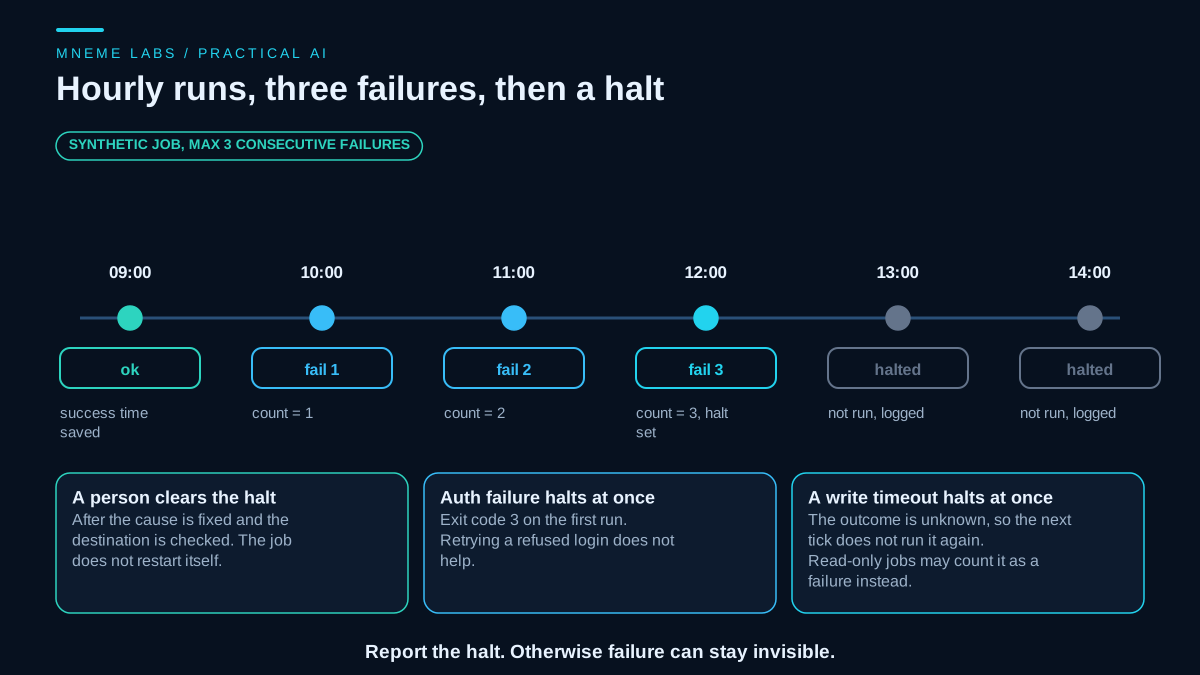
The wrapper was tested with throwaway scripts. A script that exited 0 returned ok, saved a success time and released its lock. A script that exited 1 returned failed three times, and a fourth call was refused as halted without starting the script. A script that exited 3 halted on its first run and stayed halted. A script that slept past its one second timeout returned timeout and halted the job, and the next call did not run it. Declared read-only, the same slow script needed three timeouts to halt.
Lock behavior was tested separately. With a lock file already in place, the call returned skipped: lock held, did not start the job, and left the state file and log byte for byte unchanged. A lock stamped 30 days old was still not taken over. Six threads started the same job at the same moment. One returned ok, five returned skipped: lock held, the job body ran once, and only the winner wrote a log line. A call that arrived during a slow failing run changed nothing, and the active run then saved its own count of three and halted.
These tests cover the wrapper's logic on one machine, with threads standing in for overlapping ticks. They do not test Linux cron, flock, a network filesystem, a crash mid-run, or your agent. Declaring a job read-only is your claim, which the wrapper cannot check.
Choosing where the rules live
Simple jobs fit cron plus a wrapper. Jobs that need to catch up after sleep, start after a dependency, or limit memory and processes may fit a systemd timer better. A long-lived agent that holds a connection, such as a chat bot, is not a scheduled job at all and belongs under a service manager. On Windows, Task Scheduler has its own settings for overlapping runs and timeouts, which this guide did not cover.
Failure cases
Timeouts on writes. When a run times out, the outcome is unknown. A message may have been sent. By default the wrapper halts the job at once, so the next tick does not quietly run it again. A person checks the destination system, as the guide on retries and failures explains, and then clears the halt. A job declared read-only counts a timeout toward the ordinary failure limit instead.
Authorization errors. Retrying a refused login does not help and can trigger lockouts. Halt at once and notify the owner.
Silent success. A job that exits 0 after doing nothing looks healthy. Check outputs, not only exit codes, and use the last success time with a heartbeat check, as the guide on monitoring describes.
Daylight saving. A job at a time that is skipped or repeated can be missed or doubled. Schedule write jobs away from the change hour, or make them safe to run twice.
Runaway cost. A schedule multiplies cost by the number of runs. Check a daily budget before each run, as the cost guide shows, and list the schedule and limits for each job in the operations playbook registry.
Secrets in the crontab. Anyone who can read the crontab can read what is in it. Keep credentials in a file with restricted permissions that the job loads, and never log them.
Unbounded logs. A job that appends a line every few minutes will eventually fill a disk. Rotate or trim logs.
Next step
Take one agent you run by hand. Write its crontab line with full paths, a lock, and output sent to a log. Put the wrapper around it with a timeout you would accept for a bad day. Run it once by hand, then once with a deliberately failing command to confirm that it halts after the limit. Only then add the schedule. The email guide on checking an inbox every hour shows a polling example that would fit this wrapper.
Sources
- crontab(5), Linux manual page: the five time fields, minimal environment, steps within a field, the day-field OR rule, percent signs, comments, mail, and daylight saving behavior.
- flock(1), Linux manual page: the non-blocking option, conflict exit code, wait timeout, and the warning about NFS and CIFS.
- systemd.timer, freedesktop.org manual: calendar and monotonic timers, the one-minute default accuracy, randomized delay, and catch-up after system sleep.