"How much does it cost to run an agent?" has no single answer, and any article that gives one number for everyone is guessing. Cost depends on how often the agent runs, how many model calls each run makes, how long the prompts and answers are, how many calls are repeated after failures, and what the vendor charges per token on the day you are billed.
This guide gives you a way to compute your own number. It uses a small worksheet with tested arithmetic, example rates copied from vendor pricing pages on 2026-11-15, and an invented usage profile. The usage is not a measurement of any real system, and the rates will have changed by the time you read this. Use the structure, then enter your own figures from your own bill.
What the model bill is made of
For a model call, the vendor charges for tokens in and tokens out. Input and output have different prices, and output usually costs several times more per token. Both vendors checked here also list a lower price for input tokens that are read from a cache, and Anthropic lists a higher price for the call that writes a prompt prefix into the cache.
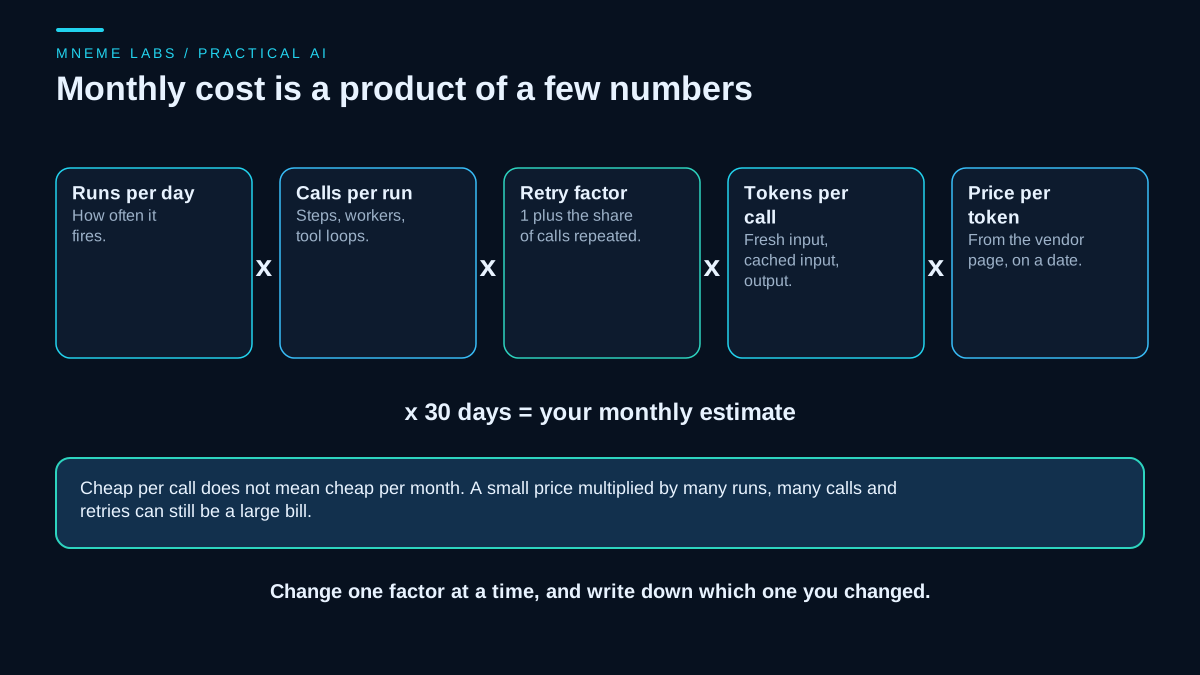
Monthly model cost is then a product of a few numbers: runs per day, calls per run, one plus the share of calls that are repeated, tokens per call, and the price per token, times the days in the month. The first diagram on this page shows that chain. Each factor is something you can measure from logs, apart from the price, which you read from the vendor.
Model tokens are not the whole bill. A real agent also pays for search or data APIs it calls, hosting for the scheduler, storage, and the time of the person who reviews its work. This worksheet covers only the model line, so treat its result as one part of the total.
Where the rates come from
Anthropic's pricing page lists a per-million-token price for base input, cache writes, cache hits and output for each model, and says the page is in US dollars. On 2026-11-15 it showed, for example, Claude Haiku 4.5 at $1 input and $5 output per million tokens, with cache reads at $0.10. Claude Sonnet 5.5 was listed at $2 input and $10 output, with cache reads at $0.10. The page also notes that Claude 4.7 and later models use a newer tokenizer that produces roughly 30 percent more tokens for the same text, so the same prompt can count differently across model generations. That matters when you compare per-token prices between models.
OpenAI's pricing page lists standard rates per million tokens, with separate columns for cached input, and separate Batch and Flex tables. The example below uses two OpenAI models whose rates were also read on their own model pages: gpt-5-mini at $0.25 input, $2.00 output and $0.025 cached input, and gpt-5.4-mini at $0.75, $4.50 and $0.075. The gpt-5-mini page marks that model as deprecated, so its row is a legacy arithmetic example and not a model to choose. The pricing page also splits some models into short-context and long-context prices, so a long prompt can change the rate.
Cloud marketplaces can bill in their own units, so read their pricing page if you buy that way.
The worksheet
The code below is the arithmetic, plus a small local ledger that the budget section explains. It uses Python's Decimal type so cents do not drift, and it has no network access. The rates are example values in the vendor pages' units, and the usage profile is invented.
import sqlite3
from decimal import Decimal as D

M = D(1_000_000)

RATES = {  # (input, cached input read, output) USD per MTok, read from vendor pages on 2026-11-15
    "anthropic claude-haiku-4.5": (D("1"), D("0.10"), D("5")),
    "anthropic claude-sonnet-5.5": (D("2"), D("0.10"), D("10")),
    "openai gpt-5-mini (deprecated)": (D("0.25"), D("0.025"), D("2.00")),
    "openai gpt-5.4-mini": (D("0.75"), D("0.075"), D("4.50")),
}


def run_cost(rate, fresh_in, cached_in, out):
    """Cost in USD of one call. Token counts are per call."""
    r_in, r_cached, r_out = rate
    return (D(fresh_in) * r_in + D(cached_in) * r_cached + D(out) * r_out) / M


def monthly(rate, runs_per_day, fresh_in, cached_in, out, calls_per_run=1, retry_rate=D("0"), days=30):
    """Monthly cost. calls_per_run covers multi-step runs and sub-agents; retry_rate adds extra calls."""
    per_call = run_cost(rate, fresh_in, cached_in, out)
    calls = D(runs_per_day) * D(calls_per_run) * (1 + D(retry_rate)) * days
    return per_call * calls


def worst_case_cost(rate, max_input_tokens, max_output_tokens):
    """Bound for one call: every input token at the full input rate, output at the max_tokens you set."""
    r_in, _, r_out = rate
    return (D(max_input_tokens) * r_in + D(max_output_tokens) * r_out) / M


class Budget:
    """Local ledger. A reservation is checked and recorded in one transaction, so jobs running at the same
    time cannot all pass the check against the same remaining amount."""

    def __init__(self, path, threshold_usd):
        self.threshold = D(threshold_usd)
        self.db = sqlite3.connect(path, timeout=30, isolation_level=None)   # autocommit, explicit BEGIN
        self.db.execute("CREATE TABLE IF NOT EXISTS ledger (id INTEGER PRIMARY KEY AUTOINCREMENT, "
                        "day TEXT NOT NULL, usd TEXT NOT NULL, settled INTEGER NOT NULL DEFAULT 0)")

    def _total(self, day, where=""):
        rows = self.db.execute("SELECT usd FROM ledger WHERE day = ? " + where, (day,))
        return sum((D(u) for (u,) in rows), D(0))

    def reserve(self, day, worst_case_usd):
        """Return a reservation id, or None if the worst case would pass the threshold."""
        self.db.execute("BEGIN IMMEDIATE")                  # take the write lock before reading
        try:
            if self._total(day) + D(worst_case_usd) > self.threshold:
                rid = None
            else:
                rid = self.db.execute("INSERT INTO ledger (day, usd) VALUES (?, ?)",
                                      (day, str(worst_case_usd))).lastrowid
        except BaseException:
            self.db.execute("ROLLBACK")
            raise
        self.db.execute("COMMIT")
        return rid

    def settle(self, rid, actual_usd):
        """Replace the reservation with the cost the call reported. True if it was higher than reserved."""
        (reserved,) = self.db.execute("SELECT usd FROM ledger WHERE id = ?", (rid,)).fetchone()
        self.db.execute("UPDATE ledger SET usd = ?, settled = 1 WHERE id = ?", (str(D(actual_usd)), rid))
        return D(actual_usd) > D(reserved)

    def reconcile(self, day, vendor_usd):
        """Compare settled local totals with the vendor's figure. Positive: the vendor billed more."""
        local = self._total(day, "AND settled = 1")
        open_n = self.db.execute("SELECT COUNT(*) FROM ledger WHERE day = ? AND settled = 0", (day,)).fetchone()[0]
        return {"local_settled": local, "vendor": D(vendor_usd), "difference": D(vendor_usd) - local, "unsettled": open_n}
What the checks showed
The first checks used round numbers that can be verified by hand. With a rate of $1 input, $0.10 cached and $5 output per million tokens, a million input tokens cost $1, a million cached tokens cost $0.10, a million output tokens cost $5, and a call with 2,000 input and 400 output tokens cost $0.004.
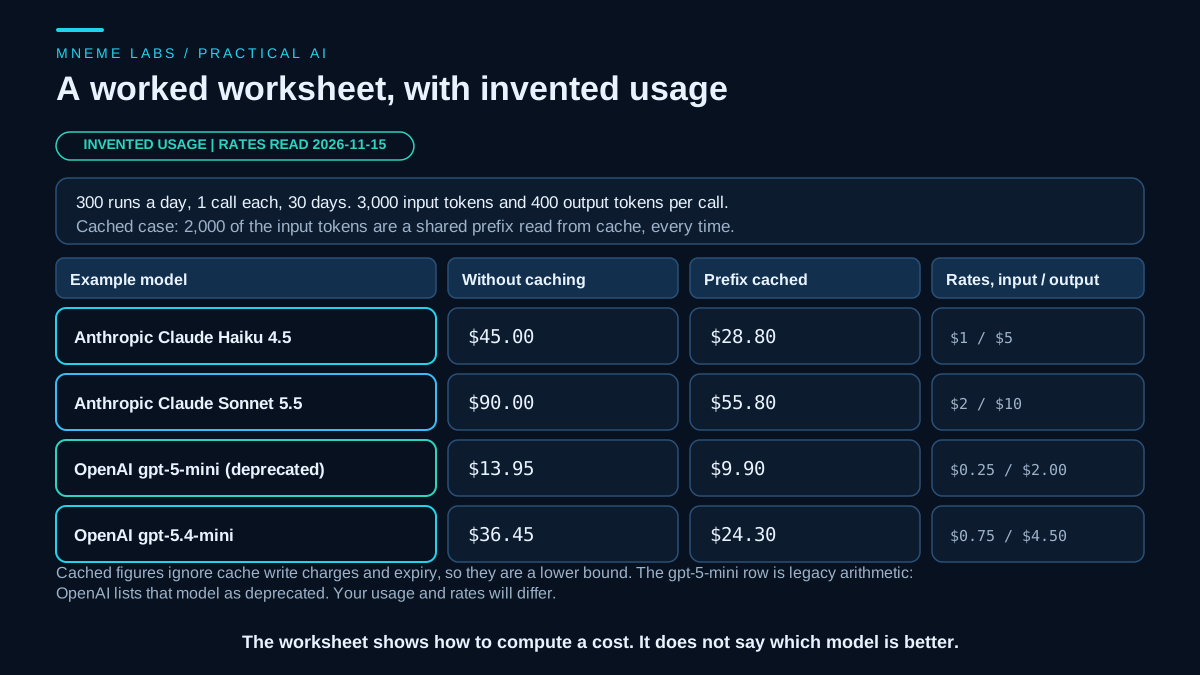
Next came an invented profile: 300 runs a day, one call per run, 3,000 input tokens and 400 output tokens per call, over 30 days. For Claude Haiku 4.5 at the example rates, that came to $45.00 a month. With 2,000 of those input tokens treated as a shared prefix read from cache every time, it came to $28.80. For Sonnet 5.5 the two figures were $90.00 and $55.80. For the legacy gpt-5-mini row they were $13.95 and $9.90, and for gpt-5.4-mini $36.45 and $24.30.
Two scaling checks followed. Adding a 10 percent retry rate multiplied the monthly figure by exactly 1.10, and four calls per run multiplied it by exactly 4.
What the numbers do not say
The cached figures are the best case. They assume every call reads the shared prefix from cache and ignore any cache-write fees. Anthropic's pricing lists cache writes above the base input price and offers 5-minute and 1-hour cache lifetimes, and its caching documentation describes opting in with a cache control setting. If calls are spread out enough that the cache expires between them, some calls pay the write price instead of the read price. The OpenAI examples use its published cached-input rates; do not apply Anthropic's write fees or expiry windows to another vendor. Treat the cached figure as a floor and measure the real hit rate.
The numbers also say nothing about quality. A cheaper model that gives worse answers on your task can cost more once you count rework. The table is arithmetic, and the model comparison is only a way to show the arithmetic.
The five levers
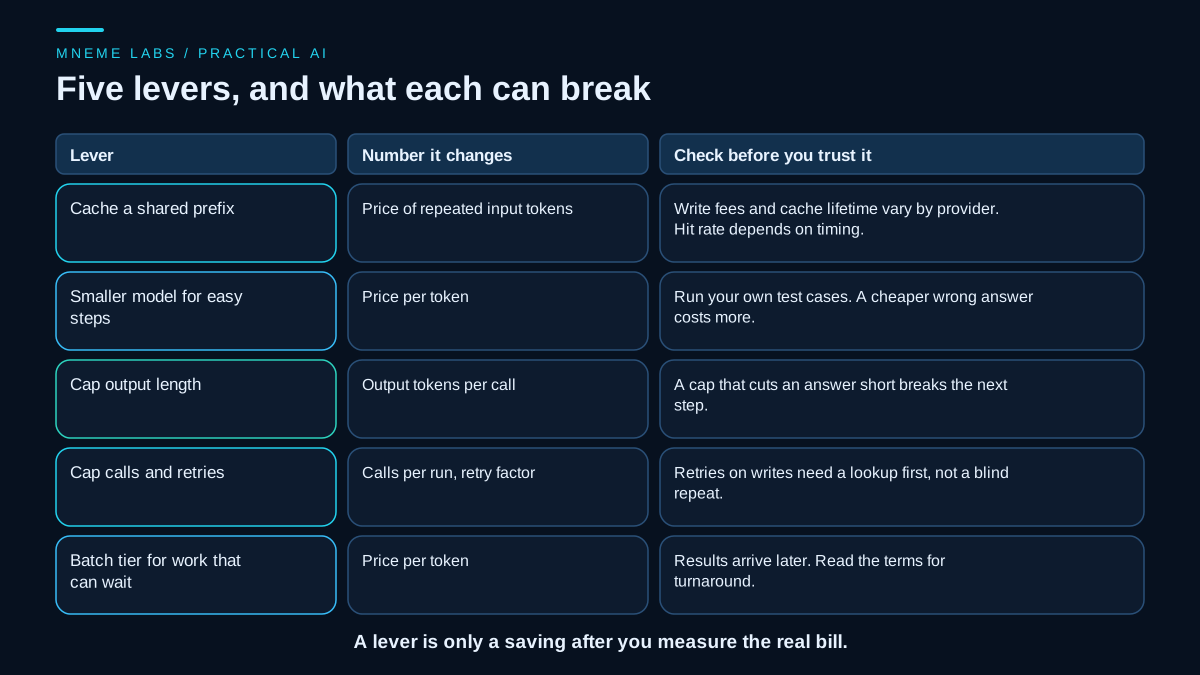
Cache a repeated prefix. If every call starts with the same long instructions or reference text, caching changes the price of those tokens. Check the hit rate from the usage data your vendor returns.
Use a smaller model for easy steps. Route simple classification or formatting to a cheaper model and keep the stronger one for steps that need it. Test with your own cases before you trust it.
Cap output length. Output tokens are the expensive side. A cap helps only if the answers still fit, because a cut-off answer can break the next step.
Cap calls and retries. Multi-step runs and sub-agents multiply calls, as the guide on sub-agents explains. Retries multiply them too, and retrying a write without checking whether it landed can cost money and cause duplicates. The guide on retries and failures covers that rule.
Use a batch tier for work that can wait. OpenAI's page lists separate Batch rates, which were lower than standard for the models compared here. Read the batch documentation for turnaround terms before moving a job.
A budget gate
An estimate is a plan. A budget gate is a control, but a local one. This is a stop threshold you maintain, not a spending cap enforced by the provider, and a bill can pass it. Vendor usage data arrives late, several jobs can start at once and each see the same remaining amount, and a call can cost more than expected because output length, reasoning tokens, tool fees and tokenizer differences vary.
Reservations reduce the first two problems and bound the third. Before a call, compute its worst-case cost from the input you will send, the output cap you set and the highest rate that could apply, and reserve that amount in a local ledger. The check and the reservation happen in one transaction, so concurrent jobs cannot all pass against the same remainder. When the call returns, replace the reservation with the reported cost. A crashed run keeps its worst-case reservation, which errs toward stopping, and each retry reserves again. Then reconcile the ledger with the vendor's usage page or invoice and investigate any gap.
The Budget class above does this. In the tests, twelve jobs ran at once against a $1.00 threshold with a $0.30 worst case each, and exactly three reservations were granted. Settling at a lower cost freed room, an overrun was recorded and counted later, and reconcile reported the gap to a vendor figure. The bound holds only if input and output limits are enforced on every call, and nothing here tested real vendor billing.
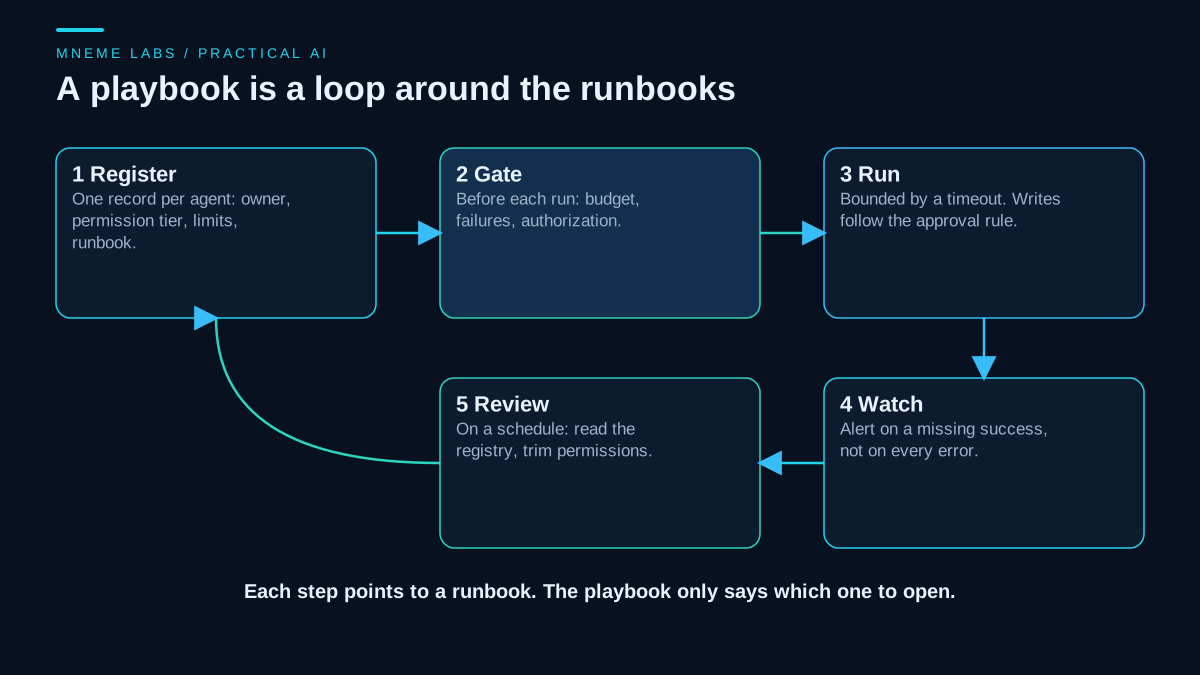
Where your provider offers spending limits, budget alerts or per-project usage caps, set those too, since they act on the vendor's own count. OWASP's guidance on unbounded consumption recommends quotas, timeouts, action limits and usage monitoring, and a local ledger is one small piece of that. The guide on scheduling agents shows where to place such a check, and the operations playbook lists a budget as a required field for every agent.
Failure cases
Estimates that never meet the invoice. Compare your computed figure with the vendor's usage page after the first week. If they differ, find out why before you scale.
Rates that moved. Pricing pages change. One of the pages read for this guide carried a note that introductory pricing for a model had become the standard price, so dates matter. Keep the date next to every rate you store.
Tokenizer differences. The same text can count as different token totals on different model generations, so measure with each model and not with a rule of thumb.
Long-context tiers. Some rates change above a context threshold. A job that sometimes sends a very long prompt can have a bill that jumps.
Hidden lines. Search APIs, hosting, storage and reviewer time are not in this worksheet.
Savings that cost accuracy. Measure quality alongside cost, or the cheapest option will look best by default.
Next step
Open your latest vendor usage page and pick one agent. Write down its runs per day, calls per run, average input and output tokens per call, and the rate you are charged. Run those numbers through the worksheet and compare the result with the actual usage line. Then set a daily stop threshold for that agent at a figure you would accept losing in a bad day, make the scheduler reserve against it before every run, and compare the ledger with the invoice each week. Turn on any provider spending limit your plan offers as well.
Sources
- Anthropic, Pricing: per-million-token rates for input, cache writes, cache hits and output on 2026-11-15, the newer tokenizer note, the standard-price note for one model, and the marketplace billing unit.
- Anthropic, Prompt caching: how caching is enabled, and the 5-minute and 1-hour cache lifetimes.
- OpenAI, API pricing: standard, Batch and Flex rate tables, cached input rates, and short-context versus long-context pricing, as read on 2026-11-15.
- OpenAI, GPT-5 mini and OpenAI, GPT-5.4 mini: the direct model pages for the example rates, and the deprecated status shown for gpt-5-mini.
- OWASP, LLM10 Unbounded Consumption: the cost and availability risk of uncontrolled inference, and the recommended quotas, timeouts, action limits and monitoring.