"Post while you sleep" describes a real and useful setup: you approve a batch of posts during the day, and a scheduler publishes them at the times you picked. It is not the same as an agent that writes and publishes by itself overnight. The second version is how accounts end up posting something wrong, something duplicated, or something that breaks a platform's rules, with nobody awake to notice.
This guide describes the first version. AI drafts the posts and a person approves them. A worker publishes only approved posts, and it stops instead of guessing when something goes wrong. It does not claim any follower or engagement gains, because none of that depends on the tooling. For the same approval-first idea applied to one network, see the Pinterest workflow guide.
Each platform controls what an automated tool may do
Before you design anything, read what each network's developer documentation allows. The pages differ, and they change.
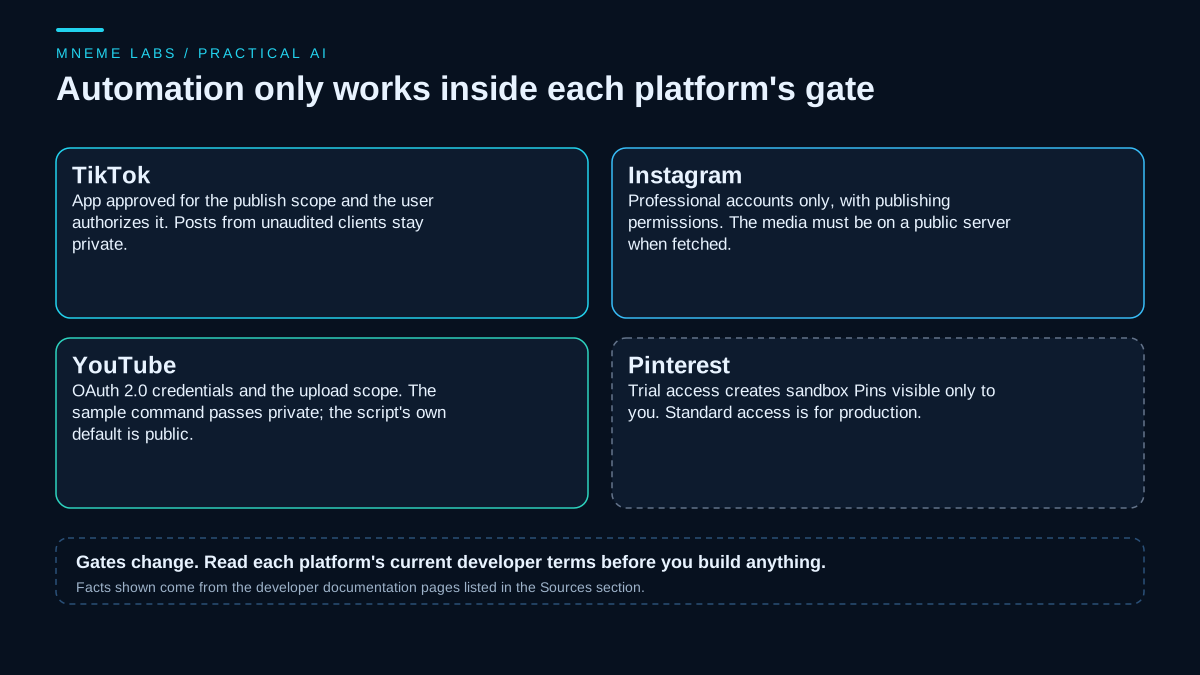
- TikTok. The Content Posting API guide says your app must be registered and approved for the
video.publishscope, and the target user must have authorized your app. It states that all content posted by unaudited clients is restricted to private viewing, and that you must undergo an audit to lift the restriction. It also requires you to query the creator's current information before a direct post. - Instagram. The content publishing guide covers publishing to Instagram professional accounts through the Instagram Platform. It lists required permissions by login type, says the media must be hosted on a publicly accessible server when the platform fetches it, and notes that accounts connected to a Page that requires Page Publishing Authorization cannot be published to until that is completed.
- YouTube. The upload guide shows an upload script that needs OAuth 2.0 credentials and the upload scope, and its sample command passes
--privacyStatus=private. The script itself defaults topublic, so a test upload needs that flag or it will be visible to everyone. The same guide's script handles transient 5xx and network errors with retries and exponential backoff, which is worth reading as a design example. - Pinterest. The access tiers page says Pins created under Trial access are visible only to their creator as sandbox items, and that Standard access is recommended for production.
What this means in practice: a lot of "autopost" demos fall apart on approval. An app that has not been approved or audited cannot publish publicly, and a personal account may not qualify at all. Check the current requirements for your account type before you plan the system around a platform you cannot publish to.
Where AI helps, and where it should not act alone
AI is good at turning a source you already published, such as a blog post or a video, into several short drafts that fit a platform's shape. It can propose hooks, write alt text, suggest hashtags, and rewrite one idea for different audiences. It is not good at knowing what is true about your business, what you have actually done, or what is timely this week.
Two platform policies set the boundary. The Pinterest Community Guidelines say its policies apply to synthetically generated content and prohibit engagement manipulation through automated or incentivized means. YouTube's spam policy lists engagement manipulation and the mass-production of near-identical content with automated tools, and it states that disclosing AI use is not a free pass to break other rules. A pipeline that mass-produces near-identical videos runs against YouTube's rule, and a pipeline built to inflate metrics runs against Pinterest's engagement-manipulation rule. Pinterest's guidelines, as read here, do not ban templated posting as such, so check its current rules for your own case.
So the rule is simple. AI drafts, a named person approves, and the system publishes at the scheduled time.
The queue
Keep every draft in one table: the platform, the text, a link to the source, the scheduled time, the approver, and a state. A post enters the queue as a draft and moves to approved only when a person puts their name on it. Review each draft against the source: does it say anything the source does not, are any claims or numbers stated that you cannot support, does it fit that network's rules, and would you be comfortable seeing it appear under your name tomorrow morning?
Store scheduled times in UTC and convert for display. A scheduler that reads local time can post at the wrong hour after a daylight saving change.
A publishing worker that fails safely
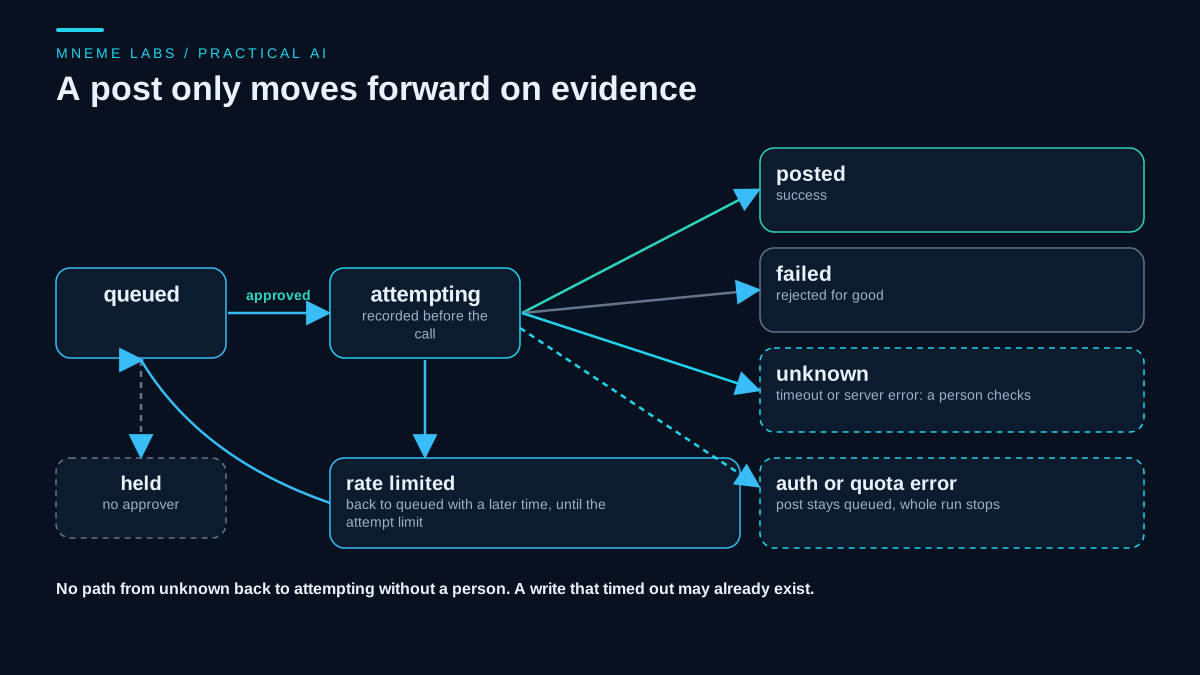
A publishing call is a write. If it times out, you do not know whether the post exists. Retrying blindly can post twice. Giving up silently can lose the post. The worker below handles this with a few rules that follow from the retry principles in the guide to agent failures and retries:
- It records the intent to post in a database before the call, so a crash leaves evidence.
- It never sends a post that has no named approver.
- A rate limit returns the post to the queue for a later time, up to an attempt limit.
- A timeout or server error on a write marks the post unknown and does not retry it. A person checks the platform.
- An authentication or quota error stops the entire run, so one broken token does not burn through the rest of the queue.
- On startup, any post still marked attempting is moved to unknown, because the last run died mid-call.
"""post_worker.py: a careful publishing worker. Standard library only. It talks to an adapter you supply.

State is kept in SQLite so a crash cannot repeat or lose a post silently.
  queued -> attempting -> posted | failed | unknown | queued (rate limited, bounded)
  held: not approved by a person, never sent.
A write that times out or hits a server error is marked 'unknown' and is NOT retried: the post may exist,
so a person checks the platform. Authentication or quota errors stop the whole run.
"""
import sqlite3
import time


class RateLimited(Exception):
    def __init__(self, retry_after):
        super().__init__("rate limited")
        self.retry_after = retry_after


class AuthError(Exception):
    pass


class QuotaExceeded(Exception):
    pass


class Rejected(Exception):
    pass


class Timeout(Exception):
    pass


class ServerError(Exception):
    pass


SCHEMA = """CREATE TABLE IF NOT EXISTS posts (
  id INTEGER PRIMARY KEY, platform TEXT, body TEXT, approved_by TEXT,
  due REAL, state TEXT DEFAULT 'queued', attempts INTEGER DEFAULT 0, note TEXT DEFAULT '')"""


def connect(path):
    db = sqlite3.connect(path)
    db.execute(SCHEMA)
    db.commit()
    return db


def recover(db):
    """A row still 'attempting' means the last run died mid-call. The post may or may not exist."""
    db.execute("UPDATE posts SET state='unknown', note='run ended during the call; check the platform' "
               "WHERE state='attempting'")
    db.commit()


def run(db, adapter, now=None, max_attempts=3, call_timeout=20):
    now = time.time() if now is None else now
    recover(db)
    due = db.execute("SELECT id, platform, body, approved_by, attempts FROM posts "
                     "WHERE state='queued' AND due<=? ORDER BY due, id", (now,)).fetchall()
    for pid, platform, body, approver, attempts in due:
        if not (approver or "").strip():
            db.execute("UPDATE posts SET state='held', note='no approver' WHERE id=?", (pid,))
            db.commit()
            continue
        # Record the intent BEFORE the call, so a crash leaves evidence.
        db.execute("UPDATE posts SET state='attempting', attempts=attempts+1 WHERE id=?", (pid,))
        db.commit()
        try:
            adapter.publish(platform, body, timeout=call_timeout)
        except RateLimited as e:
            if attempts + 1 >= max_attempts:
                db.execute("UPDATE posts SET state='failed', note='rate limited too often' WHERE id=?", (pid,))
            else:
                db.execute("UPDATE posts SET state='queued', due=?, note='rate limited' WHERE id=?",
                           (now + e.retry_after, pid))
        except (AuthError, QuotaExceeded) as e:
            db.execute("UPDATE posts SET state='queued', note=? WHERE id=?", (type(e).__name__ + ', run stopped', pid))
            db.commit()
            return "stopped: %s" % type(e).__name__
        except Rejected as e:
            db.execute("UPDATE posts SET state='failed', note=? WHERE id=?", ("rejected: %s" % e, pid))
        except (Timeout, ServerError) as e:
            db.execute("UPDATE posts SET state='unknown', note=? WHERE id=?",
                       ("%s after the call started; check the platform" % type(e).__name__, pid))
        else:
            db.execute("UPDATE posts SET state='posted', note='' WHERE id=?", (pid,))
        db.commit()
    return "finished"
The worker talks to an adapter that you write for each platform, using the official API and an app that the platform has approved. Each adapter should apply its own per-call timeout and translate the platform's errors into the exceptions above.
What the test showed
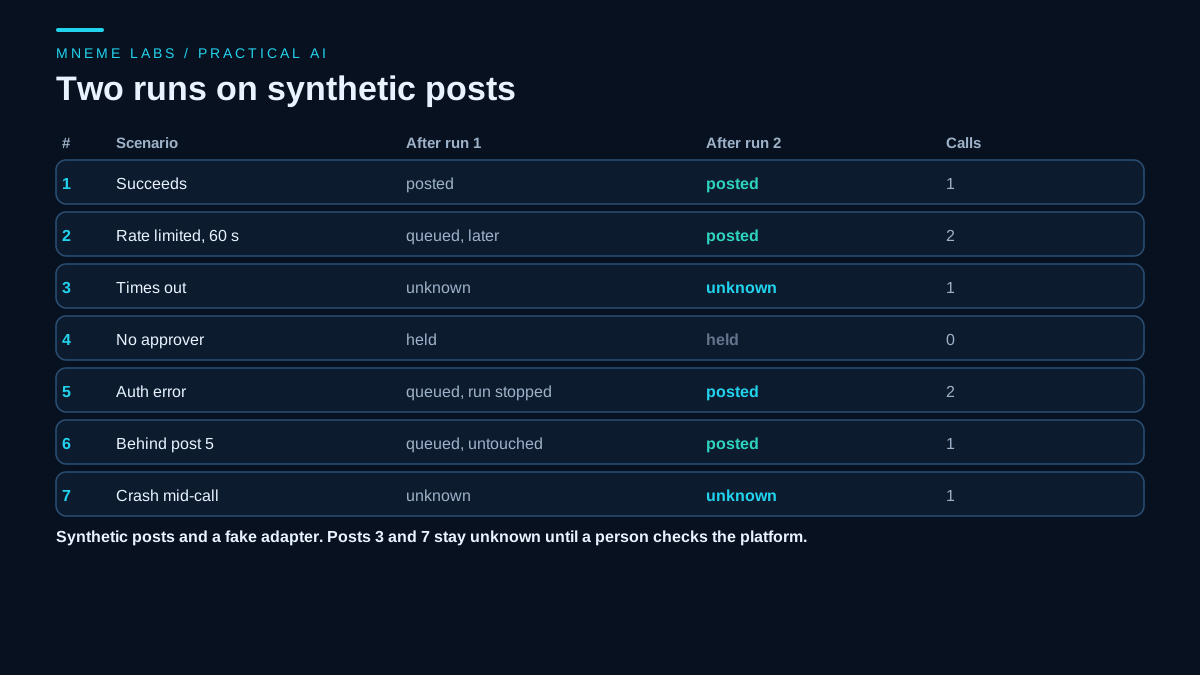
The worker was tested with a fake adapter on seven synthetic posts and two runs. Post 1 succeeded. Post 2 was rate limited for 60 seconds, went back to the queue, and posted in the second run. Post 3 timed out and stayed unknown after both runs. Post 4 had no approver and was held without ever being sent. Post 5 hit an authentication error, which stopped the first run, and posted in the second after the token was fixed. Post 6 sat behind it, untouched, and posted in the second run. Post 7 had been marked attempting at startup, as if a crash had interrupted it, and became unknown without being sent again. In total, the adapter received four calls in the first run and three in the second, and no post went out twice. No network or real account was involved.
This does not test any real platform's behavior. The adapter and its error mapping are where real-world surprises appear, so test each one against the platform's sandbox or a private account first. For watching a running system without staring at it, the monitoring guide covers alerts and logs.
A worked example
A hypothetical bike repair brand publishes one how-to video and one article each week. On a set day, the owner asks an AI tool for three short drafts per platform from each, using only the text of the source. In one review session the owner rewrites two drafts, rejects one that claims a repair "never fails", writes alt text, and puts their initials on the rest. The approved drafts are scheduled for later in the week. During the week the worker publishes them. A rate limit delays one by a minute. A timeout leaves one marked unknown, so the owner checks the account the next morning, finds the post live, and marks it posted. Nothing was posted that the owner had not read.
Failure cases to plan for
- Duplicate posts after a timeout. Mark unknown and check by hand.
- Expired or revoked tokens. Stop the run and alert someone.
- Platform changes. An endpoint, scope, or rule can change without notice. Pin a reminder to review the documentation.
- Drafts that drift from the source. Review every draft against the source.
- AI-generated images that mislead. Check them as you would a photo from a stranger.
- Time zones. Store UTC.
Limits
This is a design, not a measured result. Nothing here says that scheduling raises engagement, and the effect of posting more often on any network is unknown for your account. Platform documentation changes, the pages cited were read at the time of writing, and the worker's code does not include real adapters. A service that offers scheduling may already handle part of this, so compare what you build against what you can use as a plain, approved product.
A next step
Make a spreadsheet with the columns above, add one week of drafts from a source you published, and approve them yourself. Schedule them with whatever approved scheduling tool each platform offers, and note how long review takes. If you later automate publishing through an API, build the adapter for one platform first, test it against a private account, and add the worker.
Sources
- TikTok for Developers, Content Posting API: Direct Post: app approval and user authorization for the publish scope, private visibility for unaudited clients, audit requirement, creator info query.
- Instagram Platform, Content Publishing: professional accounts, permissions by login type, public media hosting, Page Publishing Authorization.
- YouTube Data API, Upload a video: OAuth 2.0 credentials and upload scope, sample command passes
--privacyStatus=privatewhile the script defaults to public, retry and exponential backoff for transient errors. - Pinterest Developers, Understanding our access tiers: Trial and Standard access and sandbox visibility.
- Pinterest Community Guidelines and YouTube Help, Spam policy: engagement manipulation, synthetic content, mass-produced templated content.