A target of 100 Pins a week sounds like a plan, but it is a number with no reason behind it. Pinterest does not require any weekly quota, and nothing in its documentation says more Pins produce more traffic. How many Pins make sense depends on how many pages you have worth promoting, how many honest angles each page offers, and how much review time you have. If the number is the goal, the result is usually near-identical Pins that waste an audience's attention.
AI is still useful here. It can suggest angles, draft titles and descriptions, write alt text, and propose image ideas from pages you have already published. This guide builds a workflow in which a person approves every Pin, a script holds anything incomplete, and publishing stays inside Pinterest's rules. For the planning layer that feeds it, see the guide to generating and filtering content ideas.
What Pinterest's own rules say
Pinterest's Community Guidelines state that the policies apply to everyone and to all types of content, including synthetically generated content. That means an AI-made image gets no exemption. Several items in the section on scams, deceptive goods, and practices matter for a content workflow:
- Engagement manipulation, which the guidelines describe as artificially inflating metrics through automated, paid, or incentivized means to mimic authentic activity.
- Deceptive redirection used to funnel users toward harmful or unrelated destinations. A Pin should lead to the page it describes.
- Misrepresented goods or services promoted through exaggerated claims, and synthetic or manipulated media used to misrepresent the appearance, efficacy, or nature of a product.
- Tools or templates intended to facilitate, automate, or scale scams or deceptive activities. This targets scams and deception. It does not say that posting from a template is a violation in itself.
The guidelines also list intellectual property: do not infringe anyone's rights. That affects images, fonts, and text you did not create, and it is worth checking the terms of whichever image tool you use before you publish its output commercially.
Whether many near-identical Pins count as spam is decided by Pinterest's Help Center rules, which could not be read for this guide, so check the current rules before you automate anything. Pinterest's Help Center pages disallow automated fetching in their robots file, so this guide relies on the policy pages and developer documentation that could be read. Read the Help Center spam article yourself before you set up any automation.
What the API allows
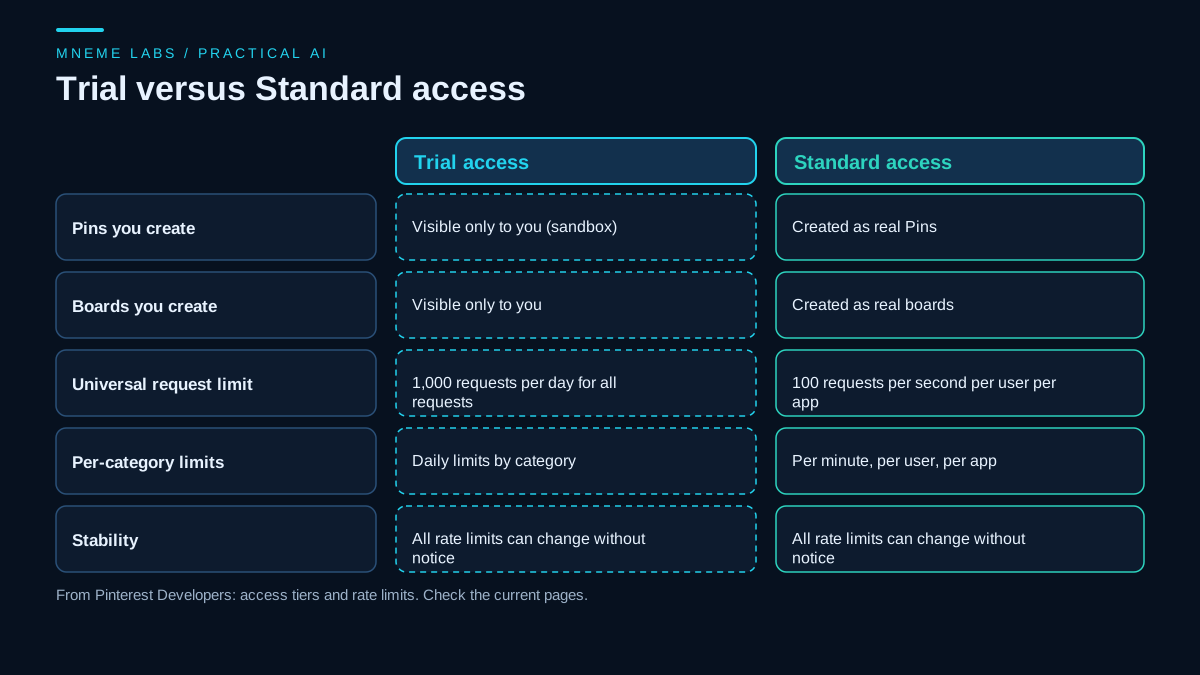
Pinterest offers an API for creating Pins. The developer documentation on access tiers says that approved apps start with Trial access, which is suited to exploring the API, and that Standard access is recommended if you want to offer Pinterest features in production. In Trial access, Pins and boards you create are visible only to you as sandbox items, so testing does not touch your real profile. Standard access creates real Pins.
The rate limits page lists universal limits: 1,000 requests per day for all requests under Trial access, and 100 requests per second per user per app under Standard access, with additional limits by category. It states that all rate limits are subject to change without notice. Build your tools so that they handle a refusal gracefully and read the current limits each time you plan a change.
The reference page for creating a Pin could not be read in an automated fetch, because it loads its content with scripts. Use it directly for the required fields and the length limits of titles and descriptions, and set those limits in the queue checker below from that page, not from memory.
The workflow
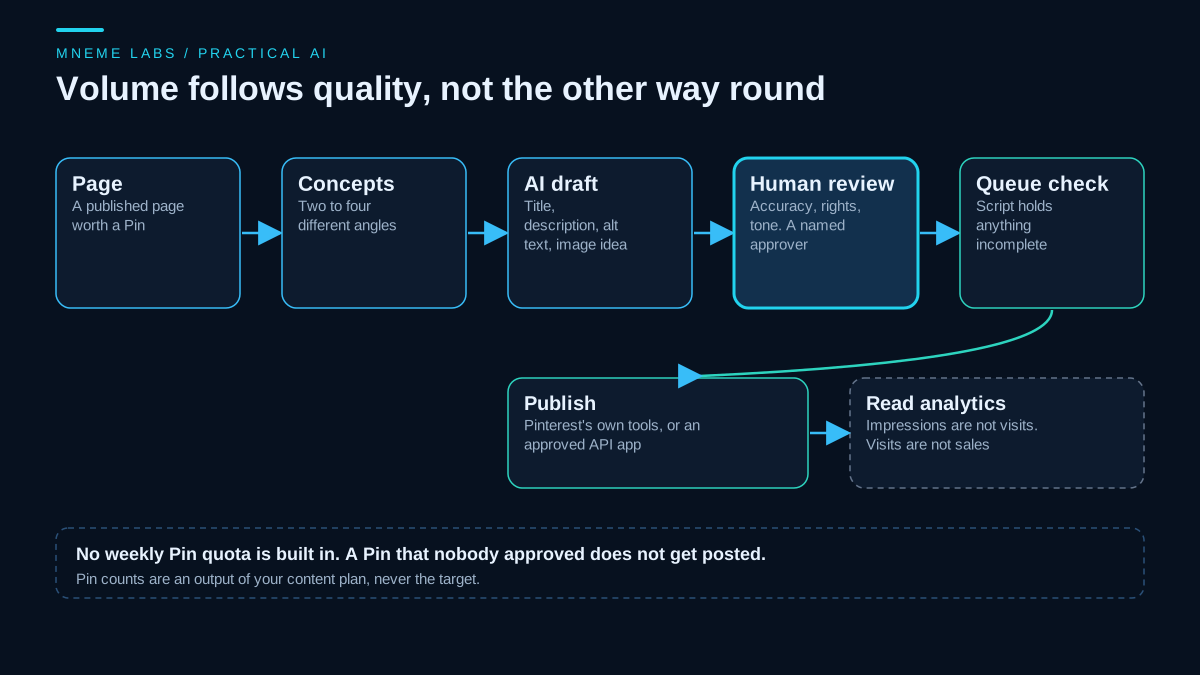
- Start from a published page that is worth a Pin. A Pin should promote something useful, not fill a calendar.
- Pick two to four distinct angles per page. Different angles means a different promise or audience: a checklist, a before-and-after, a single tip, a comparison. A new color on the same Pin is not a new angle.
- Draft with AI. Ask for a title, a description, alt text, and an image idea per angle. Tell the tool to use only what is on the page.
- Review as a person. Check that the Pin does not promise what the page does not deliver, that any generated image is not misleading, that text on the image is readable, and that you have the rights to everything shown. Put your name or initials on the approval.
- Run the queue check. The script holds anything incomplete.
- Publish with Pinterest's own tools or with an approved API app that you control.
- Read analytics and adjust the plan, treating the numbers with care: impressions are not visits, and visits are not sales.
A prompt for step 3, as plain text:
Using only the page text below, write three Pin concepts, each with a different
angle and audience. For each: a title, a description that matches the page, alt
text that describes the image, and a one-line image idea. Do not mention
anything that is not on the page. Do not invent statistics, prices or results.

[paste page text]
A queue check you can run before scheduling
The script below reads a CSV of Pin drafts and holds any that are not ready. A Pin is ready only if it has a board, title, description, link, image file, alt text, and a named approver, if its link is https on a host you allow, if the image file exists, if it is not a near duplicate of another Pin to the same link, if no more than a set number of Pins go to one link within seven days, and if it is not scheduled too close to another Pin. Length limits are off by default, so you set them from Pinterest's reference. The script never posts anything.
"""pin_queue_check.py: hold back Pin drafts that are not ready. Standard library only.

  python pin_queue_check.py queue.csv --image-dir images --allow-host example.com
         [--max-per-link-week 3] [--min-gap-min 30] [--similar 0.7] [--max-title 0] [--max-desc 0]

queue.csv columns: id, board, title, description, link, image, alt_text, approved_by, scheduled (ISO local time)
A Pin is READY only when nothing flags it and approved_by names a person. This tool never posts anything.
Length limits default to 0 (off): read them from the current API reference before you set them.
Exit code 0 = every row ready, 1 = some rows held, 2 = unreadable input.
"""
import argparse
import csv
import os
import re
import sys
from collections import defaultdict
from datetime import datetime, timedelta
from urllib.parse import urlparse

REQUIRED = ["board", "title", "description", "link", "image", "alt_text"]


def words(*parts):
    return set(re.findall(r"[a-z0-9']{3,}", " ".join(parts).lower()))


def jaccard(a, b):
    return len(a & b) / len(a | b) if a | b else 0.0


def check(rows, image_dir, hosts, max_per_link_week, min_gap_min, similar, max_title, max_desc):
    held = defaultdict(list)
    for r in rows:
        rid = r.get("id", "?")
        for col in REQUIRED:
            if not (r.get(col) or "").strip():
                held[rid].append("missing %s" % col)
        if not (r.get("approved_by") or "").strip():
            held[rid].append("not approved by a person")
        link = (r.get("link") or "").strip()
        if link:
            u = urlparse(link)
            if u.scheme != "https" or (hosts and u.hostname not in hosts):
                held[rid].append("link is not https on an allowed host")
        img = (r.get("image") or "").strip()
        if img and not os.path.isfile(os.path.join(image_dir, img)):
            held[rid].append("image file not found")
        if max_title and len(r.get("title", "")) > max_title:
            held[rid].append("title longer than %d characters" % max_title)
        if max_desc and len(r.get("description", "")) > max_desc:
            held[rid].append("description longer than %d characters" % max_desc)
    by_link = defaultdict(list)
    for r in rows:
        by_link[(r.get("link") or "").strip()].append(r)
    for link, group in by_link.items():
        for i in range(len(group)):
            for j in range(i + 1, len(group)):
                s = jaccard(words(group[i].get("title", ""), group[i].get("description", "")),
                            words(group[j].get("title", ""), group[j].get("description", "")))
                if link and s >= similar:
                    ida, idb = group[i].get("id", "?"), group[j].get("id", "?")
                    held[ida].append("near-duplicate of pin %s (%.0f%% word overlap)" % (idb, 100 * s))
                    held[idb].append("near-duplicate of pin %s (%.0f%% word overlap)" % (ida, 100 * s))
        stamps = []
        for r in group:
            try:
                stamps.append((datetime.fromisoformat(r["scheduled"]), r.get("id", "?")))
            except (KeyError, ValueError):
                held[r.get("id", "?")].append("scheduled time missing or not ISO format")
        stamps.sort()
        for t, rid in stamps:
            recent = [x for x in stamps if timedelta(0) <= t - x[0] < timedelta(days=7)]
            if link and len(recent) > max_per_link_week:
                held[rid].append("more than %d pins to the same link within 7 days" % max_per_link_week)
    allst = []
    for r in rows:
        try:
            allst.append((datetime.fromisoformat(r["scheduled"]), r.get("id", "?")))
        except (KeyError, ValueError):
            pass
    allst.sort()
    for (a, ia), (b, ib) in zip(allst, allst[1:]):
        if (b - a) < timedelta(minutes=min_gap_min):
            held[ib].append("scheduled within %d minutes of pin %s" % (min_gap_min, ia))
    return held


def main():
    ap = argparse.ArgumentParser()
    ap.add_argument("path")
    ap.add_argument("--image-dir", default=".")
    ap.add_argument("--allow-host", action="append", default=[])
    ap.add_argument("--max-per-link-week", type=int, default=3)
    ap.add_argument("--min-gap-min", type=int, default=30)
    ap.add_argument("--similar", type=float, default=0.7)
    ap.add_argument("--max-title", type=int, default=0)
    ap.add_argument("--max-desc", type=int, default=0)
    a = ap.parse_args()
    try:
        with open(a.path, encoding="utf-8-sig", newline="") as fh:
            rows = list(csv.DictReader(fh))
    except OSError as err:
        print("cannot read queue: %s" % err, file=sys.stderr)
        return 2
    held = check(rows, a.image_dir, set(a.allow_host), a.max_per_link_week, a.min_gap_min, a.similar, a.max_title, a.max_desc)
    ready = [r.get("id") for r in rows if r.get("id") not in held]
    for rid, why in held.items():
        print("HOLD %s: %s" % (rid, "; ".join(sorted(set(why)))))
    print("READY: %s" % (", ".join(ready) if ready else "none"))
    print("%d ready, %d held" % (len(ready), len(held)))
    return 1 if held else 0


if __name__ == "__main__":
    sys.exit(main())
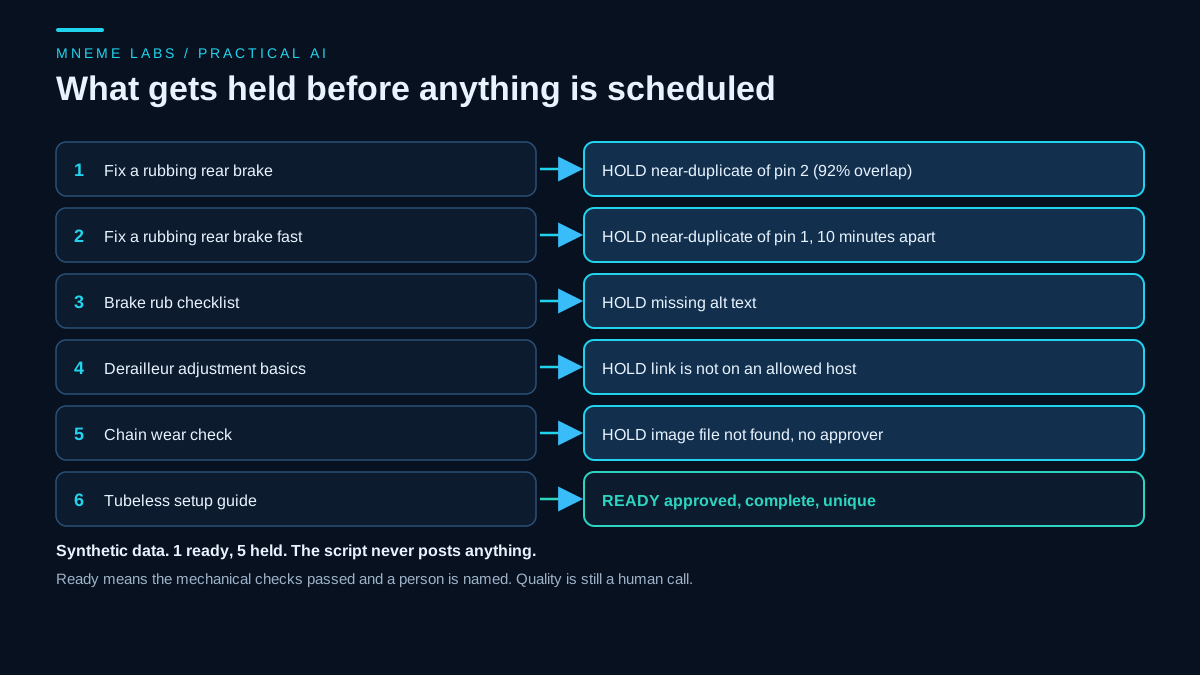
It was tested on a synthetic queue of six drafts. Pins 1 and 2 shared 92 percent of their words and were scheduled ten minutes apart, so both were held. Pin 3 had no alt text. Pin 4 linked to a host that was not on the allowlist. Pin 5 had a missing image file and no approver. Only Pin 6 was ready, and the run exited with a non-zero status. Tightening the weekly limit to one Pin per link added a weekly-limit hold to Pins 2 and 3, which shared a link with Pin 1. A missing file returned a separate exit code. No Pinterest account or API was used.
The word-overlap check is crude. Two Pins can differ in words and still look the same, and two can share words and be different. Treat a flag as a prompt to look.
The arithmetic of 100 Pins a week
Suppose a site has 12 published pages worth promoting and three honest angles each. That is 36 Pins in total. At 100 Pins a week, the stock would be used up in a few days, and everything after that would be repeats. To sustain 100 distinct Pins a week at three angles per page you would need about 33 new pages every week. Few sites publish at that rate, and a pipeline that fills the gap does so with duplicates. A sustainable cadence follows your supply of real content. Start with what you can approve properly in an hour, and let the number settle from there.
A worked example
A hobby blog about bike repair has 12 how-to posts. The owner picks the four strongest, drafts three angles for each with an AI tool, and ends up with 12 drafts. After review, 9 survive: two promised a result the post does not show, and one image text was unreadable. The queue check holds two more for missing alt text. Seven Pins go into a schedule spread over several weeks, and the owner makes a note to check Pin analytics after a month. The result is a handful of Pins a week. It is a plan the owner can keep up, and each one was looked at by a person.
Failure cases
- Near-identical Pins. Same image and text with a different background reads as duplication.
- Pins that over-promise. A Pin should match the page. The guidelines treat misleading offers and redirects as violations.
- Unreviewed AI images. Distorted hands, garbled text, and wrong products are common, and a generated product image that misrepresents a real product is a policy problem.
- Treating Trial access as production. Pins created under Trial access are sandbox items visible only to you.
- Ignoring limits. Rate limits can change without notice.
- Counting Pins as results. More Pins is an input. The result is clicks to a page that serves the reader.
Limits
This guide describes a workflow and the documented constraints. It does not predict traffic. The policy and developer pages can change, the Help Center could not be read here, and the creation endpoint reference was not readable by an automated fetch. Check each before you automate. If you also publish to other networks, the social scheduling guide covers the same approval-first idea across platforms.
A next step
Pick your three best pages. Draft two angles for each, review them yourself, and put the survivors in a CSV. Run the queue check, fix the holds, and schedule a small batch. After a month, compare Pin analytics against the pages themselves, and decide from that whether the effort deserves more of your week.
Sources
- Pinterest Community Guidelines: policies apply to synthetically generated content, engagement manipulation, deceptive redirection, misrepresented goods and synthetic media, tools to scale deception, and intellectual property.
- Pinterest Developers, Understanding our access tiers: Trial and Standard access, sandbox visibility of Trial Pins and boards, and the recommendation to use Standard for production.
- Pinterest Developers, Rate limits: 1,000 requests per day under Trial, 100 requests per second per user per app under Standard, categories, and limits changing without notice.