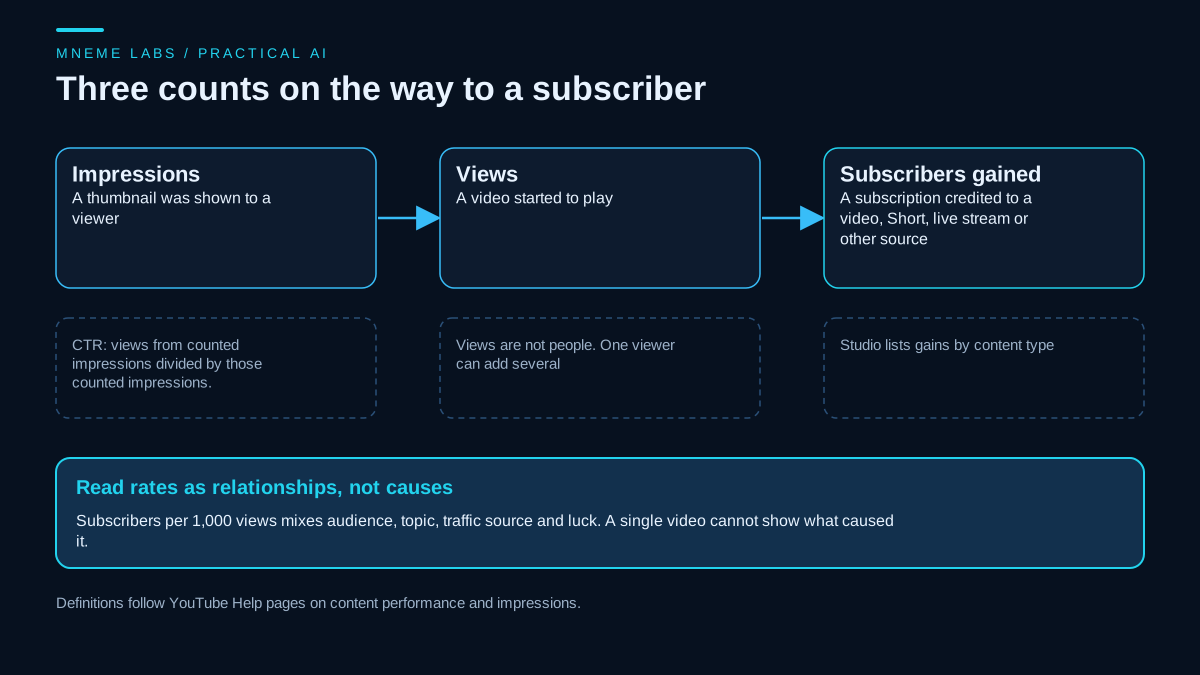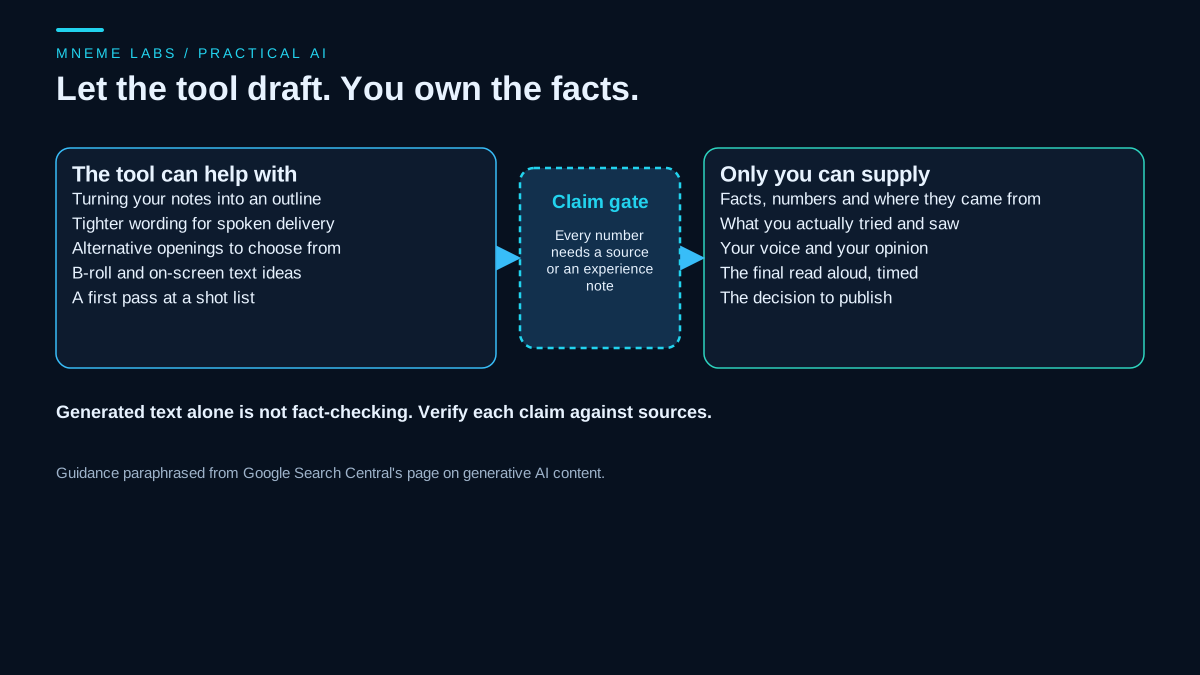
A new channel starts with no audience, no data, and no way to know what will work. Anyone who tells you how long growth will take is guessing, and an AI tool does not remove the guesswork. What AI can do is take over parts of the admin: drafting outlines, organizing notes, listing title options, and summarizing what you pasted in. The decisions about who the channel is for, what is true, and what to make next stay with you.
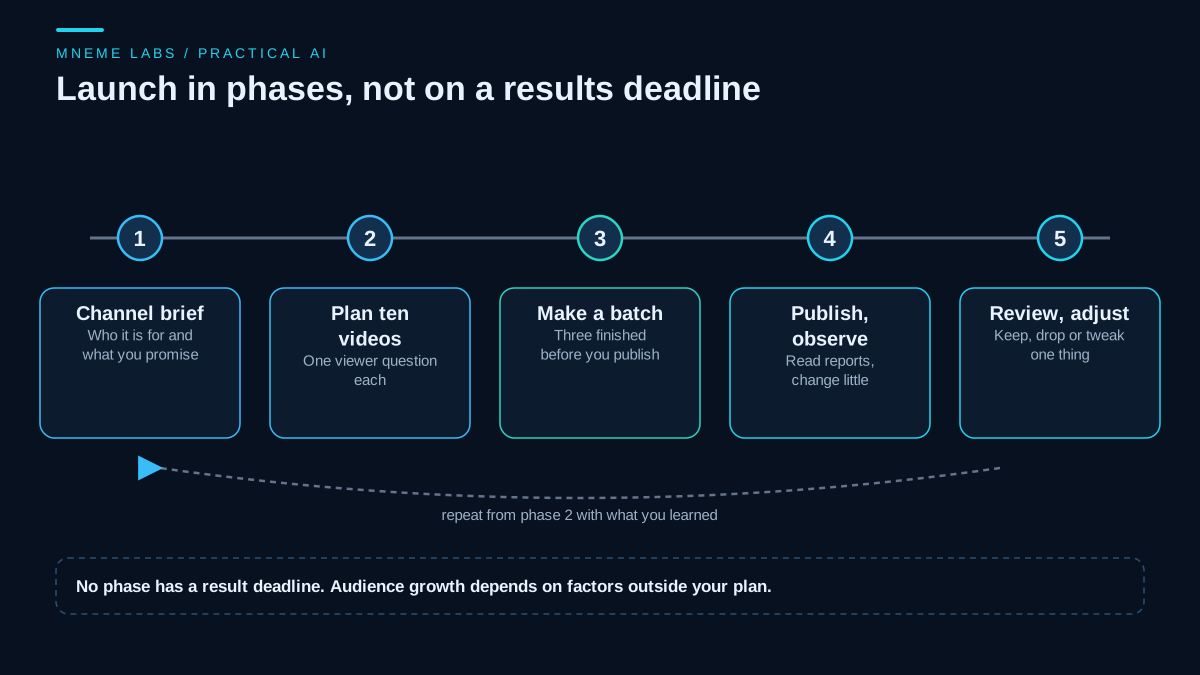
This guide is a launch plan, which is different from analyzing subscriber data after you have some. For that step, see the guide to reading your subscriber conversion data. Here the goal is smaller and more controllable: get a channel started with a clear promise, a small batch of videos, and a review habit.
Phase 1: Write a channel brief
Before any video, write four short answers in your own words:
- Who is the viewer? One specific person, such as a commuter who repairs their own bike. "Everyone interested in cycling" is not a viewer.
- What do they get? The promise of the channel, in one sentence, such as one repair per video, finished with basic tools.
- What will you not cover? Boundaries keep the channel coherent and keep you from drifting.
- What do you actually know first-hand? The strongest videos usually come from something you have done, not something you read about.
An AI assistant is good at pressure-testing a brief. Paste your four answers and ask where the promise is vague, what a skeptical viewer would ask, and which parts overlap with what already exists. Treat the reply as questions to consider. The assistant has no knowledge of your audience.
Phase 2: Find the questions viewers actually have
Pick topics from evidence you can see. Useful sources are the questions people ask you, comments and forum threads in your area, and your own repeated problems. Then look at what already exists for each question by searching on YouTube and watching the top results as a viewer would. Note what they skip, what they get wrong, and what is out of date. A gap there is a better reason to make a video than a keyword list.
AI can summarize notes that you paste in, group similar questions, and rewrite them as plain viewer questions. It cannot tell you how many people want an answer, and a figure it gives you for demand should not be trusted. If you want numbers, use the data YouTube and Search Console give you once you have it.
Phase 3: Plan the first ten videos
A plan makes later steps easier. For each video, write a working title, the viewer question it answers, the format (tutorial, comparison, checklist, story), and a target publish date. Ten videos is a working number, not a requirement. The point is to plan enough to see the shape of the channel.
Several problems are cheap to catch in the plan and expensive to catch after filming. Titles that overlap heavily make the channel feel repetitive. A plan made entirely of one format can wear thin. A video with no clear viewer question tends to ramble. Dates bunched together or spread far apart make a schedule hard to keep.
The script below checks a plan stored as JSON for those problems. It flags a missing channel brief, a video with no viewer question, near-duplicate titles by word overlap, one format dominating the plan, two videos on the same day, and long gaps between publish dates. It uses only the standard library.
"""plan_check.py: sanity-check a YouTube launch plan before you film. Standard library only.

  python plan_check.py plan.json [--max-gap-days 14] [--similar 0.6]

plan.json: {"channel": {"viewer": "...", "promise": "..."},
            "videos": [{"id": 1, "title": "...", "question": "...", "format": "tutorial", "publish": "2026-12-01"}]}
Flags: missing channel brief, a video with no viewer question, near-duplicate titles (word overlap),
one format making up most of the plan, two videos on the same day, and long gaps between videos.
Exit code 0 = clean, 1 = flags, 2 = unreadable plan.
"""
import argparse
import json
import re
import sys
from datetime import date

STOP = {"a", "an", "the", "to", "of", "and", "in", "on", "for", "your", "you", "how", "is", "it", "with"}


def words(title):
    return {w for w in re.findall(r"[a-z0-9']+", title.lower()) if w not in STOP}


def jaccard(a, b):
    return len(a & b) / len(a | b) if a | b else 0.0


def check(plan, max_gap, similar):
    flags = []
    ch = plan.get("channel", {})
    for key in ("viewer", "promise"):
        if not str(ch.get(key, "")).strip():
            flags.append("channel brief is missing '%s'" % key)
    vids = plan.get("videos", [])
    if not vids:
        return ["plan has no videos"]
    for v in vids:
        if not str(v.get("question", "")).strip():
            flags.append("video %s has no viewer question" % v.get("id", "?"))
    for i in range(len(vids)):
        for j in range(i + 1, len(vids)):
            s = jaccard(words(vids[i].get("title", "")), words(vids[j].get("title", "")))
            if s >= similar:
                flags.append("titles %s and %s overlap %.0f%%: may read as repetitive" % (
                    vids[i].get("id"), vids[j].get("id"), 100 * s))
    formats = [v.get("format", "") for v in vids]
    top = max(set(formats), key=formats.count)
    if len(vids) >= 5 and formats.count(top) / len(vids) > 0.8:
        flags.append("%d of %d videos use the format '%s'" % (formats.count(top), len(vids), top))
    try:
        dates = sorted((date.fromisoformat(v["publish"]), v.get("id")) for v in vids)
    except (KeyError, ValueError):
        return flags + ["every video needs a publish date in YYYY-MM-DD form"]
    for (d1, id1), (d2, id2) in zip(dates, dates[1:]):
        gap = (d2 - d1).days
        if gap == 0:
            flags.append("videos %s and %s are planned for the same day" % (id1, id2))
        elif gap > max_gap:
            flags.append("%d-day gap between videos %s and %s" % (gap, id1, id2))
    return flags


def main():
    ap = argparse.ArgumentParser()
    ap.add_argument("path")
    ap.add_argument("--max-gap-days", type=int, default=14)
    ap.add_argument("--similar", type=float, default=0.6)
    a = ap.parse_args()
    try:
        with open(a.path, encoding="utf-8-sig") as fh:
            plan = json.load(fh)
    except (OSError, json.JSONDecodeError) as err:
        print("cannot read plan: %s" % err, file=sys.stderr)
        return 2
    flags = check(plan, a.max_gap_days, a.similar)
    for f in flags:
        print("FLAG", f)
    print("%d videos, %d flags" % (len(plan.get("videos", [])), len(flags)))
    return 1 if flags else 0


if __name__ == "__main__":
    sys.exit(main())
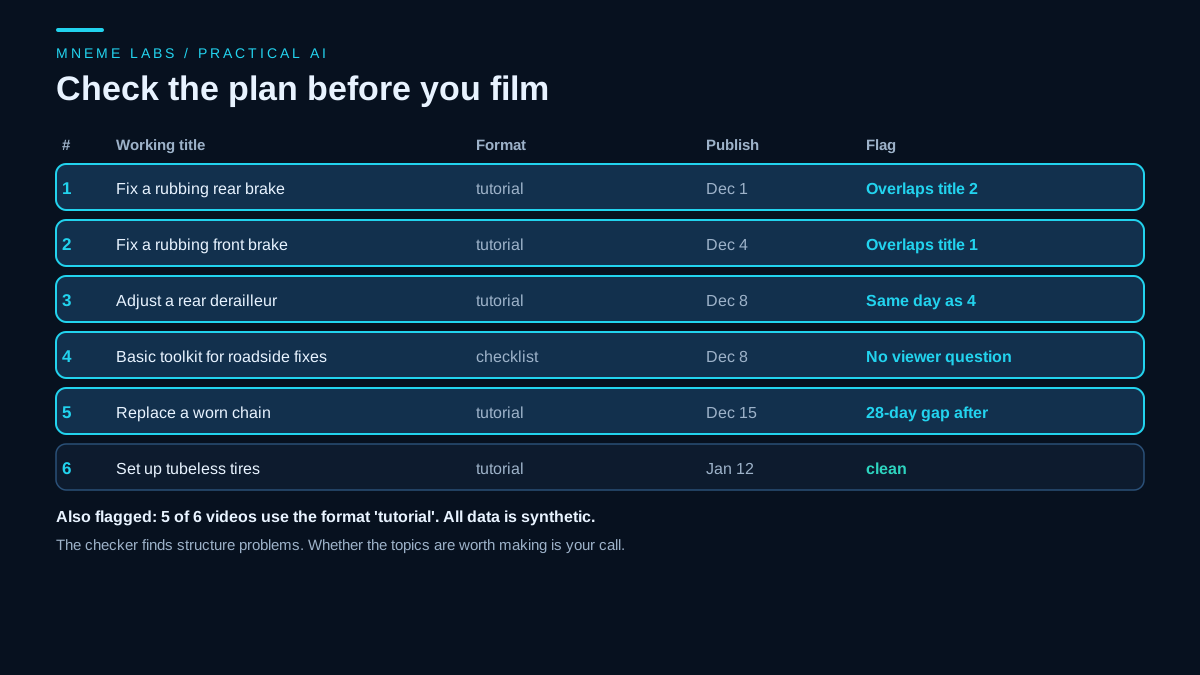
It was tested on a synthetic six-video plan for a bike repair channel with planted problems. It flagged the missing viewer question on video 4, a 60 percent title overlap between the rear and front brake videos, five of six videos sharing the format "tutorial", two videos set for the same day, and a 28-day gap before the last video. A missing file returned a separate exit code instead of a crash. The checks are structural. A plan can pass every one and still be about topics nobody wants.
Phase 4: Make a small batch before you publish
Finish a few videos before you launch. A small batch protects you from the common failure of publishing three videos and running out of steam. It also lets you see whether your production process is realistic. Use whatever process you can repeat. If your videos are spoken, the scripting workflow covers outlines, claim tags, and a read-aloud check, and the Whisper captions guide covers drafting and reviewing captions locally.
Keep a short checklist for every video: the claims have sources or are your own experience, the audio is clear, captions are reviewed, and the title and thumbnail match what the video delivers.
Phase 5: Package honestly
The title and thumbnail decide whether a viewer clicks. They also set an expectation that the first 30 seconds must meet. YouTube's Help page on impressions and click-through rate is direct on this point. It warns against raising click-through rate with clickbait and says clickbait videos tend to show high click-through but low average view duration, which makes them less likely to be recommended. The same page says new channels, videos less than a week old, and videos with fewer than 100 views can show a wide range of click-through rates, so early numbers are not a verdict.
An AI tool can draft ten title options from your brief. Pick the one that tells the truth about the video most clearly, and avoid testing several thumbnails or titles on one video. The page warns that you cannot be sure each version reached the same audience, so differences might come from traffic sources.
Phase 6: Publish with the right settings
Before you press publish, check a few things.
- AI disclosure. YouTube's Help page on disclosing generative AI content requires disclosure for realistic content that is AI-generated or meaningfully altered, such as a realistic scene that did not happen or a real person made to appear to say something they did not. Its list of production help that does not require disclosure includes using generative AI to create or improve an outline, script, thumbnail, or title, along with caption creation. Read the current page for each upload.
- Description and chapters. The description is the next guide in this series: the YouTube descriptions guide.
- Originality. YouTube's monetization policies say content should be your original creation and should not be mass-produced, generic, repetitive, or manipulative. The page lists the parts of a channel reviewers may look at, including the main theme, most viewed and newest videos, and the titles, thumbnails, and descriptions. That applies to how you use AI too. A channel made of near-identical template videos is a risk, even if each one took little effort.
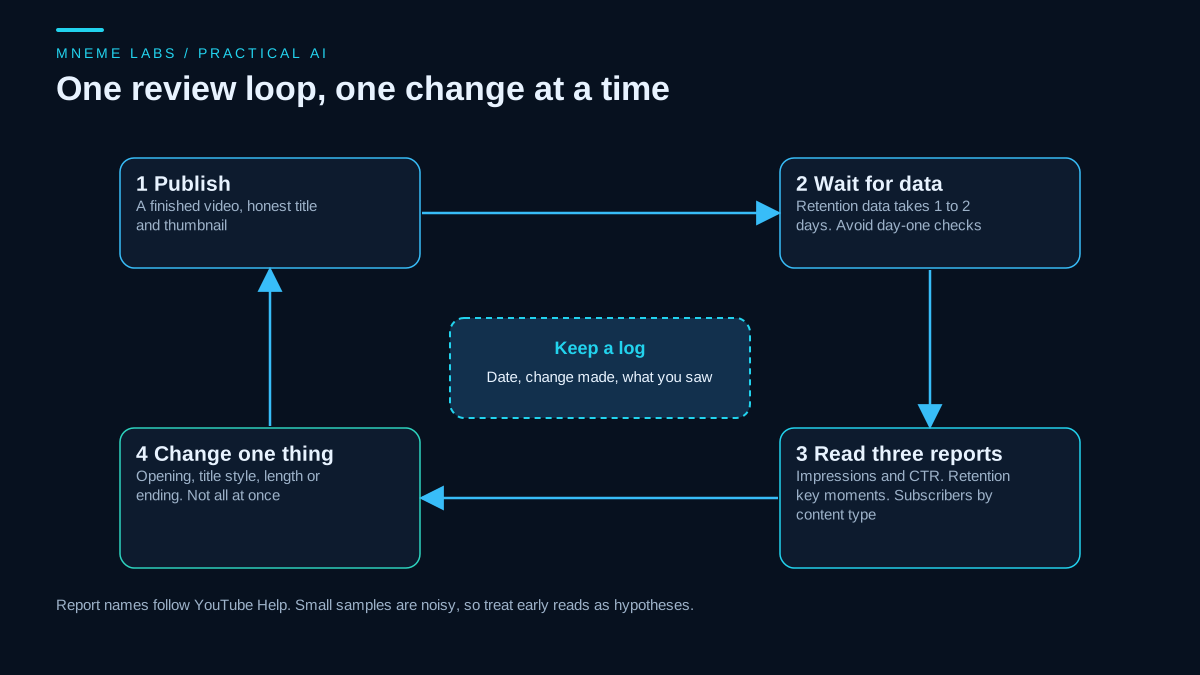
Phase 7: Review with three reports
After each video has had time to collect data, read three reports in YouTube Studio.
- Impressions and click-through rate, to see whether the packaging earned clicks relative to your other videos.
- Key moments for audience retention. The retention Help page says "Intro" shows the share of viewers still watching after the first 30 seconds, "Dips" show where viewers skipped or left, and "Spikes" show rewatches, which can also mean something was unclear. The report needs a video of at least 60 seconds with at least 100 views, and the data takes 1 to 2 days to process.
- Subscribers by content type, to see which videos turn viewers into subscribers.
Write one line in a log: date, what you changed, and what you saw. Then change one thing for the next video, such as the opening, the title style, or the ending. Changing five things at once leaves you with nothing to learn from.
A worked example
A hypothetical bike repair channel has a brief: commuters who fix their own bikes, one repair per video, ten minutes, basic tools. The owner lists ten viewer questions drawn from friends and local forums, then runs the plan checker. It flags two near-duplicate brake titles, a missing question on a toolkit video, and a month-long gap. The owner merges the brake videos into one stronger tutorial, adds a question to the toolkit video, evens out the dates, and drafts three videos before publishing the first. After the first publish the owner waits two days, reads the retention report, notices a dip at 40 seconds where the video spent a minute on tool names, and trims that section in the next video. None of this guarantees an audience. It is a loop that gives a small channel something to learn from.
What goes wrong
- Planning forever. A plan is a tool. Publish when the first batch is ready.
- Chasing the first big number. Early views and click-through rates are noisy, so do not rebuild the channel after one video.
- AI-written scripts with no first-hand detail. They read like every other video on the topic.
- Template sameness. Repeating one format and title pattern is a policy risk and a viewer-fatigue risk.
- Skipping the disclosure question. Check it each upload.
- Treating monetization as the goal on day one. The program has its own eligibility rules, covered in the subscriber guide, and its own policies.
Limits
This plan organizes your work. It does not tell you whether the topic has an audience, whether your presentation will resonate, or how long growth will take. YouTube's reports and policies change, so confirm the current help pages. If a number from any source, including an AI tool, promises a result by a date, set it aside.
A next step
Write the four-line brief today, then list ten viewer questions you could answer from real experience. Put them in the plan file, run the checker, fix the flags, and finish three videos before you publish any. When the first video has been live for a few days, read the three reports and write down one change.
Sources
- YouTube Help, Impressions and click-through-rate FAQs: early-data cautions, wide ranges for new channels and videos, clickbait warning, and caution about testing multiple thumbnails or titles on one video.
- YouTube Help, Disclosing use of GenAI content: what must be disclosed, and the production help that does not require disclosure.
- YouTube Help, Measure key moments for audience retention: Intro, Dips and Spikes definitions, minimum video length and views, and processing time.
- YouTube Help, YouTube channel monetization policies: originality, mass-produced and repetitive content, and what reviewers examine.