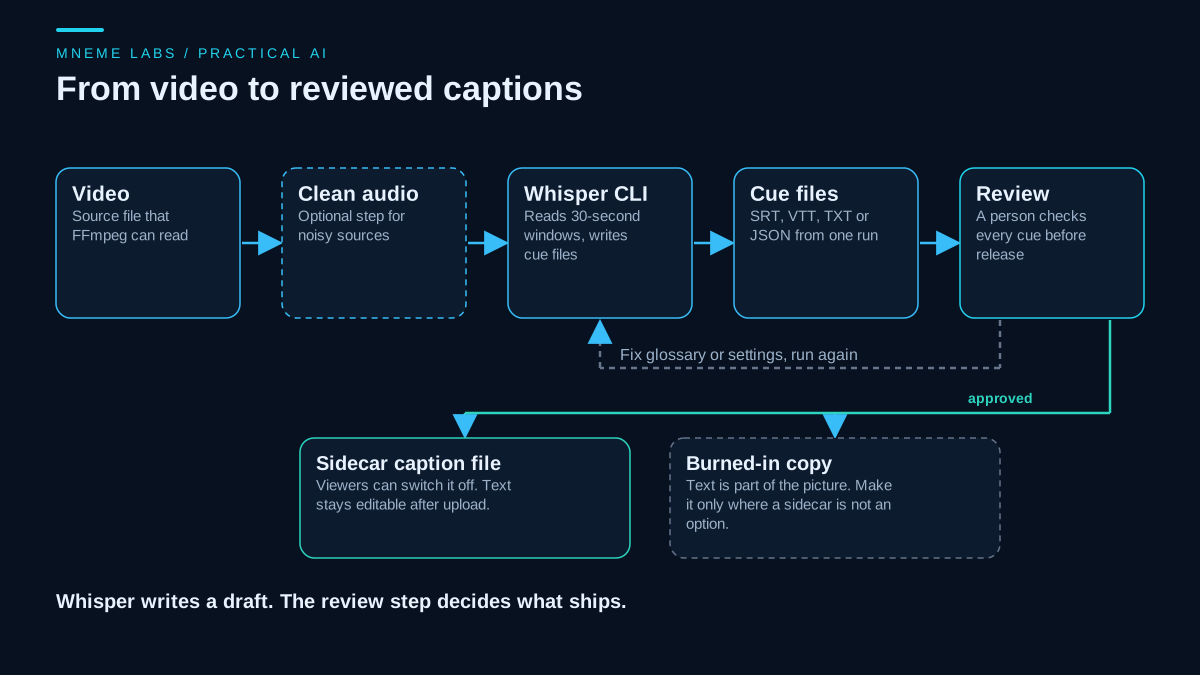
Whisper is an open-source speech recognition model that you can run from the command line. Give it an audio or video file and it writes a transcript plus timed subtitle files. Because it runs on your own computer, the recording does not have to be uploaded to a transcription service, which matters for client calls, unreleased videos, and anything under an agreement.
A draft is not a finished caption track, though. Whisper can write words that were never spoken, repeat a phrase in a loop, and mangle names. This guide covers the full path: run the tool, check the output with a script, fix what the script and your ears find, and ship the right kind of file. For the viewer-side reasons to caption short clips at all, see the short-form captions guide.
What Whisper is and what it is not
The OpenAI Whisper repository describes a general-purpose speech recognition model trained on a large and varied audio set. The code and model weights are released under the MIT License, which permits commercial use of that software and those weights. It does not grant rights to somebody else's recording or settle rights in a transcript, and it does not make any transcript accurate.
The project's own model card is blunt about the weak points. Because the models learned from large amounts of noisy data, the predictions may include text that was not in the audio. The card also says the model can generate repetitive text, and that accuracy is uneven across languages, accents, and dialects. It recommends testing the model in your own context before relying on it, and it advises against using it where a transcription error would have serious consequences. It also cautions against transcribing recordings of people made without their consent.
That list explains the rest of this guide. The model is a fast first draft. The workflow around it is what makes captions you can publish.
Install and run
The README gives the install command and says FFmpeg must be on your system, since Whisper uses it to read media files:
pip install -U openai-whisper
ffmpeg -version
The README states that the code base is expected to work with Python 3.8 to 3.11 and recent PyTorch versions. If you run a newer Python, expect to troubleshoot dependency installs, and use a virtual environment so the install does not touch other projects. The commands that call Whisper in this guide come from the README and the command-line source and were not run for this article. The FFmpeg command and the review script below were run on synthetic data.
A basic run looks like this:
whisper input.mp4 --model turbo --language English --output_format all --output_dir captions
The options come from the command-line parser in the repository's transcribe.py:
--modelpicks the model. The default isturbo.--languagenames the spoken language. Leave it out and Whisper detects the language, which can go wrong on short or mixed-language clips.--output_formatacceptstxt,vtt,srt,tsv,json,jsonl, orall. The default isall.--output_dirsets where the files go. The folder is created if it is missing.--model_dirsets where downloaded model files are stored. The default is~/.cache/whisper.
Each output file takes the name of the input, so input.mp4 produces input.srt, input.vtt, and so on. The first run with a model downloads it, so expect a wait and some disk use before any transcribing starts.
Picking a model for your hardware
The README lists six sizes with approximate memory needs: tiny and base about 1 GB of VRAM, small about 2 GB, medium about 5 GB, turbo about 6 GB, and large about 10 GB. It also lists relative speeds, but those were measured on one data-center GPU, and the README itself says real speed varies widely with language, speaking pace, and hardware. Treat them as a ranking, not a prediction for your machine. The only honest speed figure is a timing from your own computer on your own footage.
Two model facts change decisions. English-only .en variants exist for tiny through medium. And turbo is not trained for translation: the README says it returns the original language even when --task translate is set, so translation into English needs one of the multilingual models such as medium or large. The translate task only targets English. For other languages, see the guidance on localizing content and have a fluent reader check the result.
A worked example with a synthetic clip
Suppose an eight-minute bike repair tutorial has one speaker, light room noise, and a handful of parts names. This is a hypothetical example, and the mistakes below are illustrations of the kind of error to expect, not measured results.
The first draft comes back readable, but a person scanning it finds barrel a just her where the speaker said "barrel adjuster", a brand name spelled two ways, and a stretch where one sentence repeats three times during a long pause. Each has a different cause, and each has a different fix.
Names and jargon. The --initial_prompt option gives the first window a piece of text to start from. A short list of the terms in the video, such as barrel adjuster, derailleur, hex key, can nudge spelling toward those words. It is a nudge, not a rule, so the review still has to confirm each term. By default the prompt applies only to the first window, and the --carry_initial_prompt option exists to repeat it in each later window, with a note in its help text that it may reduce the effect of --condition_on_previous_text.
Loops. The parser's help text says that by default the previous window's output is fed in as a prompt for the next one, and that turning this off with --condition_on_previous_text False makes the model less prone to getting stuck in a failure loop, at the cost of less consistent text between windows. If a section loops, rerun with that option and compare both versions.
Silence. The --hallucination_silence_threshold option skips silent stretches longer than a set number of seconds when Whisper detects a possible hallucination. It requires --word_timestamps True, which the help text labels experimental. Use it on a copy of the clip and check the cue timing afterward, because word-level timing changes the output.
Fix line length at the source
Subtitle lines that are too long are the most common formatting complaint. Whisper can break lines for you when word timestamps are on. The help text lists --max_line_width (characters before a break), --max_line_count (lines per cue), and --max_words_per_line, and all of them require --word_timestamps True. Without that flag, the parser stops with an error if you set them.
whisper input.mp4 --model turbo --language English \
  --word_timestamps True --max_line_width 42 --max_line_count 2 \
  --output_format srt --output_dir captions
The number 42 is a common house-style choice, not a Whisper default. Pick the width that fits your platform and test it on a phone.
Review the cues with a script, then with your ears
A script cannot judge whether a word is right. It can find cues that are structurally wrong, which lets you spend listening time where it counts. The script below uses only the standard library. It reads an SRT file and flags overlaps, very short or very long cues, long lines, too many lines, fast reading speed, and the same text repeated across consecutive cues.
import re
import sys

MAX_CHARS_PER_LINE = 42
MAX_LINES = 2
MIN_SECONDS = 1.0
MAX_SECONDS = 7.0
MAX_CHARS_PER_SECOND = 20.0
REPEAT_LIMIT = 3

TIME = re.compile(r"(\d+):(\d{2}):(\d{2})[,.](\d{3})")


def to_seconds(stamp):
    m = TIME.fullmatch(stamp.strip())
    if not m:
        raise ValueError("bad timestamp: %r" % stamp)
    h, mi, s, ms = (int(g) for g in m.groups())
    return h * 3600 + mi * 60 + s + ms / 1000.0


def parse_srt(text):
    cues = []
    for block in re.split(r"\n\s*\n", text.replace("\r\n", "\n").strip()):
        lines = block.split("\n")
        if len(lines) < 2 or "-->" not in lines[1]:
            raise ValueError("cue block without a timing line: %r" % block[:40])
        start, end = (p.strip() for p in lines[1].split("-->"))
        cues.append({"index": lines[0].strip(), "start": to_seconds(start),
                     "end": to_seconds(end.split()[0]), "lines": lines[2:]})
    return cues


def review(cues):
    flags, repeat_run = [], 1
    for i, cue in enumerate(cues):
        text = " ".join(cue["lines"]).strip()
        dur = cue["end"] - cue["start"]
        label = cue["index"]
        if not text:
            flags.append((label, "empty text"))
        if dur <= 0:
            flags.append((label, "end is not after start"))
        elif dur < MIN_SECONDS:
            flags.append((label, "shown for %.2fs, under %.1fs" % (dur, MIN_SECONDS)))
        elif dur > MAX_SECONDS:
            flags.append((label, "shown for %.2fs, over %.1fs" % (dur, MAX_SECONDS)))
        if len(cue["lines"]) > MAX_LINES:
            flags.append((label, "%d lines" % len(cue["lines"])))
        for ln in cue["lines"]:
            if len(ln) > MAX_CHARS_PER_LINE:
                flags.append((label, "line of %d characters" % len(ln)))
        if dur > 0 and text and len(text) / dur > MAX_CHARS_PER_SECOND:
            flags.append((label, "%.1f characters per second" % (len(text) / dur)))
        if i > 0:
            prev = cues[i - 1]
            if cue["start"] < prev["end"]:
                flags.append((label, "starts before cue %s ends" % prev["index"]))
            if text and text == " ".join(prev["lines"]).strip():
                repeat_run += 1
                if repeat_run == REPEAT_LIMIT:
                    flags.append((label, "same text %d cues in a row" % REPEAT_LIMIT))
            else:
                repeat_run = 1
    return flags


if __name__ == "__main__":
    with open(sys.argv[1], encoding="utf-8-sig") as fh:
        found = review(parse_srt(fh.read()))
    for label, why in found:
        print("cue %s: %s" % (label, why))
    sys.exit(1 if found else 0)
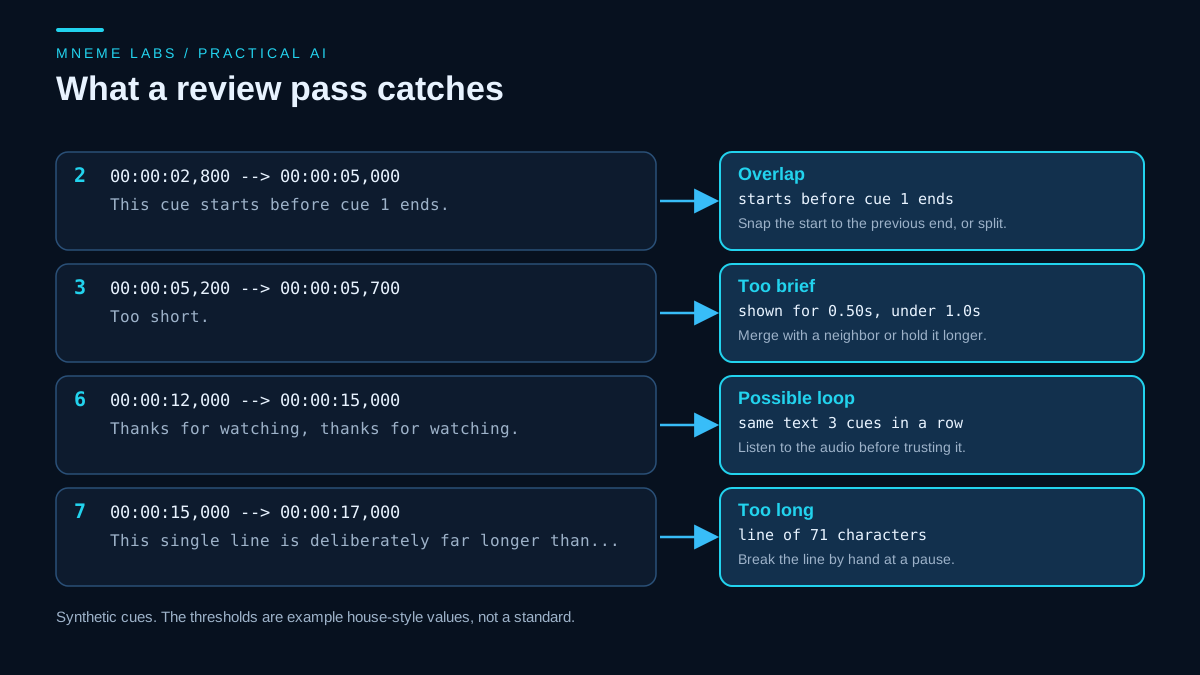
Run against a synthetic eight-cue file built to contain known problems, it flagged exactly the five planted issues: an overlap on cue 2, a half-second cue on cue 3, a three-in-a-row repeat on cue 6, and a 71-character line that also read too fast on cue 7. A clean cue passed. That shows the checks fire on the problems they target. It says nothing about how often real Whisper output contains those problems.
The script also has blind spots. A wrong word in a well-timed cue passes. A hallucinated sentence in a quiet gap can pass if the timing looks normal. A loop that changes one word each time passes. So the human pass still covers four things: names and product terms, any cue in silence or music, every number and date, and the first and last cue of each segment.
Burn in or ship a sidecar file
A sidecar file such as SRT or VTT sits beside the video. A burned-in caption is drawn onto the picture and cannot be switched off. YouTube's help page on subtitles lets you upload a caption file with or without timing, and it also offers an auto-sync option that fits text you have already written to the speech. Check that page and your own upload screen for the file types currently accepted. WebVTT, the W3C format, was designed for use with the HTML track element, so it is the natural pick for video on your own web page.
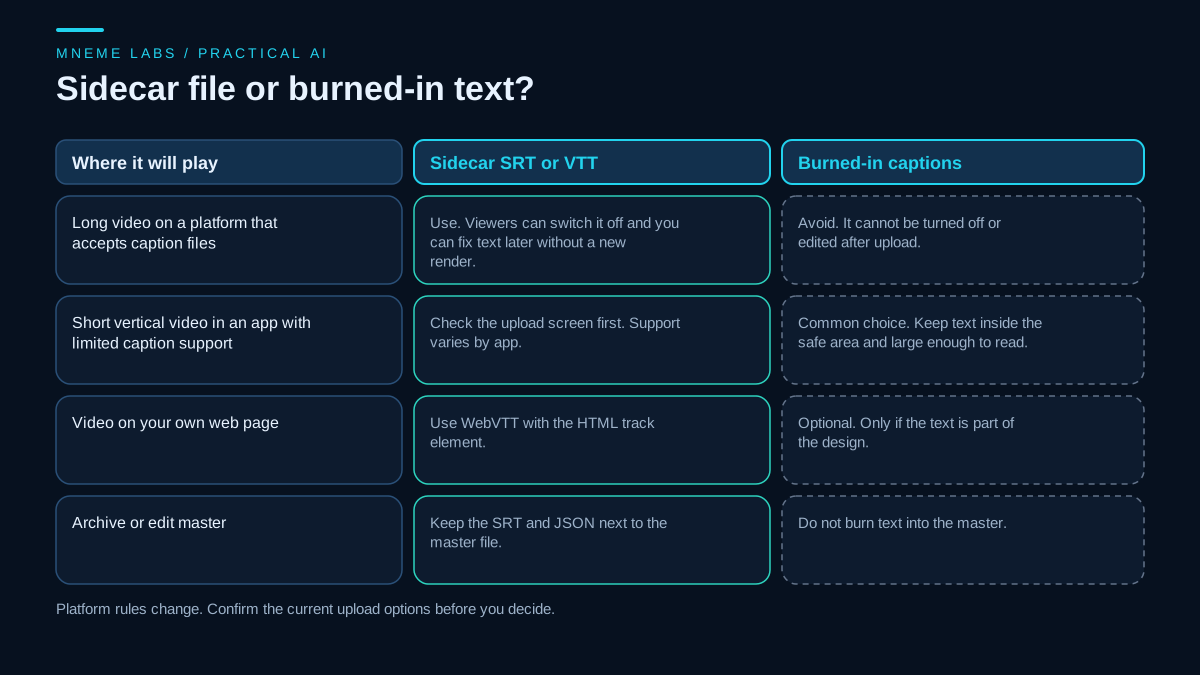
When you do need burned-in text, FFmpeg's subtitles filter renders a subtitle file onto the video using libass. The FFmpeg filter documentation lists force_style for overriding the style and charenc for files that are not UTF-8. This command was run on a synthetic three-second test clip with FFmpeg 7.1.1 and produced a valid video:
ffmpeg -i input.mp4 -vf "subtitles=captions/input.srt:force_style='Fontsize=18,Outline=2,Alignment=2'" -c:a copy subtitled.mp4
Your FFmpeg build must include libass for the filter to exist. Check with ffmpeg -filters and look for subtitles. Paths with drive letters or special characters need escaping inside a filter string. The FFmpeg documentation recommends keeping such values out of the shell where possible, so run from the folder that holds the file and use a simple relative name. Keep the clean master and the burned-in copy as separate files.
Batch runs and failure behavior
The whisper command accepts several input files in one call, which loads the model once instead of once per file:
whisper clips/a.mp4 clips/b.mp4 clips/c.mp4 --model turbo --language English --output_format srt --output_dir captions
One detail from the command-line source matters for unattended batches. When a file fails, the program prints a traceback and a Skipping message and moves on to the next file. Read in that source, the loop catches the exception, so a failed file does not stop the run. Do not trust the exit status alone. After a batch, compare the list of inputs with the list of output files and treat any missing file as a failure.
Limits to plan around
- Accuracy varies. The model card reports uneven performance across languages and accents. Test on a short clip of your own speaker before committing to a batch.
- Several speakers. The model card says speaker classification and diarization were not robustly evaluated, so do not expect speaker labels you can trust from this tool alone.
- Consent and privacy. Local processing keeps files on your machine. It does not change the model card's caution about recording people without their consent.
- Real-time use. The model card says Whisper cannot do real-time transcription out of the box.
- High-stakes captions. Legal, medical, or safety content needs a person to produce or fully verify the text.
A next step
Pick one finished video, run it with --output_format srt, run the review script, and time the whole process including your listening pass. That number, from your machine and your footage, is the one to plan around. Once the loop is stable, put the glossary prompt and the line-length settings in a small shell script so every video gets the same treatment. If you publish regularly, the blog drafting workflow shows the same pattern of draft, claim check, and human edit for written content.
Sources
- OpenAI Whisper README: install command, FFmpeg requirement, model sizes and approximate VRAM, turbo and translation limits, MIT License statement, 30-second window processing.
- Whisper LICENSE file: MIT License text.
- Whisper model card: hallucination and repetition warnings, uneven accuracy across languages and accents, no real-time use, consent caution.
- Whisper command-line source,
whisper/transcribe.py: option names, defaults, output formats, per-file failure handling. - FFmpeg filters documentation: the
subtitlesfilter, its libass requirement,force_styleandcharenc, and shell escaping advice. - YouTube Help, Add subtitles and captions: caption file upload with or without timing, and auto-sync.
- W3C WebVTT specification: WebVTT purpose and use with the HTML
trackelement.