A speech-to-text model can produce a first transcript for a short video. A transcript is not yet a caption. Captions are text paired with timing, and they only work when the words are right, they appear when the speaker says them, and viewers have time to read them before they vanish.
This guide covers the caption file attached to a video. It does not promise views or follower growth. The useful checks are concrete: whether the captions are accurate, synchronized, and readable.
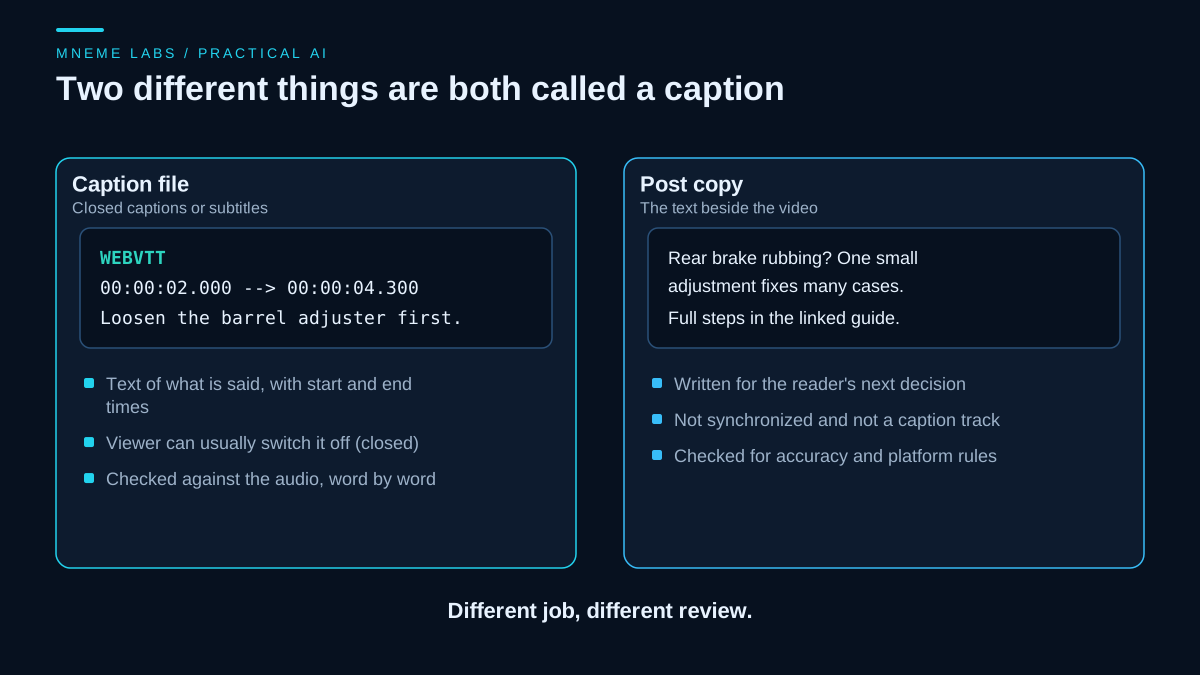
Two things are called captions
The word is used for two different jobs, and mixing them up causes bad workflows.
A caption file (closed captions or subtitles) holds the spoken words plus start and end times. The W3C describes the WebVTT format as a way to provide captions or subtitles for video, and the BBC's subtitle guidelines define closed subtitles as typically delivered as a separate file that viewers can switch off, as opposed to text burned into the picture.
Post copy is the text you write beside a video: a line of context, a question, a link. It is not synchronized to anything and it is not an accessibility feature. A model can draft it, but the review is different: is it accurate, and does it follow the platform's rules?
This article covers the first kind. If you also want help with the second, the Instagram caption guide and the short-form strategy guide cover post copy, though you should apply the same skepticism to any promise about reach.
Why accessibility is the stronger reason
The W3C's explanation of WCAG success criterion 1.2.2 says captions for prerecorded video exist so people who are deaf or hard of hearing can follow the audio. It adds that captions should identify who is speaking and include meaningful non-speech sounds, and it lists omitting dialogue or important sound effects as a failure.
That is a higher bar than "the words roughly match." If a sound matters to the video, such as a bang, a beep, or music that changes the mood, a good caption track says so. A raw transcript from a speech model usually will not.
Start from a transcript you can check
The pipeline is short:
- Extract clean audio from the final cut, not the raw footage. If you trim the video after transcribing, every timestamp after the cut is wrong.
- Run speech-to-text and keep word-level or segment-level timestamps if the service offers them.
- Group words into cues.
- Review the cues against the audio.
- Export to a format the platform accepts.
For step 2, OpenAI's speech-to-text guide says its file transcription endpoint accepts uploads up to 25 MB in formats such as mp3, mp4, m4a, wav, and webm, and that you can pass a prompt or keyword list to improve recognition of names and technical terms. The same page warns that keywords are hints, not required output, and that you should test whether they cause unspoken terms to appear. At the November 15 review, word and segment timestamps were documented only for an older model that the page itself lists as deprecated. Model availability changes, so check the current page before building on it. You can also run an open model on your own machine, as described in the local Whisper guide.
For step 5, YouTube's supported caption formats include SubRip (.srt) and SubViewer (.sbv), which it says must be plain UTF-8 with no style markup, and WebVTT (.vtt), where styling is limited. Some short-form apps only accept burned-in text or their own caption editor, so check what your target accepts first.
A worked example
Take a hypothetical 28-second video about adjusting a rear brake. The model returns word timings. The snippet below groups words into cues, targets 0.3 seconds per word before resolving overlaps, and writes WebVTT. It is a starting point checked on synthetic word timings, not a tested production tool.
def make_cues(words, max_chars=50, max_seconds=4.0, min_per_word=0.3):
    """words: list of {"word": str, "start": float, "end": float} in seconds."""
    cues, cur = [], []

    def flush():
        if not cur:
            return
        start = cur[0]["start"]
        end = max(cur[-1]["end"], start + min_per_word * len(cur))
        cues.append({"start": start, "end": end,
                     "text": " ".join(w["word"] for w in cur)})
        cur.clear()

    for w in words:
        trial = " ".join([x["word"] for x in cur] + [w["word"]])
        span = w["end"] - (cur[0]["start"] if cur else w["start"])
        if cur and (len(trial) > max_chars or span > max_seconds):
            flush()
        cur.append(w)
        if w["word"].endswith((".", "?", "!", ",")):
            flush()
    flush()
    for a, b in zip(cues, cues[1:]):
        if a["end"] > b["start"]:
            a["end"] = b["start"]
    return cues


def stamp(t):
    ms = round(t * 1000)
    h, ms = divmod(ms, 3600000)
    m, ms = divmod(ms, 60000)
    s, ms = divmod(ms, 1000)
    return f"{h:02d}:{m:02d}:{s:02d}.{ms:03d}"


def to_vtt(cues):
    out = ["WEBVTT", ""]
    for c in cues:
        out += [f"{stamp(c['start'])} --> {stamp(c['end'])}", c["text"], ""]
    return "\n".join(out)
Fed the first two sentences, it produced:
WEBVTT

00:00:01.000 --> 00:00:03.200
Loosen the barrel adjuster first.

00:00:03.600 --> 00:00:06.600
Then turn it a quarter turn and spin the wheel.
Notice what the code does not do. It does not fix a misheard part name, add a label for a sound, choose line breaks for a vertical screen, or check that the cue sits clear of the rider's hands. Those are review jobs.
Timing and readability numbers worth using
The BBC subtitle guidelines provide broadcast and online guidance, including roughly 160 to 180 words per minute, synchronization with speech, and natural line breaks. These are useful reference points, not requirements imposed by every social platform.
For this example, 0.3 seconds per word is a configurable first-pass target. It equals 200 words per minute and is faster than the BBC's 160 to 180 range, so it is not a guarantee of comfortable reading. Try a slower target for dense wording and test the result on a phone.
The code shortens a cue when the next one begins. That can defeat its reading-time target. Flag those cues for review, check the final cue against the video duration, and add deliberate line breaks. Do not shift captions away from the speech simply to make a numerical check pass.
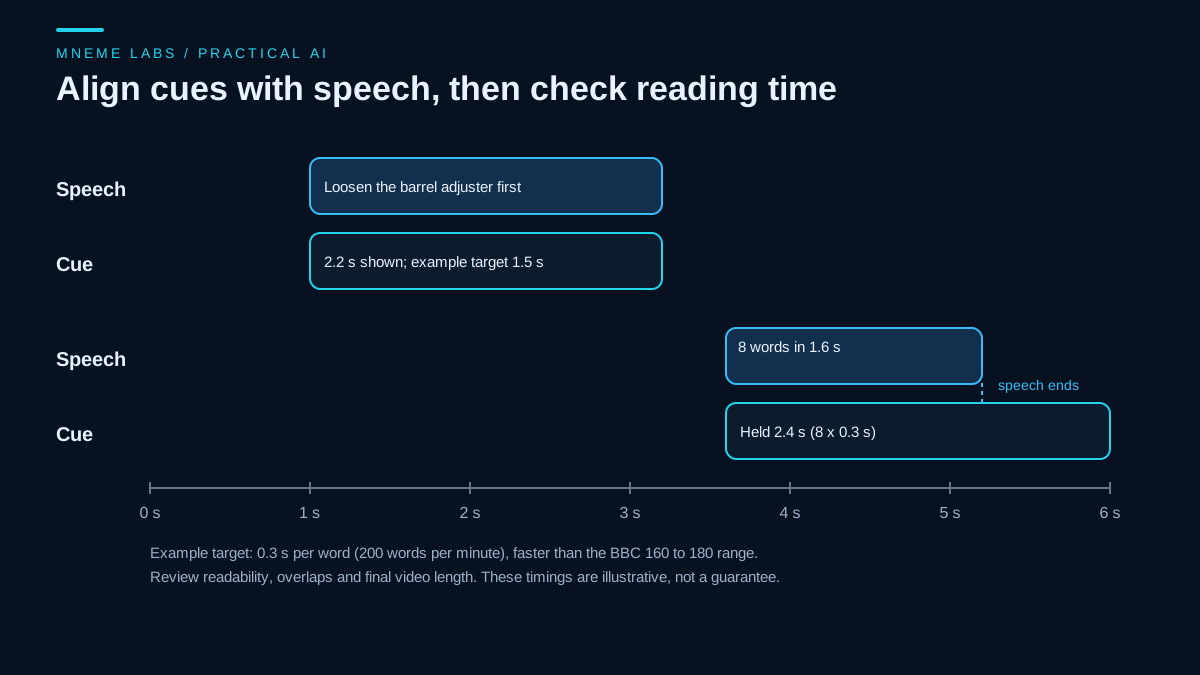
The diagram shows why a fast phrase is a problem. Eight words spoken in 1.6 seconds get 2.4 seconds at the example target, so the cue has to hold 0.8 seconds past the speech. That extension must fit the next utterance and the final edit; otherwise the cue needs editorial work. When the numbers do not fit, edit the text lightly or split the phrase. The BBC guide prefers verbatim subtitles where timing allows, and says editing should be even and keep the speaker's meaning.
What fails in practice
YouTube's automatic captions help page says automatic captions can misrepresent speech because of mispronunciations, accents, dialects, or background noise, and tells creators to review and edit them. It also lists conditions where captions may not generate at all: long silence at the start, overlapping speakers, multiple languages at once, or poor audio. Short-form clips often have exactly those problems, with music under the voice and quick overlapping reactions.
Typical failure modes to check for:
- Product names, place names, and slang spelled phonetically.
- Numbers and units (a torque value or a date wrong by one digit).
- Two speakers merged into one cue with no speaker change marked.
- A caption that stays up through a cut, so it describes the previous shot.
- Offsets after trimming: captions made from an earlier edit of the video.
Decisions you have to make
Burned-in or separate file. A separate file can be switched off, restyled by the viewer, and reused in other languages. Burned-in text always shows and keeps your styling, but you cannot correct it without re-exporting the video. If you must burn in, fix the text first.
Verbatim or cleaned up. The BBC guide leans toward verbatim. For a casual clip, trimming false starts is reasonable, but do not change meaning, and keep names and numbers exact.
Platform captions or your own. Using a platform's auto captions saves time, and you still need to review them. Supplying your own file gives you control over accuracy, and you carry the review cost.
Review checklist
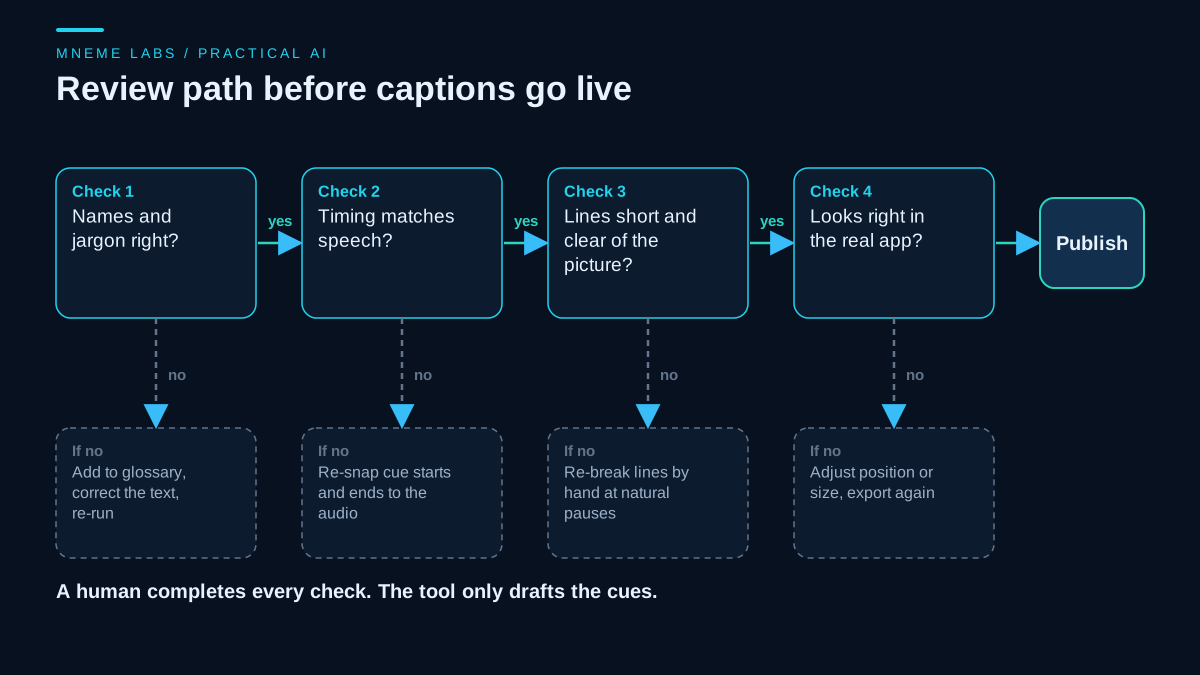
- Play the video with the sound on and read along. Fix every wrong word, name, and number.
- Play it muted. Does the text still carry the meaning, including important sounds?
- Check each cue's start and end against the audio, especially after any edit.
- Check line length and placement in a preview inside the actual app, on a phone-sized screen.
- Keep a small glossary of names and terms you reuse, and feed it back to the transcription step next time.
Limits
This workflow does not tell you whether captions will help any video perform better. The sources above support accessibility, readability, and accuracy, not growth. If you want to know whether captions change results on your channel, compare similar videos using your own analytics, and treat differences as inconclusive when the sample cannot support a reliable comparison.
The code is a sketch that assumes reliable word timings and ignores overlapping speakers. The timing rules come from a broadcaster's guidelines, a sound baseline but not a requirement of any short-form platform.
Next step
Take one finished video, produce a draft caption file, and time how long the review takes. That number tells you whether automating the first draft is worth it for you. When you are ready to extend this to audio-only content, the podcast transcript guide applies the same review habits to speaker names and show notes.
Sources
- W3C, WebVTT: The Web Video Text Tracks Format
- W3C WAI, Understanding Success Criterion 1.2.2: Captions (Prerecorded)
- BBC, Subtitle Guidelines
- YouTube Help, Supported subtitle and closed caption files
- YouTube Help, Use automatic captioning
- OpenAI, Speech to text guide
Images are original Mneme Labs diagrams.