"AI produces the whole podcast" is a claim about a pile of separate jobs, and the jobs do not carry equal risk. A model can draft a transcript or a list of questions quickly. It can also misspell a guest's name, attach a quote to the wrong speaker, or write a show note that says something nobody said. The useful question is where a person needs to look at the work before it leaves the building.
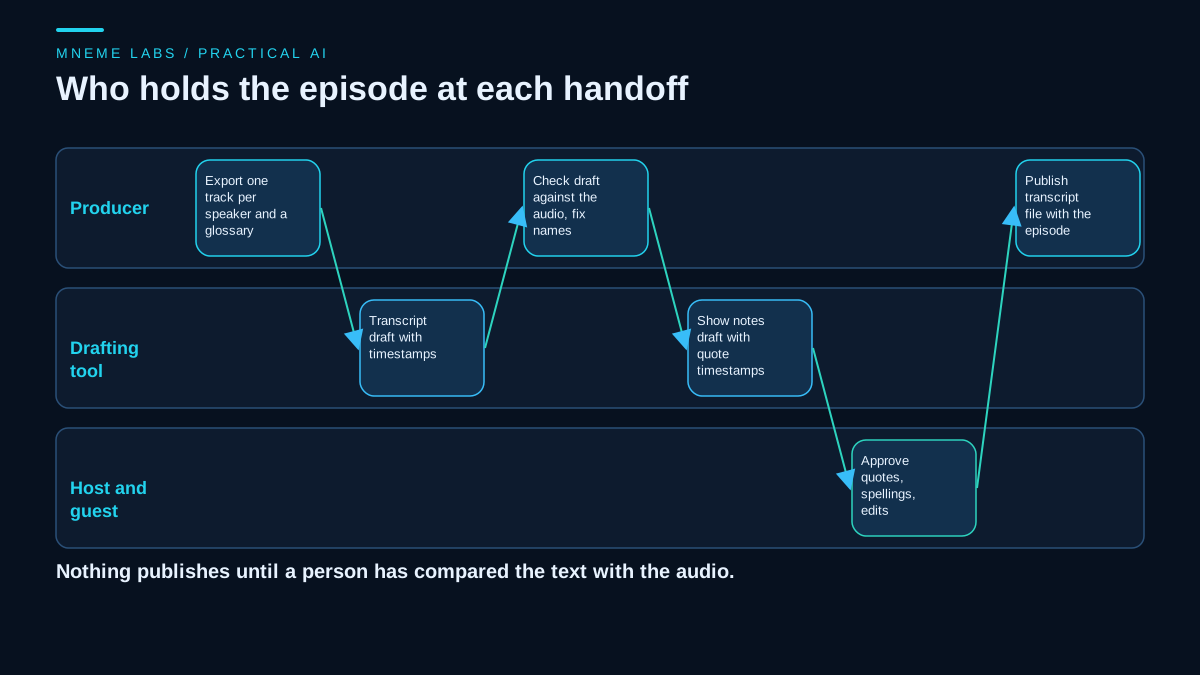
This guide follows one fictional episode through a handoff: preparation, transcript, speaker corrections, show notes, publishing, and the rules for any voice work. It names what each step produces so nothing is left as "the AI handles it." The episode, the guest, and the mill in it are invented, and no time savings are claimed.
The handoff, step by step
Imagine a local-history show. Episode 14 is a conversation with a guest, Dana Whitaker, about a closed grain mill. The producer needs a folder that both people and tools can work from, so each step has a named input and output.
A manifest keeps the pieces together:
{
  "episode": "ep014-muirhead-mill",
  "tracks": {"host": "ep014_host.wav", "guest": "ep014_guest_dana.wav"},
  "glossary": ["Muirhead Mill", "Dana Whitaker", "county ledger"],
  "transcript_draft": "ep014.draft.vtt",
  "corrections_log": "ep014.corrections.csv",
  "show_notes_draft": "ep014.notes.md",
  "voice_edits": [],
  "approvals": {"host": null, "guest": null}
}
Nothing publishes until both approvals fields hold a date and the corrections log has no open rows.
Preparation that cites its sources
Research for a guest is where a model's habit of filling gaps does the most damage, because a confident wrong biography reads like a fact.
Give the model only documents you collected: the guest's own site, their published articles, an earlier interview you are allowed to quote. Ask for a list of possible questions, each tied to a quote from those documents. Anthropic's guidance on reducing hallucinations describes the same approach: permit the model to say it does not know, ground answers in direct quotes, and remove any claim it cannot back with a quote. The page also says these techniques reduce hallucinations but do not eliminate them, so confirm biographical details with the guest.
A script can be an outline of segments and transitions. Do not script the guest's answers. Prepared answers sound prepared, and a draft that invents what the guest will say becomes a source of false quotes later.
Transcripts: tracks, glossary, review
Record one track per speaker if you can. An isolated track can provide a speaker identity from the recording setup, after you verify the channel assignment and check for crosstalk. The cost is crosstalk bleed and the need to keep tracks aligned.
Give the transcription step your glossary. OpenAI's speech-to-text guide describes a prompt and a keyword list that can improve recognition of names and technical terms. It cautions that keywords are hints, not required output, and that you should check whether they cause terms that were never spoken to appear. It also says uploads are limited to 25 MB and that you should avoid splitting a long recording mid-sentence when you chunk it.
The same guide documents a speaker-labeling option that returns segments with speaker, start, and end values, and lets you supply short reference clips for known speakers. At the November 15 review, that compatibility example used a deprecated model, so confirm what is current before you design around it. With separate tracks you may not need it.
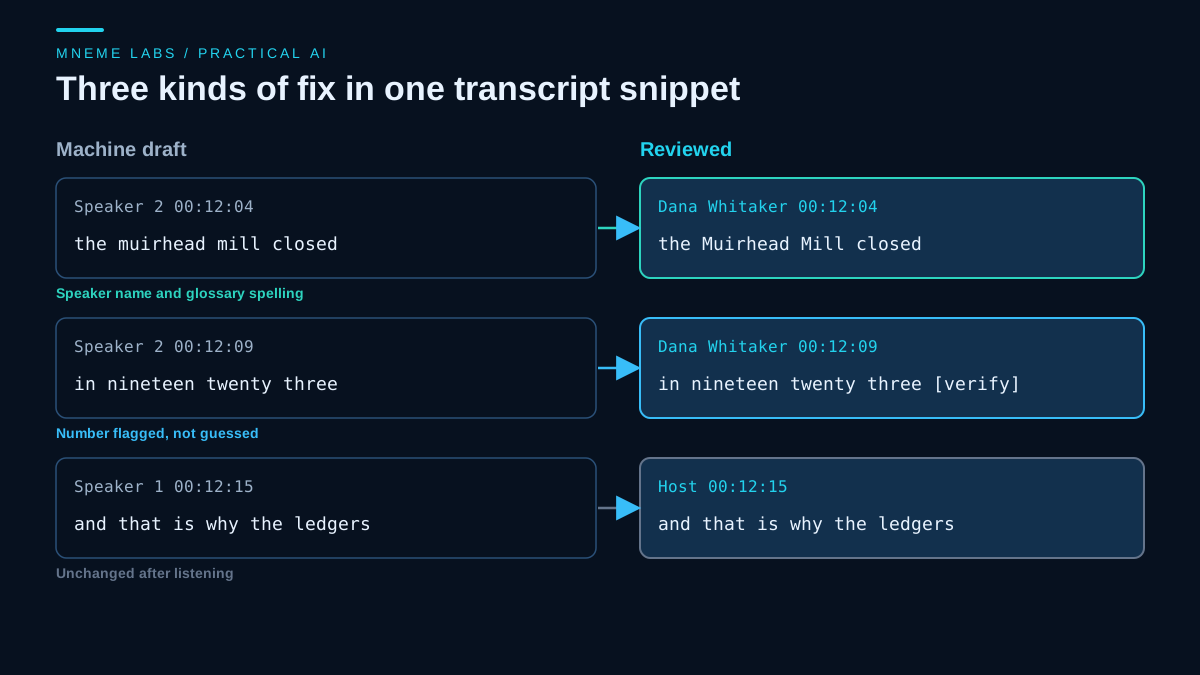
Review against the audio. The review queue has three kinds of line:
- Speaker labels: replace "Speaker 2" with a name.
- Glossary terms: correct proper nouns and local terms.
- Numbers, dates, and quotes: do not "fix" these from memory. Flag them, check the source or ask the guest, and record the answer in the corrections log.
For publishing, WebVTT can attach a name to each cue with a voice span. The W3C WebVTT specification shows the form:
WEBVTT

00:12:04.000 --> 00:12:07.500
<v Dana Whitaker>The Muirhead Mill closed in 1923.
That year is part of the invented example, and the review rule above would flag it for the guest before it ships.
Getting the transcript to listeners
Apple's transcripts documentation says Apple generates transcripts automatically after an episode is published, or you can supply your own through the RSS transcript tag. Supplying a VTT file lets you identify every speaker by name, and Apple notes that files not meeting its quality standards will not be displayed. It recommends listing host and guest names in descriptions so they are spelled correctly, and it warns that cross-talk and loud music make transcription harder. It also says that if dynamically inserted audio changes parts of an episode after the original transcription, the changed segments are not displayed.
The open podcast namespace defines a transcript element for linking a transcript or captions file from an episode. In the transcript tag documentation, a url and a type such as text/vtt are required, a language is optional, and rel="captions" marks the file as timed captions. Whether your host and the apps your listeners use honor these tags is a separate check. Test one episode.
Show notes that survive a fact check
A show-notes draft should be built from the reviewed transcript, not from the audio or from the model's general knowledge. Ask for notes as a list where every bullet has a timestamp and a supporting quote. Then discard any bullet whose quote you cannot find in the transcript. Where a guest states a fact, write "Dana says" instead of presenting it as established. Links should come from your research folder, not from the model.
This is also where your existing transcription-to-notes guide applies. Use it for structure, and use the quote-and-timestamp rule above as the quality check.
Voice work needs a consent gate
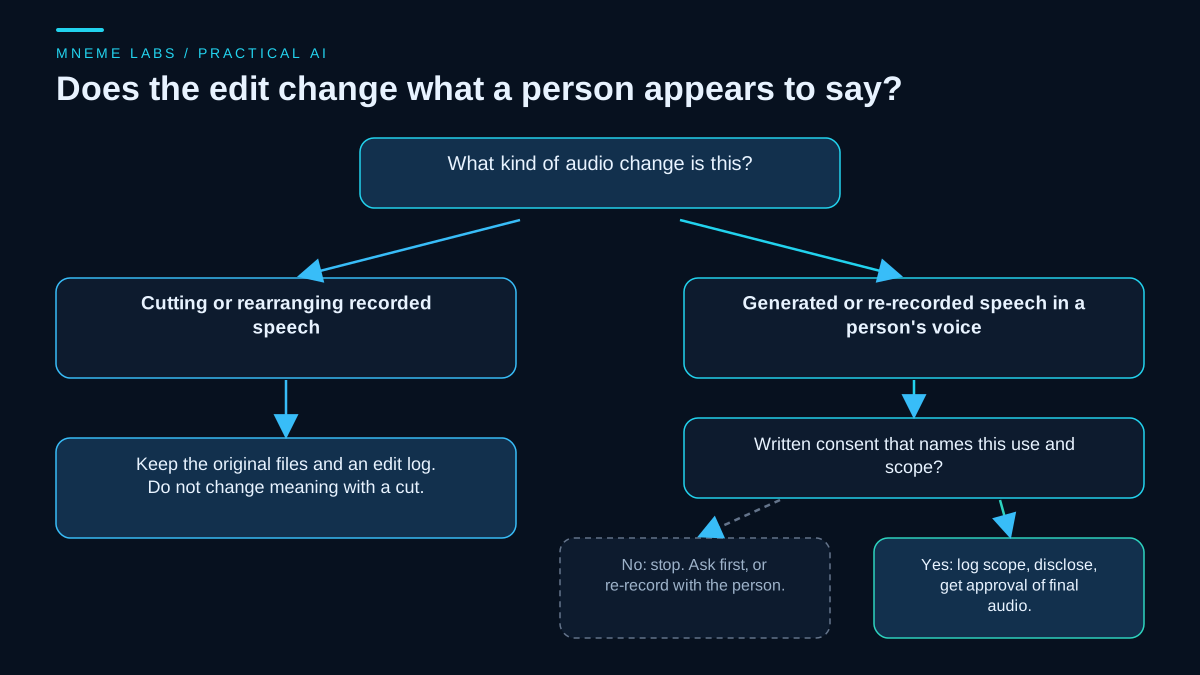
Cutting and rearranging recorded speech is ordinary editing. Keep the original files and an edit log, and do not use a cut to change what someone meant.
Generating speech in a person's voice, or re-recording lines with a synthetic voice to patch a mistake, is different. Treat it as something that needs specific, recorded permission. The ICO's guide to valid consent describes consent as freely given, specific, informed, and unambiguous, requires that people can withdraw easily, and says to keep records that demonstrate consent. A practical reading for a podcast: written permission that names the use ("patch corrections in episode 14"), a stated scope, a way to withdraw, and the speaker's approval of the final audio. Mention the use in the show notes. That guidance covers UK rules, so check the law where you and your guests are.
The voice synthesis comparison and the voiceover pipeline guide cover tools and editorial control. The permission record here is an editorial requirement for this workflow, not a legal determination about voice cloning. Voice rights and each platform's rules need their own review.
Failure modes
- Wrong speaker on a quote. Spot-check against the audio, not only the text.
- Glossary overreach. A keyword list can push the transcript toward a term that was never said.
- Silent number changes. A transcript "cleanup" that changes a date or amount is a factual edit.
- Stale transcripts after ad insertion. If dynamic ads change the audio, a transcript from the original file may not match.
- Unapproved synthetic lines. Anything generated in a person's voice without recorded consent should not ship.
Limits
This workflow adds review steps, and review takes time. No time saving is promised, because that depends on your show, your guests, and your tools. The fictional example shows the structure, not a measured result. Long or multi-language episodes may need extra handling, and Apple limits supported transcript languages and lengths.
Next step
Set up the manifest for your next episode before you record. After editing, review one full transcript and count how many corrections fall into each of the three types. That count shows where a better glossary, a separate track, or a firmer approval rule would help most.
Sources
- Apple Podcasts for Creators, Transcripts on Apple Podcasts
- Podcast Index, Podcast namespace 1.0 and transcript tag
- W3C, WebVTT: The Web Video Text Tracks Format
- OpenAI, Speech to text guide
- ICO, What is valid consent?
- Anthropic, Reduce hallucinations
Images are original Mneme Labs diagrams.