An AI tool can quickly produce a translation draft. That speed is the easy part. What decides whether the translated page is useful is everything around the translation: whether the language is the right one to add, whether the numbers and units survived, whether a native reader finds the wording natural, and whether search engines can tell which page belongs to which audience.
This guide describes a workflow that uses a machine draft as a starting point and puts checks around it. It makes no claim about traffic or revenue gains, because those depend on your audience, your topic, and how many people in the target language want what you publish. If you are still deciding what to write at all, the audience research guide comes first.
Localization is more than translation
The W3C Internationalization pages define localization as adapting content to the language, cultural, and other requirements of a specific market. The list of things it can involve is longer than many expect: number, date and time formats, currency, symbols and colors, references that may be misread or seem insensitive in a given culture, varying legal requirements, and address and name formats. A machine draft can attempt several of those adaptations, but it does not establish which local facts or requirements apply. Those decisions still need someone who knows the market.
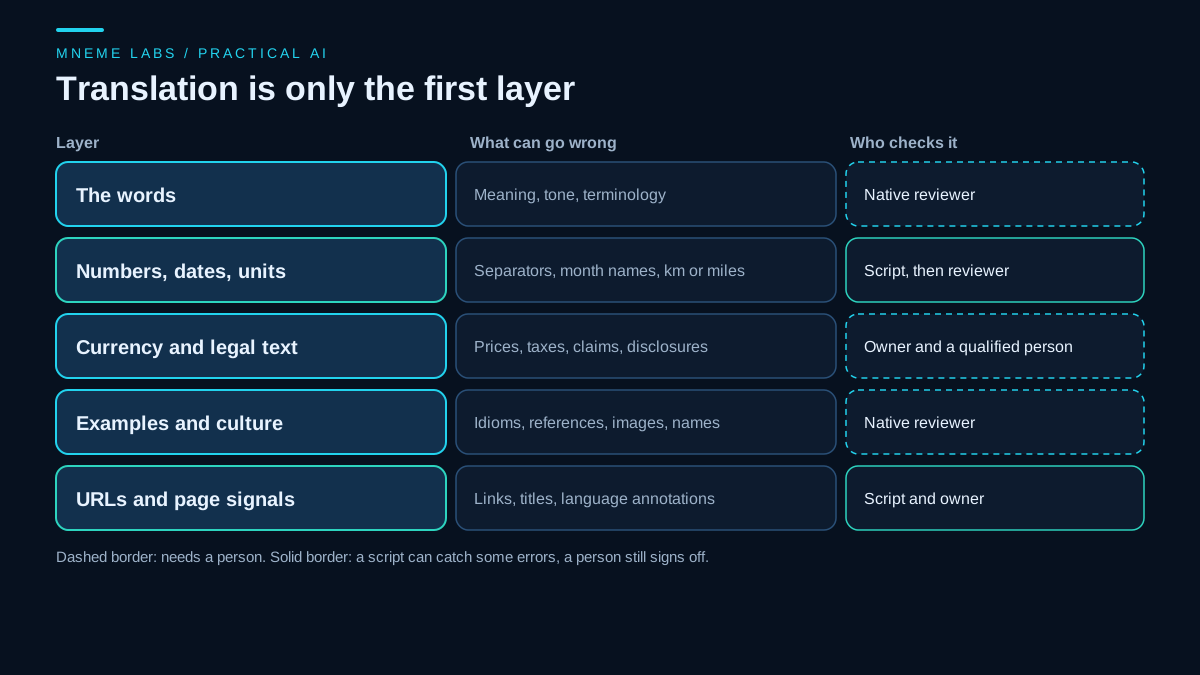
That is why the plan below treats translation as one layer of five and assigns a checker to each layer. Some checks can be automated. Others need a person who reads the target language natively.
Step 1: Choose languages from evidence
Pick a language because you have a reason, not because a tool can produce it. Reasons you can check include visitors from specific countries in your analytics, search queries in that language that already reach you, emails or comments from readers, or a product you can actually support in that market. Search Console shows queries and countries for your site, and your own mail shows who writes to you. Remember that impressions are not visits and visits are not customers.
Start with one language, and one or two pages. Choose evergreen, low-risk pages first, such as a how-to guide, not a page with pricing, legal terms, health claims, or financial advice. Those pages need an expert in the target market, not just a fluent reader.
Step 2: Prepare the source
Translation quality starts with the source. Fix ambiguous sentences, remove idioms you would not want to see translated literally, and spell out units and dates. Then build two small lists:
- Do-not-translate terms. Brand names, product names, and code words.
- Preferred translations. Terms you want rendered a specific way, such as the name of a feature, once a native reviewer has chosen it.
Give both lists to the translation tool with the text, and keep them in a file so the next page reuses them. This does not guarantee the tool follows them, which is why the next step checks.
Step 3: Run a machine draft, then check the tokens
A script cannot judge whether a translation reads well. It can check that the parts of a text that must not change did not change. Prices, percentages, dates written as digits, URLs, and product names are the usual casualties. The script below compares a source file and a translated file. It extracts number tokens from both, accepts different separators (1,299.50 in English, 1.299,50 in German, and so on), flags a number that exists in only one text, flags a URL that is missing or changed, and flags a do-not-translate term that disappeared.
"""loc_check.py: compare a source text and its localized version for things a translator can silently break.
Standard library only. This checks protected tokens, not translation quality.

  python loc_check.py source.txt translated.txt [glossary.txt]

glossary.txt: one do-not-translate term per line (brand names, product names, code words).
Exit code 0 = nothing flagged, 1 = flags, 2 = bad input.
"""
import re
import sys
from decimal import Decimal

NUMBER = re.compile(r"(?<![\w])(\d{1,3}(?:[.,\u00a0\u202f ]\d{3})+(?:[.,]\d{1,2})?|\d+(?:[.,]\d+)?)(?![\w])")
URL = re.compile(r"https?://[^\s)>\]\"']+")


def candidates(token):
    """Possible Decimal values for positive Latin-digit number tokens.
    A single mark followed by three digits can be decimal or grouping.
    Repeated identical marks must form valid three-digit groups.
    """
    t = token.replace("\u00a0", "").replace("\u202f", "").replace(" ", "")
    marks = [c for c in t if c in ".,"]
    if not marks:
        return {Decimal(t)}
    if len(set(marks)) == 1 and len(marks) > 1:
        groups = t.split(marks[0])
        if not (1 <= len(groups[0]) <= 3 and
                all(len(g) == 3 and g.isdigit() for g in groups[1:])):
            return set()
        return {Decimal("".join(groups))}
    last = max(t.rfind("."), t.rfind(","))
    head, tail = t[:last], t[last + 1:]
    if len(set(marks)) == 2:
        grouping = "," if t[last] == "." else "."
        groups = head.split(grouping)
        if not (1 <= len(groups[0]) <= 3 and
                all(len(g) == 3 and g.isdigit() for g in groups[1:]) and
                all(g.isdigit() for g in groups)):
            return set()
        return {Decimal("".join(groups) + "." + tail)}
    out = {Decimal(head + "." + tail)}
    if len(tail) == 3 and 1 <= len(head) <= 3:
        out.add(Decimal(head + tail))
    return out


def numbers(text):
    return [(m.group(1), candidates(m.group(1))) for m in NUMBER.finditer(text)]


def check(source, target, glossary):
    flags = []
    if len(target.split()) < 0.3 * len(source.split()):
        flags.append("translation is much shorter than the source")
    src_n, tgt_n = numbers(source), numbers(target)
    for tok, cands in src_n:
        if not any(cands & tc for _, tc in tgt_n):
            flags.append("number %r from the source has no match in the translation" % tok)
    for tok, cands in tgt_n:
        if not any(cands & sc for _, sc in src_n):
            flags.append("number %r appears only in the translation" % tok)
    for u in sorted(set(URL.findall(source))):
        if u not in target:
            flags.append("URL missing or changed: %s" % u)
    for term in glossary:
        if term in source and term not in target:
            flags.append("do-not-translate term missing: %r" % term)
    return flags


def main(argv):
    if len(argv) not in (3, 4):
        print(__doc__, file=sys.stderr)
        return 2
    try:
        source = open(argv[1], encoding="utf-8").read()
        target = open(argv[2], encoding="utf-8").read()
        glossary = [l.strip() for l in open(argv[3], encoding="utf-8")] if len(argv) == 4 else []
    except OSError as err:
        print("cannot read input: %s" % err, file=sys.stderr)
        return 2
    flags = check(source, target, [g for g in glossary if g])
    for f in flags:
        print("FLAG", f)
    print("%d flags" % len(flags))
    return 1 if flags else 0


if __name__ == "__main__":
    sys.exit(main(sys.argv))
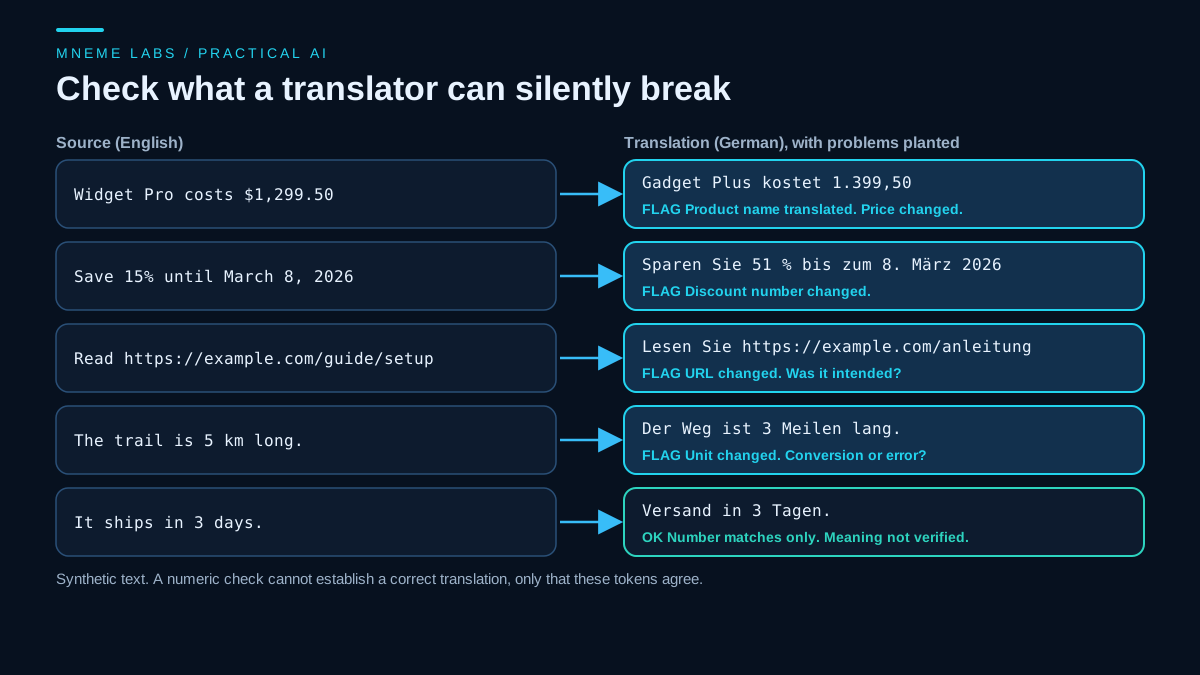
It was tested on a synthetic English paragraph with a German version written by hand. The correct German passed with zero flags. A second version with planted errors produced seven flags: the price changed from 1,299.50 to 1.399,50, the discount changed from 15 to 51, a distance of 5 kilometers became 3 miles, the guide URL changed, and the product name "Widget Pro" was replaced with another name. A flagged item is not always an error. A unit conversion or a localized URL may be deliberate, so the flag asks for a decision.
The shipping sentence shows the limit of the check. The German fixture uses "Versand in 3 Tagen", which is shipping in 3 days. Two other versions also passed with zero flags: one that says "Lieferung" (delivery) instead, which can mean something different from shipping, and one that says the item can be returned in 3 days. All three keep the number 3, and the script compares numbers, not meaning. A pass means the numbers agree. Numeric checks cannot establish that a translation is correct, so a person who reads German still has to review it.
Additional synthetic checks verified that 1,234,567 matches French 1 234 567 and German 1.234.567, while German 1.234,567 does not match that million-sized value. Repeated separators with invalid group lengths are not accepted as a complete token.
The check has blind spots. It is scoped to positive Latin-digit numbers; signs, accounting negatives, scientific notation, other numeral systems and malformed text need separate review. It does not prove the input follows a locale's grammar. It compares sets of numbers, so a number that appears in both texts but in the wrong sentence can pass. It cannot see a changed month name, a flipped meaning, or a wrong tone. It treats a token such as 1.250 as either 1.25 or 1250 because both readings are plausible, so a true error in that range can hide. Use it to catch the cheap mistakes before you spend a reviewer's time.
Step 4: Let the runtime format numbers, dates, and money
Typing separators by hand is a reliable way to make mistakes. Most programming environments include locale-aware formatting. JavaScript's Intl is one example:
const value = 1299.5;
const when = new Date(Date.UTC(2026, 2, 8));
for (const [locale, currency] of [["en-US", "USD"], ["de-DE", "EUR"], ["fr-FR", "EUR"], ["es-ES", "EUR"], ["ja-JP", "JPY"]]) {
  console.log(locale,
    new Intl.NumberFormat(locale).format(value),
    new Intl.NumberFormat(locale, { style: "currency", currency }).format(value),
    new Intl.DateTimeFormat(locale, { dateStyle: "long", timeZone: "UTC" }).format(when));
}
Running this on Node 22.20.0 with ICU 77.1 printed the following (the French currency output uses a narrow no-break space between digit groups and a no-break space before the euro sign):
| Locale | Number | Currency | Date |
|---|---|---|---|
| en-US | 1,299.5 | $1,299.50 | March 8, 2026 |
| de-DE | 1.299,5 | 1.299,50 € | 8. März 2026 |
| fr-FR | 1 299,5 | 1 299,50 € | 8 mars 2026 |
| es-ES | 1299,5 | 1299,50 € | 8 de marzo de 2026 |
| ja-JP | 1,299.5 | ¥1,300 | 2026年3月8日 |
Three lessons come from that table. The same value looks different in every locale, so hand-typed formats are risky. In this runtime French uses a narrow no-break space to group both numbers and currency, while Spanish leaves this four-digit value ungrouped. Locale data can differ between runtime versions, so test the version you deploy. And formatting a currency is not converting it: the Japanese yen line shows a different amount because yen has no decimals, and nothing here converts dollars to yen. Prices in another currency are a business decision with tax and legal consequences, so settle them with the owner of the pricing, not with a translation tool.
Step 5: Get a native review for what matters
The W3C list of localization concerns is the review checklist. Ask the reviewer to read for natural wording, correct terminology, formality, anything that could be misread or offensive, and every claim that carries risk: prices, guarantees, safety, legal terms, and health or financial statements. For low-risk pages, a reviewer might sample sections. For anything with legal or safety weight, have a qualified person review all of it.
A reviewer who sees a draft needs context: the audience, the tone, the glossary, and the list of flagged items from the token check. Give them the source page beside the draft. Keep their corrections in your glossary so the next page starts better.
Step 6: Publish and tell search engines how the pages relate
Google's guidance on localized versions of a page says localized pages are considered duplicates only if their main content stays untranslated. It describes three equivalent ways to declare alternates: HTML link elements, HTTP headers, or a sitemap. Using more than one gives no benefit in Search and makes the setup harder to manage.
The documented rules for hreflang are strict:
- Each language version must list itself and all the other versions.
- Alternate URLs must be fully qualified, with
https://. - If two pages do not point to each other, the annotations are ignored.
- You may add an
x-defaultentry as a fallback for languages you do not list. - Google does not use
hreflangor the HTMLlangattribute to detect a page's language. It uses its own algorithms for that.
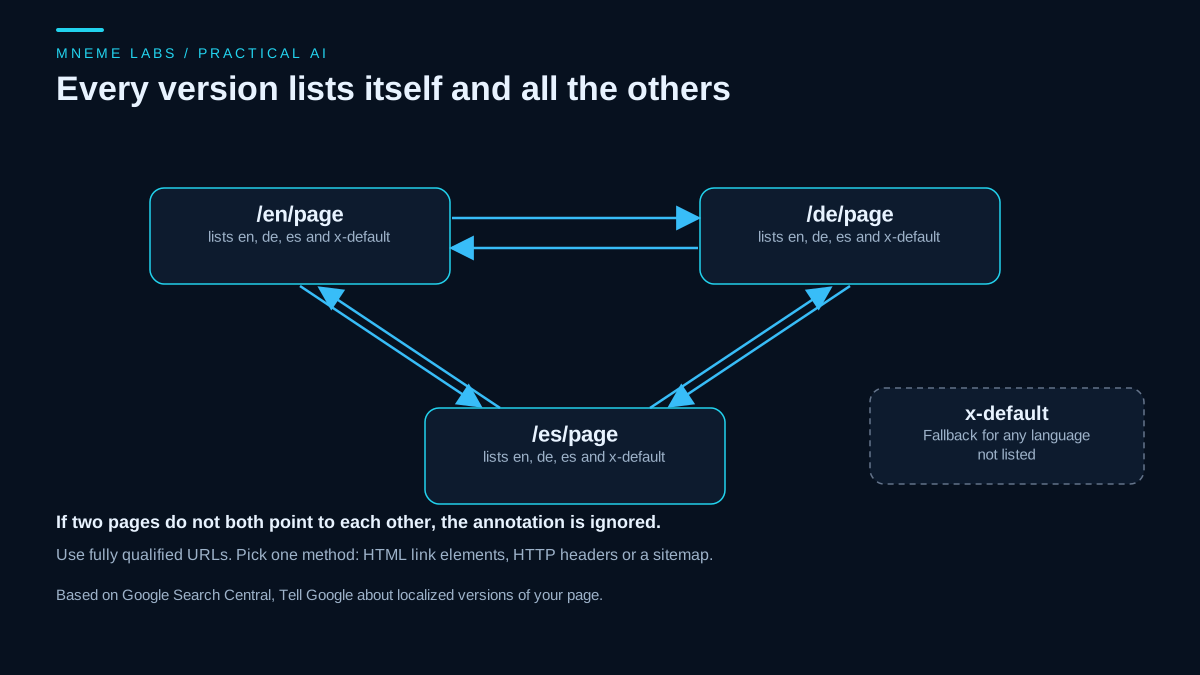
An example for the English version of a page, with a German and Spanish alternate:
<link rel="alternate" hreflang="en" href="https://example.com/en/page" />
<link rel="alternate" hreflang="de" href="https://example.com/de/page" />
<link rel="alternate" hreflang="es" href="https://example.com/es/page" />
<link rel="alternate" hreflang="x-default" href="https://example.com/en/page" />
The German and Spanish pages carry the same four lines. These tags tell Google the pages are related. They do not promise ranking, and a poor translation will not be rescued by correct markup.
Do not localize at scale without adding value
Google's spam policies define scaled content abuse as generating many pages primarily to manipulate rankings rather than help users. The examples include using generative AI tools to generate many pages without adding value, and automated transformations such as translating scraped content. A site that machine-translates every page into twelve languages with no review and no local usefulness fits that description better than it fits good practice. A smaller set of reviewed pages that a reader in that language would actually want is the safer path, and it is also a better use of effort.
Failure cases to plan for
- Wrong register. Many languages distinguish formal and informal address. A mismatch with your brand can feel rude or cold.
- Idioms and humor. These often translate literally and fail.
- Text in images. A translated page with English screenshots frustrates readers.
- Layout. Translated text can run longer than the source and break a design.
- Dates like 03/04. Day-month and month-day orders differ, so spell out the month.
- Outdated drafts. When the English page changes, the translations go stale. Record the source version each translation was based on.
Measure carefully
After publishing, check Search Console for impressions and clicks by country and query for the new pages. Impressions are not visits, a click is not a purchase, and a few weeks of small numbers can be noise. Compare against similar untranslated pages with caution, since topics differ.
A next step
Choose one evergreen page and one target language you have a real reason to serve. Write the glossary, run the machine draft, run the token check, and send the draft with the flags to a native reader. Publish with correct hreflang, and look at the numbers after a month. If the reader's feedback is mostly about wording rather than facts, the workflow is working, and the second page will go faster.
Sources
- W3C, Localization vs. Internationalization: what localization covers beyond translation.
- Google Search Central, Tell Google about localized versions of your page: duplicates versus translated pages, three equivalent methods, reciprocal and self-referencing rules, fully qualified URLs,
x-default, and that Google does not usehreflangorlangto detect language. - Google Search Central, Spam policies for Google web search: scaled content abuse, including generating many pages without added value and automated translation of scraped content.