Audience research goes wrong in a predictable way. Someone pastes a pile of scraped comments into a model, asks for "the audience profile," and gets a confident persona with an age range, a job title, and fears. It reads well. Nothing in it has been checked against anyone.
A better use of AI is narrower. Give it data you own and are allowed to use, ask it to sort and summarize that data, and then turn the patterns into hypotheses you can test on your own pages. This guide shows that workflow with an invented example, and it names the places where the data runs out.
Three kinds of input
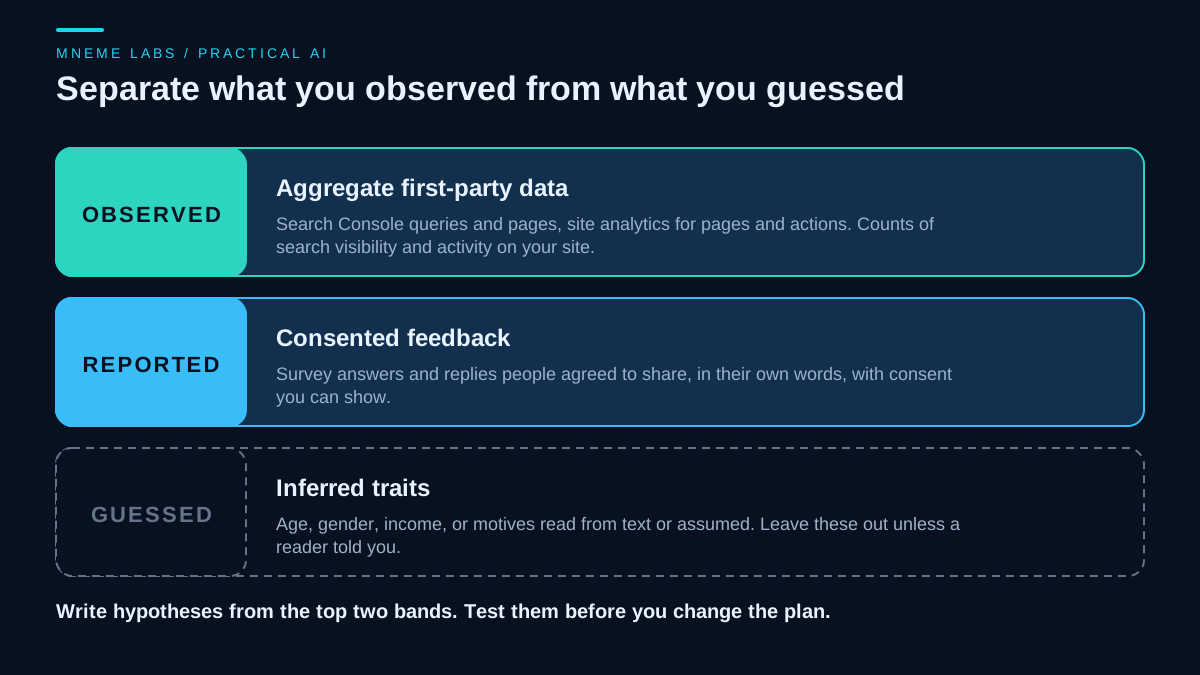
The first two kinds support planning. The third does not.
Aggregate first-party data is what your own tools record about what happened: which queries led to your site, which pages people viewed, which actions followed. Google's Performance report help page describes clicks, impressions, click-through rate, and average position, grouped by query, page, country, device, and date.
Consented feedback is what readers tell you directly: survey answers, replies to a newsletter question, interview notes. The key word is consented, which the next section covers.
Guesses are traits a person or a model infers from text, such as age, gender, income, or motives. Treat them as noise unless a reader told you.
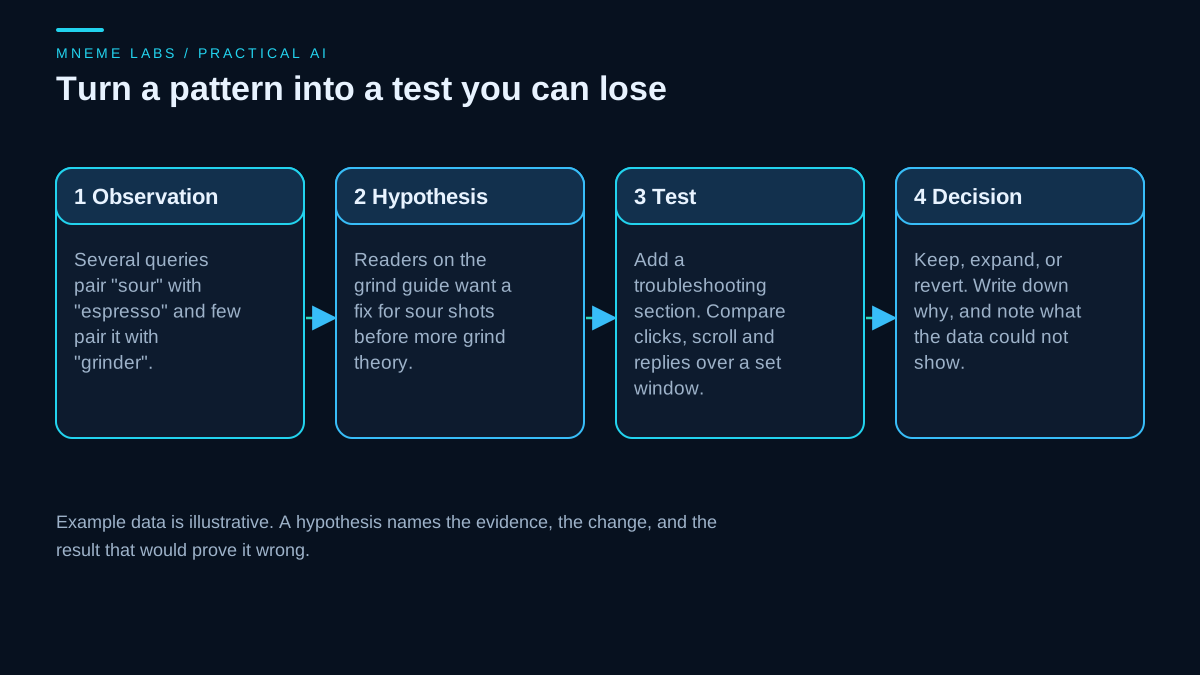
A worked example (invented data)
Imagine a small site about home espresso. The owner wants to know what to improve on a grind-size guide. The inputs are a thirty-day export of search queries for that page and eleven replies to a newsletter question, "What went wrong the last time you pulled a shot?", where each reader ticked a box allowing the reply to be used for site planning.
Step 1: count terms in the query export. A few lines of Python give a first view of which words carry the most impressions. Column names vary by export, so adjust them to match yours.
import csv
import re
from collections import Counter


def term_counts(path, query_col="Query", imp_col="Impressions", min_len=4, top=15):
    counts = Counter()
    with open(path, newline="", encoding="utf-8") as f:
        for row in csv.DictReader(f):
            imps = int(row[imp_col].replace(",", "") or 0)
            for term in set(re.findall(r"[a-z]+", row[query_col].lower())):
                if len(term) >= min_len:
                    counts[term] += imps
    return counts.most_common(top)
On a three-row test file it returned "espresso" and "sour" at the top, which is what the sample rows were built to show. That proves the code runs, nothing about real sites.
Step 2: scrub replies before anything leaves your machine. Strip email addresses, phone numbers, and names. A simple pattern catches the first two and misses names and context, so read the replies yourself after scrubbing.
EMAIL = re.compile(r"[\w.+-]+@[\w-]+\.[\w.-]+")
PHONE = re.compile(r"\+?\d[\d\s().-]{7,}\d")


def scrub(text):
    return PHONE.sub("[phone]", EMAIL.sub("[email]", text))
Step 3: ask a model to label themes, with quotes. Give it the scrubbed replies and ask for a short list of themes, each with the reply numbers that support it. Tell it to say "not enough information" when a theme has fewer than two supporting replies. Then read the replies yourself and check every theme against its quotes. Anthropic's guide to reducing hallucinations recommends exactly this pattern for document tasks: let the model say it does not know, ground answers in direct quotes, and retract claims that lack support.
Step 4: write the hypothesis. Suppose the term counts show "sour" appearing far more than "grinder," and six of the eleven replies mention bitter or sour shots. A weak conclusion would be "our audience is beginners." A testable one is:
Readers arriving on the grind-size guide want a fix for sour shots before more grind theory. If we add a troubleshooting section near the top, we will measure use of that section and ask whether it answered the question over the next four weeks. We will keep it if readers find it useful, revise it if confusion persists, and call the result inconclusive if too few readers respond.
That statement names the evidence, the change, a measure to instrument before the edit, a review window, and criteria for keeping, changing or continuing to observe the result.
What each source can and cannot say
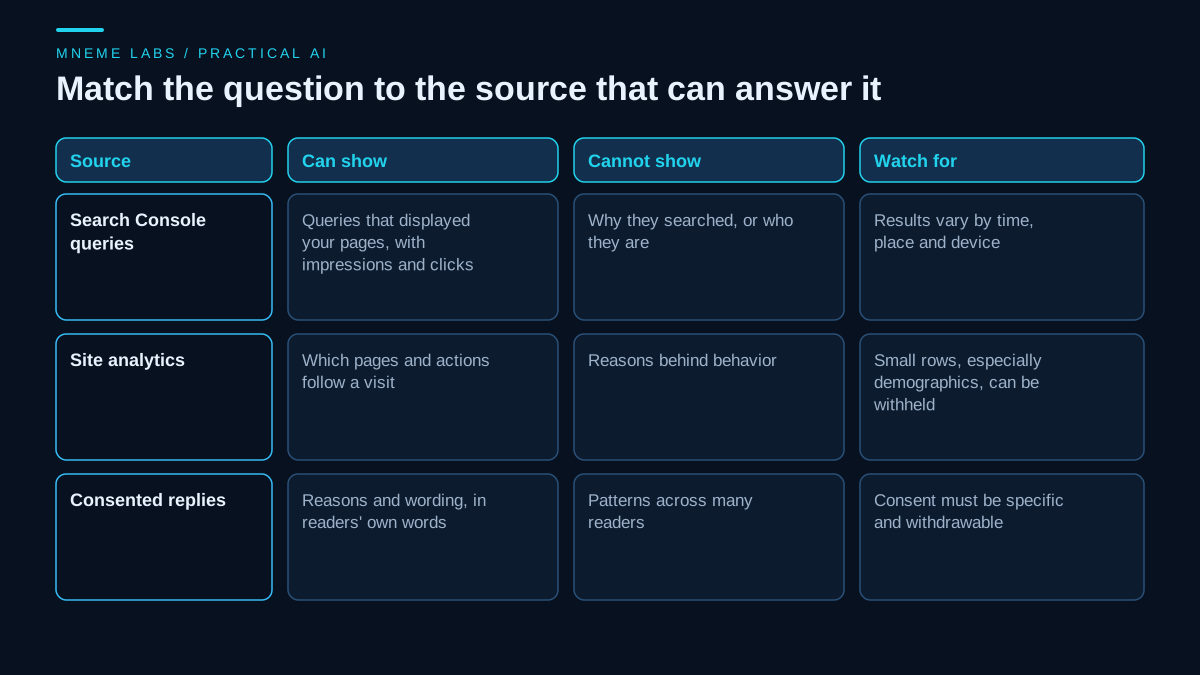
Search Console shows reported queries associated with appearances and clicks. An impression does not mean someone visited, and anonymized queries are omitted, so the table is not a complete log of every search. It does not show why they searched or who they are. The help page also notes that results depend on time, place, device, and search history, so a query listed in your report may not show your site when you search it yourself.
Site analytics shows what visitors did on your pages. Google's guide to using Search Console and Analytics together says the two use different metrics and systems, so numbers will not match exactly. It suggests comparing Search Console clicks and Analytics sessions as the closest pair.
Analytics data can also be withheld on purpose. Google's page on GA4 data thresholds says thresholds exist so a report viewer cannot infer the identity or sensitive information of individual users. They can apply to demographic data and some search query information, and they cannot be adjusted. Widening the date range can reduce them. Depending on the report and its dimensions, a small sample may be withheld, and do not try to work around them by slicing the data into smaller groups.
Consented replies give you reasons and wording that no dashboard has. They also come from the readers motivated to answer, which is a biased slice, so a theme in eleven replies is a lead, not a measurement of your readership.
Consent is a design decision
The UK Information Commissioner's Office guide to what is valid consent explains consent under UK GDPR as freely given, specific, informed, and unambiguous. It says people must be able to refuse without detriment and withdraw easily at any time, that consent should be unbundled from other terms, and that you should keep records that demonstrate it.
In practice, for this kind of research:
- Ask at the point of collection: "May we use your reply to plan articles? You can say no and still get the newsletter."
- Do not hide the permission inside a general terms checkbox.
- Record who agreed, when, and to what, and make withdrawal easy.
- If someone withdraws, remove their replies from your working files and from future analysis.
This guidance describes UK rules. If your readers live elsewhere, other laws may apply, and you should get advice for anything beyond small-scale informal feedback. Whatever the law, check what your AI vendor does with submitted text before pasting reader replies into it.
Do not guess demographics
A model asked to describe your audience will produce a plausible one whether or not it matches anyone. Do not ask it to estimate age, gender, income, or location from comment text. It cannot know, and any invented number can leak into your plans as if it were measured.
If a decision truly depends on who your readers are, ask them in a survey that explains why and makes every question optional. Google's people-first guidance asks whether you have an existing or intended audience who would find the content useful if they came to you directly. Answer that with evidence you can point to, not with a persona.
Failure modes
- Treating a model summary as a finding. Check each theme against quotes.
- Overreading small counts. A theme in three replies is a lead.
- Chasing the loudest voice. Replies skew toward people with strong feelings.
- Over-slicing analytics. Small segments get withheld or become noise.
- Skipping the test. A hypothesis you never test is just a story.
- Leaking identity. Scrubbing patterns miss names and details. Read before you paste.
Limits
This workflow works best for sites with enough traffic to produce stable counts. It tells you what to try and not what is true about readers. The example is invented, and no results are claimed. Plan for modest, repeatable experiments rather than a one-time "audience profile."
Next step
Pick one page. Export its queries for a recent period, read the top twenty, and write one hypothesis in the format above with a date and a measure. If you want to feed the results into planning, the content idea backlog guide shows how to record evidence per idea, and the content performance guide covers measuring what changed.
Sources
- Google Search Console Help, Performance report (Search results)
- Google Analytics Help, About data thresholds
- Google Search Central, Using Search Console and Google Analytics data for SEO
- Google Search Central, Creating helpful, reliable, people-first content
- ICO, What is valid consent?
- Anthropic, Reduce hallucinations
Images are original Mneme Labs diagrams.