A real estate agent's day fills up with the same few tasks: answer a listing inquiry, send the details, offer showing times, check back when nobody replies. A language model can draft most of those messages. The harder questions are whose contact details the workflow may use, what the drafts may say about a home and its neighbors, and when follow-up must stop.
This guide covers a narrow, permission-based version. People contact you through your own form or sign-in sheet, and they tell you how you may contact them. The model drafts replies from listing facts you supply. A person reviews every message and sends it. The guide does not cover buying leads, scraping listing portals or social profiles, scoring people, or mass texting, and it makes no claims about response rates or conversions.
What the workflow does and does not do
It does four things. It records an inquiry with the consent the person gave. It drafts a reply using only the listing's verified facts and the inquirer's own message. It proposes showing times read from a calendar export you provide. It queues follow-up drafts on a schedule you set, and it cancels them when a stop condition occurs.
It does not decide who is a "good" lead, search for people who did not contact you, send anything by itself, or book a showing. Those limits keep the risk in places a reviewer can see.
The intake record
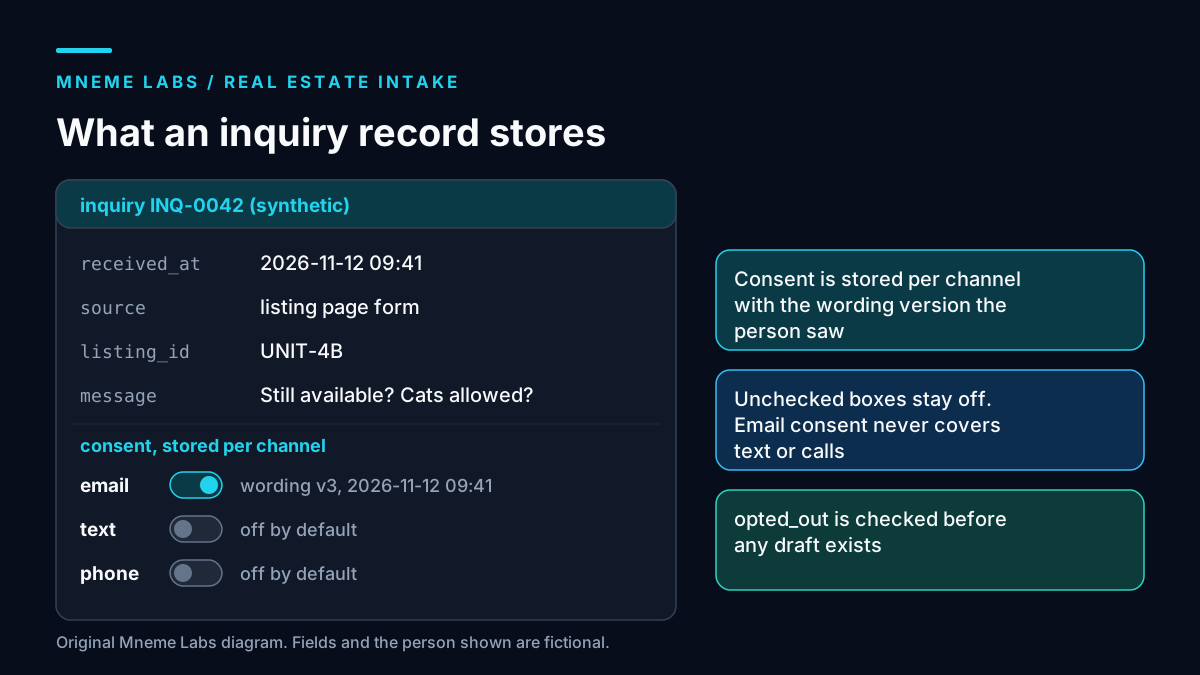
The diagram above shows the fields. The important design choice is that consent is stored per channel, with the exact wording version the person saw and a timestamp. A checkbox that says "contact me about this listing by email" does not authorize text messages or phone calls, so each channel gets its own field, and anything not checked defaults to off.
Collect only what you need to answer the question. For a rental inquiry that is usually a name, one contact method, the listing, and the person's message. Store an opt-out field and check it before any draft is created, not after. If opt-out status lives in two systems, a person who unsubscribed in one will still get messages from the other. Pick one source of truth.
Worked example: a rental inquiry
Take a fictional agent, Dana at Cedar Row Realty, and a fictional listing: a two-bedroom unit with an available date of December 1, a stated pet policy, and two weekday showing windows. Someone fills in the listing's contact form with the message "Is this still available, and are cats allowed?" and checks the email box only.
The facts file for the listing holds the availability date, the pet policy text copied from the listing agreement, and the showing windows. The model receives that file and the message. Its prompt says to answer only from the facts, to say "I'll confirm that" for anything missing, and to offer the two showing windows. The draft answers the cat question using the policy text, states the availability date, and offers the windows. Dana reads it beside the facts and sends it from her own mail client.
If the message had asked "Is it a safe neighborhood for families?" the workflow should not draft an answer. That question is covered below.
Fair housing is the main drafting constraint
HUD's overview lists the protected classes under the Fair Housing Act: race, color, national origin, religion, sex, familial status, and disability. HUD's regulation at 24 CFR 100.75 makes it unlawful to make or publish a notice, statement, or advertisement for the sale or rental of a dwelling that indicates a preference, limitation, or discrimination on those bases. It lists examples that include words, phrases, photographs, or symbols conveying that a dwelling is available or not available to a particular group, and it covers written and oral statements by a person engaged in selling or renting. An email you send about a listing is a written statement by you.
For an AI workflow this produces three working rules.
- Describe the home, not the buyer. Keep drafts to features, availability, terms, and logistics. Phrases like "perfect for young professionals" describe who should live there, not the unit.
- Do not rank people by guessed traits. Do not score or sort inquirers using names, languages, neighborhoods of origin, or anything that could proxy for a protected class. Route by what the person asked for, such as a showing request or a timeline, not by who you think they are.
- Escalate neighborhood and people questions. Questions about who lives nearby, how safe a place is, or what kind of families or residents it attracts go to a person, who can point to public data sources instead of giving an opinion. Requests involving disability, such as an accessibility or accommodation question, also go straight to a person.
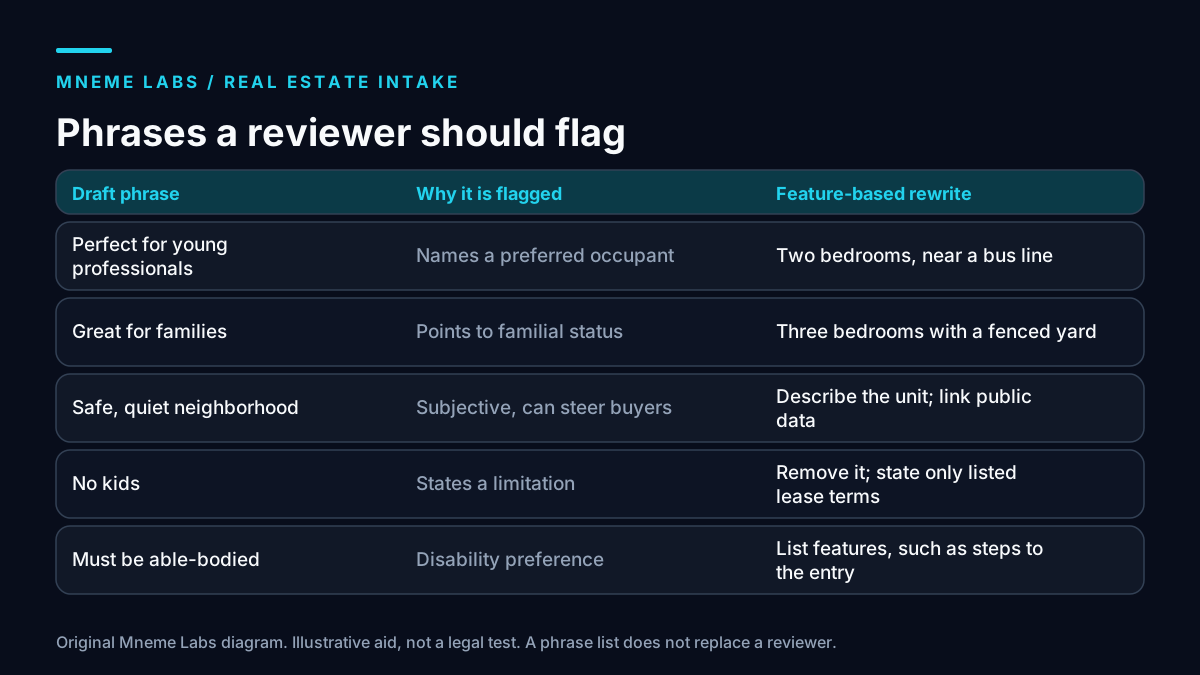
A simple lint pass can flag phrases for the reviewer. The matrix above gives examples. The sketch below checks a draft against a short list you maintain.
FLAGGED = [
    "perfect for young", "ideal for couples", "great for families",
    "safe neighborhood", "quiet neighborhood", "no kids", "able-bodied",
    "exclusive area", "good schools",
]

def lint(draft):
    low = draft.lower()
    return [phrase for phrase in FLAGGED if phrase in low]
This list is a seed, not a standard. A string match misses paraphrases and flags harmless uses, so it supports a reviewer and does not replace one. HUD's page also says the department has withdrawn some earlier guidance documents. This article uses the regulation text and the protected-class list only, and it relies on no HUD guidance about AI or digital advertising. Check HUD's current materials, and ask your broker or a housing attorney, about anything beyond that.
Contact rules differ by channel
Email, phone, and text are governed by separate rules, and this guide does not give you a compliance checklist for any of them.
For email, the FTC's rule on the primary purpose of a message lists the kinds of content that count as transactional or relationship content, such as completing a transaction the recipient already agreed to, warranty or safety information, or account notices. A marketing-style follow-up to someone who asked about a listing does not obviously fit those categories, so do not assume it does. Whether an inquiry reply or a follow-up counts as commercial email, and what that requires, is a question for a qualified person. This article did not review the full set of requirements for commercial email.
For phone calls, the FTC's Telemarketing Sales Rule bars calling a number on the National Do Not Call Registry unless the seller can show the person's signed written agreement or an established business relationship, and it requires honoring a person's request not to be called by or for that seller. The rule's own footnote points out that separate federal rules on automated calls and texts also apply. Keep text messages and automated calls turned off until a lawyer tells you what consent you need and you can prove you have it.
A follow-up schedule with stop rules
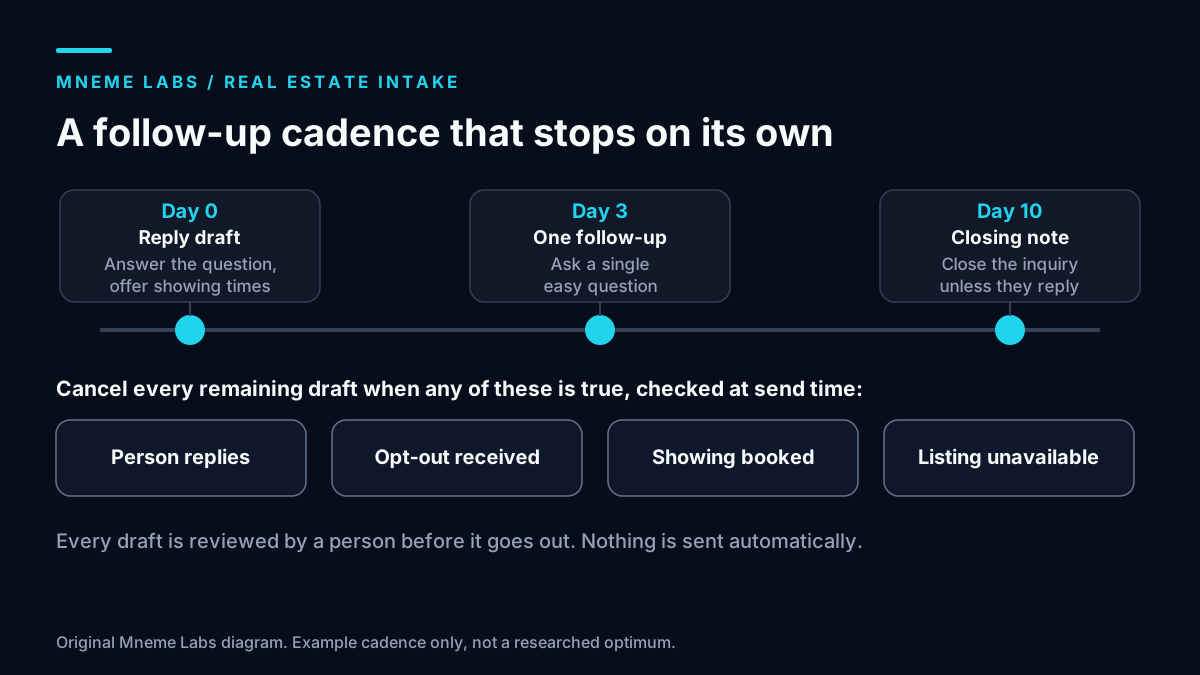
Below is an example cadence. It is a starting point you choose, not a researched optimum, and no statistic supports it.
- Day 0: a reply draft for review, answering the question and offering times.
- Day 3: if the person has not responded, one follow-up draft that asks a single easy question.
- Day 10: a closing note saying you will close the inquiry unless they reply.
The timeline in the hero diagram at the top of this page shows the three drafts and the events that cancel them. Cancel the schedule on any reply, any opt-out, a booked showing, or a listing that is no longer available. Check those four conditions at send time, not at draft time, because the situation may have changed since the draft was written. After the last note, stop. Do not enroll people in an open-ended sequence.
Failure modes
- Stale listing facts. A unit is rented and the draft still offers a showing. Re-check availability when the reviewer opens the draft, and record when each fact was last confirmed.
- Promising what the listing does not say. The model writes "no application fee" because that is common. The prompt must forbid claims that are not in the facts.
- Missed opt-out. A reply of "stop emailing me" lands in a different inbox. Treat any such message as an opt-out and update the record the same day.
- Reply loops. An auto-responder answers your draft and starts an exchange. Ignore automated replies and tag them.
- Duplicates. One person submits three forms and gets three sequences. Merge on contact details before scheduling.
- Reviewer drift. After weeks of correct drafts, reviewers stop reading. Sample sent messages against the lint list monthly.
Limits
This design covers one inquiry source and one language. The sketch code was written for this article and tested only on invented text. It does not touch a CRM, MLS, or calendar. Brokerage policy, MLS rules, licensing requirements, state and local law, and professional codes all sit outside this article, and none of the sources cited here claims that a workflow like this one is compliant.
Next step
Build the intake record on synthetic inquiries first. Write three listing fact files, then ten fake messages, including one neighborhood question, one accessibility question, and one opt-out. Confirm the workflow drafts the routine ones, escalates the sensitive ones, and cancels follow-up on opt-out. For related building blocks, the lead generation guide covers permissioned inputs and a review queue, the support drafting guide shows the evidence gate, and the content drip guide covers scheduled handoff.
Sources
- HUD: Housing Discrimination Under the Fair Housing Act. Used for the list of protected classes and the note that HUD has withdrawn some earlier guidance.
- 24 CFR 100.75, Discriminatory advertisements, statements and notices (eCFR). Used for the prohibition on statements indicating preference, limitation, or discrimination, and its examples.
- 16 CFR 316.3, Primary purpose (eCFR). Used for the categories of transactional or relationship content in email.
- 16 CFR 310.4, Abusive telemarketing acts or practices (eCFR). Used for the Do Not Call Registry rule, the written agreement and established relationship exceptions, and the footnote on separate TCPA obligations.
Diagrams are original Mneme Labs illustrations. Dana, Cedar Row Realty, and the listing are fictional.