An audit should make a messy site easier to reason about. It should not hand you a list of pages to delete. The usual shortcut is a rule such as "anything under 300 words with little traffic goes", and it is wrong often enough to do real damage: short pages can be exactly what a reader needs, and low traffic can mean a page is new, seasonal, or not yet linked from anywhere.
This guide describes a careful audit. It begins with an inventory, adds data from a search performance report, and uses rules to produce suggestions that a person reviews. A model is useful for reading pages and summarizing what each one covers. The decisions stay with the people who own the site. The example site and every number are synthetic, and this guide does not promise any traffic result, since audits do not guarantee rankings. For the writing side of fixing a weak page, see the editing guide.
Build the inventory first
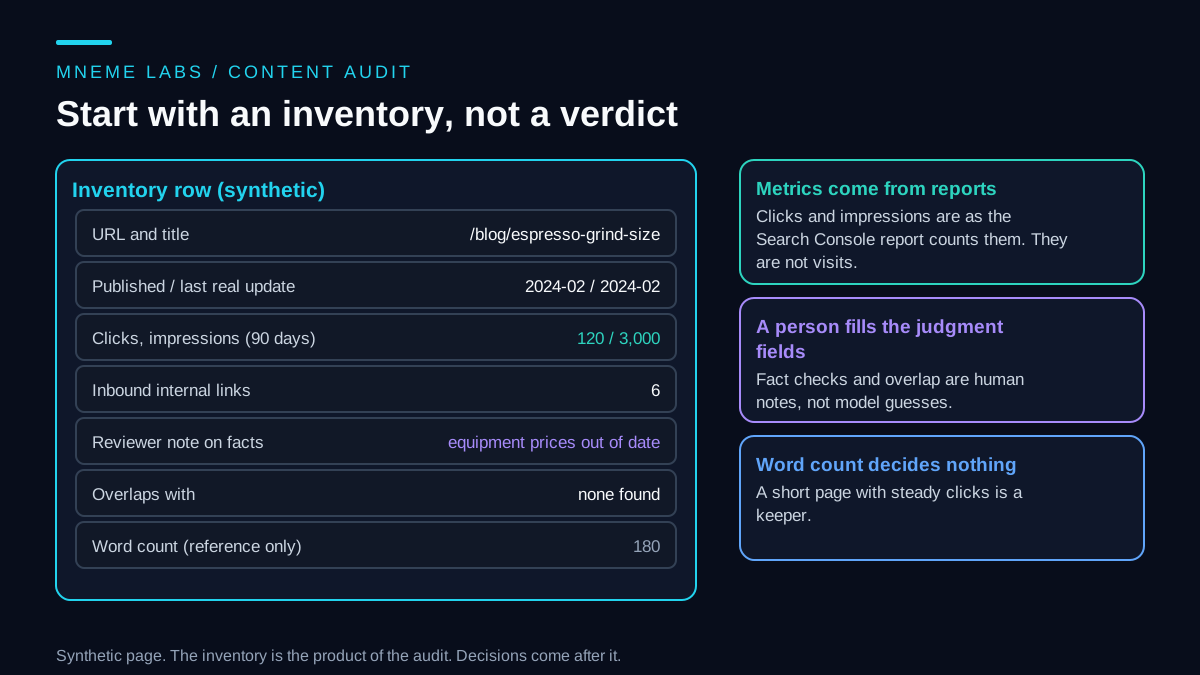
An inventory is a table with one row per page. Export it from your content system, and include the URL, title, publish date, the date of the last substantive update (not the last time someone fixed a typo), the topic or primary question the page answers, the number of internal links pointing to it, and where relevant its category or author. A model can help fill the topic column by reading each page and stating its main question in one sentence. Spot-check that column, since a model can mislabel a page whose title and content differ.
Keep fields for human judgment: whether the facts are current, whether the page overlaps another, and what the page is for. Those are best filled by a person who knows the subject. A model can propose them, but the proposal is only a draft.
Include word count if you like, for reference. Do not let it decide anything. Google's guidance on helpful content asks creators whether they are writing to a particular word count because they have heard Google has a preferred one, and answers directly that it does not. A page is long enough when it answers the reader's question.
Add performance data and read it correctly
The next step is to add search performance. Google's Search Console performance report defines the terms. Clicks are the number of times a user clicked your site from Google Search results. Impressions are how many times your site appeared in results. Click-through rate is clicks divided by impressions, and average position is the position of the topmost result from your site. The default view covers the past three months, you can group the data by page or by query, and the newest data can be preliminary and may change within hours.
These are search-report numbers, and they are not visits. A click is not a conversion, and an impression does not mean someone saw or read the result. The report also notes that results depend on the time, place, device and history of the searcher, so a query that shows up in the report may not show your site when you search for it yourself. Traffic from other sources, such as email, social links or direct visits, is not in this report at all. Treat it as one view of how a page does in search.
Use a long enough window. Three months is a reasonable starting point for most pages, and a page that is only a few weeks old has had no chance to show anything. Seasonal pages need a full year, and the sketch below flags a seasonal page that lacks one instead of judging it.
A triage sketch that suggests, never decides
The Python below turns a page record into a suggested next step for a person to review. It uses signals from the inventory and the report: age, clicks, impressions, internal links, and the human notes on stale facts and overlap. It never touches the page, and word count is in the record only to prove that it does not matter.
def triage(page):
    """Suggest a next step for a human to review. Nothing here deletes or hides a page.
    Fields: facts_stale, age_days, clicks_90d, impressions_90d, inbound_links, overlaps_with (optional),
    seasonal (optional, True if demand rises and falls through the year), and for seasonal pages
    clicks_365d and impressions_365d. Word count is never read."""
    if page["facts_stale"]:
        return "update", ["a reviewer marked facts as out of date"]
    if page["age_days"] < 120:
        return "wait", ["too new to judge search performance"]
    if page.get("seasonal"):
        # 90 days of an off-season page says little, so never judge it on that window
        if page["age_days"] < 365 or page.get("clicks_365d") is None or page.get("impressions_365d") is None:
            return "needs_annual_data", ["seasonal page without a full year of data; do not judge it on 90 days"]
        return "leave_and_recheck", [f"seasonal: a person reads the full-year numbers "
                                     f"({page['clicks_365d']} clicks, {page['impressions_365d']} impressions)"]
    ctr = page["clicks_90d"] / page["impressions_90d"] if page["impressions_90d"] else 0.0
    if page.get("overlaps_with") and page["clicks_90d"] < 20:
        return "merge_candidate", [f"overlaps with {page['overlaps_with']}; check that the intent really matches"]
    if page["clicks_90d"] >= 50:
        return "keep_and_maintain", ["draws steady clicks"]
    if page["impressions_90d"] >= 1000 and ctr < 0.01:
        return "rewrite_title_and_summary", [f"seen often but rarely clicked (ctr {ctr:.3f})"]
    if page["clicks_90d"] < 5 and page["impressions_90d"] < 100:
        if page["inbound_links"] == 0:
            return "add_links_and_recheck", ["little search exposure and no internal links, so the low numbers prove little; "
                                             "add links from related pages and recheck before any retirement decision"]
        return "review_for_retire", ["little search exposure even with internal links; a person decides"]
    return "leave_and_recheck", ["no strong signal either way"]
On seven synthetic pages, it suggested the following. A 30-day-old post waits. A 180-word post with 120 clicks is kept and maintained. A 3,200-word post whose facts a reviewer marked stale is updated. A weak post that overlaps another becomes a merge candidate. A post with 5,000 impressions and 20 clicks gets a title and summary rewrite. An unlinked page with one click and 40 impressions is not sent toward retirement. It gets internal links from related pages and is rechecked first, because a page nothing links to has had little chance to be found. Only a page with little exposure that already has internal links goes to a person to review for retirement. A middling page is left and rechecked. The test file confirms each of those, and also reruns every case with word counts of 50 and 5,000 to prove the suggestion never changes. All checks passed.
Seasonal pages get their own guard, placed after the stale-facts and age checks so a stale page is still updated and a new page still waits. Mark a page seasonal and the sketch refuses to judge it on 90 days. If the page is under a year old, or the record has no 365-day clicks and impressions, it returns needs_annual_data, which flags the gap and never leads to retirement. With a full year of numbers it returns leave_and_recheck with those numbers in the reason, and a person reads them. In the tests, a 400-day-old seasonal page checked off-season with no clicks, 10 impressions and no internal links, which the earlier version of the sketch sent to retirement review, came back as leave_and_recheck with its year of data. The same page without the annual fields came back as needs_annual_data, as did a 200-day-old seasonal page with annual fields. A seasonal page with stale facts was still sent to update.
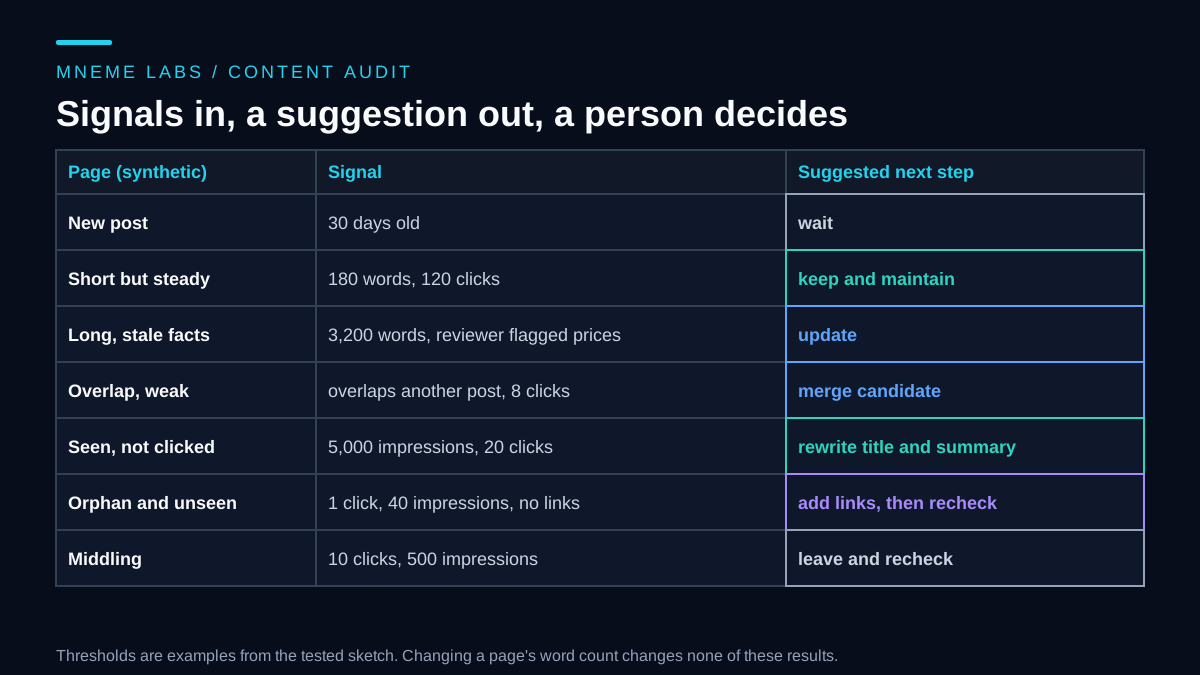
The thresholds (120 days, 50 clicks, 1,000 impressions, a 1 percent click rate) are placeholders. Set yours from your own site, and expect to adjust them after reading the first batch of results. The age rule delays judgments about search performance, not factual corrections: known stale or wrong facts go to the update queue even on a brand-new page. A suggestion is wrong sometimes, and that is the reason a person reads each one.
Act on each suggestion with care
The whole flow has a person between the suggestion and any change, and a recheck after a set period.
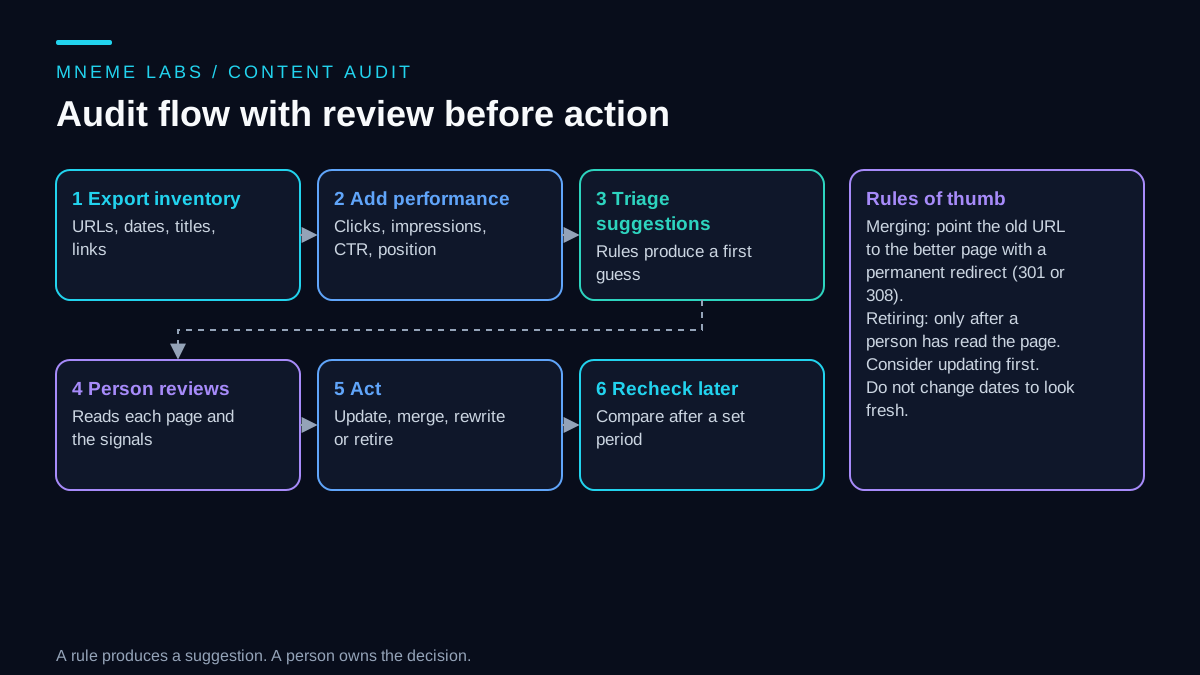
Update. Fix the facts, add what is missing, and put a real date on a real change. The helpful content guidance lists changing a page's date to make it look fresh when the content has not substantially changed as a warning sign, and also says that adding or removing a lot of content primarily because you believe it will make the site seem fresh will not help. So update pages that need it, and leave the rest alone.
Rewrite the title and summary. If a page appears often and is clicked rarely, the title or the description may not match what searchers want, or the page may rank for something it does not answer well. Read the queries before you change anything. The report can show which queries bring a page its impressions.
Merge. When two pages answer the same question, combine the better material into the stronger page and send the old URL to it with a permanent redirect. Google's documentation on redirects says that permanent redirects, such as HTTP 301 and 308, show the new target in search results, that temporary redirects show the source page, and that server-side redirects are the most reliably interpreted. It tells you to use a permanent redirect when you are sure it will not be reverted. Before merging, check that the two pages really serve the same intent. Two pages with similar keywords can answer different questions.
Retire. Treat this as the last option, and only after a person has read the page. Ask whether it can be improved, merged or redirected to something useful. If it must go, decide what visitors and any inbound links should see instead. A page with no readers and no purpose may be worth removing. A page that is simply new, seasonal or unlinked is worth fixing first. For an orphan, add internal links from related pages and recheck before any retirement decision, since a page nothing links to cannot show what it would do with links.
Failure cases to plan for
Deleting by word count. A short definition page or a calculator page with steady clicks gets removed. Word count is not a quality signal.
Judging new pages. A page that is a month old has had no time to perform. The sketch waits for 120 days, and your threshold may need to be longer.
Judging seasonal pages off-season. A holiday page checked in spring looks dead on 90 days of data. Mark seasonal pages, record a full year of clicks and impressions, and treat a missing year as a gap to fill, not as a weak page.
Merging unlike pages. Two posts with the same keyword answer different questions. Read both before combining.
Redirect mistakes. A chain of redirects, a redirect to an unrelated page, or a temporary redirect used where a permanent one was meant leaves search engines and readers confused. Test each redirect after you set it.
Reading the wrong numbers. Clicks and impressions come from search. A page with few search clicks may bring in a newsletter audience or support a sales conversation. Check other sources before acting.
Reporting a win too early. A rise in traffic after an update may reflect a season, a news event or a change by a search engine. Compare with a similar period, and say what else changed.
A model's confident summary. A model may describe a page as outdated or off-topic with no good reason. Ask it to quote the passage it is reacting to, and read it yourself.
Limits
An audit finds candidates for attention. It does not tell you what will rank, and it cannot predict how much traffic an update will bring. The sketch uses a small set of signals, and sites differ in what counts as a healthy page. The guidance cited here describes what the platform documents about its reports, redirects and content questions, and it does not guarantee any outcome. If your site earns revenue from a few pages, make changes slowly and keep a copy of what you changed.
Next step
Export your inventory with URLs, dates and titles. Add 90 days of clicks and impressions per page from your search report, and 365 days for any page you mark seasonal. Have a person fill in the stale-facts and overlap columns for your top fifty pages by impressions. Run the triage on that set, read every suggestion, and act on only the five you are most sure about. Recheck after a month. For ongoing checks that something has broken, see the monitoring guide.
Sources
- Google Search Console Help, Performance report (Search results): definitions of clicks, impressions, CTR and average position, default three-month view, preliminary data, and result variation by searcher.
- Google Search Central, Redirects and Google Search: permanent versus temporary redirects, 301 and 308, and server-side redirects.
- Google Search Central, Creating helpful, reliable, people-first content: no preferred word count, changing dates to seem fresh, and adding or removing content for perceived freshness.