A script is the plan for what you will say and show. How long it takes depends on the topic, how much you already know, how good your notes are, and how much of a draft you keep. No tool changes that for every video, so this guide makes no promise of ten-minute scripts. It describes a way of working in which an AI writing tool does the jobs it is decent at, and you keep the jobs that decide whether the video is true and sounds like you.
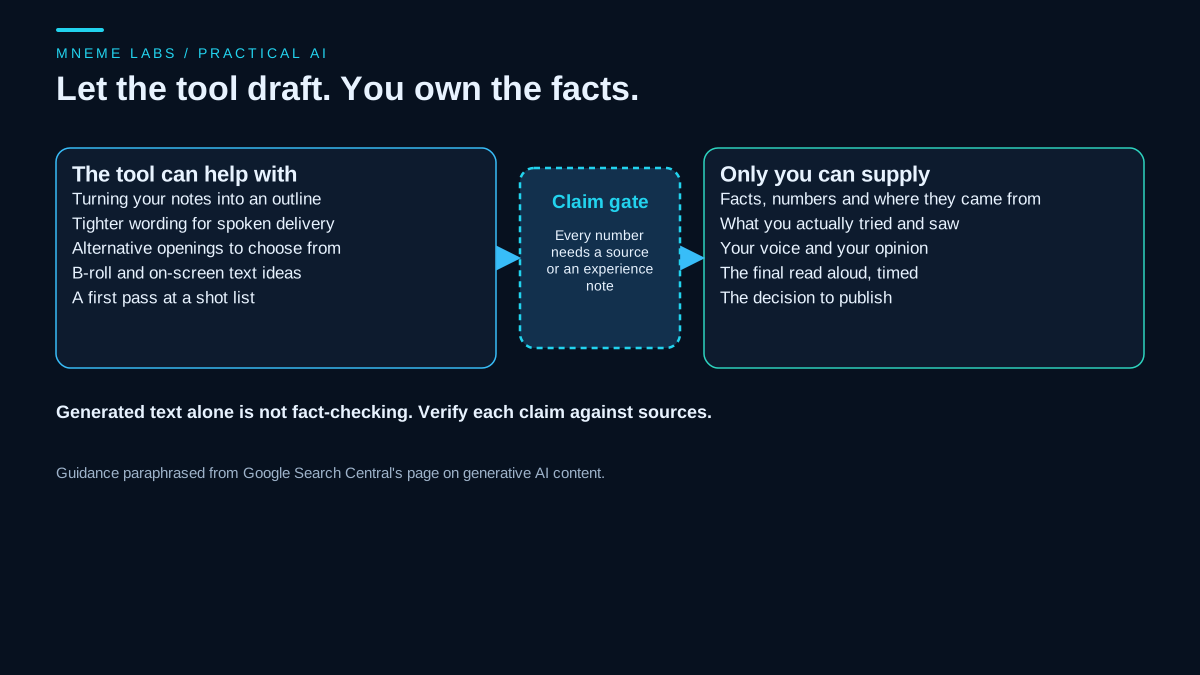
The jobs worth handing over are structural: turning notes into an outline, offering alternative openings, tightening a sentence that is hard to say aloud, and listing B-roll ideas. The jobs to keep are the facts, the things you actually tried, your opinion, and the final read. The sections below build a repeatable process around that split. For the written-content version of the same idea, see the source-first blog drafting guide.
Why the facts stay with you
Google's guidance on generative AI content tells website owners to focus on accuracy, and it says generative AI output may contain inaccuracies, often called hallucinations. The page says it is critical to manually fact-check and review AI-generated content before publishing. That guidance is written for websites, but the risk carries over to a script. Generated text alone is not fact-checking. A smooth sentence in a tutorial can still state the wrong torque, the wrong price, or a study that does not exist. Some tools can search the web or retrieve documents, and that can help you find sources, but each claim still has to be checked against the source it points to.
A video makes this worse in one way. A reader of an article can pause and check. A viewer hears the claim once, at speaking speed, and may repeat it. That is the case for a claim register: a rule that every number, ranking, and factual statement in the script carries a source or an honest note that it comes from your own experience.
The process
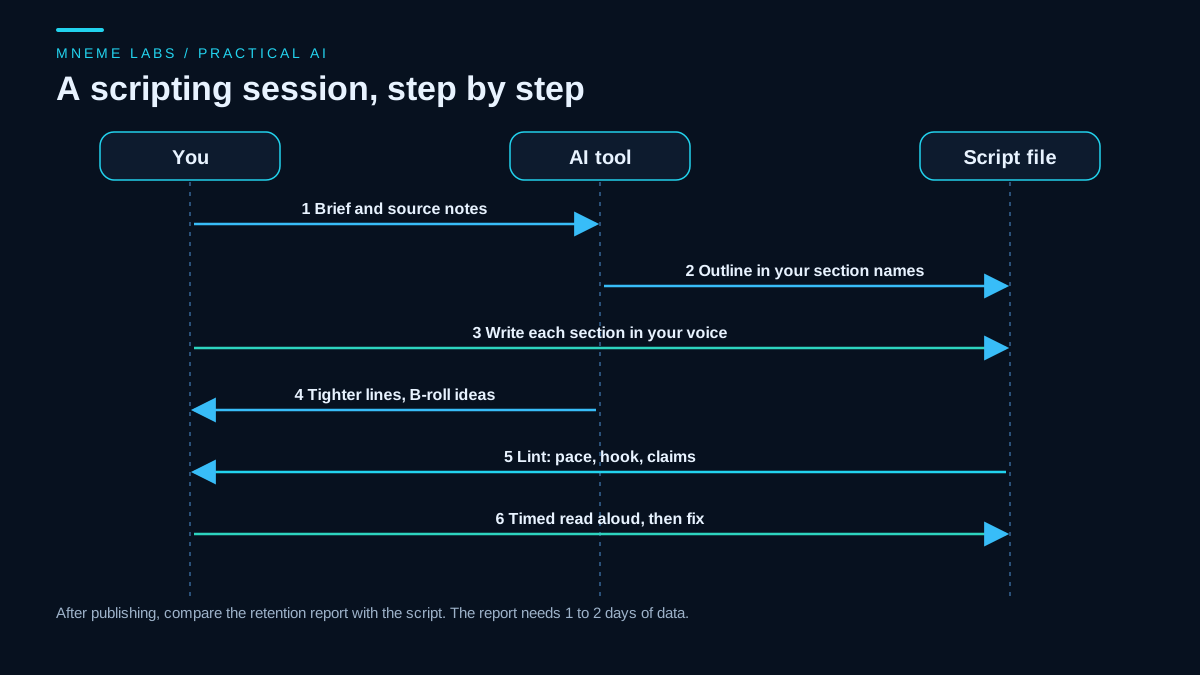
- Write a brief in your own words. Two or three sentences: who the viewer is, the question the video answers, and what they can do afterward. Add what you know first-hand.
- Assemble a source packet. Collect the manuals, official pages, and your own notes the script is allowed to use. Save the relevant passages, not only links.
- Ask for an outline, not a script. Give the tool your brief and packet and ask for section names, in order, with one sentence on what each section must show. Rename the sections yourself.
- Write or heavily edit each section in your voice. Use the tool for alternatives, not for the whole draft. If a line does not sound like something you would say, change it.
- Tag claims as you go. Mark a number with a source note or an experience note.
- Lint the script. A script checker (below) catches long hooks, sentences that are hard to say, and unsourced claims.
- Time a read aloud. Read a section out loud with a timer. Your pace, not a general average, drives the estimate.
- Plan the shots. Ask the tool for B-roll and on-screen text ideas per section, then keep only what you can actually film or make.
Example prompts for steps 3 and 8, as plain text:
Using only the notes below, propose an outline for an 8 minute tutorial.
Give each section a name and one sentence on what the viewer must see or
understand. Do not add facts that are not in the notes. Flag any section
where the notes are thin.

[paste brief and source packet]
For each section of this script, list up to three B-roll or on-screen text
ideas I can film with a phone and a bike stand. Do not invent product names.

[paste script]
The phrase "do not add facts" does not guarantee the tool obeys. It only reduces the chance. The claim register and your own read are the actual safeguard.
A script format that a program can check
A small convention makes a script machine-readable. Each section starts with ## Name, and the first section is the hook. Bracketed notes are not spoken: [B-ROLL: ...] and [SHOW: ...] for visuals, [SOURCE: ...] for a cited fact, and [MY-EXPERIENCE: ...] for something you did yourself.
The script below reads that format. It counts spoken words per section, converts them to minutes using a words-per-minute figure you supply from your own timing, flags a hook over a word limit, flags sentences that run too long to say in one breath, and flags any sentence with a digit or an absolute word such as "always", "never", or "best" that carries no source or experience note. The limits are example values, so change them to match your style.
"""script_lint.py: check a spoken-video script before you film. Standard library only.

  python script_lint.py script.md --wpm 150 [--max-hook-words 60] [--max-sentence-words 25]

Script format: sections start with a line "## Name". Bracketed notes such as [B-ROLL: ...] or
[SOURCE: ...] are not spoken. The first section is treated as the hook.
Exit code 0 = no flags, 1 = flags found, 2 = bad input.
"""
import argparse
import re
import sys

CLAIM_WORDS = re.compile(r"\b(always|never|guaranteed?|best|fastest|proven|studies show|everyone|nobody)\b", re.I)
NOTE = re.compile(r"\[([A-Z-]+)(?::[^\]]*)?\]")


def parse(text):
    sections, current = [], None
    for line in text.splitlines():
        if line.startswith("## "):
            current = {"name": line[3:].strip(), "lines": []}
            sections.append(current)
        elif current is not None and line.strip():
            current["lines"].append(line.strip())
    return sections


def spoken(line):
    text = re.sub(r"\s+", " ", re.sub(r"\[[^\]]*\]", "", line)).strip()
    return re.sub(r"\s+([.!?,;:])", r"\1", text)


def sentences(line):
    # keep a bracketed note with the sentence it follows: "text. [NOTE]" becomes "text [NOTE]."
    line = re.sub(r"([.!?])\s*((?:\[[^\]]*\]\s*)+)", lambda m: " " + m.group(2).strip() + m.group(1) + " ", line)
    return [s.strip() for s in re.split(r"(?<=[.!?])\s+", line) if s.strip()]


def lint(sections, wpm, max_hook, max_sentence):
    report, flags, total = [], [], 0
    for i, sec in enumerate(sections):
        words = sum(len(spoken(l).split()) for l in sec["lines"])
        total += words
        report.append((sec["name"], words, round(words / wpm, 1)))
        if i == 0 and words > max_hook:
            flags.append("hook '%s' is %d spoken words, over %d" % (sec["name"], words, max_hook))
        for line in sec["lines"]:
            for sent in sentences(line):
                said = spoken(sent)
                n = len(said.split())
                if n > max_sentence:
                    flags.append("[%s] %d-word sentence: %s..." % (sec["name"], n, said[:50]))
                has_source = "[SOURCE" in sent or "[MY-EXPERIENCE" in sent
                if (re.search(r"\d", said) or CLAIM_WORDS.search(said)) and not has_source:
                    flags.append("[%s] claim without a source note: %s" % (sec["name"], said[:70]))
    return report, flags, total


def main():
    ap = argparse.ArgumentParser()
    ap.add_argument("path")
    ap.add_argument("--wpm", type=float, required=True, help="your own timed speaking pace, words per minute")
    ap.add_argument("--max-hook-words", type=int, default=60)
    ap.add_argument("--max-sentence-words", type=int, default=25)
    args = ap.parse_args()
    if args.wpm <= 0:
        print("wpm must be positive", file=sys.stderr)
        return 2
    try:
        with open(args.path, encoding="utf-8-sig") as fh:
            sections = parse(fh.read())
    except OSError as err:
        print("cannot read: %s" % err, file=sys.stderr)
        return 2
    if not sections:
        print("no '## ' sections found", file=sys.stderr)
        return 2
    report, flags, total = lint(sections, args.wpm, args.max_hook_words, args.max_sentence_words)
    for name, words, minutes in report:
        print("%-22s %4d words  ~%.1f min" % (name, words, minutes))
    print("total %d words, about %.1f minutes at %g wpm" % (total, total / args.wpm, args.wpm))
    for f in flags:
        print("FLAG", f)
    return 1 if flags else 0


if __name__ == "__main__":
    sys.exit(main())
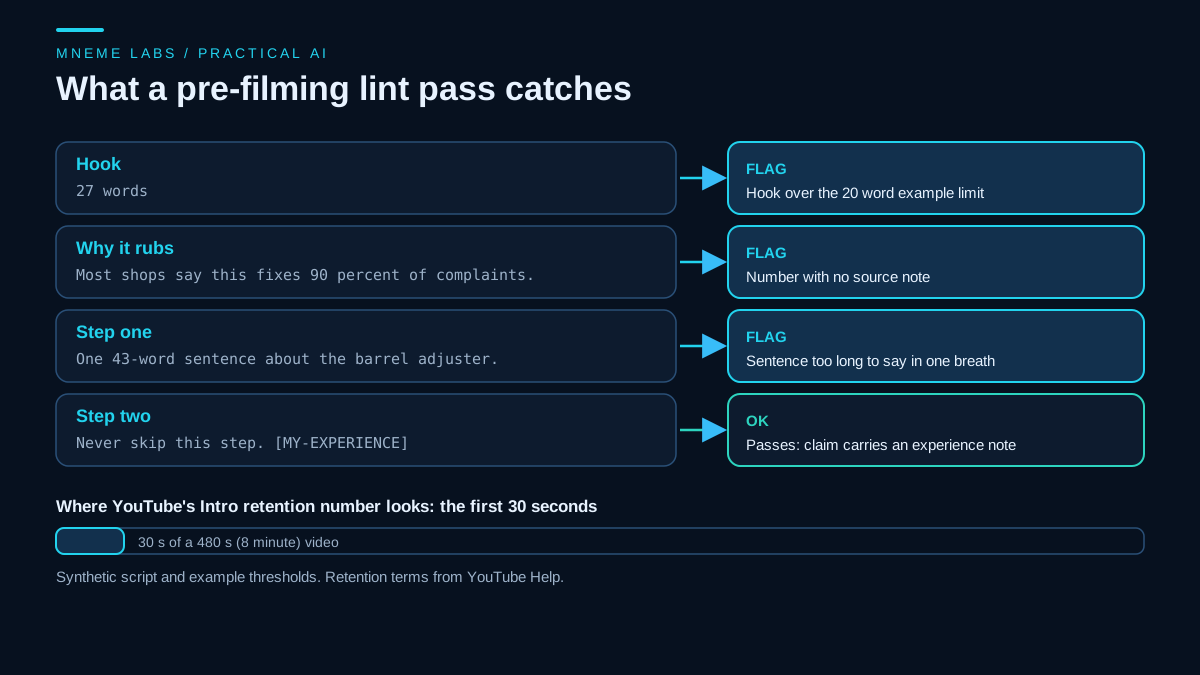
It was tested on a synthetic 99-word script about adjusting a bicycle brake, built with deliberate problems. With an example limit of 20 words for the hook, it flagged the 27-word hook, flagged the 27-word hook sentence and a 43-word sentence in the first step, and flagged a sentence claiming that something fixes "90 percent" of complaints because it had no source note. A line that said "Never skip this step" passed because it carried an experience note. It also exited with a non-zero status when it found flags, so it can sit in a pre-filming checklist.
What the script cannot do matters just as much. It cannot tell whether a source note is honest or whether the cited page says what you claim. It cannot judge tone, humor, or whether an explanation is clear. A script can pass every check and still be dull. Treat the output as a list of places to look.
Calibrate pace with your own voice
Estimating video length from word count requires a words-per-minute figure, and that figure belongs to you. Read about 200 words of a draft aloud at your normal on-camera pace, time it, and divide. Do this once per format, because explaining a technical step slowly takes longer than telling a story. Then pass that number to the checker. If your first estimate is off after the first video, change the figure and not the process.
What YouTube asks of you
Two YouTube Help pages matter at this stage.
The first covers disclosing generative AI content. YouTube requires creators to disclose realistic content that is AI-generated or meaningfully altered, such as a realistic scene that did not happen or a real person made to appear to say something they did not. The same page lists production help that does not require disclosure, and that list includes using generative AI tools to create or improve a video outline, script, thumbnail, or title, as well as idea generation, caption creation, and cloning your own voice for voice-overs. That answers the narrow question of whether an AI-assisted script needs a label on YouTube. The answer on that page is no, while realistic synthetic footage or a fake-seeming statement from a real person does. Policies change, so read the current page before you upload, and check any sponsor or platform rules that apply separately.
The second is the audience retention report, which is how you learn whether a script worked. The report's "Intro" figure shows the share of viewers still watching after the first 30 seconds. YouTube says a high figure could mean the opening matched the expectation set by the thumbnail and title, and it suggests changing the title and thumbnail, or the first 30 seconds, when the figure is low. "Dips" show where viewers skipped or left, and "spikes" show where they rewatched or shared, which can also mean the explanation was not clear. The report needs at least 60 seconds of video and 100 views, and the data takes 1 to 2 days to process. Compare the report with your script for each video, and note which kinds of openings hold viewers. With a small channel, a handful of videos is too little for a firm conclusion, so treat patterns as hypotheses.
Common failures and fixes
- Generic phrasing. A line that could appear in any video on the topic usually came from the tool. Replace it with a detail only you know.
- Invented numbers. If a statistic has no source, cut it or change it to a plain statement of what you saw yourself, and only if that is true.
- Reading the script word for word. A script written to be read can sound stiff when spoken. Say each section aloud and rewrite any line you trip over.
- Padding to hit a length. Length follows content. A tight six minutes beats a stretched eight.
- Visuals that cannot be filmed. B-roll ideas are only useful if you can make them. Cut the rest before shooting day.
- Copying a source. Use a source for facts and write your own explanation, and link or name it on screen when it matters.
A worked example
Take a hypothetical video: "How to stop a rubbing rear brake." The brief says the viewer has a rim-brake road bike and ten minutes with a hex key. The source packet holds the brake maker's manual and your own notes from fixing three bikes. The outline has four sections: the hook, why the pad rubs, finding the barrel adjuster, and testing. You write each section, using the tool only to offer two alternative hooks and to shorten the barrel-adjuster explanation. You tag the manual's guidance with a source note and your own bench notes with experience notes. The linter flags a long sentence and a "90 percent" line you cannot support, so you cut the number. You time a read aloud, set your pace, and let the estimate guide cuts. After upload, you check the retention report for the first 30 seconds before deciding whether the next opening needs a change.
Limits
- AI tools can make a script sound polished while saying little. Polish is not accuracy.
- A lint pass finds structure problems, not truth problems.
- Retention data from a handful of videos is noisy and does not show cause.
- Recording a sponsored or affiliate video adds rules this guide does not cover.
A next step
Take the next video you plan to make and write the brief and source packet before you open any AI tool. Ask for an outline only, rename its sections, write the hook yourself, and run the checker with your own pace. If the whole process feels slower than before, that is fine for a first run. The aim is a script whose claims you could defend, and the speed comes from reusing the same format.
Sources
- Google Search Central, Using generative AI content: output may contain inaccuracies, manual fact-checking and review before publishing, and giving context on how content was made.
- YouTube Help, Disclosing use of GenAI content: what must be disclosed, and the list of production help that does not, including scripts, outlines, titles, captions, and cloning one's own voice.
- YouTube Help, Measure key moments for audience retention: Intro, Top moments, Spikes and Dips definitions, the 60 second and 100 view requirement, and the 1 to 2 day processing time.