Most project status work is asking the same questions again. What is overdue? What is waiting on something else? Who is stuck? An assistant that reads a tracker export can ask those questions every morning without anyone typing a message. That part is useful. The risk is what else it can read and what it is asked to conclude. A tool that starts with task dates can drift into counting keystrokes, ranking people and sending scores upward, and at that point it is a monitoring system, with legal and trust consequences.
This guide builds a digest around one rule: report on the work, not the people. It reads a list of work items, turns the problems into questions for a person, and discards activity data before anything else runs. It makes no claim about hours saved, and it includes no connector to any tracker. You export a file from your own tool. The ten work items are invented, and the code ran only on them. One test uses timestamps written by hand in the style of a tracker export. No real tracker or account was used.
Two reasons to design this carefully
Trust is part of how teams work. The principles behind the Agile Manifesto say to build projects around motivated individuals, give them the environment and support they need, and trust them to get the job done. They name working software as the primary measure of progress, ask for a sustainable pace, and say teams reflect at regular intervals on how to become more effective. Those are software-team principles, and you can use them without being a software team. A digest that questions the state of the work fits them. A tool that watches individuals sits badly with the first one.
Monitoring people has rules. The UK Information Commissioner's Office publishes guidance on monitoring workers, and it is a useful reference even outside the UK because it spells out the questions. It says monitoring must be lawful and fair to workers, and that excessive monitoring can intrude into private lives and undermine privacy and mental wellbeing. It lists productivity tools that log how workers spend their time and keystroke monitoring among the technologies it covers. It says a data protection impact assessment must be carried out before processing likely to cause high risk, and gives as examples keystroke monitoring and monitoring that may result in financial loss, such as performance management. It describes the assessment as a step where you can discuss plans with workers. This guide is not legal advice, and the law that applies to you depends on where you and your team are. The practical reading is simple: collect less, tell people what is collected, and talk to them before you start.
Design: allow a short list of fields
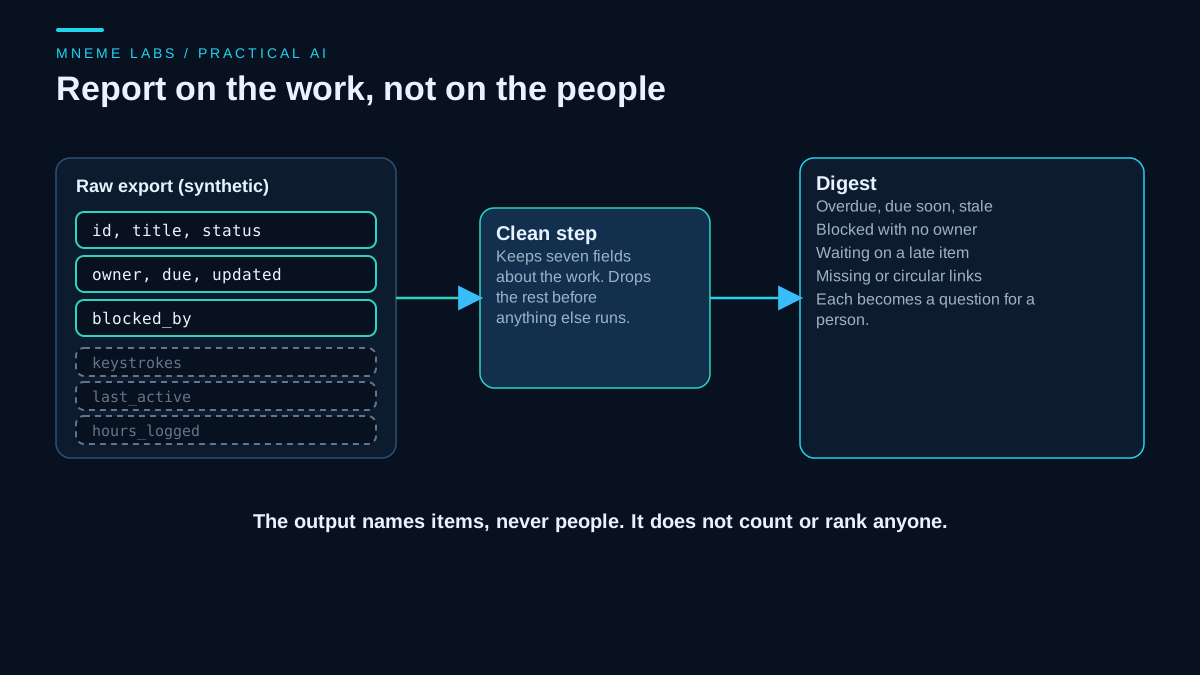
The digest accepts a small, fixed set of fields about the work: an identifier, a title, a status, an owner, a due date, a last-updated date and a list of items that block it. Everything else in an export is dropped at the first step, before any analysis or any model sees it. If a tracker export includes columns such as keystroke counts, time of last activity or hours logged, they are removed and the digest reports which column names were dropped, so the team can see the filter working.
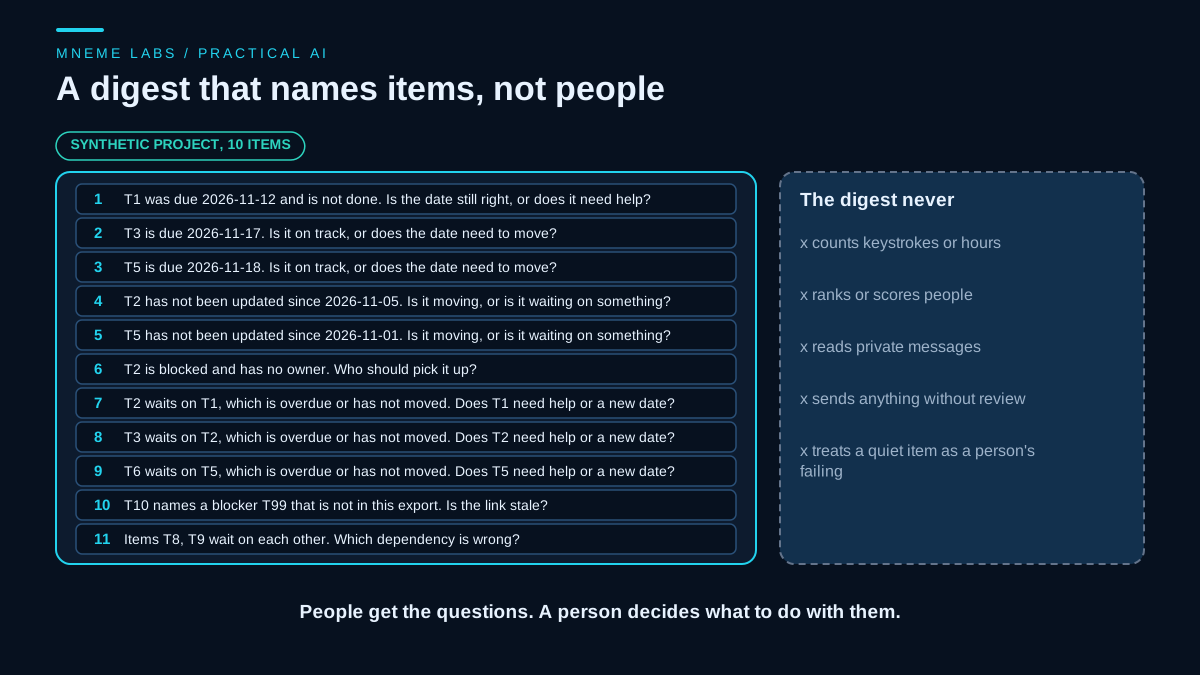
The output is a list of questions about items. It names no person, it counts no person, and it ranks no one. An owner field is read only to tell whether an item has one. The questions go to a human, who decides whether to ask anyone anything.
Dates, timestamps and time zones
Trackers mix two kinds of value. A due date is usually a calendar date such as 2026-11-20. It names a day and carries no zone. An updated field is usually a timestamp such as 2026-11-14T09:30:00.000+0000, the style Jira-type exports use, with milliseconds and a numeric offset. It names an instant. The code reads both with datetime.fromisoformat, which accepts offsets written like +0000 in Python 3.11 and later.
A plain date is used as written. A timestamp with an offset is converted to a time zone you choose and then reduced to its date. A timestamp with no offset is taken to be in that zone already. The choice matters, because a change made at 23:30 at UTC-05:00 on the 7th is already the 8th in UTC, and the item can flip between fresh and stale. The code defaults to UTC. Pass your team's zone to clean, and compute today in the same zone, for example with datetime.now(tz).date().
A value that is neither a date nor a timestamp is not guessed at. clean raises one error that names each item and field at fault and shows the value, for example item T3, field 'updated': '2026-11-14junk'. Nothing is trimmed to the first ten characters, so junk after a date is an error and not a date. A blank value means the field is missing, which is allowed.
The checks
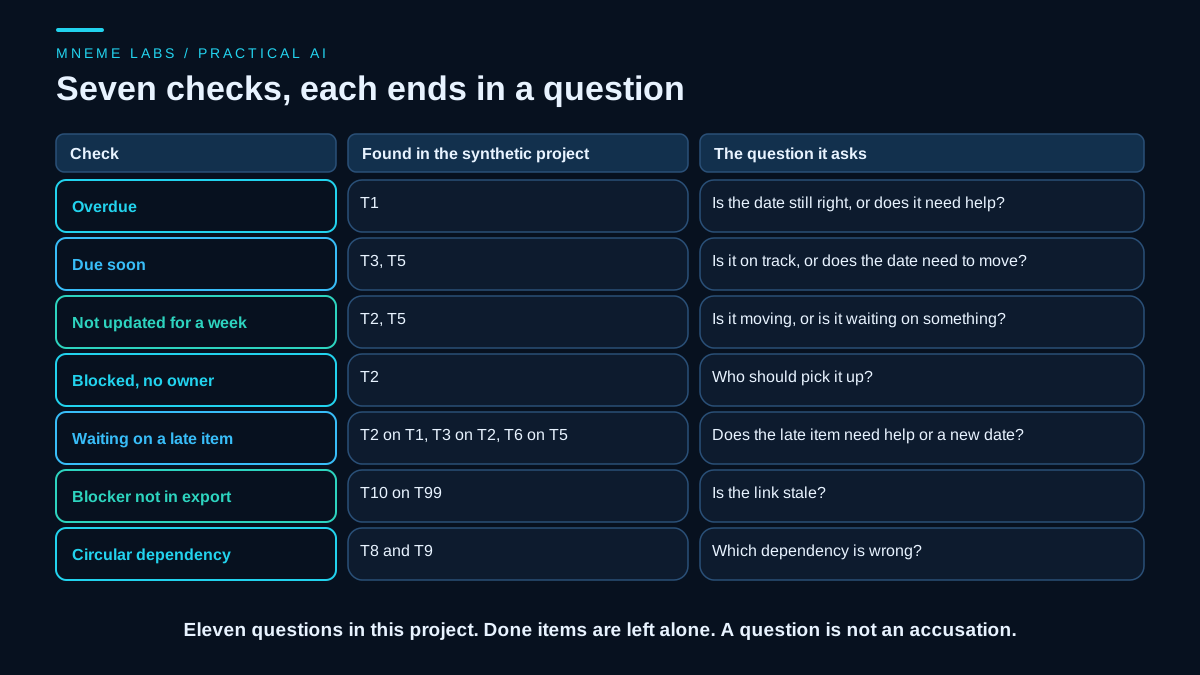
Seven checks run on open items. Overdue items are those past their due date. Due soon means within three days. Stale means not updated for more than a week. A blocked item with no owner needs someone. An item that waits on something overdue or stale needs a decision about that something. A blocker that is not in the export suggests a stale link. A circular dependency, where items wait on each other, means one of the links is wrong. Done items are never reported. The day counts are example values to adjust. Every check ends in a question. One item can appear in more than one question, and that is deliberate, because each question asks for a different decision.
from datetime import date, datetime, timedelta, timezone

ALLOWED = {"id", "title", "status", "owner", "due", "updated", "blocked_by"}
OPEN = {"todo", "doing", "blocked"}


def parse_day(value, tz=timezone.utc):
    """Return the calendar day, as a date, for an ISO 8601 date or timestamp. Raise ValueError if it is neither.
    A plain date such as 2026-11-14 already names a day and is used as written.
    A timestamp with an offset (Z, +0000, -05:00) is converted to tz first, then reduced to its date.
    A timestamp with no offset is taken to be in tz already. Nothing is trimmed: trailing junk is an error.
    Needs Python 3.11 or later for offsets written like +0000."""
    if isinstance(value, datetime):
        moment = value
    elif isinstance(value, date):
        return value
    elif isinstance(value, str):
        moment = datetime.fromisoformat(value.strip())
    else:
        raise ValueError("not text")
    return (moment.astimezone(tz) if moment.tzinfo else moment).date()


def clean(raw_items, tz=timezone.utc):
    """Keep only allowed fields. Return (items, dropped_field_names).
    `due` and `updated` become dates in the zone tz. A blank value means missing. Any other value that is not
    ISO 8601 raises one ValueError that names every item and field at fault."""
    items, dropped, errors = [], set(), []
    for n, r in enumerate(raw_items, 1):
        dropped |= set(r) - ALLOWED
        it = {k: r.get(k) for k in ALLOWED}
        it["blocked_by"] = list(r.get("blocked_by") or [])
        label = it["id"] if it["id"] not in (None, "") else "row %d" % n
        for k in ("due", "updated"):
            v = it[k]
            if v is None or (isinstance(v, str) and not v.strip()):
                it[k] = None
                continue
            try:
                it[k] = parse_day(v, tz)
            except (ValueError, TypeError, OverflowError):
                errors.append("item %s, field '%s': %r is not an ISO 8601 date or timestamp" % (label, k, v))
        items.append(it)
    if errors:
        raise ValueError("; ".join(errors))
    return items, sorted(dropped)


def find_cycles(items):
    """Return a sorted list of ids that sit on a dependency cycle."""
    by_id = {i["id"]: i for i in items}
    on_cycle, state = set(), {}

    def visit(n, path):
        state[n] = 1
        for m in by_id[n]["blocked_by"]:
            if m not in by_id:
                continue
            if state.get(m) == 1:
                on_cycle.update(path[path.index(m):])
            elif m not in state:
                visit(m, path + [m])
        state[n] = 2

    for i in by_id:
        if i not in state:
            visit(i, [i])
    return sorted(on_cycle)


def digest(items, today, stale_days=7, soon_days=3):
    """`today` is a date in the same zone that was given to clean(), for example datetime.now(tz).date()."""
    if isinstance(today, datetime) or not isinstance(today, date):
        raise ValueError("today must be a date, not a timestamp")
    by_id = {i["id"]: i for i in items}
    open_items = [i for i in items if i["status"] in OPEN]
    overdue = sorted(i["id"] for i in open_items if i["due"] and i["due"] < today)
    soon = sorted(i["id"] for i in open_items if i["due"] and today <= i["due"] <= today + timedelta(days=soon_days))
    stale = sorted(i["id"] for i in open_items if i["updated"] and (today - i["updated"]).days > stale_days)
    unowned_blocked = sorted(i["id"] for i in open_items if i["status"] == "blocked" and not i["owner"])
    unknown_blockers = sorted({(i["id"], b) for i in open_items for b in i["blocked_by"] if b not in by_id})
    # an open item waiting on something that is itself overdue or stale needs a decision about that something
    late = set(overdue) | set(stale)
    waiting_on_late = sorted({(i["id"], b) for i in open_items for b in i["blocked_by"]
                              if b in late and by_id[b]["status"] in OPEN})
    cycles = find_cycles(items)
    questions = []
    for iid in overdue:
        questions.append("%s was due %s and is not done. Is the date still right, or does it need help?"
                         % (iid, by_id[iid]["due"].isoformat()))
    for iid in soon:
        questions.append("%s is due %s. Is it on track, or does the date need to move?"
                         % (iid, by_id[iid]["due"].isoformat()))
    for iid in stale:
        questions.append("%s has not been updated since %s. Is it moving, or is it waiting on something?"
                         % (iid, by_id[iid]["updated"].isoformat()))
    for iid in unowned_blocked:
        questions.append("%s is blocked and has no owner. Who should pick it up?" % iid)
    for iid, b in waiting_on_late:
        questions.append("%s waits on %s, which is overdue or has not moved. Does %s need help or a new date?" % (iid, b, b))
    for iid, b in unknown_blockers:
        questions.append("%s names a blocker %s that is not in this export. Is the link stale?" % (iid, b))
    if cycles:
        questions.append("Items %s wait on each other. Which dependency is wrong?" % ", ".join(cycles))
    return {"overdue": overdue, "due_soon": soon, "stale": stale,
            "unowned_blocked": unowned_blocked, "waiting_on_late": waiting_on_late,
            "unknown_blockers": unknown_blockers, "cycles": cycles, "questions": questions}
The code above is complete as printed. find_cycles is a short depth-first walk over the blocker links. The tests ran this exact text, read from this page.
What the tests showed
The synthetic project had ten items, with three activity columns attached to two of them: a keystroke count, a last-active time and logged hours. The cleaning step dropped exactly those three columns and kept the seven allowed fields on every item.
On the cleaned items, one item was overdue, two were due within three days, and two had not been updated for more than a week. One blocked item had no owner. Three items waited on something that was overdue or stale, and one of those was a chain: an item waiting on a stale item that itself waited on an overdue one. One item named a blocker that was not in the export, and two items waited on each other. The digest turned these into eleven questions, at least one from each of the seven checks: one overdue, two due soon, two not updated for a week, one blocked with no owner, three waiting on a late item, one unknown blocker and one cycle. The same item can appear in more than one question. T2 is stale, has no owner and waits on T1, and each question asks for a different decision. A finished item with an old date produced nothing.
Dates were tested separately. A second copy of the project wrote updated as tracker-style timestamps, 2026-11-14T09:30:00.000+0000, and produced the same digest and the same eleven questions. A change made at 23:30 on 7 November at UTC-05:00 counts as 7 days old under UTC and 8 days old under a UTC-05:00 team zone, so it was stale in one and not in the other. A plain due date did not move with the zone, while a due timestamp of 01:00 UTC on 17 November became the 16th in the UTC-05:00 zone. Values that are not ISO 8601, such as 2026-11-14junk, 2026-13-45, 11/14/2026, a bare number of seconds and true, each raised an error naming the item and the field. When two items were bad, one error named both. Blank values were accepted as missing.
Two checks mattered more than the rest. The output was searched for the four owner names in the data, and none appeared. The result also had no per-person field, no velocity and no score. And a clean project produced an empty digest, so quiet days stay quiet.
These tests show that the filter and the checks behave as described on invented data. They do not show that the digest is useful to any particular team, that a tracker export will look like this one, or that people will welcome it.
Where a model fits
A model can turn the questions into a readable message, or help a team phrase a follow-up kindly. Give it the digest, not the tracker, and not any comments or chat history you have not reviewed. Text from comments can contain instructions, and a model that holds credentials to post in a channel can be steered by it. OWASP's guidance on excessive agency recommends human approval for high-impact actions and limiting what an agent can do. For a digest, the practical form is a read-only credential for the tracker and a draft message that a person sends.
If you read the tracker through its API and not an export, respect its limits. Atlassian's Jira Cloud documentation describes three independent rate limiting systems, an hourly points-based quota, a per-second burst limit on each endpoint, and a limit on how often a single issue can be written, and says the app must handle all of them. A daily read-only job can reduce requests, but its volume and burst rate still matter. Follow pagination, inspect rate-limit responses, and back off when required instead of assuming a daily schedule guarantees compliance. Schedule it with the guidance in the article on scheduling agents, and list it in the registry described in the operations playbook.
Using it without turning it into surveillance
Tell the team what the digest reads and which fields it drops. Let owners correct their own items. Use the digest as input to a short conversation, not as a replacement for one. Do not use it as evidence in a performance review, and say so in writing. If your plans go beyond work items, such as tracking activity, speak to the people affected and check the law that applies to you first.
Failure cases
Stale data looks like stalled work. A tracker that nobody updates will show every item as stale. The question to ask is whether the tool or the work has stopped.
Counts become targets. When a number is used to judge people, they tend to manage the number. A digest with no per-person counts removes that incentive.
False certainty from dates. A due date is a plan. An overdue item may be waiting on a customer, and the digest cannot know.
Dependency data is often wrong. Blocker links go out of date quickly. The check for unknown and circular links finds only the obvious cases.
Day boundaries. A timestamp near midnight falls on different days in different zones, so an item can be fresh in one zone and stale in another. Choose the zone once and use it for both the timestamps and today.
Over-reach. A convenient new field in an export, such as time of last activity, is easy to add. Adding it changes what the tool is.
Quiet success. A job that exits cleanly with an empty digest looks the same as a broken one. Use a heartbeat, as in the guide on monitoring.
Next step
Export one project from your tracker. Open the file and list its columns. Note which date fields are plain dates and which are timestamps, and decide which time zone your team's days follow. Mark each as about the work or about a person, and delete the second kind before you run anything. Run the digest on that file, read the questions, and ask the team which ones were useful and which felt like pressure. Change the checks based on their answers, and ask before adding any new field.
Sources
- Agile Manifesto, Principles behind the Agile Manifesto: building around motivated individuals and trusting them, working software as the primary measure of progress, sustainable pace, self-organizing teams, and regular reflection.
- ICO, Employment practices and data protection: monitoring workers: lawful and fair monitoring, excessive monitoring, productivity and keystroke tools, the DPIA requirement for high-risk processing, and discussing plans with workers.
- Atlassian, Jira Cloud rate limiting: the three rate limiting systems for Jira Cloud apps and integrations.
- OWASP, LLM06 Excessive Agency: limiting an agent's functions and permissions and requiring human approval for high-impact actions.