A lead magnet is a free resource offered in exchange for an email address. The idea works when the resource solves a small, real problem for the person who asked for it. It fails when it is a generic PDF that was produced because a model can produce thirty of them quickly. Volume is easy. Usefulness takes testing.
This guide takes the opposite approach to making thirty magnets in a few hours. It builds one, checks that it is correct, tries it on real readers, and then puts it behind a signup form that asks for consent properly. The example artifact is a small freelance rate calculator, and every number in it is synthetic. No signup rate, list growth or revenue result is claimed, since those depend on your audience and offer. If you want ideas for topics before you pick the artifact, the audience research guide and the idea backlog guide cover that stage.
Pick the artifact from a real question
Start with a question that your readers or customers ask repeatedly. "What should I charge per hour?" is a common one for freelancers. The best lead magnets help someone do one thing: calculate a number, fill in a checklist, or copy a template. They give a result the same day.
A good test is whether the person could use it without reading anything else. A checklist that fits on a page, a template with sample text filled in, or a calculator with four inputs passes. A forty-page "ultimate guide" usually does not, and it takes more effort to check.
Pick the format that matches the question. A rate calculator answers a numeric question, so a small tool or a spreadsheet is right. A client onboarding checklist answers a process question, so a one-page document is right.
Let AI draft, then check the artifact yourself
A model is useful for the first draft. It can propose the formula, write the explanatory text, suggest sample inputs, and draft the signup copy. It is not a reliable judge of whether the formula is right. A calculator that returns a wrong number is worse than no calculator, because the reader will act on it.
The rule that makes the work safe is to test with cases you worked out by hand. For the rate calculator, the logic is that you need a yearly take-home amount, which means earning more before tax, plus business costs, spread over the hours you can actually bill. Here is a small Python version.
def hourly_rate(target_take_home, tax_rate, business_costs, weeks_worked, billable_hours_per_week):
    """Estimate the hourly rate needed to reach a yearly take-home goal.

    tax_rate is a placeholder fraction you choose. It is not tax advice.
    """
    if not 0 <= tax_rate < 1:
        raise ValueError("tax_rate must be at least 0 and below 1")
    if weeks_worked <= 0 or billable_hours_per_week <= 0:
        raise ValueError("weeks_worked and billable_hours_per_week must be positive")
    if min(target_take_home, business_costs) < 0:
        raise ValueError("amounts cannot be negative")
    billable_hours = weeks_worked * billable_hours_per_week
    needed_before_tax = target_take_home / (1 - tax_rate) + business_costs
    return round(needed_before_tax / billable_hours, 2)
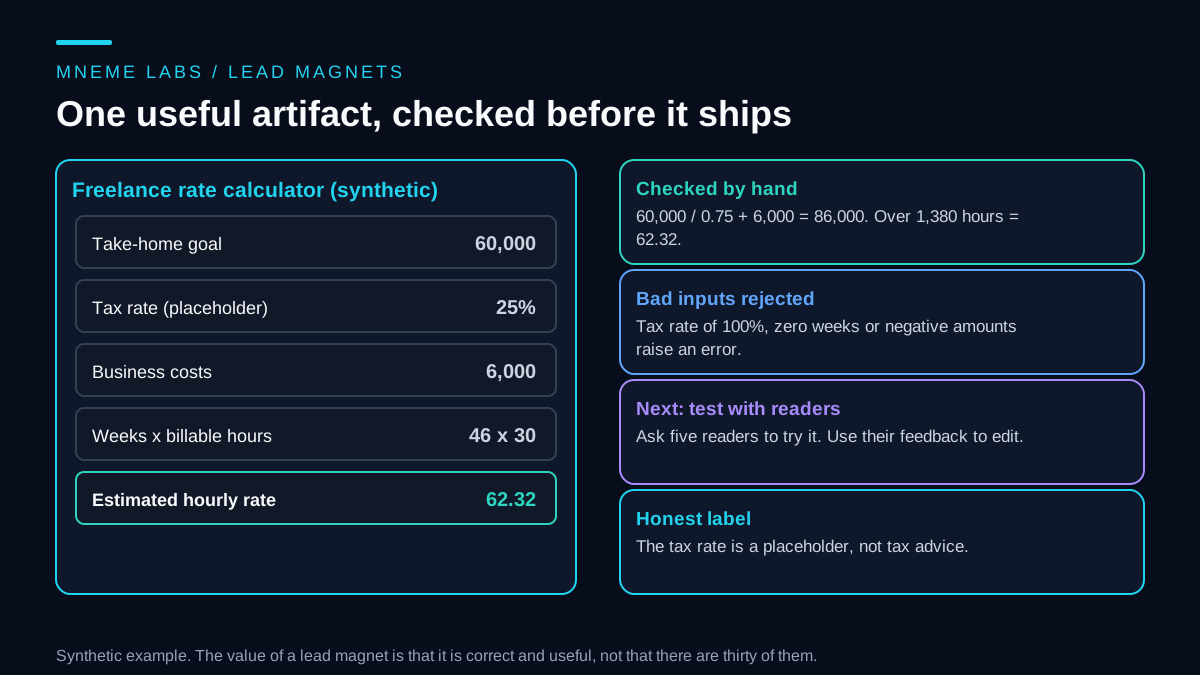
The hand check goes like this. A take-home goal of 60,000 with a 25 percent placeholder tax rate needs 60,000 divided by 0.75, which is 80,000 before tax. Add 6,000 of business costs for 86,000. With 46 working weeks of 30 billable hours, that is 1,380 hours, and 86,000 divided by 1,380 is 62.32. The test file asserts that value, plus a zero-tax case that gives exactly 30.0, two direction checks (higher costs raise the rate, more billable hours lower it), and four invalid inputs that must raise an error. All checks passed.
Those tests cover the arithmetic. They do not make the calculator wise. The tax rate is a rough placeholder, and real tax depends on where you live and your circumstances. Say so on the tool, in plain words, next to the result. A calculator that implies tax advice is a liability.
Try it on a few real people
After the tests pass, give the artifact to five people from your target audience and watch them use it, or ask them to describe what they did. Look for the moments when they hesitate: a label they misread, a number they did not know how to estimate, a result they did not trust. Fix those. Five people will not give you statistics, and they will find most of the things that confuse a stranger.
Ask each person one more question: what would you do with this result? If they have no answer, the artifact may be interesting and not useful. If they say they would raise their rates or stop taking a type of work, you have something worth offering.
Make the signup form honest
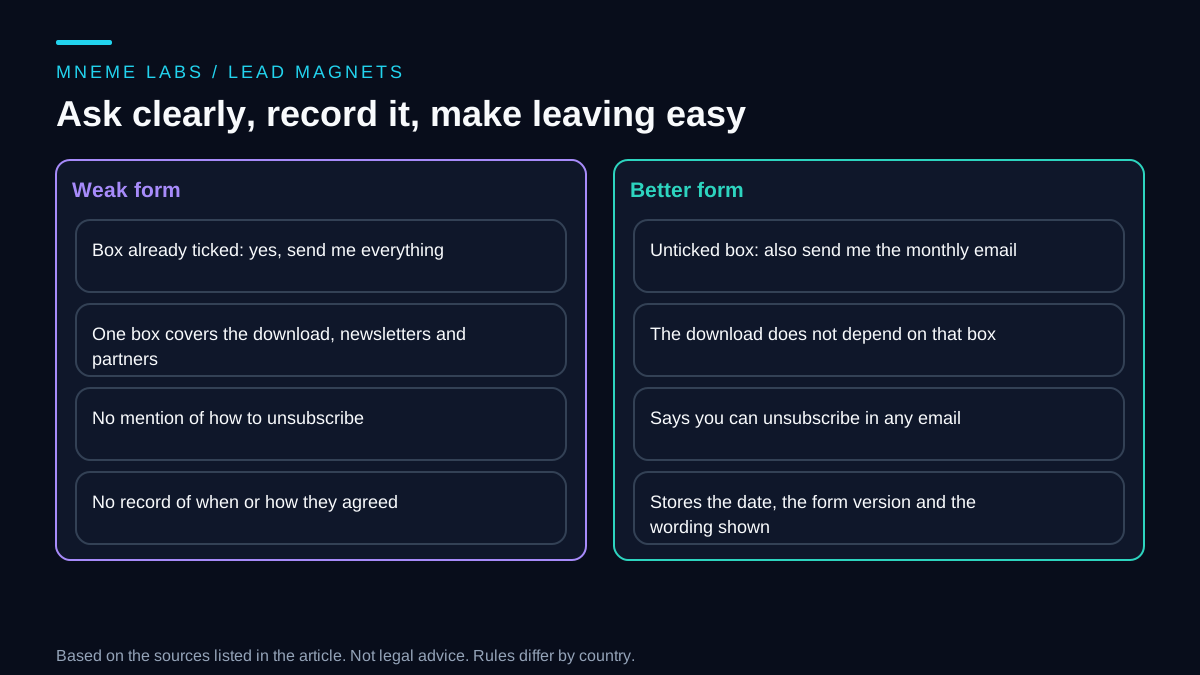
Once the artifact works, a form collects the address. Keep it plain. The UK Information Commissioner's guidance on valid consent says consent under UK GDPR must be freely given, specific, informed and unambiguous, signaled by a statement or a clear affirmative action. It says people must be able to refuse without detriment and to withdraw easily, that consent should be unbundled from other terms, and that Article 7 requires keeping records to demonstrate consent. Its example of an online store making sharing of customer data a condition of sale shows the problem with bundling.
In practice, that suggests a form where the download does not depend on agreeing to a newsletter, an unticked box for the newsletter with a plain description of what will be sent and how often, and a note about unsubscribing. Store the date, the form version and the wording shown. This is guidance from one regulator on one law, and UK electronic marketing rules have further requirements, so check the rules in each place where your subscribers live.
In the United States, the CAN-SPAM statute at 15 U.S.C. 7704 requires commercial email to include a clear way to decline further messages and a valid physical postal address, and to honor an opt-out request within ten business days. It also requires that a commercial message identify itself as an advertisement unless the recipient gave prior affirmative consent. A model may draft the welcome email, but the footer, the unsubscribe link and the address belong to your template, not to a prompt.
Mind deliverability
A good magnet is worthless if the email never arrives. Google's email sender guidelines list requirements for sending to Gmail accounts since February 2024. All senders need SPF or DKIM authentication, valid DNS records, a TLS connection, and a spam rate below 0.3 percent in Postmaster Tools. Senders of more than 5,000 messages a day to Gmail accounts also need SPF, DKIM and DMARC, and marketing messages must support one-click unsubscribe and show a visible unsubscribe link. A small list may be under those thresholds, but the habits are good for any list. Most email platforms handle authentication through a setup wizard, so follow it and check that it worked.
Read the numbers carefully
A lead magnet page produces several numbers, and they answer different questions. Visits are not unique people. Form submissions are not wanted addresses. Confirmed addresses show the address works and says nothing about whether the person will read your mail. Whether people used the artifact is hard to see, so ask a few of them. Unsubscribes tell you someone left, not why.
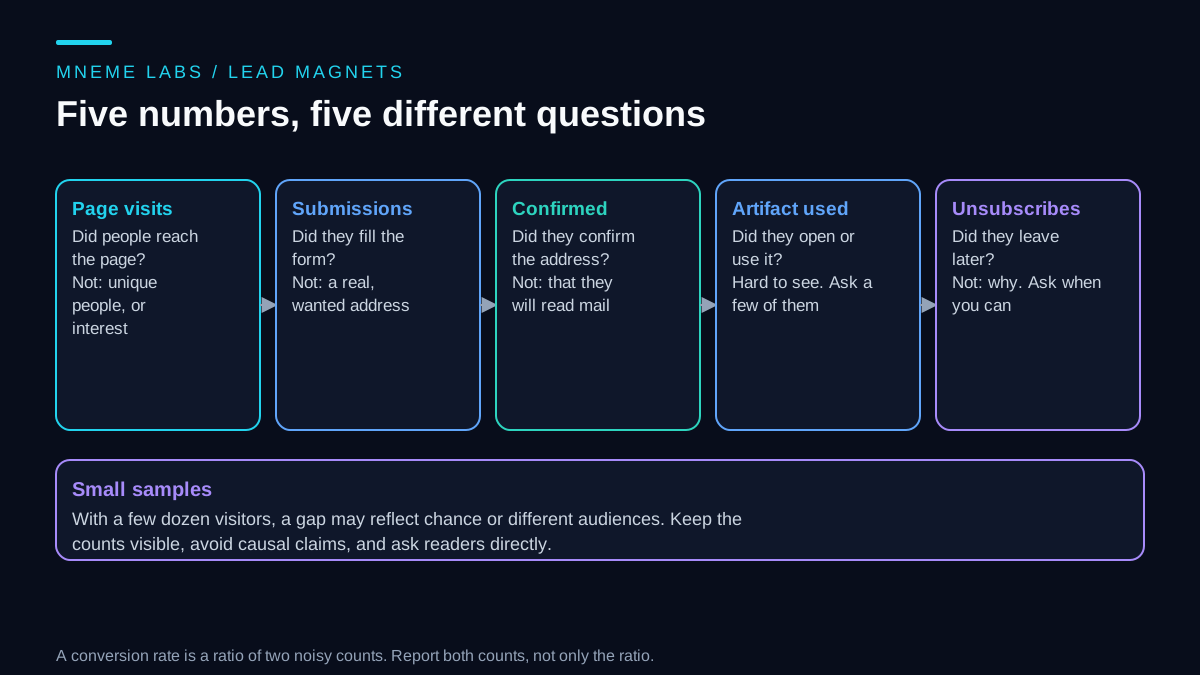
A signup rate is a ratio of two small, noisy counts. With a few dozen visitors, a gap between two versions of a page is as likely to be luck as a real difference, and an A/B comparison with that little traffic cannot settle anything. Report both counts, not only the percentage, and be wary of explaining a change by a single cause. Two things moved at once if you changed the headline during a week when you also posted on social media.
Failure cases to plan for
A wrong artifact. A formula error or an outdated number goes out to everyone. Test with hand-worked cases and date the artifact so readers know how current it is.
Generic output. Thirty similar checklists teach nothing. Keep the one that solves a real problem and drop the rest.
Consent shortcuts. Pre-ticked boxes, bundled consent and hidden unsubscribe links create legal risk and unhappy subscribers.
Bought or scraped lists. Adding people who never asked is a different thing from a lead magnet and invites complaints.
No follow-up plan. Collecting addresses without a reason to write to them wastes the effort. Decide what the first three emails will say before the form goes live.
Over-collection. Asking for a phone number or company size "just in case" lowers signups and adds data you must protect. The ICO's data minimisation principle, covered in the lead qualification guide, applies here too.
Limits
This guide builds one artifact and says nothing about how much traffic you will get. It does not promise a conversion rate, and the rate calculator is an example, not advice on what you should charge. The consent and email points come from UK and US sources and from Google's rules for Gmail, and other jurisdictions and mailbox providers differ. A lawyer or a consultant can review your form if you operate across borders.
Next step
List the three questions your audience asks most. Choose the one with a numeric or checklist answer, and have a model draft the artifact. Test it with cases you work out by hand, then with five real people. Write the signup form with a separate, unticked newsletter box, and send yourself the first email to check the footer, the unsubscribe link and the authentication. Only then send people to it.
Sources
- ICO, What is valid consent?: consent definition, freely given and unbundled consent, easy withdrawal, and keeping records.
- 15 U.S.C. 7704 (CAN-SPAM), via Cornell LII: opt-out mechanism, postal address, advertisement identification, and ten business day rule.
- Google, Email sender guidelines: authentication, TLS, spam rate, and one-click unsubscribe requirements for sending to Gmail accounts.