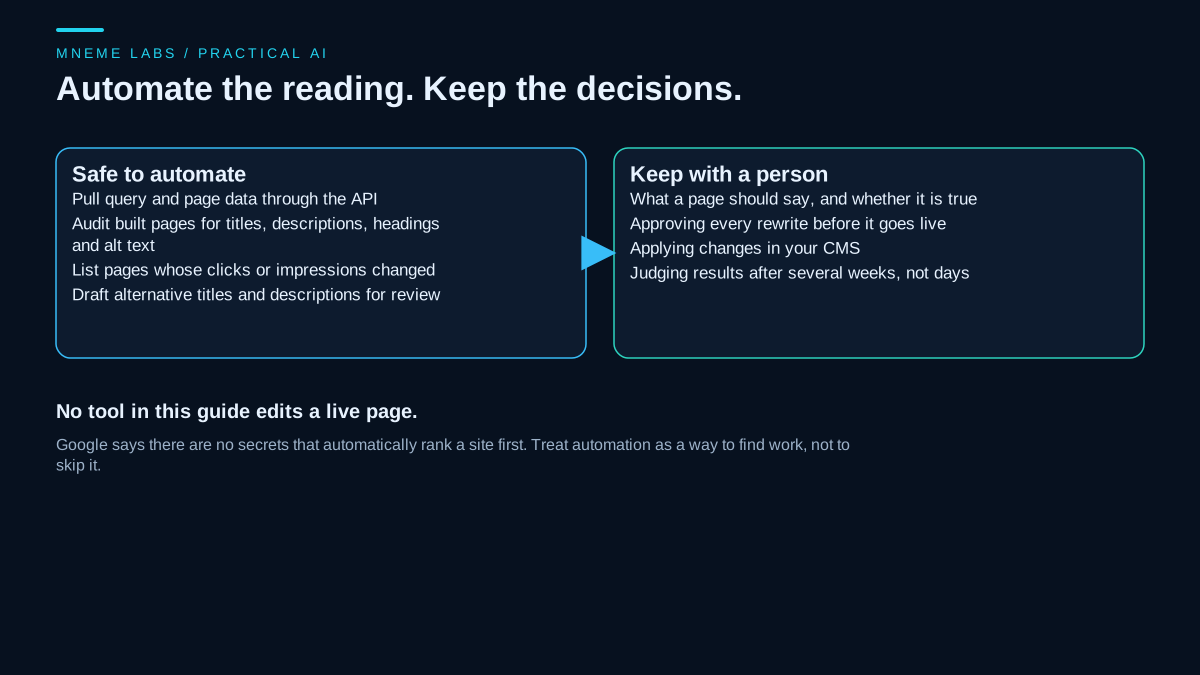
A list of 500 keywords is not a plan. For a niche blog, the more useful question is smaller: which topics do readers search for, which of those does the blog already cover well, and which deserve a page of their own? Search volume figures and difficulty scores can inform the answer, but the figures are estimates from tools built for other purposes, and nothing in them guarantees that a page will rank.
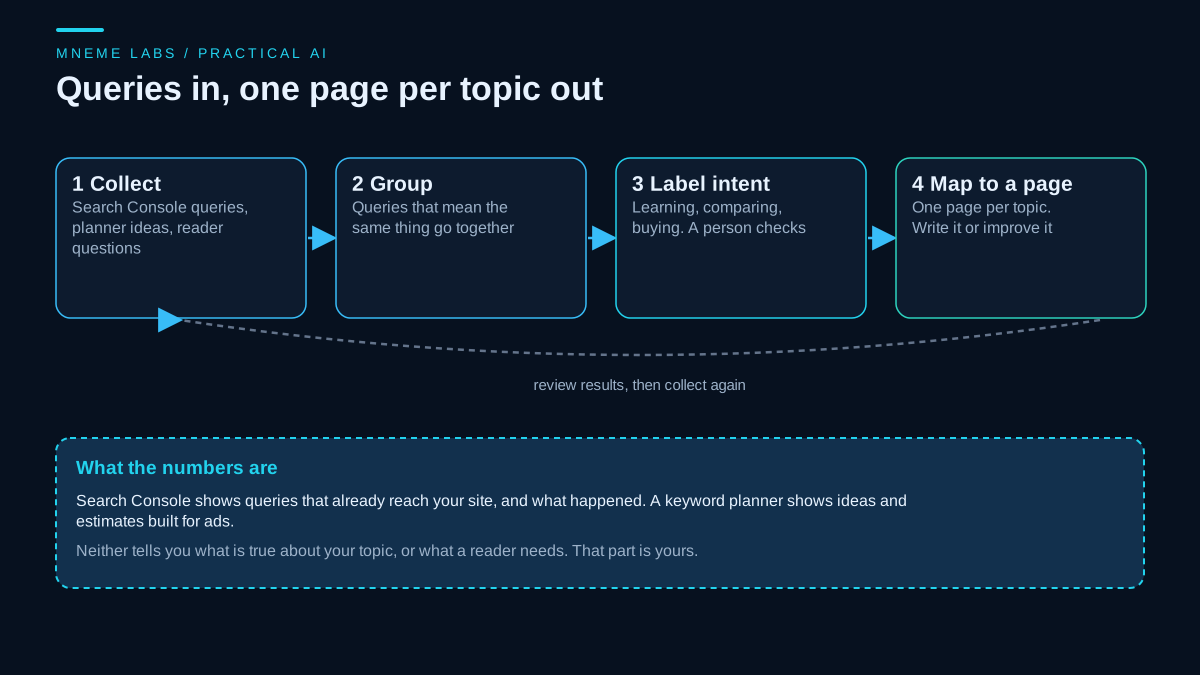
This guide builds a modest, repeatable process. It starts from the queries that already reach your site, adds ideas from a keyword planner and from your readers, groups them into topics, labels what the searcher seems to want, and ties each topic to one page. AI helps with organizing and wording. It does not supply search volumes, and its guesses about ranking should be ignored. The trending-topics counterpart of this guide is reading Google Trends data. For a longer idea backlog, see the guide to filtering blog ideas.
Where keyword data comes from
Search Console, your own data. The Performance report lists the queries that showed your site in Google Search, with clicks, impressions, click-through rate, and average position, and it can group them by query, page, country, and device. The default view is three months. Weekly and monthly views smooth out daily noise. The newest data can be preliminary. The report also notes that you may not see your own site if you search for a listed query yourself, since results vary by place, device, and history. Average position is the position of the topmost result from your site, averaged. This is the strongest source for an existing site because it reflects real searches that could find you.
A keyword planner, as a secondary source. Google's Keyword Planner is built to research keywords for Search campaigns. Its help page says it helps you discover keyword ideas, view estimated monthly searches, and see the cost to target keywords. It also says you must complete account setup, including billing information, to use basic features such as getting keyword ideas. Keywords with very low search volumes, and some sensitive ones, are not discoverable, and you get an error instead. For a niche blog, that last point matters: the long tail you want may be exactly what the tool hides. The estimates and the "competition" values describe advertising, which is a different market from organic results.
Your readers. Emails, comments, forum threads, and questions at the end of videos are the words people use. They rarely show up in a planner and often reveal what a page is missing.
Existing results. Search a topic yourself and read what ranks. This tells you what kind of page searchers get and what is missing.
What Google says to expect
The SEO Starter Guide contains two sentences worth keeping next to any keyword plan. It says there are no secrets that automatically rank a site first. And it says that after a change you likely want to wait a few weeks to assess whether it helped, because some changes take effect in hours and others take months, and not all changes produce a noticeable impact. Keyword research should be treated that way: a way to decide what to write and improve, with results judged over weeks by the same report that supplied the queries.
A process
- Write a seed list in your own words. Ten to twenty phrases a reader would use, not the terms you use.
- Export queries from Search Console. Use a window long enough to catch recurring queries. Add a column for readers' questions you collected.
- Group them by topic. Queries that mean the same thing belong together.
- Label the intent. Is the searcher trying to learn something, compare options, or buy? The label decides the page type.
- Check what you already have. For each topic, is there a page, and is it the right one?
- Map each topic to one page. Write it, improve it, or merge overlapping pages.
- Wait and review after several weeks.
A script for steps 3 and 4
The script below reads the Queries table exported from Search Console. It groups queries that share a distinctive word, ignoring words that appear in a large share of all queries, since the niche word itself should not decide the grouping. It labels a likely intent from simple word rules, such as how, why, best, vs, and buy. And it flags a query as worth a look when impressions are above a floor you set and average position falls in a range you set. The defaults of 50 impressions and positions 8 to 20 are examples. The flag marks where to look first. It does not promise that a change will move a position.
"""query_groups.py: group Search Console queries into topics and surface pages worth improving. Standard library only.

  python query_groups.py queries.csv [--min-impressions 50] [--pos-low 8] [--pos-high 20]

queries.csv is the Queries table exported from the Search Console Performance report:
columns like "Top queries", Clicks, Impressions, CTR, Position. Column names are matched loosely.
Groups share a significant word with the group's lead query, which is crude. Intent labels come from word rules.
The "worth a look" flag means impressions are high and average position is in a range you set. It is a
heuristic for where to look first, not a promise that a change will move the position.
"""
import argparse
import csv
import re
import sys
from collections import defaultdict

STOP = set("a an the to of and in on for your you how what why is it with are can do does i my best vs".split())
INFO = {"how", "what", "why", "when", "where", "which", "guide", "tutorial", "tips", "ideas", "examples"}
COMMERCIAL = {"best", "vs", "versus", "review", "reviews", "alternative", "alternatives", "compare", "comparison"}
TRANSACT = {"buy", "price", "cheap", "discount", "coupon", "order", "pricing"}


def col(row, *names):
    low = {k.lower().strip(): v for k, v in row.items()}
    for n in names:
        for k, v in low.items():
            if n in k:
                return v
    raise KeyError(names[0])


def num(text):
    t = str(text).replace(",", "").replace("%", "").strip()
    return float(t) if t not in ("", "-") else 0.0


def sig(query):
    return [w for w in re.findall(r"[a-z0-9']+", query.lower()) if w not in STOP and len(w) > 2]


def intent(query):
    w = set(re.findall(r"[a-z']+", query.lower()))
    if w & TRANSACT:
        return "transactional"
    if w & COMMERCIAL:
        return "comparing options"
    if w & INFO:
        return "learning"
    return "unclear"


def group(rows, common_share=0.4):
    """Words that appear in many queries (the niche word itself) cannot define a group."""
    df = defaultdict(int)
    for r in rows:
        for w in set(sig(r["query"])):
            df[w] += 1
    common = {w for w, n in df.items() if rows and n / len(rows) >= common_share}
    ordered = sorted(rows, key=lambda r: -r["impressions"])
    groups = []
    for r in ordered:
        words = set(sig(r["query"])) - common
        home = next((g for g in groups if words & g["words"]), None)
        if home:
            home["rows"].append(r)
            home["words"] |= words
        else:
            groups.append({"lead": r["query"], "words": set(words) or {r["query"]}, "rows": [r]})
    return groups

def main():
    ap = argparse.ArgumentParser()
    ap.add_argument("path")
    ap.add_argument("--min-impressions", type=float, default=50)
    ap.add_argument("--pos-low", type=float, default=8)
    ap.add_argument("--pos-high", type=float, default=20)
    a = ap.parse_args()
    try:
        with open(a.path, encoding="utf-8-sig", newline="") as fh:
            raw = list(csv.DictReader(fh))
        rows = [{"query": col(r, "quer"), "clicks": num(col(r, "click")), "impressions": num(col(r, "impression")),
                 "position": num(col(r, "position"))} for r in raw]
    except (OSError, KeyError, ValueError) as err:
        print("cannot read: %r" % err, file=sys.stderr)
        return 2
    for g in group(rows):
        imp = sum(r["impressions"] for r in g["rows"])
        clk = sum(r["clicks"] for r in g["rows"])
        print("%-32s %3d queries %6d impressions %4d clicks" % (g["lead"][:32], len(g["rows"]), imp, clk))
        for r in g["rows"]:
            flag = ""
            if r["impressions"] >= a.min_impressions and a.pos_low <= r["position"] <= a.pos_high:
                flag = "  <- worth a look"
            elif r["impressions"] < a.min_impressions:
                flag = "  (too few impressions to read)"
            print("    %-34s %-17s pos %5.1f  imp %5d%s" % (r["query"][:34], intent(r["query"]), r["position"], r["impressions"], flag))
    return 0


if __name__ == "__main__":
    sys.exit(main())
What it did on synthetic queries
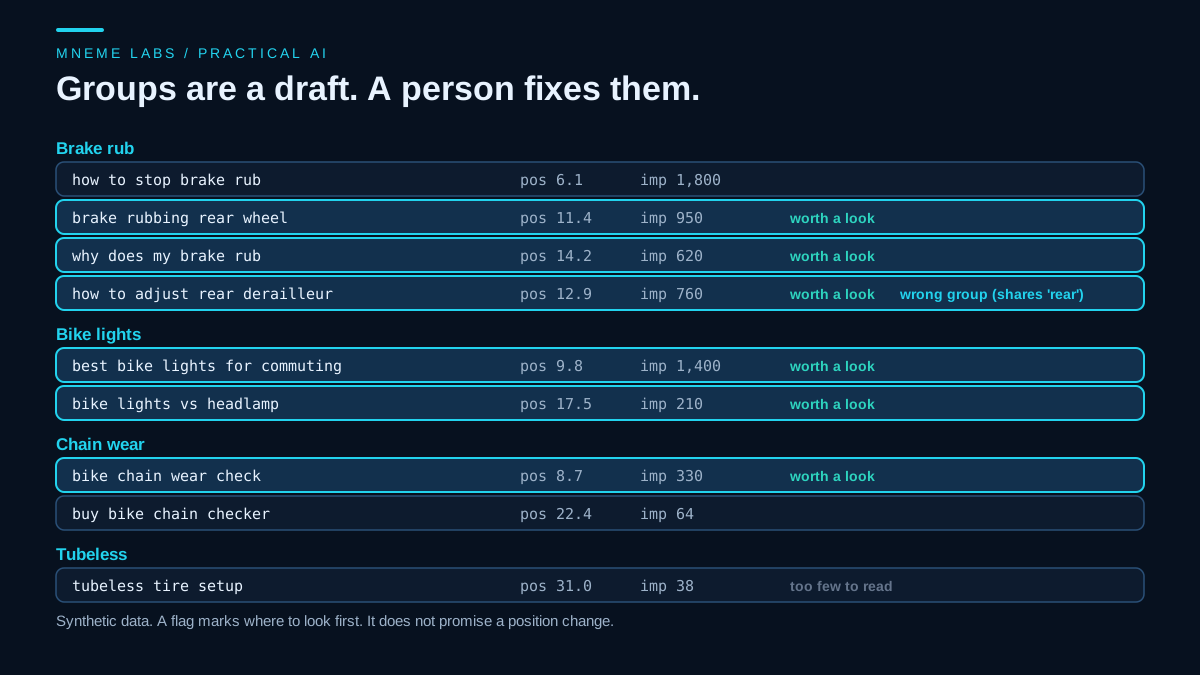
The script was run on ten made-up queries for a bike repair blog. It produced five groups, and it flagged the right things: the brake queries at positions 11.4 and 14.2, the lights query at 9.8, and the chain query at 8.7 were marked worth a look, a tubeless query with 38 impressions was marked too few to read, and two high-position queries with strong clicks were left alone. It also made a mistake that is worth seeing. A query about adjusting a rear derailleur landed in the brake group because both mention "rear". Word-overlap grouping cannot know that rear brakes and rear derailleurs are different topics.
That mistake is the reason a person reviews the groups. A good use of an AI assistant is to read the grouped output and propose splits and merges, which you then judge. A prompt for that, as plain text:
Here are query groups from my Search Console export, with impressions and
average position. For each group, say whether the queries are really one topic.
If not, propose a split. Do not invent search volumes or ranking predictions.

[paste script output]
The intent labels are rough too. A query like "brake rubbing rear wheel" is labeled unclear because it has no signal word. Open the search results for a few queries and read what ranks, which tells you more than a word rule.
One page per topic
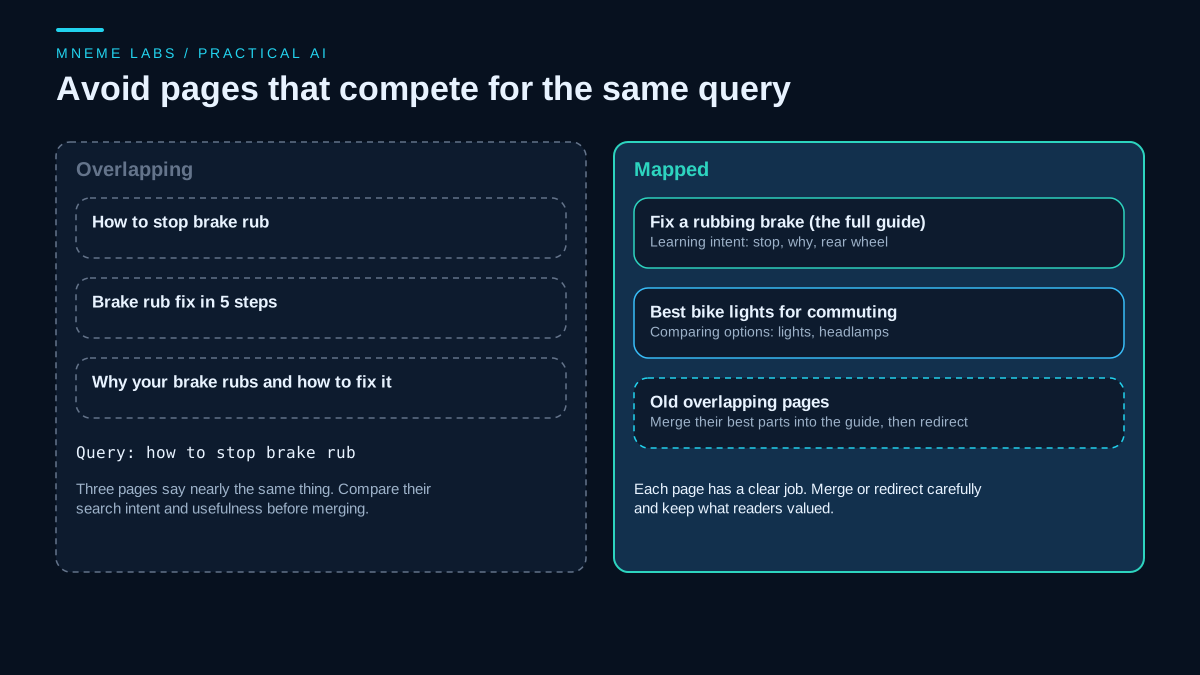
Once the groups are right, give each one a single home. Three pages that answer "how to stop brake rub" make it harder for a reader to pick one, and they split what could be one stronger page. Where overlap exists, decide which page is the best base, add the useful parts of the others, and redirect carefully. Do the reverse for a page that tries to answer a learning query and a buying query at once: split it by intent.
Priorities for a small site
- Improve what is close. A query with solid impressions and a position somewhere on the second page may reflect a page that could be clearer or more complete. Read it as a reader would.
- Fill real gaps. A topic your readers ask about and you do not cover is a candidate, if you can write it accurately.
- Leave thin data alone. Queries with few impressions say little. Wait.
- Match your knowledge. A keyword in a field where you have no experience invites weak pages. Google's guidance on generative AI content says that using AI tools to generate many pages without adding value for users may violate its spam policy on scaled content abuse. A page built around a keyword and not around a reader's need is the kind that guidance has in mind.
Failure cases
- Treating tool estimates as facts. Volume and competition scores are estimates and are often built for advertisers.
- Chasing the highest volume. A broad, popular query is hard to win and may not fit your blog.
- Mapping two pages to one query. They end up competing.
- Changing many things at once. You will not know what helped.
- Judging too soon. Wait weeks, not days.
- Letting AI write many keyword pages. Volume without value is the risk the policy describes.
A next step
Export your queries for the past three months, run the grouping script, and fix the groups by hand. Pick the two groups with the best evidence and a topic you know well, decide whether each needs a new page or an improvement to an existing one, and make the change. Note the date, and look at the same queries after a few weeks. For the optimization side of the work, see the guide to automating on-page SEO checks.
Sources
- Search Console Help, Performance report: metrics, query and page dimensions, default range, weekly and monthly granularity, preliminary data, and result variation by searcher.
- Google Ads Help, Use Keyword Planner: purpose for Search campaigns, keyword ideas and estimated monthly searches, account setup with billing information, and low-volume keywords not being discoverable.
- Google Search Central, SEO Starter Guide: no secrets that rank a site first, and waiting a few weeks to assess changes.
- Google Search Central, Using generative AI content: scaled content abuse and adding value.