Affiliate pages need maintenance after publication. A merchant pauses a program, a product is replaced by a new model, a disclosure gets deleted during a redesign, and nobody notices for months. Those are inventory and maintenance problems, and they suit an automated assistant far better than writing persuasive copy does.
This guide describes an operations role for an AI agent: it reads your own pages, compares what it finds with an inventory you control, and writes an audit report. It does not choose offers, edit live pages, or decide rankings. It makes no revenue claims. A separate guide covers writing descriptions from a claim ledger. This one is about keeping a site of existing pages trustworthy.
Start with an inventory the agent cannot change
The inventory is a spreadsheet or CSV that a person owns. Each row describes one affiliate relationship you are actually approved for: a link id, merchant, program, the destination host, the program status, the pages where the link may appear, who owns it, the date the status was last confirmed, and the date the product facts were last verified.
Program status takes four values: approved, paused, suspended, and unknown. This read-only audit does not connect to network accounts. A person records status from a dashboard or merchant email, with the evidence date. A separately authorized integration could supply the same evidence. The rule is simple: only approved rows may appear on a page, and unknown counts as not approved. Never add an offer or merchant you have not been approved for, and keep applications, account access and agreement changes outside this audit workflow.
What the agent checks
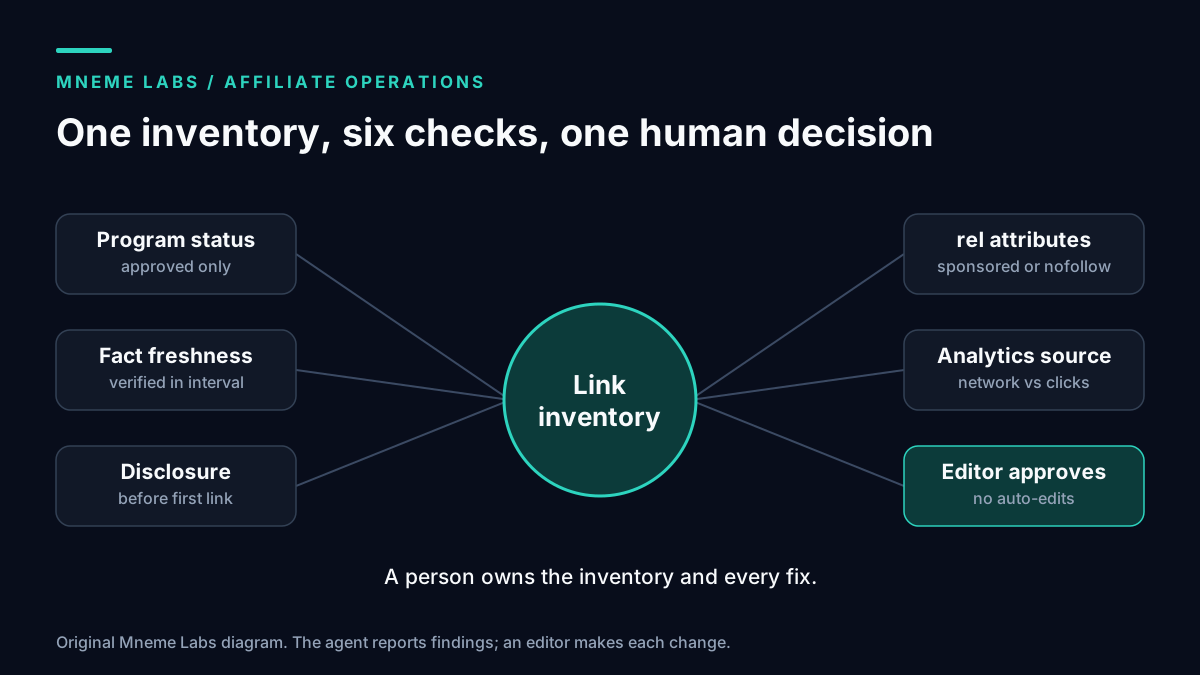
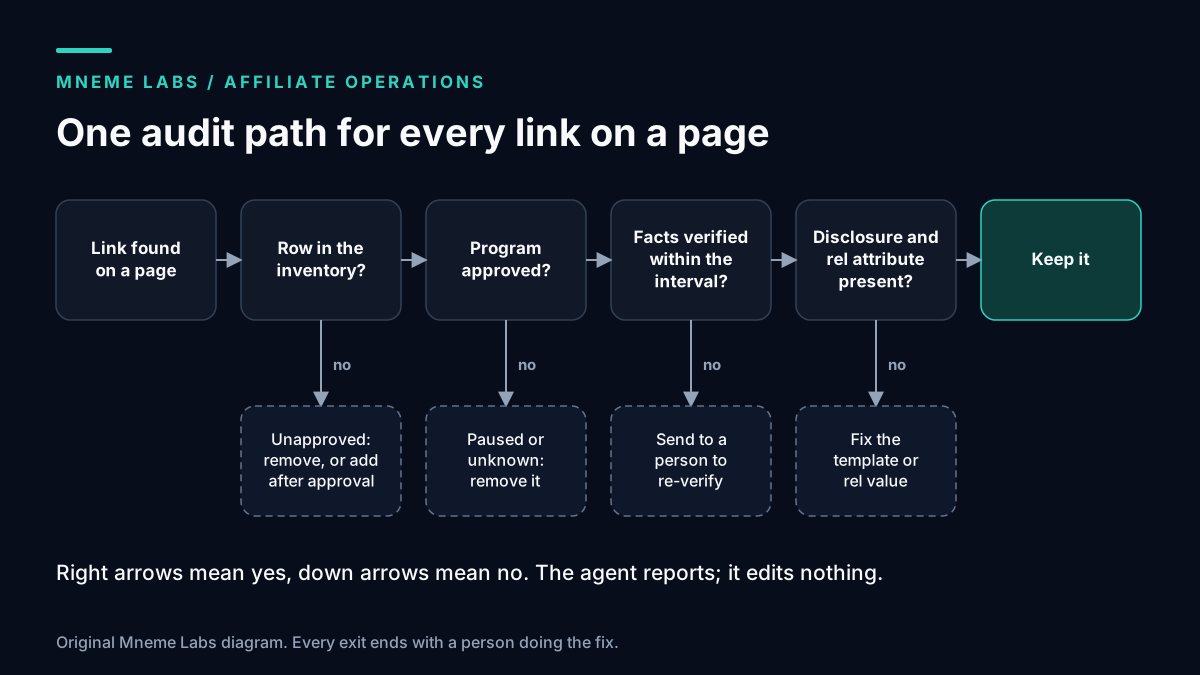
The audit has five inventory checks, plus an optional reachability check. Each produces a finding for a human, not a fix.
- Inventory match. Every outbound link whose host belongs to an affiliate program must match an inventory row. A link with no row is unapproved until someone adds one.
- Program status. A link to a paused, suspended, or unknown program is flagged for removal.
- Fact freshness. If the product facts on a page were last verified before your interval, the page goes to a re-verification list. Choose an interval you can sustain, since a short one that nobody follows is worse than a longer one that people do.
- Disclosure. The page must contain a disclosure in the body before the first affiliate link.
- Link attributes. Affiliate links carry the
relvalue your policy requires.
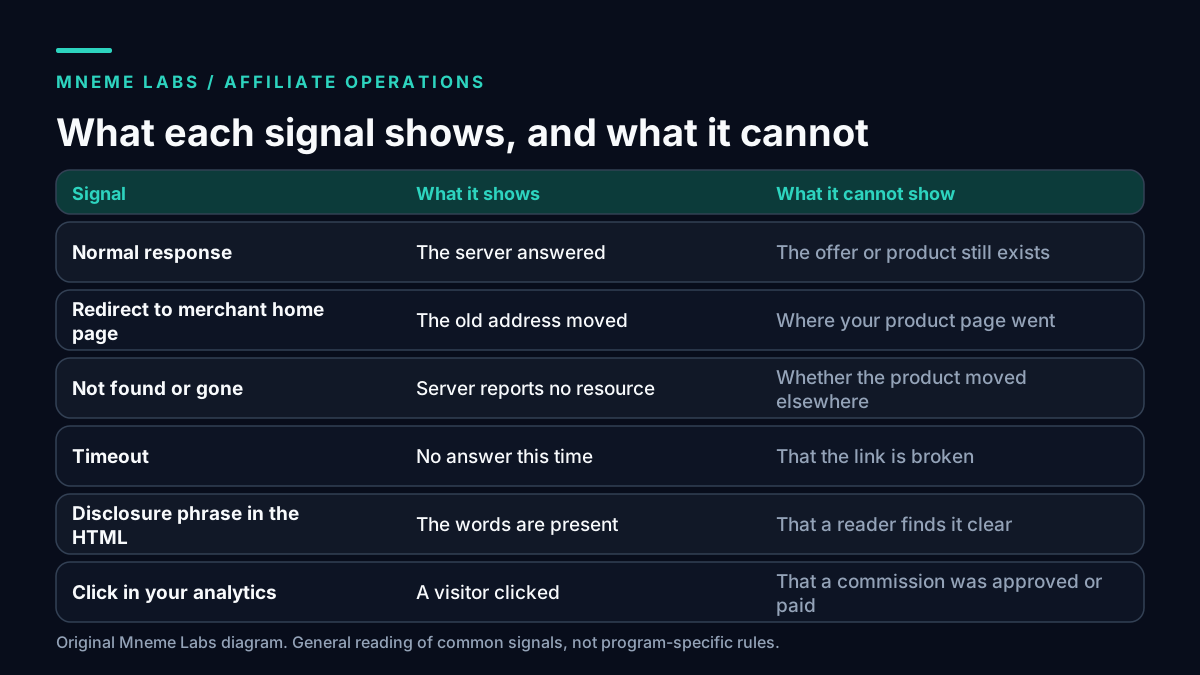
Reachability is a sixth, weaker check, and the second diagram above explains why. A page that returns a normal response proves the server answered. It does not prove the product is available, that the offer still exists, that the destination matches your claim, or that the program is active. A redirect to the merchant's home page can look healthy while the product page you described is gone. Treat a failed fetch as a prompt to look, and a successful fetch as the absence of one particular problem.
Read each program's terms before sending automated requests to tracking links. This article did not review any program's terms, and some programs may restrict automated clicks. Auditing the HTML of your own pages needs no requests to those links at all.
A small audit script
This standard-library Python sketch parses one page, finds links on inventory hosts, and reports missing rel values and a missing disclosure before the first affiliate link. The host list and phrases are placeholders you replace.
from html.parser import HTMLParser
from urllib.parse import urlparse

AFFILIATE_HOSTS = {"merchant.example", "tracker.example"}
DISCLOSURE_PHRASES = ("affiliate link", "we earn a commission", "commission")

class Audit(HTMLParser):
    def __init__(self):
        super().__init__()
        self.text_before_first = []
        self.seen_first = False
        self.findings = []

    def handle_starttag(self, tag, attrs):
        if tag != "a":
            return
        a = dict(attrs)
        host = urlparse(a.get("href", "")).hostname or ""
        if host in AFFILIATE_HOSTS:
            self.seen_first = True
            rel = set((a.get("rel") or "").lower().replace(",", " ").split())
            if not {"sponsored", "nofollow"}.intersection(rel):
                self.findings.append(f"missing rel on link to {host}")

    def handle_data(self, data):
        if not self.seen_first:
            self.text_before_first.append(data)

def audit(html):
    p = Audit()
    p.feed(html)
    before = " ".join(p.text_before_first).lower()
    if p.seen_first and not any(ph in before for ph in DISCLOSURE_PHRASES):
        p.findings.append("no disclosure before first affiliate link")
    return p.findings
The script is only a first-pass lint check. It can mistake a word in navigation, hidden text or a script for a disclosure. It cannot measure visibility, placement on screen, or clarity. Review the rendered page as well. It also sees only links present in the HTML you give it. If a plugin rewrites or cloaks links, export the plugin's mapping, because a crawler may see only internal redirect paths.
Disclosure and ranking rules the agent must respect
The FTC's Endorsement Guides, 16 CFR Part 255, work through a blogger who writes independent coffee maker reviews and earns a share of sales through affiliate links. The Guides say those reviews should clearly and conspicuously disclose the compensation. They define a clear and conspicuous disclosure as one that is difficult to miss and easy to understand, and for interactive media, unavoidable. A separate example in the Guides finds a disclosure that appears only on a profile page inadequate, because people reading a paid post could easily miss it. For a site, that points to a disclosure on the page itself, near the first link, and not only in a footer.
A second example in the Guides concerns a ranking site. If a site accepts payment in exchange for higher rankings, the Guides call those paid rankings deceptive, and say a disclosure would not fix that. If it does not take payment for rankings but earns affiliate referral payments from some merchants, it should clearly and conspicuously disclose that. The design consequence is practical: keep commission rates out of the data any agent sees when it compares or orders products. Rank on the criteria you can defend in public.
On link attributes, Google's documentation says to mark advertisements or paid placements with rel="sponsored", and says nofollow remains acceptable. Many publishers apply sponsored to affiliate links. Decide one policy, write it down, and have the audit enforce it. Google's spam policies also describe thin affiliation: affiliate pages with descriptions and reviews copied from the merchant without added value. They note that useful affiliate sites add value through original reviews, testing, comparisons, and price information. An agent that mass-adds links to old posts without adding anything useful pushes a site toward that description.
Worked example: a monthly audit
Picture a fictional site called Trailhead Gear Notes with 40 pages and an inventory CSV. The agent crawls the site's own pages, extracts the links, and runs the decision path in the diagram above. Its report might contain four findings.
- A link on three pages points to a merchant whose inventory status is now "paused." Action: remove or replace after an editor decides.
- A tent comparison page has specification facts last verified nine months ago, past the six-month interval the site chose. Action: send to re-verification.
- A new buying guide has two affiliate links and no disclosure before them. Action: add the disclosure, which comes from the page template.
- A product link returns a normal response but lands on the merchant's home page. Action: an editor checks whether the product was discontinued.
Every finding names a page, a row, and a suggested owner. The agent does not change anything. An editor makes each fix and updates the inventory.
Analytics: what the agent can and cannot say
Your own analytics can tell you that people clicked a link on a page. They cannot tell you what the merchant approved, reversed, or paid. The network or merchant report is the record of commissions. An agent summarizing a dashboard should label every figure with its source and never blend click data with commission data into one number.
Campaign tags need care too. Google's current campaign URL guidance says parameter values are case sensitive, so utm_source=Newsletter and utm_source=newsletter are different values. Pick one naming convention and have the agent flag deviations.
Do not let an agent run placement tests on live pages by itself. Small sites rarely have enough traffic to separate a real difference from noise, and an automated change of link position or wording can also change the disclosure's visibility.
Failure modes
- Alert flood. The first run finds hundreds of items and the team ignores all of them. Cap the report to the highest-severity findings and work them down.
- Stale inventory. The audit trusts a status that changed last week. Re-confirm status on a schedule and after any merchant email.
- Agent edits live pages. Keep write access out of the agent's hands. It reads and reports.
- Disclosure moved by a redesign. The check passes only if the phrase appears before the first link in the HTML, so run it after every template change.
- Commission-driven order. Someone adds an "earnings" column to the comparison data. Remove it from the agent's context.
Limits
The script was written for this article and run only on invented HTML. No real program, network, or analytics account was used. Nothing here confirms that a given site meets FTC, Google, or any program's requirements, and none of it is legal advice.
Next step
Build the inventory for your top ten pages. Mark each row's status from your network dashboard, run the script on those pages, and fix what it finds by hand. Then read this site's affiliate disclosure and resources page for how its own links are presented. If you are scheduling updates, the content drip guide shows how to separate drafts, approval, and publication.
Sources
- 16 CFR Part 255, Endorsement Guides (eCFR). Used for the clear and conspicuous definition (255.0), the affiliate-link blogger example and the paid-ranking example (255.4 and 255.5).
- Google Search Central: Qualify your outbound links. Used for
sponsoredandnofollow. - Google Search Central: Spam policies. Used for thin affiliation.
- Google Search Central: Write high quality reviews. Used for the review guidance and its pointer to the affiliate policy.
- Google Analytics Help: URL builders. Used for current UTM naming, case sensitivity and the Traffic acquisition report.
Diagrams are original Mneme Labs illustrations. Trailhead Gear Notes is fictional.