An Obsidian vault is a folder of plain text files. That is the reason AI tools fit it so well, and it is also the reason a careless script can do real harm. Nothing sits between a model's suggestion and your files unless you build something there.
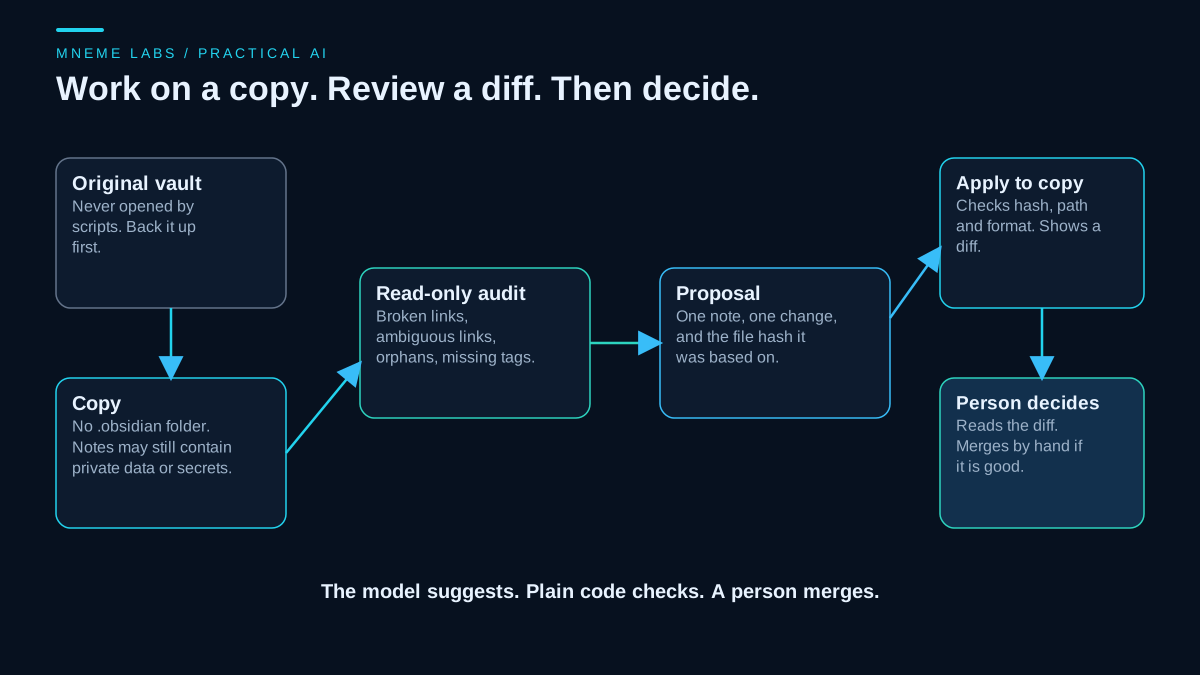
This guide does not describe anyone's personal vault or setup. Every note below is invented, and every check ran on a throwaway copy in a temporary folder. The pattern is what matters: copy the vault, read it without writing, turn each suggested change into a small proposal, check the proposal with plain code, show a diff, and let a person decide. The code is standard-library Python, and the model is not part of the tests. A model would sit upstream and produce the proposals, and the checks apply to its output the same way they apply to a person's.
What Obsidian says about how a vault works
Obsidian's help describes a vault as a folder on your local file system, including subfolders, holding notes as Markdown plain text files. Because they are plain files, other editors and scripts can change them, and Obsidian refreshes the vault to pick up outside changes. The help also lists the services that can sync a vault, including Obsidian Sync, Dropbox, iCloud, OneDrive and Git. That list has a consequence for scripts. A script that edits a note in a synced vault is editing the live note, and the change can travel to every device that syncs it.
Vault settings live in a hidden .obsidian folder in the vault root. The help says it holds preferences specific to the vault, such as hotkeys, themes and community plugins. A script that copies a vault for experiments should leave that folder behind. Plugin data can contain tokens, and settings files change constantly. The help suggests ignoring the workspace layout files if you keep a vault in Git, which points to how often they change.
The help also warns that Obsidian keeps a metadata cache that can drift out of sync with the files, and says you can rebuild it from the settings. If a script changes many files and links or counts look wrong afterward, the cache is one thing to check.
Why a naive link checker gets it wrong
Links are the first thing people want to audit, and the help shows why a simple pattern is not enough. Obsidian accepts wikilinks and Markdown links as equivalent. A link can include a folder path from the vault root with forward slashes. It can point to a heading with a hash, to a block with a caret and an identifier, or carry an alias after a pipe. An exclamation mark in front makes it an embed. Links to files other than Markdown notes need the file extension. Markdown-style links need URL-encoded spaces. A link to a note that does not exist yet is treated as a note to create.
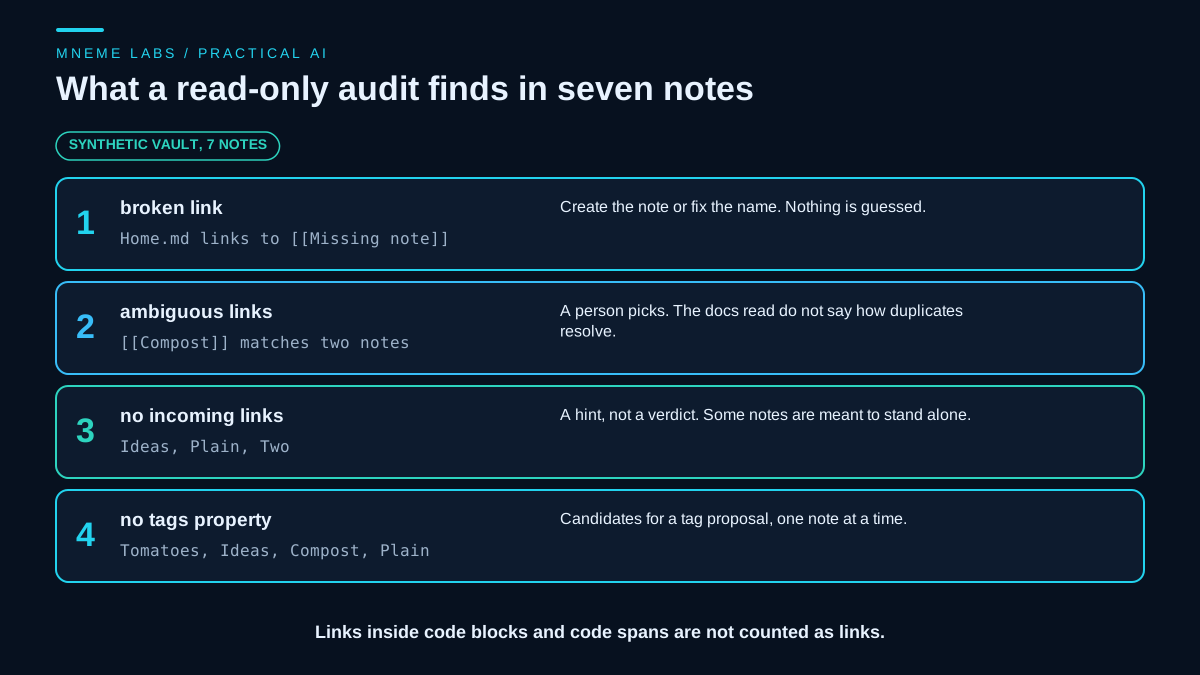
The help does not say how Obsidian chooses between two notes with the same name in different folders, so a careful audit reports those links as ambiguous and leaves the decision to a person. The scanner below also removes code blocks and code spans before it looks for links. That is a choice made for this tool, not a rule taken from the help, because link-like text in code is usually an example and not a real link.
Properties are YAML with rules
Tags can live in a note's properties, which Obsidian stores as YAML at the top of the file. The help says each property name must be unique within a note, so a note cannot have two tags properties. It says internal links inside properties need quotes. It also says that once a property name has a type, all properties with that name across the vault use the same type. And it says plainly that bulk editing outside the properties view is better done with scripts, plugins or other tools. A script is a supported way to do it, as long as it respects those rules.
That is why the applier below refuses what it cannot handle safely. It writes tags only in the block list form, refuses a note with a duplicate tags property, and refuses a note whose tags value is written as an inline list. Refusing is better than producing a file that looks right and breaks a property.
The tool
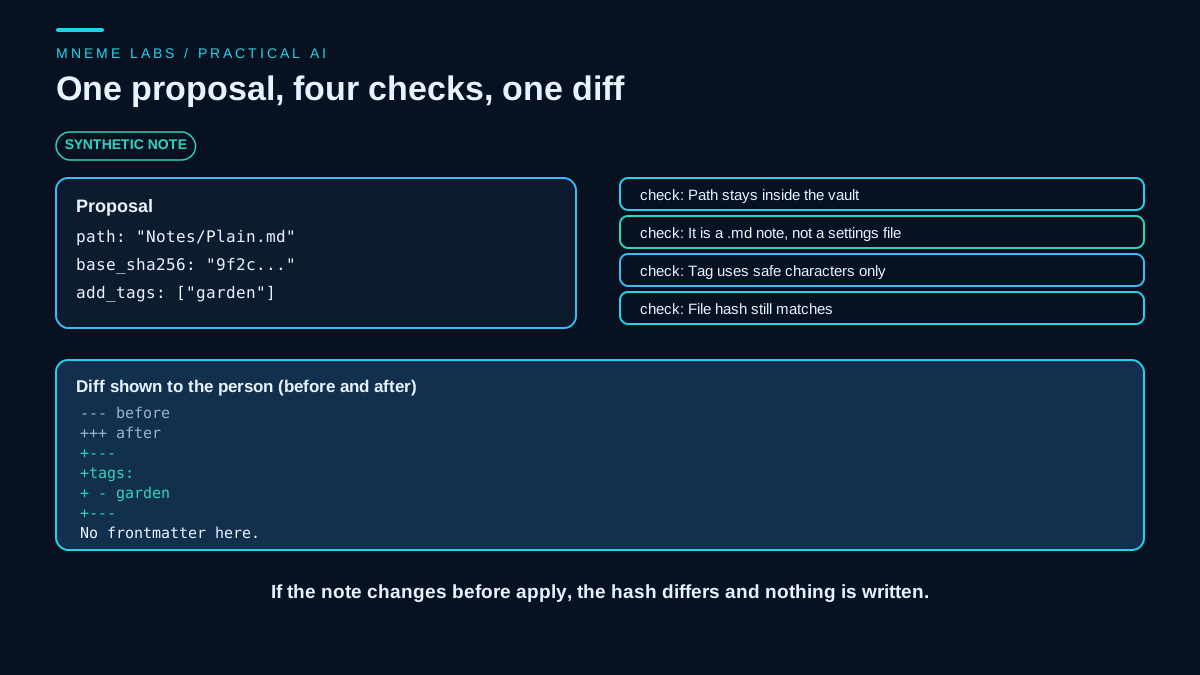
Three small functions carry the design. audit reads a copy of the vault and writes nothing. plan_tags records the path of one note and a hash of its current bytes. apply_tags checks the path, the tag format and the hash, builds the new text, and returns a diff. It writes only when asked.
This is an excerpt, and it is deliberately incomplete. The helper names it relies on (the Path import, notes, split_frontmatter, LINK, FENCE, INLINE, TAG_OK and sha) are not shown, and the text-building step at the end of apply_tags is replaced by a comment. The block does not run on its own, and the test results below come from the full version, which is not printed on this page. Read the code as a description of the checks, and write your own versions before relying on them.
def audit(vault):
    vault = Path(vault)
    files = [p for p in vault.rglob("*") if p.is_file() and ".obsidian" not in p.parts]
    by_rel = {p.relative_to(vault).as_posix(): p for p in files}
    by_name = {}
    for rel in by_rel:
        by_name.setdefault(rel.rsplit("/", 1)[-1], []).append(rel)
    out = {"broken": [], "ambiguous": [], "orphans": [], "no_tags": []}
    incoming = {rel: 0 for rel in by_rel}
    for note in notes(vault):
        rel_note = note.relative_to(vault).as_posix()
        text = note.read_text(encoding="utf-8")
        fm, body = split_frontmatter(text)
        if not fm or not any(l.startswith("tags:") for l in fm):
            out["no_tags"].append(rel_note)
        scan = INLINE.sub("", FENCE.sub("", body))             # links inside code are not links
        for target in LINK.findall(scan):
            t = target.strip()
            cands = [t, t + ".md"]
            if "/" in t:
                hits = [c for c in cands if c in by_rel]
            else:
                hits = [r for c in cands for r in by_name.get(c, [])]
            if not hits:
                out["broken"].append((rel_note, t))
            elif len(set(hits)) > 1:
                out["ambiguous"].append((rel_note, t))
                for h in set(hits):                              # a link that could mean either is not proof of an orphan
                    incoming[h] += 1
            else:
                incoming[hits[0]] += 1
    out["orphans"] = sorted(r for r, n in incoming.items() if n == 0 and r.endswith(".md"))
    return out


def plan_tags(vault, rel, add_tags):
    """Build a proposal for one note. Reads the file, writes nothing."""
    return {"path": rel, "base_sha256": sha(Path(vault) / rel), "add_tags": list(add_tags)}


def apply_tags(vault, proposal, write=False):
    """Return (status, diff). Only a copy of a vault should ever be passed in."""
    root = Path(vault).resolve()
    path = (root / proposal["path"]).resolve()
    try:
        rel_parts = path.relative_to(root).parts
    except ValueError:
        return "refused: path outside the vault", ""
    if ".obsidian" in rel_parts or path.suffix != ".md" or not path.is_file():
        return "refused: not a note in the vault", ""
    for t in proposal["add_tags"]:
        if not TAG_OK.match(t):
            return "refused: bad tag %r" % t, ""
    if sha(path) != proposal["base_sha256"]:
        return "stale: the note changed after the proposal", ""
    # ... build the new text, refuse duplicate or inline tags, compute the diff,
    # then write through a temporary file and an atomic replace only if write=True
The full tested version builds the new text in the elided part. It handles a note with no properties, a note with a block list that needs new entries, and the two refusal cases. A write goes to a temporary file first and replaces the note in one step, so a crash does not leave a half-written note.
What the tests showed
The synthetic vault had seven notes, a binary attachment, and a .obsidian folder holding fake settings and a fake plugin file. These results come from the full version of the tool, not the excerpt above, and you cannot reproduce them from this page alone. Copying it left the settings folder behind.
The audit found one broken link, a link to a note that does not exist. It found two ambiguous links, both pointing at the name Compost, which exists in two folders. It listed three notes that nothing links to. It listed four notes with no tags property. A link inside a fenced code block and one inside an inline code span were ignored, an embed of an image resolved, and a link with a heading suffix resolved by note name. An early version reported both Compost notes as orphans even though links pointed at them. The fix was to count an ambiguous link toward each possible target, which is now covered by a test.
For the applier, a dry run changed nothing and showed the diff. A real write to a note with no properties produced a block with the new tag and left the body byte for byte the same. Replaying the same proposal after the note had changed was refused as stale. Merging into an existing list added only the new tag. The applier refused a note whose tags were written inline, a note with two tags properties, a path that climbed out of the vault, a path into .obsidian, and a tag with a space in it. After all of that, every file in the original vault still had the same hash it started with.
None of this tests how well a model chooses tags or links. It tests the safety net underneath those choices. The scanner is also simple. It does not parse every Markdown form, and it handles only the wikilink shapes in the tests.
Where a model fits
A model is useful upstream of the proposals. It can read a note and suggest tags, suggest which notes relate to which, or summarize a folder. Treat every output as a suggestion that the checks above must pass. Notes can also contain text you pasted from the web, and that text can carry instructions aimed at the model. OWASP's guidance on prompt injection describes content from external sources changing a model's behavior and recommends least privilege and human approval for high-impact actions. A model that can only write proposals to a file cannot edit your notes, whatever a clipped web page tells it to do.
Notes you send to a hosted model leave your machine. Decide which folders are never sent, and check what a script sends before pointing it at a private vault. If you use embeddings or repeated model calls across a large vault, work out the cost first with the cost worksheet. Note that a vault is not agent memory just because it holds notes. For what an agent should save and load, see the guide on memory layers.
Failure cases
Syncing during a write. If a sync service is running while a script writes, a device can pick up a partial or conflicting version. Work on a copy outside the synced folder, and merge approved changes by hand.
Stale proposals. A proposal made last week may not match the note today. The hash check catches it. Do not reuse a proposal after editing the note.
Wrong suggestions that look reasonable. A tag that is plausible and wrong is still wrong. Read each diff, and keep proposals small enough to read.
Duplicate names. Two notes with the same name make links ambiguous. The audit reports them, and a person decides whether to rename.
Secrets in settings. Plugin data can hold tokens. Leave the .obsidian folder out of copies and out of anything you send to a model.
Cache drift. After many outside edits, Obsidian's metadata cache may disagree with the files. Rebuild it from settings.
Scale and edge cases. The tests used seven notes. Large vaults, unusual encodings, tables, nested properties and notes with link-like text in odd places were not tested.
Next step
Make a copy of a small folder of notes, not the whole vault, and leave the .obsidian folder out. Write, or adapt from the excerpt, an audit that reports broken links, ambiguous links, orphans and notes without tags, and run it on the copy. Read the findings. Pick one note and write a single tag proposal by hand, then build an applier that does a dry run first and shows the diff, and read that diff. Only after that, let a model draft proposals, and keep merging the approved ones into the real vault yourself.
Sources
- Obsidian Help, How Obsidian stores data: vaults as local folders of Markdown files, outside edits and sync services, the
.obsidiansettings folder, the Git note about workspace files, and the metadata cache. - Obsidian Help, Internal links: wikilink and Markdown link formats, folder paths, heading and block links, aliases, embeds, URL encoding, and characters that may not work in links.
- Obsidian Help, Properties: YAML properties at the top of a note, unique names within a note, quoting of internal links, shared property types, and the advice on bulk editing.
- OWASP, LLM01 Prompt Injection: indirect injection from external content, least privilege, and human approval for high-impact actions.