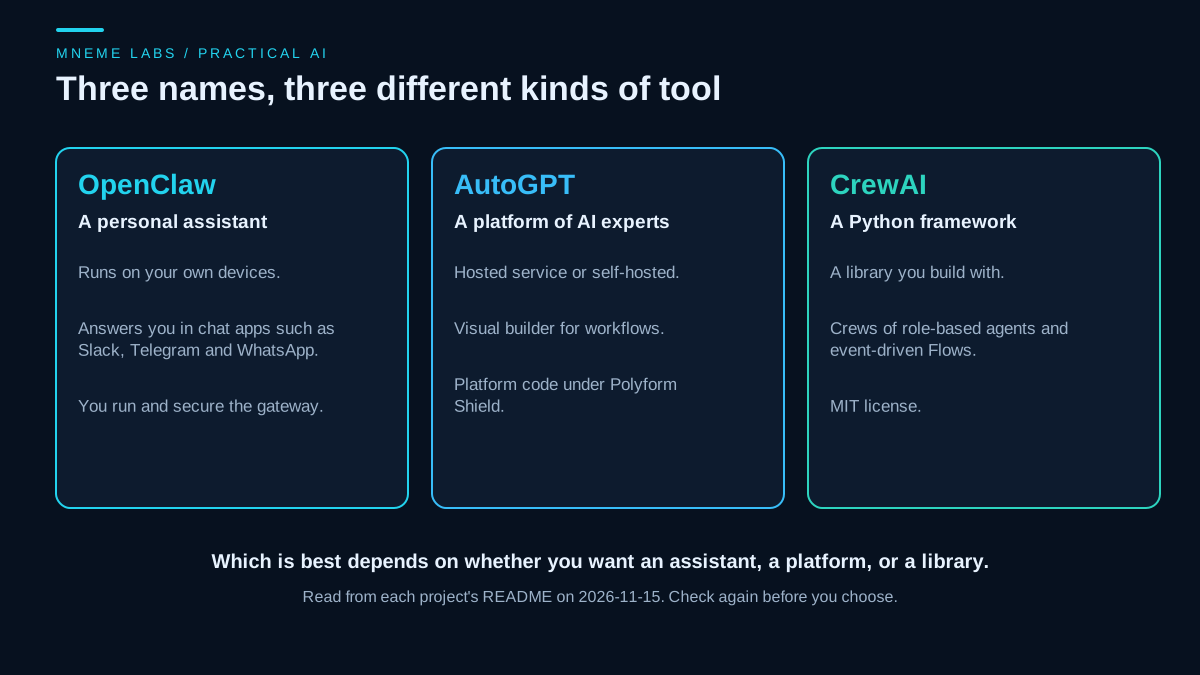
Comparison posts often line up OpenClaw, AutoGPT and CrewAI as if they compete for the same job. They do not. Reading each project's own README shows three different kinds of software, and picking between them is mostly a matter of knowing which kind you need.
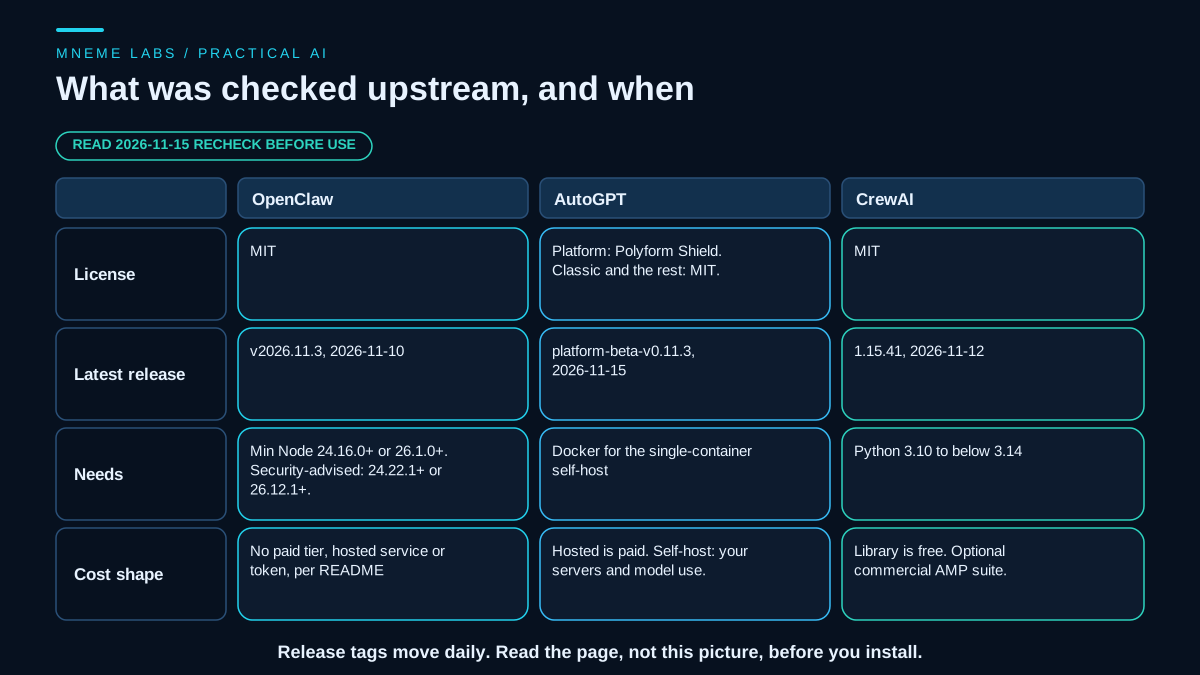
This guide is based on the upstream READMEs and release pages as they stood on 2026-11-15. These projects release often, so treat every version and requirement here as a dated snapshot. Mneme Labs did not benchmark these tools against each other, so there are no speed, accuracy or reliability rankings in this article. Any ranking that does not say which tasks were run, with what acceptance test, should be doubted.
What each project says it is
OpenClaw describes itself as an open-source AI assistant that runs on your own computer and meets you in channels you already use, with Discord, iMessage, Slack, Teams, Telegram and WhatsApp among those named. A single Gateway acts as the local control plane for sessions, tools, events and channel connections. Models are plugins, so you can swap one provider or local model for another. The README states that state, memory and credentials live on your hardware, that the project is stewarded by a non-profit foundation, and that it has no paid tier, hosted service or token. The license is MIT. The latest release on GitHub when this was checked was v2026.11.3, published 2026-11-10.
AutoGPT now presents itself as a platform of AI "experts" coordinated by a lead called Otto, plus a visual builder for repeatable workflows. There are two ways to run it. The hosted Platform is a paid service with trial terms and usage pricing set out on the vendor's pricing page. The self-hosted route runs a single container image that you configure with your own model credentials, on your own infrastructure. The licensing is split. The autogpt_platform directory uses the Polyform Shield license, which the README summarizes as free for personal and internal business use but not for selling as a competing hosted service. The classic standalone agent and the rest of the repository are MIT. The latest GitHub release when checked was autogpt-platform-beta-v0.11.3, published 2026-11-15.
CrewAI is an open-source Python framework for building multi-agent workflows. It has two main ideas. Crews are teams of role-based agents that collaborate on a task. Flows are event-driven workflows that give precise control over execution, state and branching, and can embed Crews. The README states a requirement of Python 3.10 or newer and below 3.14, and uses the uv tool for installation. The framework is MIT licensed. A separate commercial suite called AMP adds managed deployment and observability for organizations. The latest release when checked was 1.15.41, published 2026-11-12.
What this means in practice
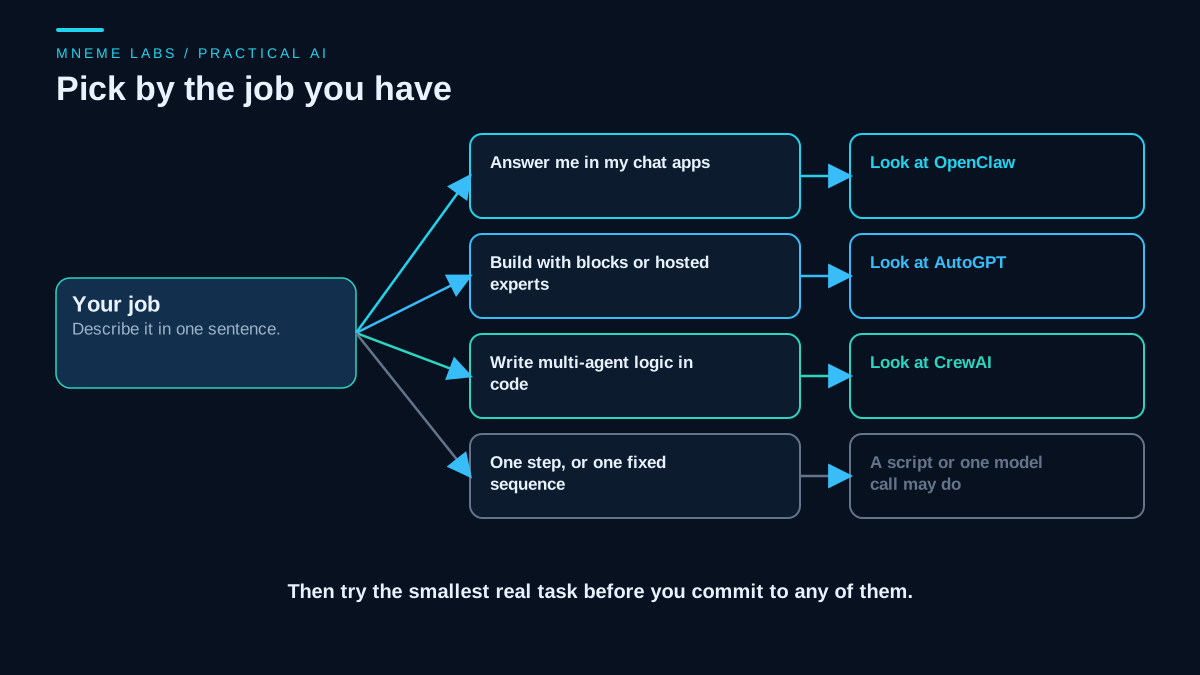
OpenClaw is the one to look at if the job is "an assistant that answers in the chat apps already in use." It is an application you operate, not a library you import. You install it, onboard it, connect channels, and manage a gateway that can run tools on a host machine. That last point matters. Its README tells readers to treat inbound messages as untrusted, notes that unknown senders are paired by default on direct-message channels, and says tools run on the host for the main session unless sandboxing is configured. Read its security and sandboxing guides before connecting other people or exposing the gateway to a network.
AutoGPT fits a different need: a product-like environment where specialist agents and a visual workflow builder are provided, and you decide between paying for hosting or running the container yourself. If you self-host, the cost moves to your infrastructure and your model usage, and operations, backups and upgrades become your job. If you plan to build a service for others on top of the platform code, read the Polyform Shield terms first, because the README says it cannot be sold as a competing hosted service. One more trap: "AutoGPT" has meant different things over time. Older tutorials describe the standalone agent, now called Classic. Check which one a guide or a repository path refers to.
CrewAI suits a developer who wants to write multi-agent behavior in code and keep it in a repository. You get building blocks, not a finished assistant. You also own the tests, the hosting, the retry rules and the monitoring. Its quick-start scaffold generates a project with agent definitions, a crew file, tools and a knowledge folder. Starting with a single Crew and adding a Flow only when you need explicit control is a sensible path, though that is a design judgment and not a documented requirement.
A worked scenario
Take a fictional three-person print shop with three wishes. The owner wants a way to ask "which orders ship today?" from a phone chat. A part-time developer wants to generate a weekly supplier summary from a spreadsheet. The shop also wants a small hosted tool to draft social posts, without running servers.
The first wish is an assistant in a chat app, so OpenClaw is the category to evaluate, along with its security setup. The second is a scripted job with a fixed sequence, which may need nothing more than a script and one model call, and CrewAI only if the summary grows into several cooperating steps. The third is a hosted tool with no servers to run, which points to a hosted platform such as AutoGPT's, with its paid plan checked on the vendor's pricing page. The point of the example is the mapping from job to category. It involves no claim that any of the three would do these jobs well.
Check your machine before you commit
Version requirements are the most likely thing to break a first install. The short script below encodes the Node rules for OpenClaw's npm install path and the Python range for CrewAI. It reads versions from your own machine. It changes nothing.
The OpenClaw README, as read on 2026-11-15, gives two Node levels. The minimum is 24.16.0 or newer on 24.x, or 26.1.0 or newer. It also says 24.22.1 or newer, or 26.12.1 or newer, is strongly recommended for security. A version can therefore meet the minimum and still fall short of the recommendation, so the script gives three answers instead of two.
import re


def parse(v):
    m = re.search(r"(\d+)\.(\d+)(?:\.(\d+))?", v or "")
    return tuple(int(x or 0) for x in m.groups()) if m else None


def node_status(v):
    """'below minimum', 'minimum only' (installs, not security-recommended) or 'recommended'."""
    t = parse(v)
    if not t:
        return "below minimum"
    if t[0] == 24:
        floor, advised = (24, 16, 0), (24, 22, 1)
    elif t[0] >= 26:
        floor, advised = (26, 1, 0), (26, 12, 1)
    else:
        return "below minimum"
    if t < floor:
        return "below minimum"
    return "recommended" if t >= advised else "minimum only"


def python_ok(v):
    """CrewAI README: Python >=3.10 and <3.14."""
    t = parse(v)
    return bool(t) and (3, 10) <= t[:2] < (3, 14)
The self-test checked the edges. Node 24.16.0 and 24.22.0 came back as "minimum only", 24.22.1 and later as "recommended", and 24.15.9 and 25.0.0 as "below minimum". On the 26 line, 26.1.0 and 26.12.0 were "minimum only", 26.12.1 was "recommended", and 26.0.9 was below the minimum. Empty or missing input fails. Python 3.10.0 and 3.13.2 pass, 3.9.18 and 3.14.0 fail, and a nonsense string fails. The rule for versions above 26 is an extrapolation from the README's "and newer" wording. These rules came from the README as read on the check date. They will drift, and the OpenClaw installer script can provision Node for you, so a failing Node check is not necessarily a blocker. Treat 24.16.0 to 24.22.0 as a minimum that installs but is not what upstream recommends, and update the rules when the README changes.
A trial plan you can run yourself
If you want a real comparison, build it from your own work. Pick two or three tasks you actually do. For each, write down an acceptance test before you start, such as "the weekly summary lists every supplier in the sheet and no supplier that is not in it." Time-box the trial to a fixed number of hours per tool. Record how many setup steps you needed, how many times you corrected the output by hand, which errors blocked you, and what the model provider's usage page says the run cost. Use the provider's own usage figures and not an estimate. Repeat the same tasks across the tools you are comparing.
That record tells you something a feature list cannot: how much work each tool leaves for you.
Limits and risks
Snapshot facts. Releases for all three land frequently. A requirement that is true today can change next week, so read the live README and release page before installing.
Fit is not quality. Matching a job to a category says the tool is built for that kind of work. It does not say the tool will do your particular job well.
Security surface. An assistant with tool access, connected to messaging channels, can be steered by whoever can message it. A framework that calls tools on your behalf inherits the same issue. See the guides on giving an agent browser control and sub-agents for allowlist and checking patterns, and the guide on retries and failures before any of these tools performs a write.
Cost. Hosted plans have prices you must read on the vendor's page. Self-hosting trades a subscription for servers, time and model usage. Neither is free in practice.
Licenses. MIT is permissive. Polyform Shield has a specific restriction. If a license decision affects a business, read the text and ask a lawyer.
Next step
Write one sentence describing the job you want done and pick the matching category from the flow above. Open that project's README and release page, check the requirements against your machine, and run its quick start with a throwaway task, not with real accounts or customer data. If it cannot finish a small task in an afternoon, you have learned something cheaply.
Sources
- OpenClaw README: what OpenClaw is, the Gateway and channels, models as plugins, MIT license, no paid tier or hosted service, Node requirement for the npm path (minimum, plus the version range upstream strongly recommends for security), and the security notes about untrusted inbound messages and host-run tools.
- AutoGPT README: hosted Platform as a paid service, the self-hosted container route, the visual builder, the license split between Polyform Shield and MIT, and the Classic project.
- CrewAI README: Crews and Flows, the Python version range, uv installation, the project scaffold, MIT license, and the commercial AMP suite.
- OpenClaw releases, AutoGPT releases and CrewAI releases: the latest release tags and dates quoted above, read through the public GitHub API on 2026-11-15.