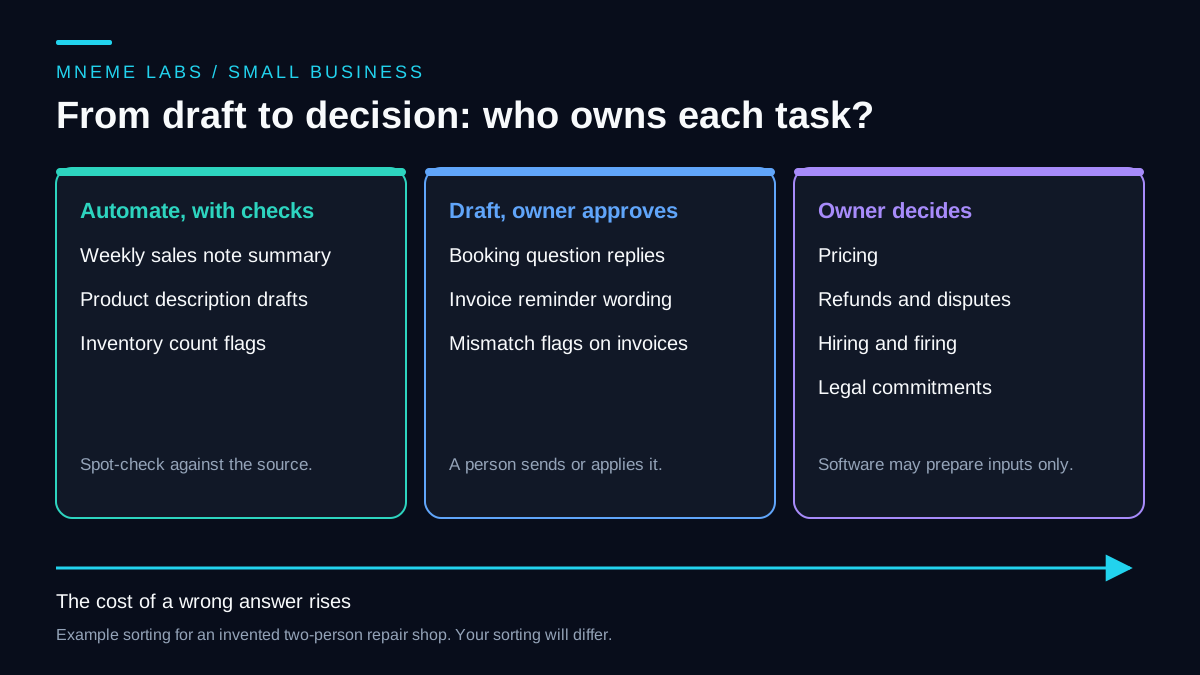
Most small businesses should not try to run everything through one agent. A better question is which tasks software can draft and a person can check faster than doing them by hand, and which decisions stay with the owner no matter how good the draft looks.
This guide gives a way to sort tasks, a way to estimate whether delegating one saves time, and a set of operating limits. The worked example is an invented two-person bike repair and rental shop. Nothing here reports results from a real business. If you want the system design behind a multi-account setup, read the three-brand architecture guide. This article stays on the earlier decision of what to delegate at all.
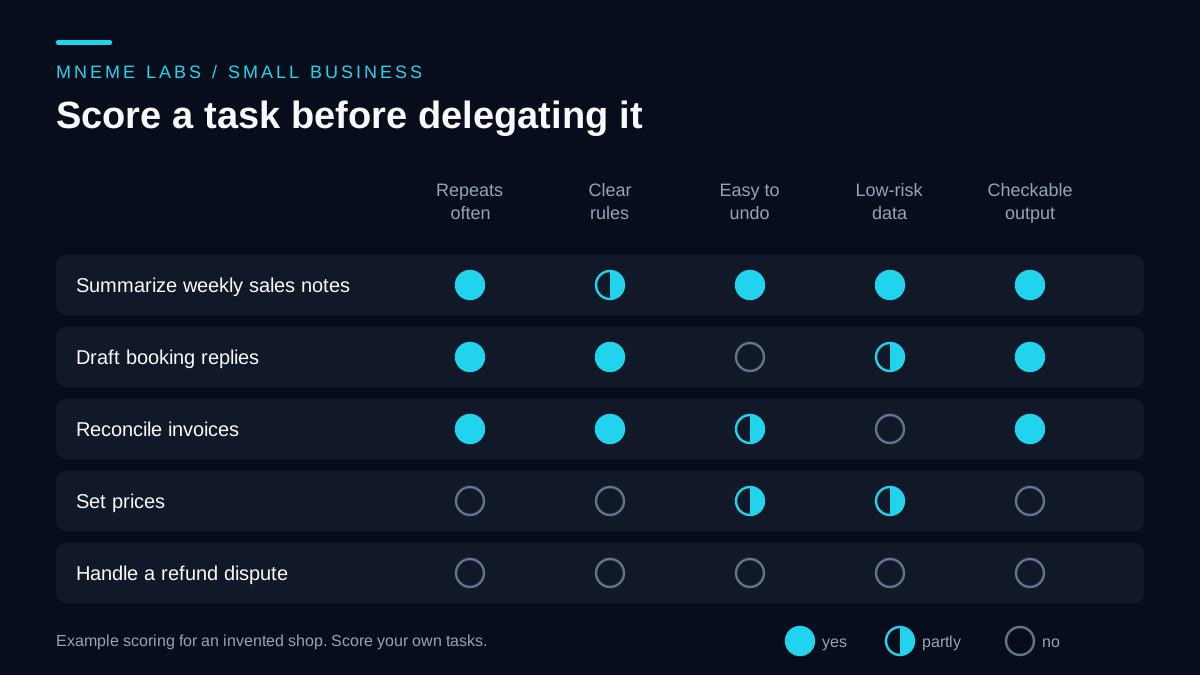
Score single tasks, not departments
Delegating "marketing" or "customer service" is too coarse. Break the work into single tasks and ask five questions about each one:
- Does it repeat often enough to justify the setup?
- Are the rules clear enough to write down?
- Can a mistake be undone, or caught before a customer sees it?
- Is the data low-risk to process with the tool you plan to use?
- Can you check the output quickly against a source?
A task that answers yes to all five is a good candidate. A task that fails the third or fourth question needs an approval step or stays with a person. A task that fails the first or second is probably not worth automating yet, because you will spend more time maintaining the workflow than it saves.
The grid above applies this to five tasks in the example shop:
- Summarizing weekly sales notes. Internal data, repeated weekly, and the summary can be checked against the notes. Delegate it, with occasional spot checks.
- Drafting replies to booking questions. The rules (hours, prices, rental terms) can be written in a fact sheet, so each draft can be checked against it. The replies reach customers and cannot be unsent, and they involve names and phone numbers. Delegate the draft, keep the sending.
- Reconciling invoices. The rules are clear, but the data is financial and an error costs money. Let the tool flag mismatches for the owner or bookkeeper. It should not edit records.
- Setting prices. It happens rarely, depends on judgment, and is hard to check. The owner decides. A tool can prepare a comparison of last season's figures as input.
- Handling a refund dispute. Owner only.
Estimate the time before building anything
The saving from a delegated task is not the time the draft takes. It is the by-hand time minus everything you now spend around the draft:
net minutes per month = by-hand minutes, minus review minutes, minus setup and upkeep minutes, minus rework minutes
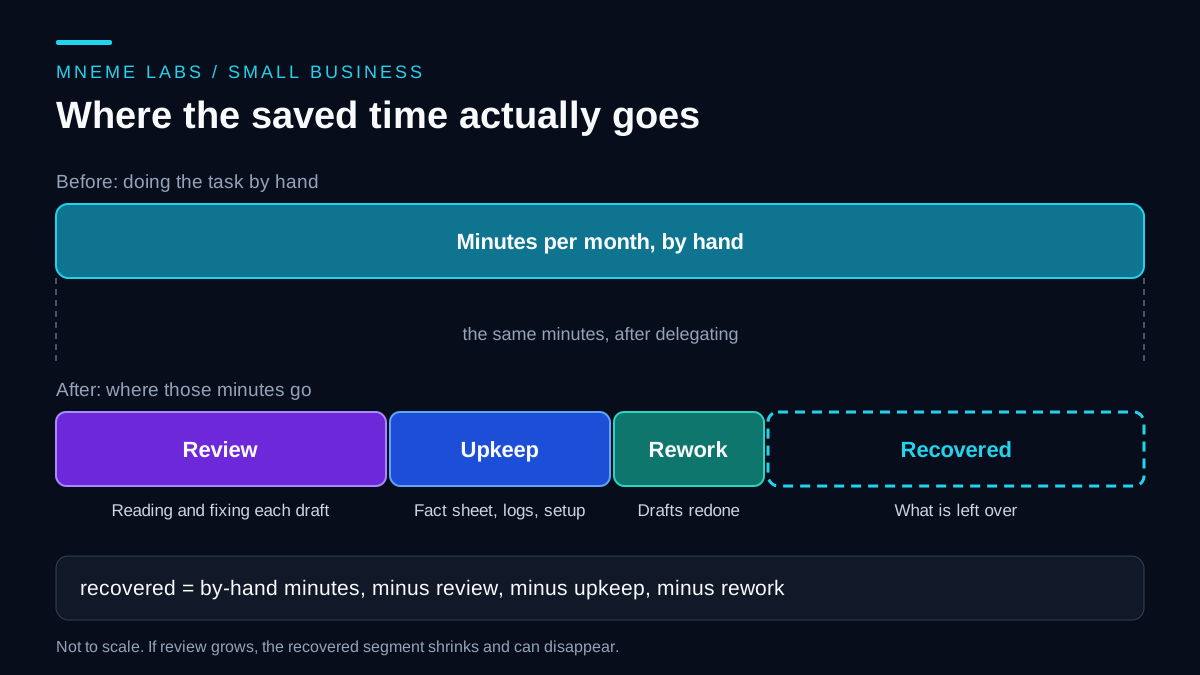
Here is the arithmetic for booking replies. The inputs are invented to show the calculation, not measured from anywhere. Suppose the shop gets 40 booking questions a month and each takes 5 minutes by hand, which is 200 minutes. Reviewing each draft takes 2 minutes, which is 80. Four drafts need a rewrite of 5 minutes each, which is 20. Keeping the fact sheet current and checking logs takes 45 minutes a month. The total around the draft is 145 minutes, so the net saving is 55 minutes.
Now change one input. If careful review takes 4 minutes per draft instead of 2, the total becomes 160 plus 20 plus 45, or 225 minutes, and the workflow costs 25 minutes more than doing the task by hand. In this example, changing review time alone reverses the result. Measure it instead of assuming that reviewing a draft is nearly free.
Before you build, time the task by hand for two weeks. After you build, time review and upkeep the same way. Replace the invented numbers above with yours.
Count the money as well as the minutes
Model usage is billed by the provider according to its current pricing, so read the pricing page and usage reports of the service you choose. Do not copy figures from articles, including this one. Add subscription fees for any tools and your own hourly value for setup and upkeep.
Costs can also change after you have built something. Google's Gmail API quota page, for example, describes a daily billing threshold but says full billing details will be announced with at least 90 days' notice. That is not evidence that charges have already started for your project. If a workflow depends on an outside API, re-read its quota and billing terms on a schedule. For purchasing decisions, the tools page and resources page list what the lab currently points people to. Record actual usage and review time before committing to a larger rollout.
Set operating levels per task
Give each delegated task one of three levels, and raise a level only after you have watched the task at the current one:
- Read-only. The workflow reads inputs and writes a summary or a flag. It cannot change anything.
- Draft. It writes proposed replies or documents into a review queue. A person sends or applies them.
- Act with approval. After a person approves one specific item, the workflow carries out that one action.
Some tasks never move past the second level: moving money, agreeing to contract terms, hiring and firing decisions, refunds, and anything that amounts to regulated advice. The reason is partly risk and partly accountability. The OWASP entry on excessive agency names excessive functionality, permissions, and autonomy as root causes of harm from LLM-driven tools. It recommends giving integrations the minimum permissions they need and requiring human approval for high-impact actions. A workflow that drafts invoices has no reason to hold a payment credential.
Anthropic's guide to building effective agents makes a related point from the engineering side. It notes that more autonomous agents mean higher cost and a chance of compounding errors, and recommends extensive testing in sandboxed environments, appropriate guardrails, and stopping conditions such as a maximum number of iterations. It also suggests using the simplest solution that works, which may mean no agent at all.
Several narrow workflows beat one all-access agent
"One agent that runs the business" is attractive because setup looks simple. It also puts every permission in one place: the mailbox, the accounts, the files, the calendar. A narrow workflow for each task, each with its own permission and its own queue, limits the damage when something goes wrong. A mistake in the sales-note summary cannot touch the invoices if the two never share credentials.
If you want a formal vocabulary for risk, NIST publishes a voluntary AI Risk Management Framework and a generative AI profile released in July 2024. Treat them as reading for when your use grows, not as a checklist for a first project.
Failure modes to expect
- The owner becomes the bottleneck. Drafts pile up and review slips. Review at a fixed time once or twice a day, and reduce volume before you reduce care.
- Stale reference data. If the fact sheet still lists last year's hours, the drafts will state them confidently. Put a "last verified" date on it and a monthly reminder.
- Customer data in the wrong place. Check what your chosen provider does with submitted data before sending names or account details. A local model is one option, described in the first-agent guide.
- Review drift. After a few good weeks people stop reading closely. Sample a few approved items each week against their sources.
- Outside changes. Prices, limits, and policies at the services you depend on change. Note the date you last checked each one.
What to do this week
List twenty recurring tasks and score them with the five questions. Time three candidates by hand for two weeks. Pick the best one and set it up at the draft level, with a written fact sheet and a review queue. Write down one stop rule before you start, such as "if review plus upkeep exceeds the by-hand time for two weeks in a row, switch it off." Then review the result honestly.
For a specific example of this split, see the customer inquiry drafting workflow. The security guide covers the permissions side in more detail.
Sources
- OWASP GenAI, LLM06:2025 Excessive Agency: root causes and the advice to limit permissions and require human approval for high-impact actions.
- Anthropic, Building effective AI agents: autonomy raises cost and the chance of compounding errors, so test in sandboxes and use stopping conditions.
- Google, Gmail API usage limits: describes the daily billing threshold and the notice required before billing changes take effect.
- NIST, AI Risk Management Framework: a voluntary framework, with a generative AI profile released July 26, 2024.