Model announcements blur two questions. What does the vendor document the model as supporting? And does it do your particular job well? The first question has an answer you can read. The second can only be answered by testing your own work. This article addresses both: it summarizes what Google's documentation said about Gemini 3.1 Pro when it was read on November 15, 2026, then gives you a method to run your own evaluation.
Mneme Labs did not run Gemini 3.1 Pro for this article, and nothing below is a personal benchmark. Every capability and limit comes from a Google page named in the sources, and the status of Google's models changes, so check the pages again before you build on any of it.
Model identifier and status
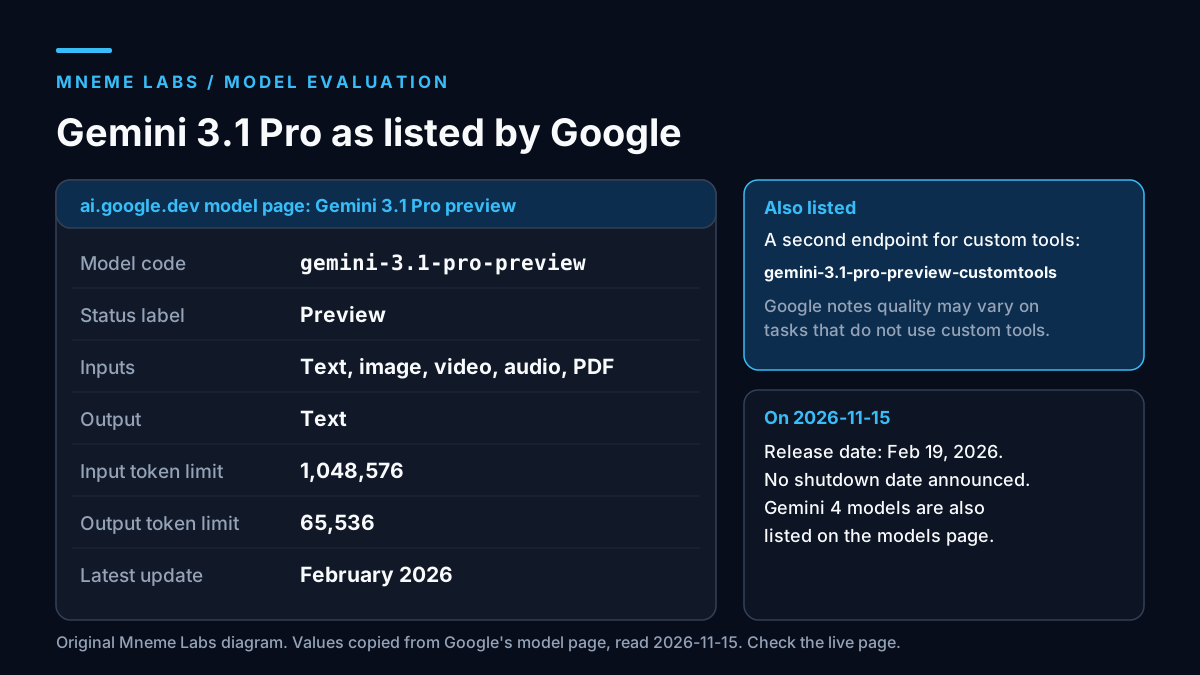
On Google's Gemini API model page, the model code is gemini-3.1-pro-preview. The same page lists a second endpoint, gemini-3.1-pro-preview-customtools, which Google describes as better at prioritizing custom tools such as view_file or search_code when you mix bash and your own tools. Google also warns that you may see quality fluctuations on use cases that do not benefit from tools.
The word "preview" is part of the identifier, and it is a status, not a style choice. Google's model-versions section says preview models may be used for production, typically have billing enabled, may have more restrictive rate limits, and will be deprecated with at least two weeks' notice. Google's deprecations page lists gemini-3.1-pro-preview with a release date of February 19, 2026 and no shutdown date announced. The same page shows how this works in practice: gemini-3-pro-preview was released in November 2025 and shut down on March 9, 2026, with 3.1 Pro as its recommended replacement.
Gemini 3.1 Pro is also no longer the newest family. Google's models page now lists three Gemini 4 models, and its "latest models" page recommends gemini-4-hydrogen as a default for new projects and names two other Gemini 4 models for deeper reasoning. The 3.1 Pro endpoint still appears on the models page under Gemini 3. Whether it suits you depends on your requirements, so treat this article as documentation about one model, not a recommendation to choose it.
Documented specifications
Google's 3.1 Pro page lists these properties:
| Property | Value on Google's page |
|---|---|
| Inputs | Text, image, video, audio, and PDF |
| Output | Text |
| Input token limit | 1,048,576 |
| Output token limit | 65,536 |
| Latest update | February 2026 |
Google's long-context page adds a detail that matters when you budget. For the Gemini 4 models it says the 1M-token window is shared across input, thinking, and output tokens, while earlier Gemini 3 and 2.5 models use separate 1M input and 64K output budgets. That page names earlier Gemini 3 models in general, not 3.1 Pro specifically, so confirm the budget behavior with your own requests.
The model page describes intended uses; it does not establish performance on your data. Turn your actual requirements into an evaluation rather than treating a capability label as a measured result.
Supported and unsupported features
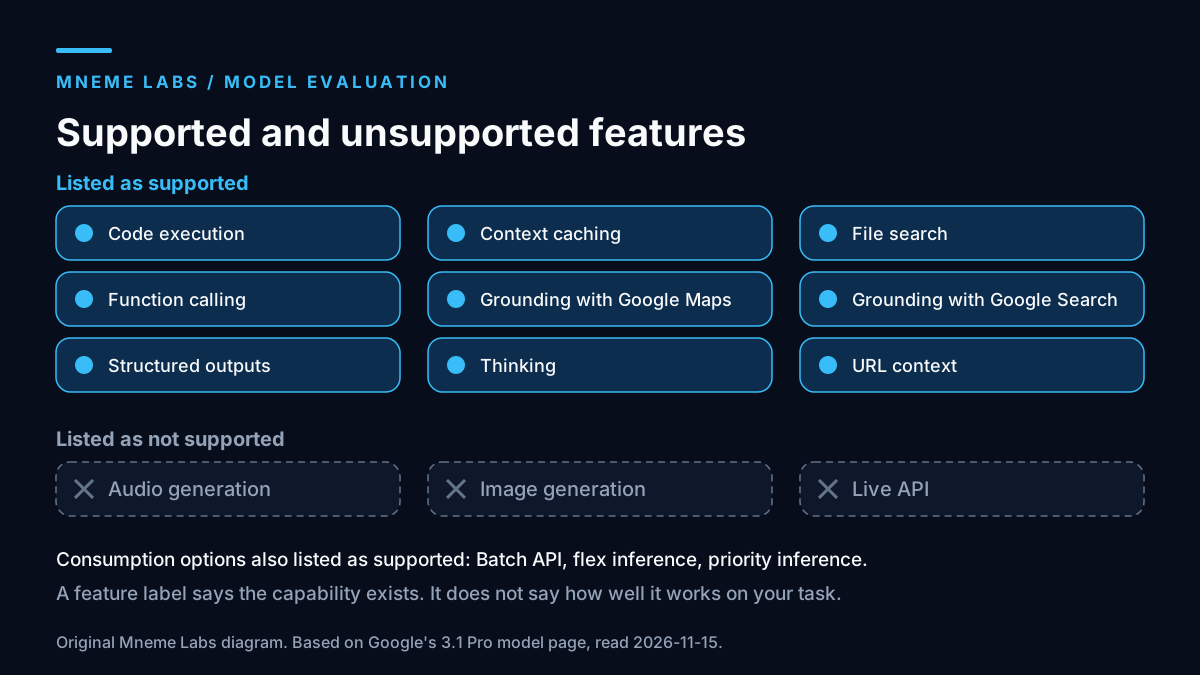
The grid above reflects the model page's capability list. Marked as supported: code execution, context caching, file search, function calling, grounding with Google Maps, grounding with Google Search, structured outputs, thinking, and URL context. The Batch API, flex inference, and priority inference are listed as supported consumption options. Marked as not supported: audio generation, image generation, and the Live API.
Those labels are narrower than they may sound. "Supports structured outputs" means you can ask for output that follows a JSON Schema, and Google's structured-output documentation describes that. It does not mean every field will be correct. "Supports function calling" means the model can propose a tool call. Whether it picks the right tool with the right arguments for your tools is something you have to measure.
What the model card says and does not say
Google's model card, dated February 19, 2026, describes 3.1 Pro as based on Gemini 3 Pro, with a context window of up to 1M tokens and a 64K output. It reports benchmark results compared with Gemini 3 Pro and models from other vendors, with notes on the harness used for each.
Read those numbers as vendor-reported results on named benchmarks under stated conditions. They are not results on your documents. One row shows why that matters. For the long-context benchmark MRCR v2 with eight needles, the card lists 84.9% at 128k average context for 3.1 Pro, and 26.3% at the 1M pointwise setting. The two figures use different measurement settings, so do not subtract them. They do show that a large maximum window does not guarantee uniform recall across its full length.
The card's section on known limitations does not list them. It refers to the Gemini 3 Pro model card, which was not opened for this article. If limitations matter to your decision, read that document directly.
A reader-run evaluation method
The aim is a small, repeatable test that tells you whether this model, or any alternative, is good enough for a specific job. Set the pass criteria before you see any results.
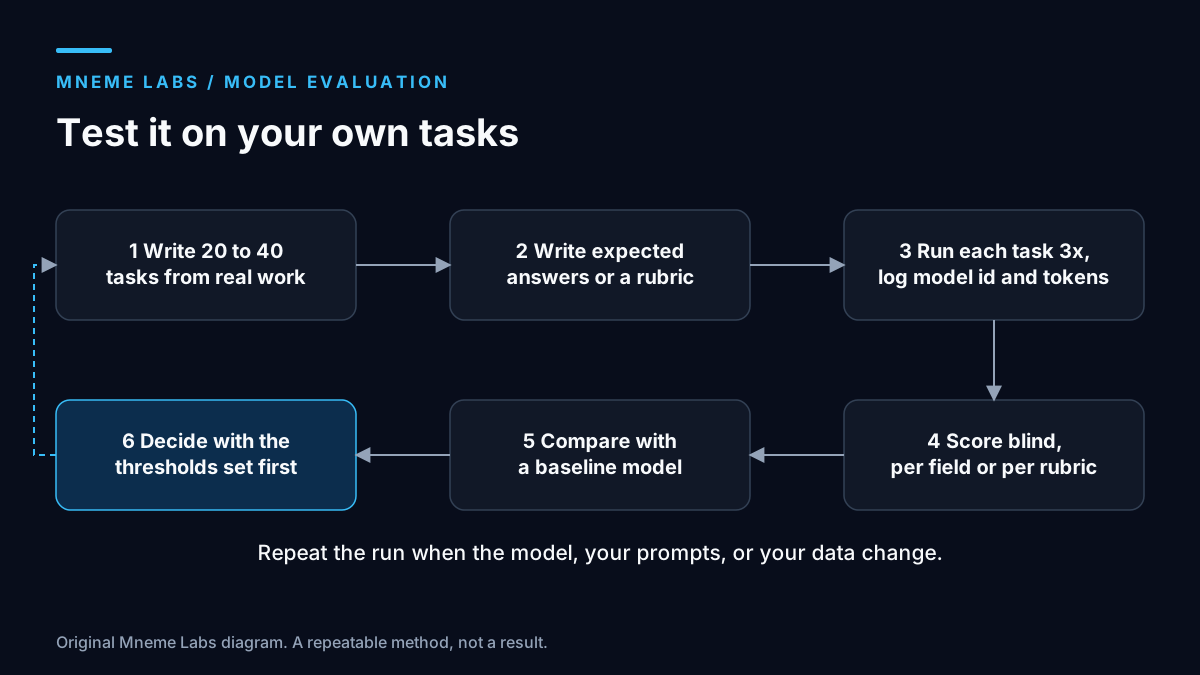
- Write 20 to 40 tasks from your real work. Include routine cases, edge cases, and cases with no right answer. Remove personal and confidential data before you send anything to a hosted API.
- Write the expected answer or a scoring rubric for each task. Prefer checks a program can run, such as exact field matches. Use human scoring for judgment tasks and hide which model produced each answer.
- Cover the categories you rely on. Long context: plant a known fact at different depths in a long document and ask for it. Extraction: ask for schema-valid JSON, then score each field separately, because valid JSON can hold wrong values. Multimodal: use your actual PDFs and screenshots. Tool calling: score the tool chosen and its arguments. Abstention: include questions the supplied material cannot answer, and score whether the model says so.
- Run every task more than once. Output varies between runs. Three runs give an initial look at variation, not a statistical guarantee of reliability.
- Log everything. Record the date, exact model identifier, settings such as the thinking level, token counts, elapsed time, and the reply. Without the identifier, a later comparison is meaningless.
- Compare against a baseline. Test the model you use now and, if relevant, a model Google currently recommends, using identical tasks.
- Compute cost from your token counts and Google's current pricing page. This article states no prices because they change.
- Decide using the thresholds you wrote first, and repeat the run when the model, your prompts, or your data change.
This harness skeleton records one CSV row per run. You supply call_model, which sends a prompt to whatever API you use and returns the reply and token usage, and a check function for each task.
import csv, datetime, time

def run_suite(tasks, call_model, model_id, runs=3, out="results.csv"):
    """tasks: dicts with id, category, prompt, check (reply -> bool)."""
    with open(out, "w", newline="", encoding="utf-8") as f:
        w = csv.writer(f)
        w.writerow(["date", "model_id", "task_id", "category", "run",
                    "passed", "seconds", "input_tokens", "output_tokens", "reply"])
        for t in tasks:
            for run in range(1, runs + 1):
                start = time.perf_counter()
                reply, usage = call_model(t["prompt"])
                secs = round(time.perf_counter() - start, 2)
                w.writerow([datetime.date.today().isoformat(), model_id,
                            t["id"], t["category"], run, bool(t["check"](reply)),
                            secs, usage.get("input_tokens"),
                            usage.get("output_tokens"), reply])
Worked example: extracting fields from invoices
Suppose you want to extract vendor name, invoice number, date, total, and currency from PDF invoices. Collect 25 of your own invoices with the sensitive details removed, and write the correct values for each in a spreadsheet. Ask for output matching a JSON Schema with all five fields required, and include several invoices where a field is genuinely absent.
Score each field separately across the runs. Count five kinds of problems: invalid JSON, missing fields, wrong values, invented values for absent fields, and correct abstentions. Report counts by field, not one combined percentage, because a model that misreads totals and one that misreads dates call for different fixes. If it fills in a plausible invoice number where none exists, that failure matters more than a typo in a vendor name. Whatever the numbers show, they describe your invoices only.
Failure modes in evaluations
- Testing with the vendor's examples. They may not represent your input distribution. Use your own data.
- One run per task. A single pass can be luck. Repeat.
- Changing two things at once. If you change both the prompt and the model, you cannot tell which one mattered.
- Unlogged model identifiers. An alias can point to different versions over time. Google documents that "latest" aliases get hot-swapped after a two-week notice.
- Assuming code carries over. Google's page on newer Flash models says that starting with Gemini 3.6 Flash and 3.5 Flash-Lite, and for all future model releases,
temperature,top_p, andtop_kare deprecated and ignored, and a request ending in a model turn returns an HTTP 400 error. That applies to those newer models, not to 3.1 Pro, but it is a reason to retest when you migrate.
Limits of this article
This is a documentation summary dated November 15, 2026. Mneme Labs did not call the API, run any benchmark, or compare Gemini 3.1 Pro with another model, so this article makes no claim about its accuracy, hallucination rate, speed, or cost on any task. Google may have changed the pages cited below since they were read.
Next step
Write ten tasks from your own work and the expected answers, then run the harness against the model you use today. That gives you a baseline before any switch. For a local starting point with validation and a saved review record, see the first agent walkthrough. If your tasks depend on your own documents, read the guide to retrieval on your own data before you rely on a long context window alone.
Sources
- Google AI: Gemini models overview. Used for the model list, the Gemini 4 entries, and the stable, preview, latest, and experimental version patterns.
- Google AI: Gemini 3.1 Pro preview model page. Used for the model code, customtools endpoint, supported types, token limits, capability list, and consumption options.
- Google AI: Gemini deprecations. Used for release dates, the absence of an announced shutdown date, and the 3 Pro preview shutdown.
- Google DeepMind: Gemini 3.1 Pro model card. Used for the model description, publication date, benchmark reporting, and the MRCR long-context rows.
- Google AI: Latest Gemini models. Used for the recommendation of Gemini 4 models for new projects.
- Google AI: Long context. Used for the shared and separate token budget description.
- Google AI: What's new in Gemini 3.6 Flash and 3.5 Flash-Lite. Used for the sampling parameter and prefilled turn changes.
- Google AI: Structured outputs. Used for JSON Schema output.
Diagrams are original Mneme Labs illustrations built from the cited pages.