Most business documents are three things stacked together: facts from a system of record, text someone already approved, and a small amount of new writing. A language model is useful for the third layer and risky for the first two. If you let it produce all three, you get a polished document that may contain a wrong number, an invented deliverable, or a clause nobody approved.
This guide builds a generator around that split. The facts come from a structured file that a person owns. The standard text comes from templates. The model writes only the short narrative sections, and code checks its output before a human sees it. The worked example is a monthly client status report for a fictional design studio. The same pattern extends to proposals. Contracts get a stricter rule, covered in its own section.
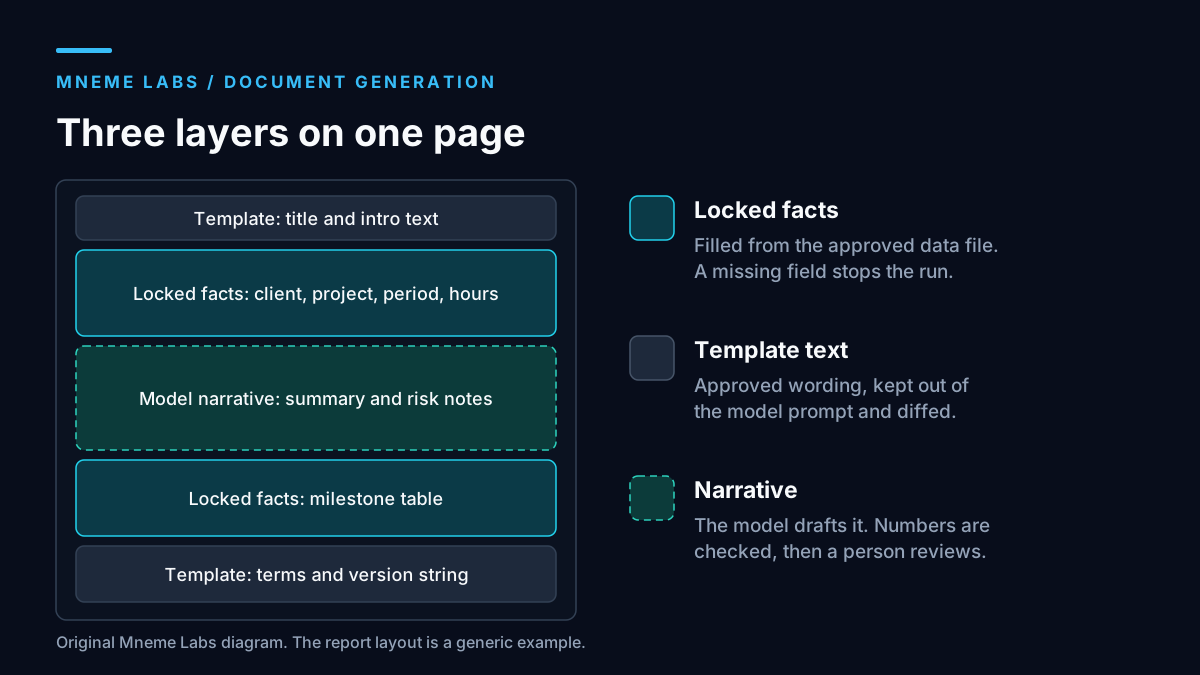
Separate the three layers
The diagram above shows how a report page divides. Locked facts are names, dates, hours, milestone status, and totals. They come from a file or export that someone responsible for the data has approved, and the model never retypes them. Approved template text covers headings, standard paragraphs, and footers that your team already wrote. Narrative is the summary and risk commentary that changes each month, and it is the only part the model drafts.
This split gives you a clear place to look when something is wrong. A wrong number is a data problem. A strange clause is a template problem. An unsupported sentence is a narrative problem. Mixed documents blur those causes.
Define required fields before you generate
A model that is handed incomplete data will often fill the gap with something plausible. Stop that by validating the facts first and refusing to generate when fields are missing. JSON Schema is the usual way to describe the shape. Its documentation notes that by default, leaving out properties is valid, and an empty object passes. You have to list a required array, and you can set additionalProperties to false to reject extra keys.
The model providers support the same idea on output. OpenAI's Structured Outputs documentation says the feature constrains completed, non-refusal output to your schema, and that your application still has to handle refusals, incomplete responses, and business rules the schema cannot express. Google's Gemini documentation describes JSON Schema output too. Treat schema support as a format guarantee only.
For the input side, this standard-library sketch checks required fields, date order, and hour ranges after a schema validator has checked field types and ISO date formats. Malformed input must be rejected before calling it. It also compares every number in the model's narrative against the numbers in your facts, which can flag a numeric token absent from the facts.
import re
from datetime import date

REQUIRED = ["client_name", "project_id", "period_start", "period_end",
            "hours_used", "hours_budgeted", "percent_used", "milestones"]

def check_facts(f):
    errors = [f"missing {k}" for k in REQUIRED if f.get(k) in (None, "", [])]
    if not errors:
        if date.fromisoformat(f["period_end"]) < date.fromisoformat(f["period_start"]):
            errors.append("period_end is before period_start")
        if f["hours_used"] < 0 or f["hours_budgeted"] <= 0:
            errors.append("hours out of range")
    return errors

NUM = r"\d+(?:\.\d+)?"

def unexpected_numbers(narrative, facts_text):
    """Numbers that appear in the narrative but not in the facts."""
    return sorted(set(re.findall(NUM, narrative)) - set(re.findall(NUM, facts_text)))
Compute derived values such as percent_used in code and put them in the facts file. Then the narrative can mention them without the model doing arithmetic. The number check has limits. It cannot tell whether "14" refers to hours or days, and it will pass a true number attached to a false statement. It is a net for obvious fabrications, not proof of accuracy.
Worked example: the monthly status report
Imagine Larkspur Studio, an invented design studio, sending a status report for project LS-2041. The facts file holds the client name, the reporting period, hours used and budgeted from the time tracker export, a percent used computed by code, and a list of milestones with due dates and statuses. It also holds a short list of risks that the project lead typed in and a list of decisions needed from the client.
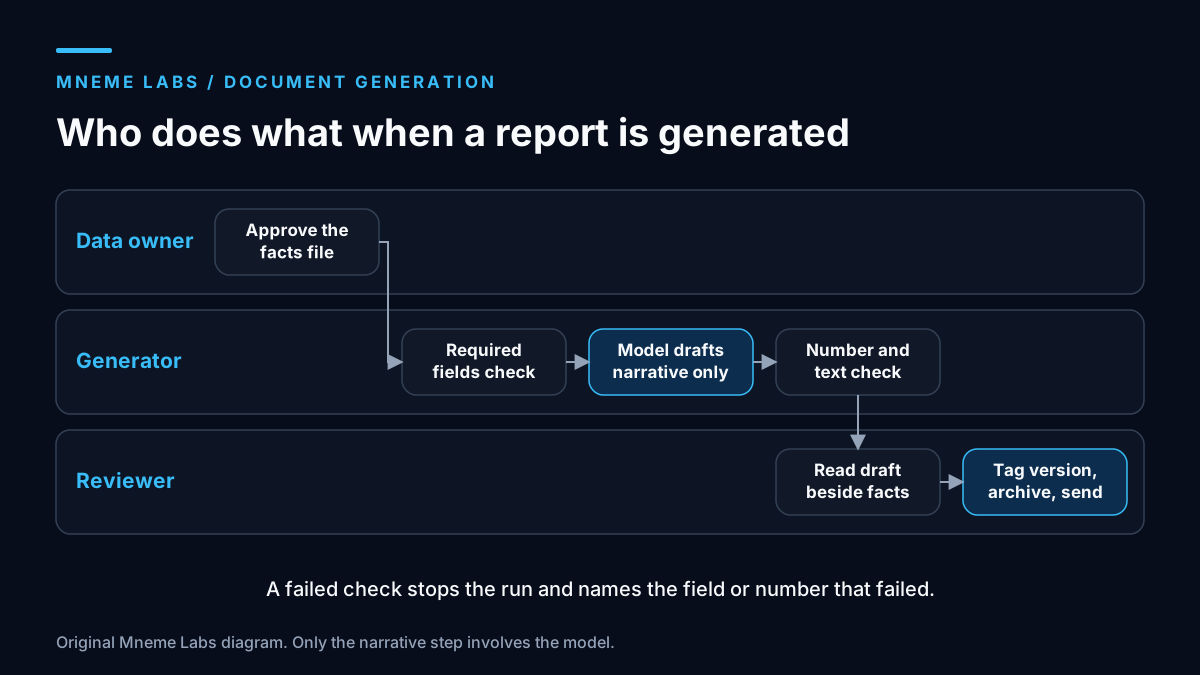
The generation steps run in a fixed order:
- The data owner confirms the facts file and marks it approved.
- The script runs
check_facts. Any error stops the run and names the field or range that failed. - The model receives the facts and a prompt that asks for a three-sentence summary and one paragraph on each listed risk. The prompt says to use only the supplied facts and to write "not provided" where something is missing.
- The script runs
unexpected_numberson the output and scans for leftover placeholders such asTBDor double braces. - The renderer merges locked facts, template text, and narrative into the final layout.
- A reviewer reads the draft beside the facts file and approves, edits, or rejects it.
Anthropic's guidance on reducing hallucinations supports step 3. It recommends allowing the model to say it lacks information and grounding responses in the supplied material. It also says these techniques reduce errors without eliminating them, which is why steps 4 and 6 exist.
Proposals follow the same pattern
A proposal adds two new inputs: a price list and a library of approved scope items. The model can draft the executive summary and tailor the introduction to the client's stated needs. It must not invent deliverables, prices, timelines, or case studies. Each deliverable in the proposal should map to an entry in the scope library, and each price should come from the price list. A case study can appear only if it exists in an approved file that records whether the client agreed to be named.
Dates are derived from your calendar, not the model's guesses. If the sales lead has not decided on a start date, the field stays empty, the check fails, and the proposal waits.
Contracts: templates and qualified review only
Do not ask a model to write contract clauses, and do not treat model output as a contract. This article gives no legal advice and no assurance that any generated document is valid, enforceable, or appropriate for your situation. Contract requirements depend on jurisdiction, subject matter, and the specific parties, and none of the sources used here address them.
A safer role is narrow. A lawyer approves a template. The generator fills in named fields such as party names, dates, and amounts from verified data. A qualified reviewer reads the finished document before anyone signs it. If a field is missing or a party asks for different wording, the document goes back to the lawyer, not to the model. Keep the clause text frozen in the template and checked by diff, so any change between versions is visible.
Do not paste confidential contracts, client data, or personal information into any tool that has not been approved for that data. Build and test with synthetic names and amounts. Check how a vendor handles submitted data before real documents enter the workflow. This article did not verify any vendor's data terms.
Version control for documents
A document you sent last quarter still has to be explainable when someone asks what it said and why. Store the facts file, template version, prompt, model identifier, and output together in an access-controlled document archive. Git can version synthetic examples and non-sensitive templates. For real client records, apply your retention and deletion rules; a private Git repository is not automatically an appropriate archive because old commits retain removed data. Git's documentation says annotated tags are stored as full objects, with a checksum, the tagger's name and email, a date, and a message, and can be signed. That makes an annotated tag a good marker for each issued version.
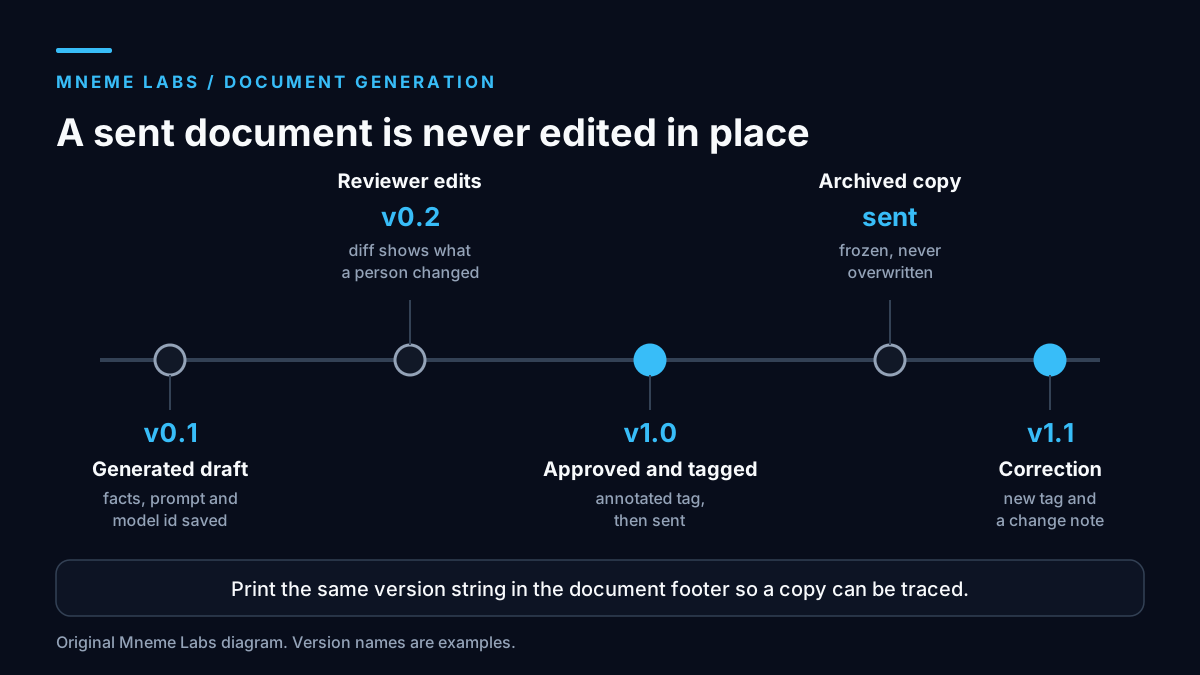
The timeline above shows the routine. A generated draft is saved as a working version in that approved archive. Reviewer edits become a second version, so you can diff what a human changed. The approved file is tagged with the document id and version, for example LS-2041-report-2026-10-v1.0, and the same version string is printed in the footer. If a mistake appears after sending, issue v1.1 with a change note. Never overwrite the sent file.
Failure modes
- Stale facts. The time tracker export is a week old. Print the export date in the document and fail the run if it is older than your limit.
- Cross-client leakage. One run sees another client's data. Generate one document per run with only that client's facts in the prompt.
- Template drift. Someone edits the template without review. Version it, diff it, and require approval for changes.
- Rubber-stamp review. A reviewer who reads only the narrative misses a wrong fact. Make the review screen show the facts beside the text.
- Reworded terms. The model "improves" a standard payment sentence in a template. Keep template text outside the model's prompt entirely.
- Over-trust in the number check. Passing the check means only that the numeric tokens were recognized. A changed sign, unit, association, or meaning can still make the report wrong.
NIST's Generative AI Profile is a voluntary companion to its AI Risk Management Framework and is a reasonable place to look for a wider risk checklist once the basics work.
Limits
The scripts here are sketches written for this article and were run only on invented data. They are not a document management system and they do not integrate with any CRM, drive, or e-signature tool. The structure suits documents built from structured facts. It fits poorly for free-form essays, negotiated legal text, or anything where the content itself needs creative judgment.
Next step
Take one recurring report you already produce. List every fact it contains and where each fact comes from. Mark each paragraph as data, template, or narrative. If you cannot name a source for a fact, fix that before involving a model. For a small local starting point, the first agent walkthrough shows a bounded worker with validation and a saved review record, and the guide to using your own data covers retrieval from approved documents.
Sources
- JSON Schema: object. Used for default behavior of missing properties,
required, andadditionalProperties. - OpenAI: Structured model outputs. Used for schema-constrained output and the need to handle refusals and business rules in application code.
- Google: Gemini structured outputs. Used for JSON Schema output on Gemini models.
- Anthropic: Reduce hallucinations. Used for allowing uncertainty, grounding in supplied material, and the caveat that errors are reduced, not eliminated.
- Git book: Tagging. Used for annotated tags and what they store.
- NIST: AI RMF Generative AI Profile (AI 600-1). Used only to describe the profile as a voluntary companion to the AI RMF. The full document was not reviewed for this article.
Diagrams are original Mneme Labs illustrations. Larkspur Studio, project LS-2041, and all figures are fictional.