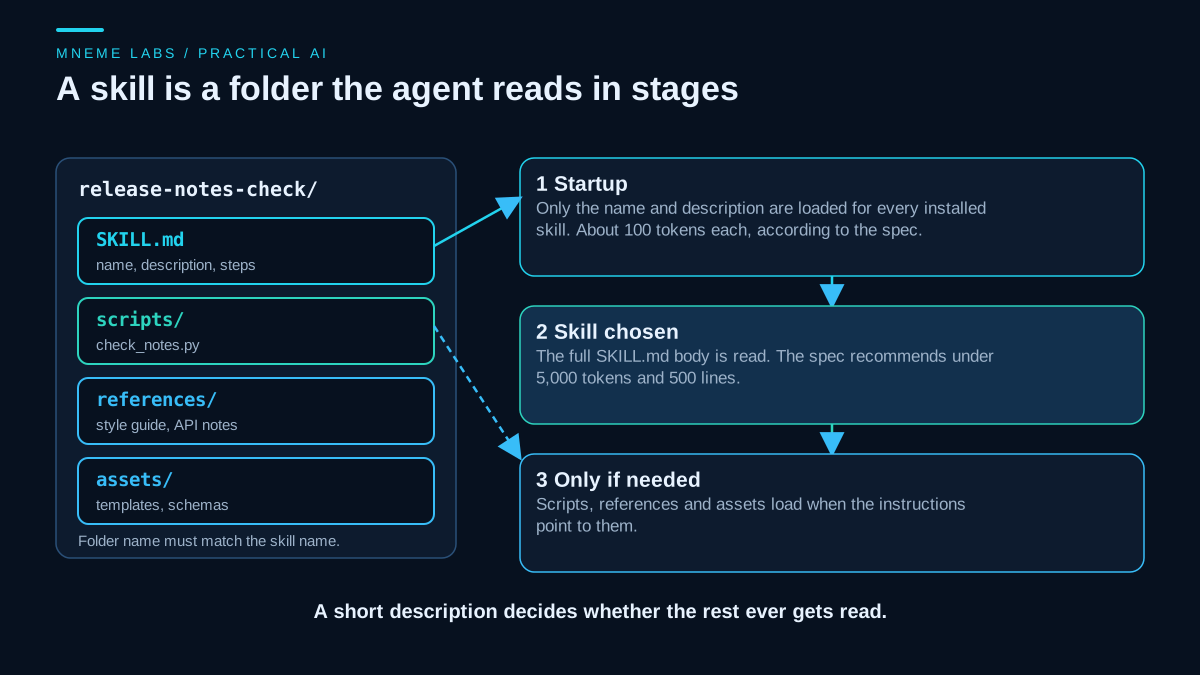
"Skill" now means two different things in agent writing. Older posts use it for any function an agent can call. The current usage, set out in the open Agent Skills specification and in Anthropic's documentation, is narrower: a skill is a folder containing a SKILL.md file of instructions, plus optional scripts and reference files. The agent reads the instructions when a task matches the skill's description.
This guide uses the narrow meaning. It shows what goes in the folder, builds a small example with a script you can run, and explains when a skill is the wrong tool. The example is a fictional release notes workflow with invented data. Nothing here was measured on a production system, and the skill format is still being adopted unevenly, so check your own product's documentation before relying on any detail.
Why write a skill at all
A skill pays off when the same kind of job comes back and the agent keeps getting the same details wrong. The details might be a house style, a command with awkward flags, or a rule such as "breaking changes always go first." You could paste those instructions into every conversation. A skill stores them once and loads them only when relevant.
The Anthropic overview describes the contrast with a prompt: a prompt is conversation-level guidance for one task, while a skill loads on demand so the guidance is not repeated. The Agent Skills best practices page adds a caution that applies to you before you write anything. If the agent already handles a task well without extra instructions, a skill may add nothing, so test the task without the skill first.
Skill, tool, memory, sub-agent
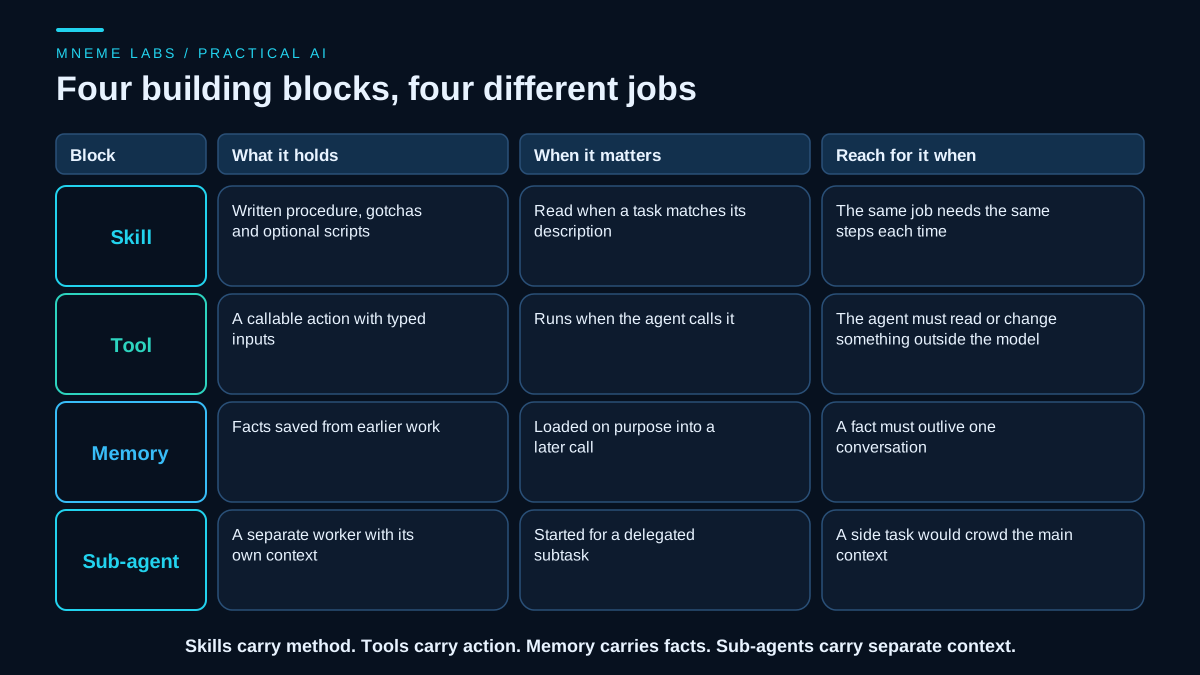
These four are easy to mix up, and the grid above separates them.
A tool is an action the agent can call, such as reading a file or calling an API. A skill is written method: which steps to follow, which mistakes to avoid, and which scripts to run. A skill can tell the agent to use a tool, but it is not itself the tool. Memory holds facts that should survive past one conversation, which the memory guide covers. A sub-agent is a separate worker with its own context window, covered in the guide on sub-agents.
A quick test: if you can phrase the need as "every time this task comes up, follow these steps," it is a skill. If it is "look up Y," it is a tool. If it is "remember that Z is true," it is memory. If it is "go and work on this on the side," it is a sub-agent.
How a skill is laid out and loaded
The specification defines a skill as a directory with one required file, SKILL.md, and optional scripts/, references/ and assets/ folders. The file starts with YAML frontmatter. Two fields are required: name and description. The name allows lowercase letters, numbers and single hyphens, up to 64 characters, and must match the folder name. The description allows up to 1,024 characters and should say both what the skill does and when to use it.
The format exists so agents can load a skill in stages. At startup the agent sees only the name and description of each installed skill, which the spec puts at about 100 tokens per skill. When a task matches, it reads the full SKILL.md body, which the spec recommends keeping under 5,000 tokens and 500 lines. Scripts, reference files and assets are read or run only when the instructions point to them. The hero image above shows these three stages.
This is why the description matters more than any other line. It is the only text the agent sees before deciding. A description like "Helps with release notes" gives little to match against. A description that names the inputs and the trigger phrases a user would actually say does better.
A worked example: release notes with a check script
Take a fictional project called Tally, a small command line tool. Each release, someone exports the merged changes as a JSON list and asks an agent for release notes. Two things go wrong. The draft sometimes leaves out a breaking change, and sometimes it includes an item that was never merged. Both are mechanical to check, so the skill bundles a script for them and leaves the wording to the agent.
Here is the SKILL.md. Commands are written inline so the file stays readable.
---
name: release-notes-check
description: Drafts release notes from a JSON list of merged changes and checks the draft against that list. Use when the user asks for release notes, a changelog entry, or a "what changed" summary for a version.
compatibility: Requires Python 3.9 or newer. No network access.
metadata:
  version: "0.1"
---

# Release notes from merged changes

## Inputs
The user provides a JSON file of merged changes. Each entry has `id`, `title`
and `breaking` (true or false). If the file is missing, ask for it. Do not
write notes from memory of the conversation.

## Steps
1. Read the changes file. Group entries under Breaking, Added, Fixed, Other.
2. Write one bullet per change, in plain words, ending with the id: `(#101)`.
3. Put every breaking change under Breaking, even if its title sounds minor.
4. Run: python scripts/check_notes.py --changes CHANGES --draft DRAFT
5. If the exit code is 1, read the JSON, fix the draft, and run again.
6. If the exit code is 2, report the error. Do not guess at the input.

## Gotchas
- The script checks ids, not meaning. Reread each bullet against its title.
- Never invent a change that is not in the file.
- Do not publish. Return the draft for a person to review.

## Output
Return the draft, then the final script result.
Three choices in this file follow the Agent Skills best practices. The steps give one default path and no menu of alternatives. The gotchas section holds the corrections you would otherwise repeat, and the guidance there is to add a line each time you have to correct the agent. The skill also refuses to guess when input is missing, which keeps a bad input from turning into a confident draft.
The script is where deterministic work belongs. Here it is in full.
#!/usr/bin/env python3
"""Check a release-notes draft against the list of merged changes.

Usage: check_notes.py --changes changes.json --draft notes.md

Prints one JSON object to stdout. Diagnostics go to stderr.
Exit codes: 0 = no problems, 1 = problems found, 2 = bad input.
"""
import argparse
import json
import re
import sys

EXIT_OK, EXIT_PROBLEMS, EXIT_BAD_INPUT = 0, 1, 2
CITE = re.compile(r"\(#(\d+)\)")


def check(changes, draft):
    known = {str(c["id"]): c for c in changes}
    cited = set()
    uncited_bullets = []
    for line in draft.splitlines():
        if not line.lstrip().startswith("- "):
            continue
        ids = CITE.findall(line)
        if not ids:
            uncited_bullets.append(line.strip())
        cited.update(ids)
    return {
        "unknown_ids": sorted(cited - known.keys()),
        "bullets_without_id": uncited_bullets,
        "missing_breaking": sorted(
            i for i, c in known.items() if c.get("breaking") and i not in cited),
    }


def main(argv=None):
    p = argparse.ArgumentParser(description=__doc__.splitlines()[0])
    p.add_argument("--changes", required=True, help="JSON list of {id, title, breaking}")
    p.add_argument("--draft", required=True, help="Markdown draft with '- text (#id)' bullets")
    args = p.parse_args(argv)
    try:
        with open(args.changes, encoding="utf-8") as f:
            changes = json.load(f)
        with open(args.draft, encoding="utf-8") as f:
            draft = f.read()
        if not isinstance(changes, list):
            raise ValueError("changes file must hold a JSON list")
        result = check(changes, draft)
    except (OSError, ValueError, KeyError, TypeError) as e:
        print(f"Error: {e}", file=sys.stderr)
        return EXIT_BAD_INPUT
    print(json.dumps(result, indent=2))
    return EXIT_PROBLEMS if any(result.values()) else EXIT_OK


if __name__ == "__main__":
    sys.exit(main())
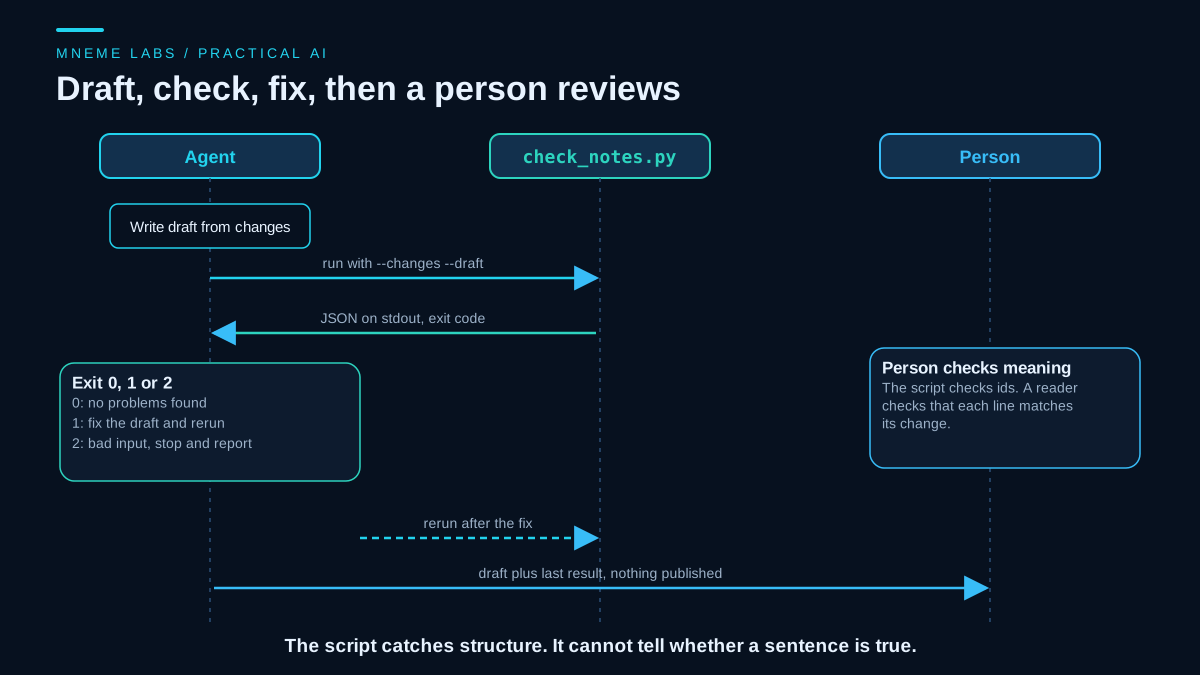
The Agent Skills guide on scripts explains the design. Agents run in non-interactive shells, so the script takes everything through flags and never prompts. --help is how the agent learns the interface. Structured JSON goes to stdout and diagnostics go to stderr, so the agent can parse the first without noise from the second. Distinct exit codes tell the agent whether to fix the draft or stop.
What the tests covered
The tests ran on three invented changes, one of them marked breaking. A draft citing all three ids returned exit code 0 and an empty report. A draft that cited an id that does not exist, left one bullet without an id and omitted the breaking change returned exit code 1 with each problem listed under its own key. Pointing the script at files that do not exist returned exit code 2, an error on stderr and nothing on stdout. A separate check confirmed that the frontmatter follows the naming rules from the specification and that a badly named skill is rejected.
Those tests cover the script and the file format. They do not show that an agent will pick the skill at the right moment, or that its drafts read well. That needs trials with real prompts, which the Agent Skills pages on evaluating skills and optimizing descriptions describe.
Where the content should come from
The best practices page warns against asking a model to write a skill from general knowledge alone. The result is vague advice such as "handle errors appropriately." It recommends extracting the skill from a task you completed with an agent, keeping the corrections you made along the way, or building it from real project material such as runbooks and issue history.
For Tally, that would mean running two or three real releases by hand with an agent, noting each time the draft needed fixing, and turning those fixes into gotchas and script checks. The script above came from two specific failure types, not from a general list of release note rules.
Failure cases
The skill never triggers. The description does not match how people phrase the request. Test with several phrasings, including ones that never use the word "release."
The skill triggers too often. A description that is too broad loads instructions into unrelated tasks. The spec and best practices both favor coherent, moderately scoped skills.
Instructions go stale. A skill is a file in your project. When the process changes and the file does not, the agent follows the old process faithfully. Keep skills under version control and review them like any other document.
The check passes and the content is wrong. The example script can pass a draft that attaches the wrong sentence to a valid id. Treat script output as one safeguard and keep a human reader for anything that is published.
An untrusted skill. Anthropic's documentation says to use skills only from sources you trust, because a skill can direct an agent to call tools or run code in ways that do not match its stated purpose. Read every bundled file before installing someone else's skill, especially scripts and anything that fetches from outside URLs.
Over-long instructions. Everything in the body competes for the agent's attention. The best practices guide says to include what the agent would get wrong without you, and to cut what it already knows.
Limits and portability
The skill format is shared, but products differ. Anthropic's documentation lists extra name rules for its own platform, and says skills run through the API in a sandbox with no network access and no runtime package installation. The spec marks the allowed-tools field as experimental, with support that varies. If your script needs a network call or a package install, confirm that your target product allows it, and state those needs in the compatibility field.
Skills are also the wrong choice for one-off work. If the task will not repeat, write the instructions in the conversation. If the problem is that the agent lacks a fact, use memory. If it lacks a capability, such as reaching an API, you need a tool. Where a failed write could cost money or send a message, read the guide on retries and failures before putting that step in a skill.
Next step
Pick one task you have repeated at least three times with an agent. Write down the corrections you made each time. Turn them into a SKILL.md of under 100 lines with a precise description, and move any step that can be checked by code into a script with exit codes. Then run the task with and without the skill and compare the results by reading them. Keep the skill only if the with-skill version is clearly better.
Sources
- Agent Skills specification: required files,
nameanddescriptionrules and limits, optional fields, directory layout, and the three-stage loading model with the recommended size limits. - Agent Skills: best practices for skill creators: starting from real tasks, gotchas sections, defaults over menus, validation loops, and testing whether a skill adds value.
- Agent Skills: using scripts in skills: non-interactive scripts, help output, structured output on stdout, diagnostics on stderr, and meaningful exit codes.
- Anthropic, Agent Skills overview: skills compared with prompts, progressive disclosure, platform-specific name rules, the API sandbox limits, and the security guidance on untrusted skills.